
DakotaSamuel
New member
- Local time
- 5:43 AM
- Messages
- 4
I have a friends Asus x54h laptop that is not booting, and it is droving me crazy.
What is happening:
When the power button is pressed the fan turns on and some indicator lights turn on including the hard drive indicator light. Then the disc drive makes a noise and the hard drive indicator light turns off. Here is a picture of the indicator lights:

Nothing ever shows up on the screen.
Sometimes after running 1-5 minutes the laptop will just completely turn off.
What I have tried:
-Booting with just the power cord connected.
-Booting with just the battery connected.
-Taking out the battery and unplugging the power cord and holding the power button for 40 seconds, then plug in and try to boot again.
-Attaching a screen and pushing the keyboard buttons to add an additional screen. Nothing showed up on it.
-Taking it's hard drive and putting it in a good laptop. It booted into Windows and ran without issues.
-Replacing the current stick of ram with a new one from crucial.com. This laptop only has one RAM slot and I don't have any compatible RAM so I had to just buy one. I put it in, and nothing happened differently. Also, if I remove the RAM completely nothing happens differently. This made me think that there might be an issue with the RAM slot. I looked at it, and there seems to be something a little weird about one of the connectors. Here is a picture:
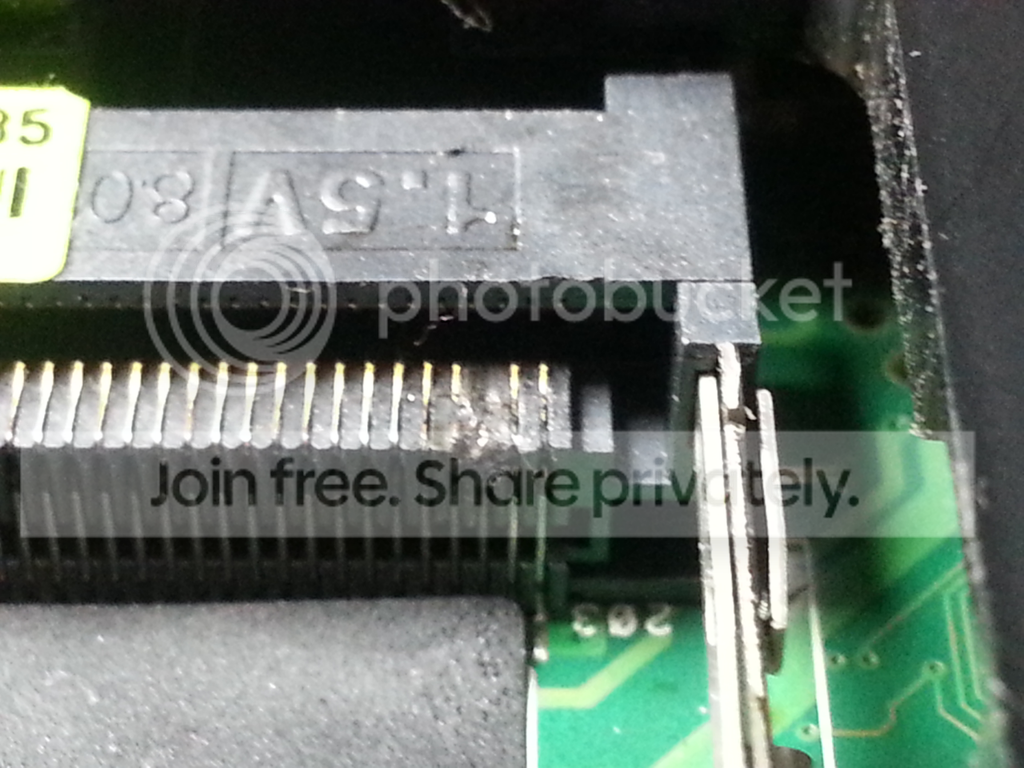
I am not sure, but I thought that this might be causing the RAM to not be detected. I used a voltmeter to test between the trace of the RAM and where that connection goes into the motherboard, and it seems to be good (not certain though).
-Took apart the laptop and removed the CMOS battery overnight. When I put it back together and pressed the power button nothing happened. I tried a few more times and then it started to do what it usually does but then it powered off after a few seconds. I tried again and it returned to normal doing what it usually did. Fan turns on and indicator lights turn on, disk drive runs for few seconds, hard drive light turns off, and screen remains black.
So, now I am almost completely out of ideas. The only thought I have is maybe trying to reflow the GPU. What are your thoughts? Do you think that might be the issue or is it the memory slot, or something else? I really want to get this working since my friend doesn't have the cash to buy a new laptop.
Thanks!
What is happening:
When the power button is pressed the fan turns on and some indicator lights turn on including the hard drive indicator light. Then the disc drive makes a noise and the hard drive indicator light turns off. Here is a picture of the indicator lights:
Nothing ever shows up on the screen.
Sometimes after running 1-5 minutes the laptop will just completely turn off.
What I have tried:
-Booting with just the power cord connected.
-Booting with just the battery connected.
-Taking out the battery and unplugging the power cord and holding the power button for 40 seconds, then plug in and try to boot again.
-Attaching a screen and pushing the keyboard buttons to add an additional screen. Nothing showed up on it.
-Taking it's hard drive and putting it in a good laptop. It booted into Windows and ran without issues.
-Replacing the current stick of ram with a new one from crucial.com. This laptop only has one RAM slot and I don't have any compatible RAM so I had to just buy one. I put it in, and nothing happened differently. Also, if I remove the RAM completely nothing happens differently. This made me think that there might be an issue with the RAM slot. I looked at it, and there seems to be something a little weird about one of the connectors. Here is a picture:
I am not sure, but I thought that this might be causing the RAM to not be detected. I used a voltmeter to test between the trace of the RAM and where that connection goes into the motherboard, and it seems to be good (not certain though).
-Took apart the laptop and removed the CMOS battery overnight. When I put it back together and pressed the power button nothing happened. I tried a few more times and then it started to do what it usually does but then it powered off after a few seconds. I tried again and it returned to normal doing what it usually did. Fan turns on and indicator lights turn on, disk drive runs for few seconds, hard drive light turns off, and screen remains black.
So, now I am almost completely out of ideas. The only thought I have is maybe trying to reflow the GPU. What are your thoughts? Do you think that might be the issue or is it the memory slot, or something else? I really want to get this working since my friend doesn't have the cash to buy a new laptop.
Thanks!
My Computer
At a glance
Windows 7
- Computer type
- Laptop
- Computer Manufacturer/Model Number
- Asus
- OS
- Windows 7


