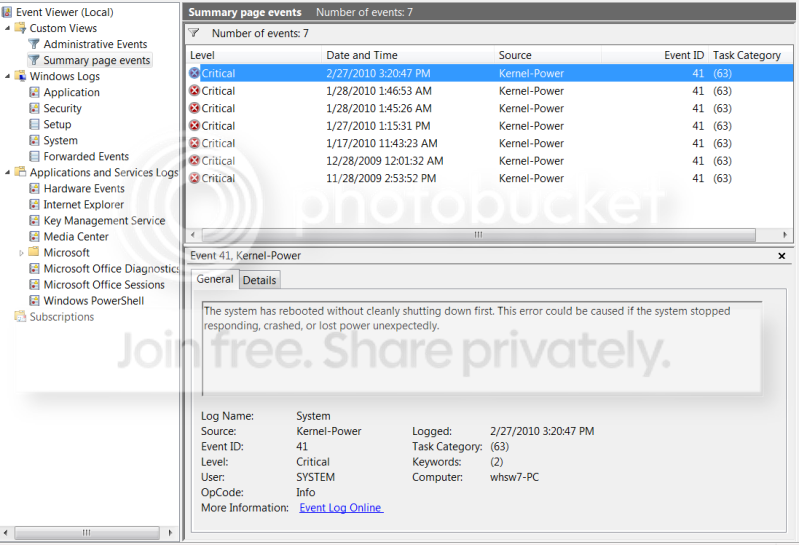
At my wits end - Kernal-Power Event 41 Freeze.

Just a minor update. Haven't had a lot of time the last few days in the evening to tinker with the machine.

I did download and run cpu-z to get a more accurate idea of my mobo etc, and make sure it supported SLI, which it does.

I have yet to try the network card fix, or swapping out to the old vid card, just haven't had the energy to drag the old machine out of the basement and take it apart, and the network card my friend sent me is apparently being delivered on the back of a land tortoise from Seattle..... :)

I did go into my BIOS and bumped the voltage on my RAM from 1.85 to 1.95 (it does say 1.85 on the side of the sticks)....and actually ran for a few hours last night w/o freezing. I don't anticipate this being a fix, I've had a few hours of stability before, but just thought I'd add it out there for people to try in the event they havent.

I"m away for the weekend, will update results of network card/vid card next week.
 

My Computer My Computer

At a glance

Windows 7 Home PremiumIntel Core2 Quad [email protected] 2.66ghz8 GB 4x2 GB DDR2 - CorsairNvidia GeForce 9800 GX2
Computer Manufacturer/Model Number
Dell XPS 630i
OS
Windows 7 Home Premium
CPU
Intel Core2 Quad [email protected] 2.66ghz
Motherboard
Nvidia Nforce 650i
Memory
8 GB 4x2 GB DDR2 - Corsair
Graphics Card(s)
Nvidia GeForce 9800 GX2
Sound Card
Realtek
Monitor(s) Displays
Samsung SyncMaster 226cw
Hard Drives
Hitachi HDS721075KLA SCSI
DVD/CD Drive
PSU
750W
Case
Dell
Cooling
Air 6(?) Fans
Posting additional info, mainly for benefit of anyone else stuck in same boat!

Changes listed above did Nada, logged in last night after being away for the weekend and made it about 10 minutes before crashing.

Spent an hour on the phone with Dell on Friday, they are sending a tech out today with a new motherboard and processor. Their "records" indicate these type of errors happen somewhere between the processor/motherboard connection. I tried to get them to also replace the PSU but apparently I have to try this first.

I still have the new PSU I bought in the box, going to ask the guy if he'll install that also while he's there.

I'll update when this is all complete and if it seemed to help. I'm really going to have no clue what else to do if it doesnt!!
 

My Computer My Computer

At a glance

Windows 7 Home PremiumIntel Core2 Quad [email protected] 2.66ghz8 GB 4x2 GB DDR2 - CorsairNvidia GeForce 9800 GX2
Computer Manufacturer/Model Number
Dell XPS 630i
OS
Windows 7 Home Premium
CPU
Intel Core2 Quad [email protected] 2.66ghz
Motherboard
Nvidia Nforce 650i
Memory
8 GB 4x2 GB DDR2 - Corsair
Graphics Card(s)
Nvidia GeForce 9800 GX2
Sound Card
Realtek
Monitor(s) Displays
Samsung SyncMaster 226cw
Hard Drives
Hitachi HDS721075KLA SCSI
DVD/CD Drive
PSU
750W
Case
Dell
Cooling
Air 6(?) Fans
So it could be the cpu, lord I hope not:cry:
 

My Computer My Computer

At a glance

windows 7 64bit HomeProcessor AMD Phenom(tm) 9500 Quad-Core Proce...4x 2 gig CORSAIR TWIN Memory Model : TWIN2X40...Asus EAH5770 Graphic Card
OS
windows 7 64bit Home
CPU
Processor AMD Phenom(tm) 9500 Quad-Core Processor, 2200 Mhz,
Motherboard
Asus M4A79 Deluxe Motherboard
Memory
4x 2 gig CORSAIR TWIN Memory Model : TWIN2X4096-6400C5DHX
Graphics Card(s)
Asus EAH5770 Graphic Card
Sound Card
Disabled(using ati built in)
Monitor(s) Displays
Main,Panasonic 42in Plasma/2nd Thermaltake touch screen
Hard Drives
2 x 1 tb drives and a Kingston 64 gig Solid state
SSDNOW V series hard drive for the OS
PSU
PSU,Kamariki4 650w
Case
Themaltake DH202 Touch screen
Keyboard
Keysonic ACK616RF
Mouse
Keysonic ACK616RF
Internet Speed
Virgin 10 meg
Hi all, been having similar problems 4 weeks now, and can honestly say the only way to fix this Event 41 issue is to RMA all components beginning with 1. PSU, 2. Motherboard, 3. RAM, 4. HDD, 5. CPU . . . and so on, until the problem goes away - I know it will take a long time if only fix it 6 components along . . . but just think ; it Will be worth it in the end.:)
 

My Computer My Computer

At a glance

Windows 7 Home Premium 64 bit. (OEM)Intel Core2Quad Q9550 at 2.83GHz. O/C to 3.4GHzOCZ Reaper HPC Dual Channel 2 x 2 GB DDR2-106...2 x Sapphire Radeon HD 5850's. (Crossfire). C...
Computer Manufacturer/Model Number
Home Build
OS
Windows 7 Home Premium 64 bit. (OEM)
CPU
Intel Core2Quad Q9550 at 2.83GHz. O/C to 3.4GHz
Motherboard
Asus P5Q Deluxe. BIOS 2301
Memory
OCZ Reaper HPC Dual Channel 2 x 2 GB DDR2-1066 PC2-8500
Graphics Card(s)
2 x Sapphire Radeon HD 5850's. (Crossfire). CCC 13.12
Sound Card
On Mo'bo. 8-channel. Razer 5.1 Headset.
Monitor(s) Displays
Samsung Syncmaster P2450
Screen Resolution
1280x1024 60Hz
Hard Drives
1 x Samsung 120Gb SSD.
1 x Seagate Barracuda 500Gb HDD.
PSU
Corsair HX 850W
Case
Antec 300. With 3X Noctua NF-P12 Fans + 1X NF-P14 FLX
Cooling
Noctua NH-U12P SE2 (2X NF-P12 Fans)
Keyboard
Logitech G15
Mouse
Logitech G5
Internet Speed
120Mb
Antivirus
Avast free.
Browser
Google Chrome
Other Info
Sony NEC Optiarc DVD±RW burner AD-7241S
Updating again.

Dell stuff is delayed until today (supposedly). So after tonight I should be able to comment on new CPU/Motherboard.

So on Monday I get another message reminding me that my system hadn't done a full virus scan in 30+ days. I'd never really paid much attention to it, but at this point I recalled I have it set to scan 2x a week. If further occured to me that the only thing in common software-wise across the two different OS installations was McAfee. Scrolling through 2 months worth of event viewer, I noticed a handful of errors related to "mferkdk.sys" and something with McAfee not opening them correctly (sorry I'm not at the computer to do an actual cut'n'paste).

I uninstalled McAfee completely, and haven't froze since that time. I take it with 'many' grains of salt, i have only had time to be on the system for about 4 hrs total since then, and it has run for longer without freezing before. I'm also not comfortable without anti-virus as i'm a paranoid freak (see my twice weekly scans)

Just adding in the event it helps anyone else.
 

My Computer My Computer

At a glance

Windows 7 Home PremiumIntel Core2 Quad [email protected] 2.66ghz8 GB 4x2 GB DDR2 - CorsairNvidia GeForce 9800 GX2
Computer Manufacturer/Model Number
Dell XPS 630i
OS
Windows 7 Home Premium
CPU
Intel Core2 Quad [email protected] 2.66ghz
Motherboard
Nvidia Nforce 650i
Memory
8 GB 4x2 GB DDR2 - Corsair
Graphics Card(s)
Nvidia GeForce 9800 GX2
Sound Card
Realtek
Monitor(s) Displays
Samsung SyncMaster 226cw
Hard Drives
Hitachi HDS721075KLA SCSI
DVD/CD Drive
PSU
750W
Case
Dell
Cooling
Air 6(?) Fans
There is plenty of free anti virus software,microsoft have there own one now and avg is good, sometimes the free open source stoftware is better than the paid software..worth looking into.
 

My Computer My Computer

At a glance

windows 7 64bit HomeProcessor AMD Phenom(tm) 9500 Quad-Core Proce...4x 2 gig CORSAIR TWIN Memory Model : TWIN2X40...Asus EAH5770 Graphic Card
OS
windows 7 64bit Home
CPU
Processor AMD Phenom(tm) 9500 Quad-Core Processor, 2200 Mhz,
Motherboard
Asus M4A79 Deluxe Motherboard
Memory
4x 2 gig CORSAIR TWIN Memory Model : TWIN2X4096-6400C5DHX
Graphics Card(s)
Asus EAH5770 Graphic Card
Sound Card
Disabled(using ati built in)
Monitor(s) Displays
Main,Panasonic 42in Plasma/2nd Thermaltake touch screen
Hard Drives
2 x 1 tb drives and a Kingston 64 gig Solid state
SSDNOW V series hard drive for the OS
PSU
PSU,Kamariki4 650w
Case
Themaltake DH202 Touch screen
Keyboard
Keysonic ACK616RF
Mouse
Keysonic ACK616RF
Internet Speed
Virgin 10 meg
So Robbie how are you getting on with this awfull problem?

Well, well, I have replaced the psu with a 80 gold plus 750w. And it ran for over 24 hours with out a freeze.

But guess what, it froze again, and it was harder to boot up once I pulled the power!

It froze at restart at the Asus logo, I had to reset the Motherboard with the reset switch on the M4A79 Delux mb.

Its running again now, I do not know what's left to do? I have rma almost all the hardware now apart from the cpu.
I guess it must be a hardware issue somewhere. Any more ideas??
please.gif
 

My Computer My Computer

At a glance

windows 7 64bit HomeProcessor AMD Phenom(tm) 9500 Quad-Core Proce...4x 2 gig CORSAIR TWIN Memory Model : TWIN2X40...Asus EAH5770 Graphic Card
OS
windows 7 64bit Home
CPU
Processor AMD Phenom(tm) 9500 Quad-Core Processor, 2200 Mhz,
Motherboard
Asus M4A79 Deluxe Motherboard
Memory
4x 2 gig CORSAIR TWIN Memory Model : TWIN2X4096-6400C5DHX
Graphics Card(s)
Asus EAH5770 Graphic Card
Sound Card
Disabled(using ati built in)
Monitor(s) Displays
Main,Panasonic 42in Plasma/2nd Thermaltake touch screen
Hard Drives
2 x 1 tb drives and a Kingston 64 gig Solid state
SSDNOW V series hard drive for the OS
PSU
PSU,Kamariki4 650w
Case
Themaltake DH202 Touch screen
Keyboard
Keysonic ACK616RF
Mouse
Keysonic ACK616RF
Internet Speed
Virgin 10 meg
Heh, wish I had anything positive to report.

Dell guy shows up on Wednesday and spends 3 hrs installing new mobo and processor, and then cannot get the machine to boot to a display. He calls me at work and says it's obviously a monitor problem (which wasn't a dell purchase) and I should try new cables or buy a new monitor.

I told him he was full of it and that the monitor was displaying fine (aside from the obvious) at 12am the night before. I had him connect the computer to an old monitor I had laying around and he called and admitted that one wouldn't display either and that he was stumped. He also didn't have time to at least put the old mobo back in, so I was pretty much left with no system at all.

Called Dell and raised hell, asking for a system exchange, or better yet, a different system with me covering any difference in price. Apparently that is not in the cards yet, but today I have someone showing up with another motherboard, another video card, another heat sink, and a new hard drive with no OS loaded onto it. I've also purchased a dvi to dvi monitor cable to remove any issue with adaptors from the equation.

To say I'm frustrated beyond belief is an understatement. I firmly believe I will get all this replaced, load up a new copy of 7, download a few games, and immediately freeze again...at which point I will drive the computer to Texas and throw it through Michael Dell's office window....

I'm trying to stay positive, I knew next to nothing about computers when this started, and I've learned a ton in the past month, which is a good thing....i've also discovered this board as an amazing resource with helpful & knowoledgeable people, which is another good thing....but damn...I work my ass off during the week, commute all over creation, get through evening shenanigans with 2 young kids,,,when the house is finally quiet I really just want to turn on a computer and space out for a few hours...not spend time taking components in and out or reading lines in my event log....

I'll update when I have more to report.
 

My Computer My Computer

At a glance

Windows 7 Home PremiumIntel Core2 Quad [email protected] 2.66ghz8 GB 4x2 GB DDR2 - CorsairNvidia GeForce 9800 GX2
Computer Manufacturer/Model Number
Dell XPS 630i
OS
Windows 7 Home Premium
CPU
Intel Core2 Quad [email protected] 2.66ghz
Motherboard
Nvidia Nforce 650i
Memory
8 GB 4x2 GB DDR2 - Corsair
Graphics Card(s)
Nvidia GeForce 9800 GX2
Sound Card
Realtek
Monitor(s) Displays
Samsung SyncMaster 226cw
Hard Drives
Hitachi HDS721075KLA SCSI
DVD/CD Drive
PSU
750W
Case
Dell
Cooling
Air 6(?) Fans
So the sad end to my saga...after getting an automated message letting me know that all replacement parts were on backorder, I called them and said it was bullsh*t, got nasty, and they are sending me a system replacement.

I really hate having to be "that" guy on the other end of the line, but I'm afraid my patience was worn thin.

Thanks to everyone who took the time to read this and the helpful responses I received, I hope maybe some of the ideas and attempts i made along the way possibly can be of use to others.
 

My Computer My Computer

At a glance

Windows 7 Home PremiumIntel Core2 Quad [email protected] 2.66ghz8 GB 4x2 GB DDR2 - CorsairNvidia GeForce 9800 GX2
Computer Manufacturer/Model Number
Dell XPS 630i
OS
Windows 7 Home Premium
CPU
Intel Core2 Quad [email protected] 2.66ghz
Motherboard
Nvidia Nforce 650i
Memory
8 GB 4x2 GB DDR2 - Corsair
Graphics Card(s)
Nvidia GeForce 9800 GX2
Sound Card
Realtek
Monitor(s) Displays
Samsung SyncMaster 226cw
Hard Drives
Hitachi HDS721075KLA SCSI
DVD/CD Drive
PSU
750W
Case
Dell
Cooling
Air 6(?) Fans
This seems to be an epidemic. I looked into my event viewer and found a few exactly the same as yours. I was not even aware that these events were happening. Mine happen apparently at logoff. I do have a new Antec PSU - so I would think it is not a PSU problem. My diagnostic data is practically the same as yours but I have no clue what to make of it.

2010-03-05_181005.png


- <Event xmlns="http://schemas.microsoft.com/win/2004/08/events/event">
- <System>
<Provider Name="Microsoft-Windows-Kernel-Power" Guid="{331C3B3A-2005-44C2-AC5E-77220C37D6B4}" />
<EventID>41</EventID>
<Version>2</Version>
<Level>1</Level>
<Task>63</Task>
<Opcode>0</Opcode>
<Keywords>0x8000000000000002</Keywords>
<TimeCreated SystemTime="2010-02-27T20:20:47.680800000Z" />
<EventRecordID>50367</EventRecordID>
<Correlation />
<Execution ProcessID="4" ThreadID="8" />
<Channel>System</Channel>
<Computer>whsw7-PC</Computer>
<Security UserID="S-1-5-18" />
</System>
- <EventData>
<Data Name="BugcheckCode">0</Data>
<Data Name="BugcheckParameter1">0x0</Data>
<Data Name="BugcheckParameter2">0x0</Data>
<Data Name="BugcheckParameter3">0x0</Data>
<Data Name="BugcheckParameter4">0x0</Data>
<Data Name="SleepInProgress">false</Data>
<Data Name="PowerButtonTimestamp">0</Data>
</EventData>
</Event>
 

My Computer My Computer

At a glance

Vista, Windows7, Mint Mate, Zorin, Windows 8from 1.6GHz Duo to i7
Computer Manufacturer/Model Number
HP, Dell, Gateway, Toshiba - 4 laptops and 2 desktops
OS
Vista, Windows7, Mint Mate, Zorin, Windows 8
CPU
from 1.6GHz Duo to i7
Monitor(s) Displays
2x HP w2207
Hard Drives
5x HDD, 7x SSD, 12x Externals
Keyboard
with trackball - no mices
Mouse
Trackball mice
Internet Speed
DSL 6000
i updated my sound drivers and it didnt help but i think ive figured it out for my system. i swapped my graphics cards into eachothers slot and i havent frozen since. now for some stress tests.
 

My Computer My Computer

At a glance

Windows 7 Ultimate x64Intel Core i7 720QM8GB factory installedATI Mobility Radeon 5870 W/ Flashed VBIOS to ...
Computer Manufacturer/Model Number
Asus G73JH-A2
OS
Windows 7 Ultimate x64
CPU
Intel Core i7 720QM
Memory
8GB factory installed
Graphics Card(s)
ATI Mobility Radeon 5870 W/ Flashed VBIOS to fix GSOD
Screen Resolution
1920x1080
Hard Drives
1 500GB 1 250GB
Keyboard
G15
Mouse
G9x
Internet Speed
Rogers extreme/Bell fibe25 depending on where I am.
i updated my sound drivers and it didnt help but i think ive figured it out for my system. i swapped my graphics cards into eachothers slot and i havent frozen since. now for some stress tests.
Let us konw about your results. Although it would probably not apply to me (if it works) because I have only one modest 9500GT graphics card, it may be interesting for others.
 

My Computer My Computer

At a glance

Vista, Windows7, Mint Mate, Zorin, Windows 8from 1.6GHz Duo to i7
Computer Manufacturer/Model Number
HP, Dell, Gateway, Toshiba - 4 laptops and 2 desktops
OS
Vista, Windows7, Mint Mate, Zorin, Windows 8
CPU
from 1.6GHz Duo to i7
Monitor(s) Displays
2x HP w2207
Hard Drives
5x HDD, 7x SSD, 12x Externals
Keyboard
with trackball - no mices
Mouse
Trackball mice
Internet Speed
DSL 6000
well i noticed it seemed to be happening to me in 3d apps and frequently on loading screens. ram tests fine so i use one graphics card (which froze twice) then the other. and it haasnt frozen yet. however ill give it a few more days before i claim case closed.

EDIT: ok! appearantly only usin one graphics card increased stability but i was just burning a movie and it did it again. i cant just buy a whole new damn computer. im hoping it is memory.

EDIT 2: ok uploading sf diagnostic info and pics. oh and funny thing is stress tests on gpu's cpu and memory all refuse to freeze the system.
 
Last edited:

My Computer My Computer

At a glance

Windows 7 Ultimate x64Intel Core i7 720QM8GB factory installedATI Mobility Radeon 5870 W/ Flashed VBIOS to ...
Computer Manufacturer/Model Number
Asus G73JH-A2
OS
Windows 7 Ultimate x64
CPU
Intel Core i7 720QM
Memory
8GB factory installed
Graphics Card(s)
ATI Mobility Radeon 5870 W/ Flashed VBIOS to fix GSOD
Screen Resolution
1920x1080
Hard Drives
1 500GB 1 250GB
Keyboard
G15
Mouse
G9x
Internet Speed
Rogers extreme/Bell fibe25 depending on where I am.
can any one fix this?
 

My Computer My Computer

At a glance

windows 7 64bit HomeProcessor AMD Phenom(tm) 9500 Quad-Core Proce...4x 2 gig CORSAIR TWIN Memory Model : TWIN2X40...Asus EAH5770 Graphic Card
OS
windows 7 64bit Home
CPU
Processor AMD Phenom(tm) 9500 Quad-Core Processor, 2200 Mhz,
Motherboard
Asus M4A79 Deluxe Motherboard
Memory
4x 2 gig CORSAIR TWIN Memory Model : TWIN2X4096-6400C5DHX
Graphics Card(s)
Asus EAH5770 Graphic Card
Sound Card
Disabled(using ati built in)
Monitor(s) Displays
Main,Panasonic 42in Plasma/2nd Thermaltake touch screen
Hard Drives
2 x 1 tb drives and a Kingston 64 gig Solid state
SSDNOW V series hard drive for the OS
PSU
PSU,Kamariki4 650w
Case
Themaltake DH202 Touch screen
Keyboard
Keysonic ACK616RF
Mouse
Keysonic ACK616RF
Internet Speed
Virgin 10 meg
been having similar problems with my dell - and it all started after putting in a brand new q6600 - ive tried everything the origional cpu - bla bla bla - the lot . I thought i fixed it after swithcing off stepping in the bios fine for a week then BOOM its back, i am sick ;-( no help for 124 stop codes - its hardware- but it ran perfect for 10 days ?? anyway have atached some screenshots for comparison
 

My Computer My Computer

At a glance

7 ultima 32 bitINTEL QUAD CORE Q6600 2.4 Ghz3GB 533 MhzG-FORCE 8400 GS
Computer Manufacturer/Model Number
DELL E520
OS
7 ultima 32 bit
CPU
INTEL QUAD CORE Q6600 2.4 Ghz
Motherboard
OWG864 SOCKET775
Memory
3GB 533 Mhz
Graphics Card(s)
G-FORCE 8400 GS
Sound Card
HIGH DEFINITION AUDIO DEVICE
Monitor(s) Displays
2 24 inch dell
Hard Drives
WD 320
PSU
305 W
Cooling
DELL STANDARD
ah yes i have the exact same problem myself ive done all of these things and more besides and im still finding it a random problem. altho i dont think ive had it as bad as you guys. my pc has only ever restarted bwt 3 or 4 times in the hour.

1) Downloaded and installed upto date drivers
2) Run a complete virus scan
3) Cleaned all my fans
4) put more thermal paste onto my processor because it seemed to be lacking abit
5) installed a new power supply
6) checked for over heating

the only thing i havent done is something in bios and monday ill be doing a clean install and see if that works
 

My Computer My Computer

At a glance

Windows 7
OS
Windows 7
This was talked about four months ago, but it's the only thing I can find about this problem:/
The exact same thing is happening to my computer.
 

My Computer My Computer

At a glance

Windows 7 ProfessionalAMD Athlon(tm) 64 Processor 3200+ 2.01 GHz2.50GB
OS
Windows 7 Professional
CPU
AMD Athlon(tm) 64 Processor 3200+ 2.01 GHz
Memory
2.50GB
Monitor(s) Displays
compaq 7600
Hard Drives
1024 x 768
Keyboard
Logitech
Mouse
Microsoft hardware wireless mouse driver
Internet Speed
11.0 mbps
mines my memory as far as im concerned. ive used the graphics cars in similar systems with not ill results. try changing your ram with another set.
 

My Computer My Computer

At a glance

Windows 7 Ultimate x64Intel Core i7 720QM8GB factory installedATI Mobility Radeon 5870 W/ Flashed VBIOS to ...
Computer Manufacturer/Model Number
Asus G73JH-A2
OS
Windows 7 Ultimate x64
CPU
Intel Core i7 720QM
Memory
8GB factory installed
Graphics Card(s)
ATI Mobility Radeon 5870 W/ Flashed VBIOS to fix GSOD
Screen Resolution
1920x1080
Hard Drives
1 500GB 1 250GB
Keyboard
G15
Mouse
G9x
Internet Speed
Rogers extreme/Bell fibe25 depending on where I am.
Back
Top