Solved ATI HDTV Wonder and windows update

Windows will install the default drivers that this card needs automatically (I have one). This card has a problem as it will not come out of sleep or hibernate. If you try to use it and it appears dead, just reboot and try again. Works fine in windows 7 WMC, but I have been unable to get it to work in 8 or 8.1 WMC even though Windows finds all the drivers. There isn't a Windows 10 Tech Preview WMC, so I could not try it with Windows 10 but the drivers are there.
 

My Computer My Computer

At a glance

Vista
OS
Vista
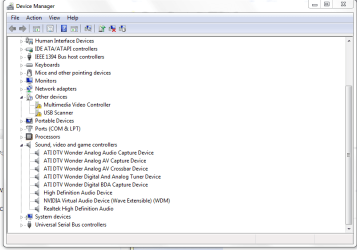
I moved the card to another 64 bit PC.
But oddly, windows could not install it?
But I got it working. I went to the other PC, in system32 exists these ATI drivers and in folder called 'driver store'
exists more ATI drivers.

So I copied to flash drive, pointed win7 device manager to the drive and it installed. I did for all 3 devices.

I uploaded these to google drive, and set to all. So maybe anyone can now download them if needed.
https://drive.google.com/folderview?id=0B43EHHTTdLSfZ1BfRFRmSGtmOGM&usp=sharing

I dont know if the folders are needed, but most certainly the other files.
 

Attachments

  • ATI wonder hdtvfixed.PNG
    ATI wonder hdtvfixed.PNG
    18.9 KB · Views: 1

My Computer My Computer

At a glance

Windows 7 Ultimate x64
OS
Windows 7 Ultimate x64
Back
Top