Solved ATI Radeon 5970 Dedicated Memory Issue

Josh94

New member
Local time
12:50 AM
Messages
7
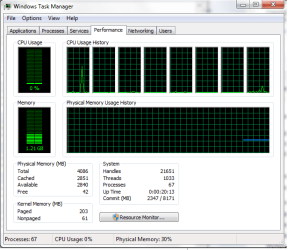
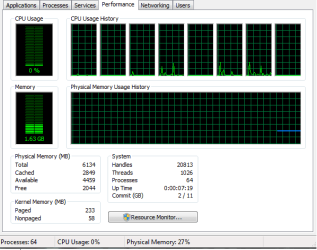
I've been having problems with my video card's dedicated memory. It's been taking up 2g of my memory sometimes and sometimes it doesn't. When it takes the 2g
i've noticed a slow down when running high end games, and it runs slower while multi-tasking. Some said this was normal, but I don't want it to take memory if it is going to slow my PC.

I've also been having problems with my ram, as you can see in the pictures at one point only 2g were available. And on the POST start up of my PC, it keeps rebooting (after blue screen), sometimes it does this for 10-20 minutes. I've read somewhere re-seating my sticks might fix it, but I don't want to void the warranty and break something while i'm doing it.

(I'm not very savvy with computers, so bear with me.)
 

Attachments

  • Task Manager 2GB.jpg
    Task Manager 2GB.jpg
    60 KB · Views: 13
  • Task Manager 4GB.png
    Task Manager 4GB.png
    18.1 KB · Views: 11
  • Task Manager 6GB.png
    Task Manager 6GB.png
    9.3 KB · Views: 11
  • Video Dedicated Memory.png
    Video Dedicated Memory.png
    12.3 KB · Views: 15

My Computer My Computer

OS
Windows 7 Home Premium x64
CPU
Intel (R) Core i7 CPU 920 @2.67GHz
Memory
6GB DDR3
Graphics Card(s)
ATI Radeon HD 5970
Monitor(s) Displays
Generic PnP
Screen Resolution
1440x900
Cooling
Liquid
Is your rig custom-built?

If it isn't too much of a hassle to get to, just undo the tabs that's holding the memory in-place and switch them over new slots. Do NOT have them seated directly next to each other (i.e. Don't have one slot in yellow and the other in orange, that'll result is single channel), seat them in the same colored DIMM slot.

As for the reserved memory bit I believe that is normal and my basically reads the same. I don't know 7 as well as I do XP so someone should come along shortly to speak more on that matter.
 

My Computer My Computer

Computer type
PC/Desktop
Computer Manufacturer/Model Number
Custom
OS
Windows 10 Technical Preview - x64
CPU
Core i5-3570K - 4.5GHz
Motherboard
ASUS Sabertooth Z77 [B. 2003]
Memory
G.Skill Sniper 12GB DDR3-1600
Graphics Card(s)
ASUS GeForce GTX 970 STRIX
Monitor(s) Displays
Acer K272HUL
Screen Resolution
2560x1440
Hard Drives
Samsung 840 Evo 250GB (OS), Samsung Spinpoint F3 HD103SJ 1TB (Games), Seagate Expansion 1TB (Additional storage, Backup)
PSU
Cooler Master Real Power Pro 750W, Corsair HX1000W
Case
HAF-X
Cooling
XSPC Rasa RS360
Keyboard
Gigabyte Osmium, Noppoo Choc Mid 87, Corsair K70 RGB
Mouse
Roccat Kova
Internet Speed
50 Mbps up, 50 Mbps down
Antivirus
BitDefender TS 2013, Malwarebytes AM, SUPERAntiSpyware
Browser
Google Chrome
Other Info
Razer Vespula Gaming Pad, Razer eXactMat, Blackmagic Intensity Pro, Corsair Vengeance 1500 USB Headset, Google/ASUS Nexus 7
No my computer isn't custom built. It has a Dell warranty.
 

My Computer My Computer

OS
Windows 7 Home Premium x64
CPU
Intel (R) Core i7 CPU 920 @2.67GHz
Memory
6GB DDR3
Graphics Card(s)
ATI Radeon HD 5970
Monitor(s) Displays
Generic PnP
Screen Resolution
1440x900
Cooling
Liquid
I checked to see if I could re-seat my ram, and I noticed 2 tabs on the bottom and top of each stick. I can undo the top ones, but the bottom one are to close to my graphics card (I have a big card), so I cannot unlatch them.
 

My Computer My Computer

OS
Windows 7 Home Premium x64
CPU
Intel (R) Core i7 CPU 920 @2.67GHz
Memory
6GB DDR3
Graphics Card(s)
ATI Radeon HD 5970
Monitor(s) Displays
Generic PnP
Screen Resolution
1440x900
Cooling
Liquid
Then unearth the video card so you can get to them. Won't be that big of a hassle, just remember to keep yourself grounded.
 

My Computer My Computer

Computer type
PC/Desktop
Computer Manufacturer/Model Number
Custom
OS
Windows 10 Technical Preview - x64
CPU
Core i5-3570K - 4.5GHz
Motherboard
ASUS Sabertooth Z77 [B. 2003]
Memory
G.Skill Sniper 12GB DDR3-1600
Graphics Card(s)
ASUS GeForce GTX 970 STRIX
Monitor(s) Displays
Acer K272HUL
Screen Resolution
2560x1440
Hard Drives
Samsung 840 Evo 250GB (OS), Samsung Spinpoint F3 HD103SJ 1TB (Games), Seagate Expansion 1TB (Additional storage, Backup)
PSU
Cooler Master Real Power Pro 750W, Corsair HX1000W
Case
HAF-X
Cooling
XSPC Rasa RS360
Keyboard
Gigabyte Osmium, Noppoo Choc Mid 87, Corsair K70 RGB
Mouse
Roccat Kova
Internet Speed
50 Mbps up, 50 Mbps down
Antivirus
BitDefender TS 2013, Malwarebytes AM, SUPERAntiSpyware
Browser
Google Chrome
Other Info
Razer Vespula Gaming Pad, Razer eXactMat, Blackmagic Intensity Pro, Corsair Vengeance 1500 USB Headset, Google/ASUS Nexus 7
Okay, i managed to remove my video card and re-seat my ram. And that seemed to do the trick.

I have booted up several times without any blue screens, freezes or boot loops. And I have my 6g of ram running with only 10MB hardware reserved. :D
 

My Computer My Computer

OS
Windows 7 Home Premium x64
CPU
Intel (R) Core i7 CPU 920 @2.67GHz
Memory
6GB DDR3
Graphics Card(s)
ATI Radeon HD 5970
Monitor(s) Displays
Generic PnP
Screen Resolution
1440x900
Cooling
Liquid
Glad to hear. :cool:
 

My Computer My Computer

Computer type
PC/Desktop
Computer Manufacturer/Model Number
Custom
OS
Windows 10 Technical Preview - x64
CPU
Core i5-3570K - 4.5GHz
Motherboard
ASUS Sabertooth Z77 [B. 2003]
Memory
G.Skill Sniper 12GB DDR3-1600
Graphics Card(s)
ASUS GeForce GTX 970 STRIX
Monitor(s) Displays
Acer K272HUL
Screen Resolution
2560x1440
Hard Drives
Samsung 840 Evo 250GB (OS), Samsung Spinpoint F3 HD103SJ 1TB (Games), Seagate Expansion 1TB (Additional storage, Backup)
PSU
Cooler Master Real Power Pro 750W, Corsair HX1000W
Case
HAF-X
Cooling
XSPC Rasa RS360
Keyboard
Gigabyte Osmium, Noppoo Choc Mid 87, Corsair K70 RGB
Mouse
Roccat Kova
Internet Speed
50 Mbps up, 50 Mbps down
Antivirus
BitDefender TS 2013, Malwarebytes AM, SUPERAntiSpyware
Browser
Google Chrome
Other Info
Razer Vespula Gaming Pad, Razer eXactMat, Blackmagic Intensity Pro, Corsair Vengeance 1500 USB Headset, Google/ASUS Nexus 7
Back
Top