Attempt to transfer XP desktop shortcuts to Windows 7 PC failed

justkay

New member
Local time
9:54 PM
Messages
4
I have alot of desktop shortcuts on my older XP system & wanted to copy them to my new Windows 7 PC. I successfully copied them onto my external hard drive, powered off, reconnected the external hard drive to my Windows 7 PC & powered on. I then copied the desktop shortcut file to the apporpriate place (C:\(user)\desktop folder. It looked like it worked but whenever I try to open one by selecting it, all I get is a blank IE 9 screen. There is no address for the website. Yet, when I look at the properties of a shortcut, it displays the full website address.

What am I doing wrong? Hopefully I will not have to enter each one in manually.
 

My Computer My Computer

At a glance

Windows 7 Pro 32 bitIntel i3 2120 3.3 GHz2 GB RAM
Computer Manufacturer/Model Number
HP 3400 series
OS
Windows 7 Pro 32 bit
CPU
Intel i3 2120 3.3 GHz
Memory
2 GB RAM
Hard Drives
500 GB
What are you trying to copy ? Favorites ?

You have to copy ( import ) your favorites from your user account in XP to your favorites in W7.
 

My Computer My Computer

At a glance

Windows 10 Pro x64Intel Core i7 6700KGSkill TridentZ RGB 16GB 3600 16-16-16-36EVGA GTX 980 Ti SC x2
Computer type
PC/Desktop
Computer Manufacturer/Model Number
Skylake Special #666
OS
Windows 10 Pro x64
CPU
Intel Core i7 6700K
Motherboard
Asus Sabertooth Z170 Mark 1
Memory
GSkill TridentZ RGB 16GB 3600 16-16-16-36
Graphics Card(s)
EVGA GTX 980 Ti SC x2
Sound Card
Realtek High Definition
Monitor(s) Displays
AOC G2460PG
Screen Resolution
1920 x 1080 144Hz
Hard Drives
Samsung 860 Pro 256GB, Seagate Barracuda 4TB x2
PSU
EVGA 1000 P2, EVGA White Custom Braided Cables
Case
Corsair Vengeance C70 Gunmetal Black
Cooling
Corsair H100i v2, Corsair ML120 x2, Thermal Grizzly Kryonaut
Keyboard
Logitech G910 Orion Spectrum
Mouse
Logitech G700s
Internet Speed
Verizon Fios Quantum Gateway 75/75
Antivirus
Windows Defender, Malwarebytes Free 3.8.3
Browser
Chrome
Other Info
Corsair SP120 x4, LG Blu-ray Drive, Durabrand HT-395 100 Watt Dolby Digital Amp, Corsair H2100 Wireless 7.1 Headset
I already successfully copied my favorites over. What I am trying to do now is to simply copy the desktop shortcuts (icons) I have on my XP system. Most of these are not actually in my favorites.
 

My Computer My Computer

At a glance

Windows 7 Pro 32 bitIntel i3 2120 3.3 GHz2 GB RAM
Computer Manufacturer/Model Number
HP 3400 series
OS
Windows 7 Pro 32 bit
CPU
Intel i3 2120 3.3 GHz
Memory
2 GB RAM
Hard Drives
500 GB
Shortcuts to what exactly?
 

My Computer My Computer

At a glance

Windows 10 Education 64 bitAMD Phenom II X4 980 Black Edition Deneb 3.7GHz8GB 4GBx2 Kingston PC10600 DDR3 1333 MemoryZotac NVIDIA Geforce GT640 2 Gig DDR3 PCIe
Computer type
PC/Desktop
Computer Manufacturer/Model Number
Home Built
OS
Windows 10 Education 64 bit
CPU
AMD Phenom II X4 980 Black Edition Deneb 3.7GHz
Motherboard
Asus M4N68T-M V2 µATX Motherboard
Memory
8GB 4GBx2 Kingston PC10600 DDR3 1333 Memory
Graphics Card(s)
Zotac NVIDIA Geforce GT640 2 Gig DDR3 PCIe
Sound Card
VIA VT1708s High Definition Audio 8-channel Onboard
Monitor(s) Displays
22" LG E2242 1080p and 2 19" I-INC AG191D
Screen Resolution
1280x1024 - 1920x1080 - 1280x1024
Hard Drives
Crucial M100 256 GB SSD and 500 GB WD Blue SATA
PSU
Thermaltake TR 620
Case
Power Up Black ATX Mid-Tower Case
Cooling
Stock heatsink and fan
Keyboard
Logitech Wireless K350 Wave
Mouse
Logitech Wireless M570 Trackman Wheel
Internet Speed
80 Mbps Down 30 Mbps Up
Antivirus
Windows Defender
Browser
Internet Explorer 11
Other Info
HP DVD1040e Lightscribe - External USB2
Primarily to websites that I frequent. I create them while I am on a website by using the File drop down menu of Internet Explorer & then choose "send", then "shortcut to Desktop".
 

My Computer My Computer

At a glance

Windows 7 Pro 32 bitIntel i3 2120 3.3 GHz2 GB RAM
Computer Manufacturer/Model Number
HP 3400 series
OS
Windows 7 Pro 32 bit
CPU
Intel i3 2120 3.3 GHz
Memory
2 GB RAM
Hard Drives
500 GB
You have to create them from 7. Why aren`t you just adding the favorites menu to your start menu ? ( It would be 2 clicks ) Why are you cluttering up your desktop with icons ?
 

My Computer My Computer

At a glance

Windows 10 Pro x64Intel Core i7 6700KGSkill TridentZ RGB 16GB 3600 16-16-16-36EVGA GTX 980 Ti SC x2
Computer type
PC/Desktop
Computer Manufacturer/Model Number
Skylake Special #666
OS
Windows 10 Pro x64
CPU
Intel Core i7 6700K
Motherboard
Asus Sabertooth Z170 Mark 1
Memory
GSkill TridentZ RGB 16GB 3600 16-16-16-36
Graphics Card(s)
EVGA GTX 980 Ti SC x2
Sound Card
Realtek High Definition
Monitor(s) Displays
AOC G2460PG
Screen Resolution
1920 x 1080 144Hz
Hard Drives
Samsung 860 Pro 256GB, Seagate Barracuda 4TB x2
PSU
EVGA 1000 P2, EVGA White Custom Braided Cables
Case
Corsair Vengeance C70 Gunmetal Black
Cooling
Corsair H100i v2, Corsair ML120 x2, Thermal Grizzly Kryonaut
Keyboard
Logitech G910 Orion Spectrum
Mouse
Logitech G700s
Internet Speed
Verizon Fios Quantum Gateway 75/75
Antivirus
Windows Defender, Malwarebytes Free 3.8.3
Browser
Chrome
Other Info
Corsair SP120 x4, LG Blu-ray Drive, Durabrand HT-395 100 Watt Dolby Digital Amp, Corsair H2100 Wireless 7.1 Headset
I am sorry to hear that I will have to recreate them. It has been very convenient just to use that send to desktop ability in XP. I like having my most commonly used websites right there where I can easily find them.
I guess what I can do to minimize the amount of work for me is to create a saved favorite in XP for each of those desktop icons I want in 7 & then copy that file to the apporpriate favorite folder in 7. Then create a desktop shortcut for any one that I want visible on my desktop.
 

My Computer My Computer

At a glance

Windows 7 Pro 32 bitIntel i3 2120 3.3 GHz2 GB RAM
Computer Manufacturer/Model Number
HP 3400 series
OS
Windows 7 Pro 32 bit
CPU
Intel i3 2120 3.3 GHz
Memory
2 GB RAM
Hard Drives
500 GB
You have to create them from 7. Why aren`t you just adding the favorites menu to your start menu ? ( It would be 2 clicks ) Why are you cluttering up your desktop with icons ?

I'm thinking the OP is just keeping a few easily accessed icons on the desktop for the most frequently visited websites.
 

My Computer My Computer

At a glance

Win 7 Ultimate 64 bitIntel i7-3930KKingston HyperX Genesis 32GB Kit (8x4GB Modul...MSI R7850 Twin Frozr 2GD5/OC Radeon HD 7850 2...
Computer type
PC/Desktop
Computer Manufacturer/Model Number
Custom Build
OS
Win 7 Ultimate 64 bit
CPU
Intel i7-3930K
Motherboard
ASUS P9X79 WS
Memory
Kingston HyperX Genesis 32GB Kit (8x4GB Modules) 1600MHz DDR
Graphics Card(s)
MSI R7850 Twin Frozr 2GD5/OC Radeon HD 7850 2GB 256-bit GDDR
Sound Card
Asus Xonar Essence STX
Monitor(s) Displays
3x Asus VG248QE 24", Vizio 32" TV
Screen Resolution
1920 x 1080, ?
Hard Drives
Samsung 128GB 840 Pro SSD (1),
Samsung 4TB 850 EVO SSDs (4)
Samsung 4TB 850 EVO SSDs (16) external backup drives used in 2.5" hot swap bays in the computer.
PSU
Corsair HX750w
Case
Antec Two Hundred v2 (modified)
Cooling
Cooler Master GeminII S524 120mm (fan replaced with a 140mm)
Keyboard
Logitech G510s
Mouse
Logitech M525 (two in use)
Internet Speed
=< 32Mbps down, 8Mbps up
Antivirus
AVAST!, MBAM, SAS, Spybot S&D (all but MBAM free) Glary Util
Browser
IE11
Other Info
LSI 9211-8i HBA card (8 SATA III ports), 2.5" & 3.5" Hot Swap Bays, HooToo HT-CR001 PCI-E to USB 3.0 Internal Hub + 6 Slot Card Reader, and LG Model CH12LS28 BD-ROM Optical Drive. Also, ScanSnap S1500 ADF duplexing scanner, Canon 9000F flat bed scanner, Corsair SP2500 2.1 speakers, Samsung CLP 415nw laser color printer, Cyberpower PP2200SW UPS
I totally understand what the OP is trying to do, thanks.
 

My Computer My Computer

At a glance

Windows 10 Pro x64Intel Core i7 6700KGSkill TridentZ RGB 16GB 3600 16-16-16-36EVGA GTX 980 Ti SC x2
Computer type
PC/Desktop
Computer Manufacturer/Model Number
Skylake Special #666
OS
Windows 10 Pro x64
CPU
Intel Core i7 6700K
Motherboard
Asus Sabertooth Z170 Mark 1
Memory
GSkill TridentZ RGB 16GB 3600 16-16-16-36
Graphics Card(s)
EVGA GTX 980 Ti SC x2
Sound Card
Realtek High Definition
Monitor(s) Displays
AOC G2460PG
Screen Resolution
1920 x 1080 144Hz
Hard Drives
Samsung 860 Pro 256GB, Seagate Barracuda 4TB x2
PSU
EVGA 1000 P2, EVGA White Custom Braided Cables
Case
Corsair Vengeance C70 Gunmetal Black
Cooling
Corsair H100i v2, Corsair ML120 x2, Thermal Grizzly Kryonaut
Keyboard
Logitech G910 Orion Spectrum
Mouse
Logitech G700s
Internet Speed
Verizon Fios Quantum Gateway 75/75
Antivirus
Windows Defender, Malwarebytes Free 3.8.3
Browser
Chrome
Other Info
Corsair SP120 x4, LG Blu-ray Drive, Durabrand HT-395 100 Watt Dolby Digital Amp, Corsair H2100 Wireless 7.1 Headset
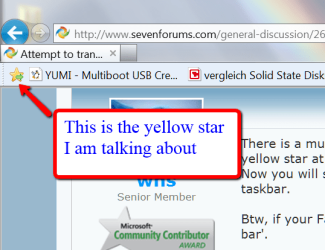
There is a much easier way. When you are on a website that you want to retain, click the yellow star at the beginning of your Favorites bar. Then right click on the taskbar > Toolbars > check 'Links". Now you will see all links that are in the Favorites bar when you click on the chevrons next to Links in the taskbar.

Btw, if your Favorites bar is not showing, right click on the top frame of the IE window and check 'Favorites bar'.
 

Attachments

  • 2012-11-13_2135.png
    2012-11-13_2135.png
    28.4 KB · Views: 3

My Computer My Computer

At a glance

Vista, Windows7, Mint Mate, Zorin, Windows 8from 1.6GHz Duo to i7
Computer Manufacturer/Model Number
HP, Dell, Gateway, Toshiba - 4 laptops and 2 desktops
OS
Vista, Windows7, Mint Mate, Zorin, Windows 8
CPU
from 1.6GHz Duo to i7
Monitor(s) Displays
2x HP w2207
Hard Drives
5x HDD, 7x SSD, 12x Externals
Keyboard
with trackball - no mices
Mouse
Trackball mice
Internet Speed
DSL 6000
Back
Top