
Hi, hope you guys can help/guide me out.
So I receive a gift a couple of months ago, but did not have the chance to test it until now.
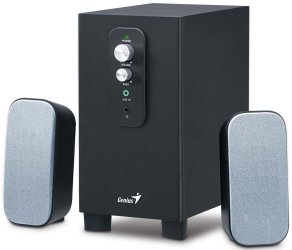
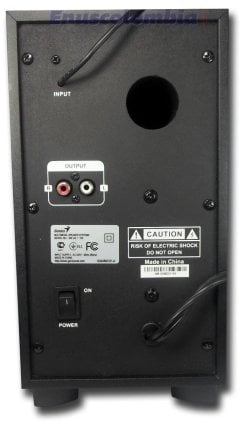
I have a set of audio speakers+sub-woofer, if you take a look at the pics (specially the back.jpg) the speakers are connected through a RCA cable, and where says input its a 3.5mm cable that goes into the computer (speakers output)
Now when I connected them to the PC, the sub-woofer and right speakers works fine, but the left is not producing audio at all. I find out that both speakers are working fine if I connected them in the red output/R, seems the left one is not working. At first I thought it was config of my PC I did download the latest drivers from Realtek Website, I tried the ones that comes from the DVD/Motherboard (ASROCK H81M-HDS) and same issue. I tried multiple settings from the audio devices (5.1 surround, quadraphonic, stereo) but no success.
Finally what I did is that I connected the system to my Galaxy S3 smartphone and another audio system as well and I have the same issue, no audio coming from the output Left/White, Subwoofer is working fine, and output/Red(Right) is working fine. I'm not sure if its due to the fact that system receives the signal from a 3.5mm cable and then has to send it through 3 outputs (L/R RCA speakers and the subwoofer)
What I'm trying to find out is, if this something related to the audio system itself, or does the PC and S3 need a configuration?
In case is something related (hardware) of the audio system, could it be repairable?
thanks in advance!
So I receive a gift a couple of months ago, but did not have the chance to test it until now.
I have a set of audio speakers+sub-woofer, if you take a look at the pics (specially the back.jpg) the speakers are connected through a RCA cable, and where says input its a 3.5mm cable that goes into the computer (speakers output)
Now when I connected them to the PC, the sub-woofer and right speakers works fine, but the left is not producing audio at all. I find out that both speakers are working fine if I connected them in the red output/R, seems the left one is not working. At first I thought it was config of my PC I did download the latest drivers from Realtek Website, I tried the ones that comes from the DVD/Motherboard (ASROCK H81M-HDS) and same issue. I tried multiple settings from the audio devices (5.1 surround, quadraphonic, stereo) but no success.
Finally what I did is that I connected the system to my Galaxy S3 smartphone and another audio system as well and I have the same issue, no audio coming from the output Left/White, Subwoofer is working fine, and output/Red(Right) is working fine. I'm not sure if its due to the fact that system receives the signal from a 3.5mm cable and then has to send it through 3 outputs (L/R RCA speakers and the subwoofer)
What I'm trying to find out is, if this something related to the audio system itself, or does the PC and S3 need a configuration?
In case is something related (hardware) of the audio system, could it be repairable?
thanks in advance!
Attachments
Last edited:
My Computer
At a glance
Windows 7 Home Premium x64Intel Core i5 - 44408GB DDR3-1600MHZEVGA NVIDIA GTX 750 SGC
- Computer type
- PC/Desktop
- Computer Manufacturer/Model Number
- Custom Build
- OS
- Windows 7 Home Premium x64
- CPU
- Intel Core i5 - 4440
- Motherboard
- ASRock H81M-HDS
- Memory
- 8GB DDR3-1600MHZ
- Graphics Card(s)
- EVGA NVIDIA GTX 750 SGC
- Hard Drives
- Western Digital 1TB (1000GB) Caviar Blue - Disco Duro, 64MB Cache Buffer, SATA 3 (600MB/s)
- Antivirus
- AVG Internet Security 2015
- Browser
- Google Chrome


