Audio Driver won't install

AClone135

New member
Local time
3:32 PM
Messages
6
Good day everyone!

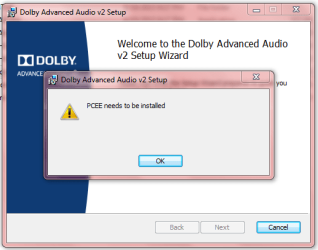
As stated in the title, the audio driver won't install for my laptop. I have an Acer Aspire 4755g running Windows 7 Professional x64. I have downloaded the latest driver from the Acer support website and have uninstalled/reinstalled it multiple times already to no avail...

The problem first started when "Dolby Advanced Audio - Unable to start the Dolby Audio driver" started popping up. I uninstalled the driver and tried reinstalling it to fix the problem, but I was unable to reinstall it properly. I remember it being successfully reinstalled (the Realtek one), but I didn't notice and uninstalled it again.

I'm starting to think that it might be a hardware problem now...
 

Attachments
  • ayy.PNG
    ayy.PNG
    46.2 KB · Views: 0
  • a.PNG
    a.PNG
    16.6 KB · Views: 15

My Computer

Computer type
PC/Desktop
OS
Windows 7 Professional x64
Uninstall the "Audio Device On High Definition Audio Bus" in the Device Manager. RIGHT click on that entry to highlight it and then LEFT click "Uninstall". If it asks if you want to also uninstall the drivers, click yes. Then restart the PC and when Windows starts it should detect the sound and install the generic, basic function, High Definition Audio Device driver, assuming there is nothing wrong with the sound hardware and its enabled in the BIOS.

If the Windows installed High Definition Audio Device was installed, check the sound Playback to see if you have audio. If this works OK, you can attempt the Realtek driver install again (if that is the correct sound driver).

The Dolby will not install until the Realtek is first installed.
 

My Computer

Computer type
PC/Desktop
Computer Manufacturer/Model Number
My Own Build
OS
Windows 10 64 bit
CPU
Intel i7 6700K
Motherboard
ASUS ROG Maximus VIII Hero
Memory
16GB Corsair Dominator
Graphics Card(s)
Intel CPU Graphics
Sound Card
RealTek
Monitor(s) Displays
27" Dell S2719dgf
Screen Resolution
2560X1440
Hard Drives
1 TB Samsung 850 EVO SSD for Win 10 Pro
500GB Samsung 850 EVO SSD for Win 10 Insider
2 TB drive for backup
PSU
EVGA Supernova 750G2
Case
BeQuiet Silent Base 600
Cooling
Deepcool Captain 120EX
Keyboard
Microsoft Wireless 2000
Mouse
Microsoft wireless
Internet Speed
100 MB/sec (Cable)
Antivirus
Microsoft Defender and Malwarebytes
Browser
Edge/Firefox
Other Info
Cakewalk (Sonar) by BandLab and Studio One 4.1 Pro recording studio software. MOTU 896Mk3 Hybrid recording interface, Frontier Tranzport wireless control unit, Behringer X-Touch Control Surface.
Five USB connected optical drives for CD Audio production using Nero BurningROM
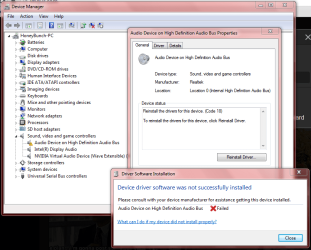
I uninstalled the Audio Device on High Definition Audio Bus, restarted, and this happened. Will it be okay to proceed to the next step?
 

Attachments

  • b.PNG
    b.PNG
    42.3 KB · Views: 0

My Computer

Computer type
PC/Desktop
OS
Windows 7 Professional x64
The device does not show its disabled in your screen shot.

Did you run the troubleshooter? or did that automatically come up?
 

My Computer

Computer type
PC/Desktop
Computer Manufacturer/Model Number
My Own Build
OS
Windows 10 64 bit
CPU
Intel i7 6700K
Motherboard
ASUS ROG Maximus VIII Hero
Memory
16GB Corsair Dominator
Graphics Card(s)
Intel CPU Graphics
Sound Card
RealTek
Monitor(s) Displays
27" Dell S2719dgf
Screen Resolution
2560X1440
Hard Drives
1 TB Samsung 850 EVO SSD for Win 10 Pro
500GB Samsung 850 EVO SSD for Win 10 Insider
2 TB drive for backup
PSU
EVGA Supernova 750G2
Case
BeQuiet Silent Base 600
Cooling
Deepcool Captain 120EX
Keyboard
Microsoft Wireless 2000
Mouse
Microsoft wireless
Internet Speed
100 MB/sec (Cable)
Antivirus
Microsoft Defender and Malwarebytes
Browser
Edge/Firefox
Other Info
Cakewalk (Sonar) by BandLab and Studio One 4.1 Pro recording studio software. MOTU 896Mk3 Hybrid recording interface, Frontier Tranzport wireless control unit, Behringer X-Touch Control Surface.
Five USB connected optical drives for CD Audio production using Nero BurningROM
I clicked on the sound icon then it opened.
 

Attachments

  • c.PNG
    c.PNG
    1 KB · Views: 10

My Computer

Computer type
PC/Desktop
OS
Windows 7 Professional x64
I see the Wi-Fi is not connected. Make a connection and see if anything changes. Sometimes, when Windows is installing a driver, it needs to access an on-line data base to get the driver or items needed.

According to what I see, this is an Intel CPU system. Reinstalling the Intel Motherboard Chipset drivers may also help the problems.
 

My Computer

Computer type
PC/Desktop
Computer Manufacturer/Model Number
My Own Build
OS
Windows 10 64 bit
CPU
Intel i7 6700K
Motherboard
ASUS ROG Maximus VIII Hero
Memory
16GB Corsair Dominator
Graphics Card(s)
Intel CPU Graphics
Sound Card
RealTek
Monitor(s) Displays
27" Dell S2719dgf
Screen Resolution
2560X1440
Hard Drives
1 TB Samsung 850 EVO SSD for Win 10 Pro
500GB Samsung 850 EVO SSD for Win 10 Insider
2 TB drive for backup
PSU
EVGA Supernova 750G2
Case
BeQuiet Silent Base 600
Cooling
Deepcool Captain 120EX
Keyboard
Microsoft Wireless 2000
Mouse
Microsoft wireless
Internet Speed
100 MB/sec (Cable)
Antivirus
Microsoft Defender and Malwarebytes
Browser
Edge/Firefox
Other Info
Cakewalk (Sonar) by BandLab and Studio One 4.1 Pro recording studio software. MOTU 896Mk3 Hybrid recording interface, Frontier Tranzport wireless control unit, Behringer X-Touch Control Surface.
Five USB connected optical drives for CD Audio production using Nero BurningROM
The wifi is actually connected. That's another problem I'm currently having, albeit a minor one. That said, will it be okay to proceed?

Also, yes, Intel i7 is my processor.
 

My Computer

Computer type
PC/Desktop
OS
Windows 7 Professional x64
Yes, reinstall the Intel motherboard chipset drivers.
 

My Computer

Computer type
PC/Desktop
Computer Manufacturer/Model Number
My Own Build
OS
Windows 10 64 bit
CPU
Intel i7 6700K
Motherboard
ASUS ROG Maximus VIII Hero
Memory
16GB Corsair Dominator
Graphics Card(s)
Intel CPU Graphics
Sound Card
RealTek
Monitor(s) Displays
27" Dell S2719dgf
Screen Resolution
2560X1440
Hard Drives
1 TB Samsung 850 EVO SSD for Win 10 Pro
500GB Samsung 850 EVO SSD for Win 10 Insider
2 TB drive for backup
PSU
EVGA Supernova 750G2
Case
BeQuiet Silent Base 600
Cooling
Deepcool Captain 120EX
Keyboard
Microsoft Wireless 2000
Mouse
Microsoft wireless
Internet Speed
100 MB/sec (Cable)
Antivirus
Microsoft Defender and Malwarebytes
Browser
Edge/Firefox
Other Info
Cakewalk (Sonar) by BandLab and Studio One 4.1 Pro recording studio software. MOTU 896Mk3 Hybrid recording interface, Frontier Tranzport wireless control unit, Behringer X-Touch Control Surface.
Five USB connected optical drives for CD Audio production using Nero BurningROM
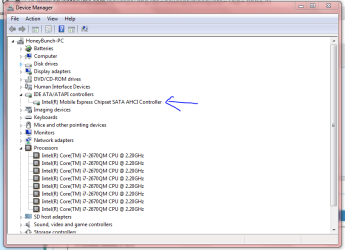
After I reinstall the chipset drivers, I'll proceed with reinstalling the audio driver, right?

Also, which ones will I uninstall (in the image)?
 

Attachments

  • d.PNG
    d.PNG
    23.8 KB · Views: 0

My Computer

Computer type
PC/Desktop
OS
Windows 7 Professional x64
What you mark is not the motherboard chipset drivers.

The chipset drivers identify all the devices on or attached to the motherboard and the reason I suggested installing them. If the sound was not identified or improperly identified then it would not install or install properly.

Its listed as "Chipset Intel Chipset Driver" on the Acer downloads.
Download Drivers and Manuals | Acer Official Site
 

My Computer

Computer type
PC/Desktop
Computer Manufacturer/Model Number
My Own Build
OS
Windows 10 64 bit
CPU
Intel i7 6700K
Motherboard
ASUS ROG Maximus VIII Hero
Memory
16GB Corsair Dominator
Graphics Card(s)
Intel CPU Graphics
Sound Card
RealTek
Monitor(s) Displays
27" Dell S2719dgf
Screen Resolution
2560X1440
Hard Drives
1 TB Samsung 850 EVO SSD for Win 10 Pro
500GB Samsung 850 EVO SSD for Win 10 Insider
2 TB drive for backup
PSU
EVGA Supernova 750G2
Case
BeQuiet Silent Base 600
Cooling
Deepcool Captain 120EX
Keyboard
Microsoft Wireless 2000
Mouse
Microsoft wireless
Internet Speed
100 MB/sec (Cable)
Antivirus
Microsoft Defender and Malwarebytes
Browser
Edge/Firefox
Other Info
Cakewalk (Sonar) by BandLab and Studio One 4.1 Pro recording studio software. MOTU 896Mk3 Hybrid recording interface, Frontier Tranzport wireless control unit, Behringer X-Touch Control Surface.
Five USB connected optical drives for CD Audio production using Nero BurningROM
Should I uninstall anything before installing the chipset drivers? If so, which one is it?
 

My Computer

Computer type
PC/Desktop
OS
Windows 7 Professional x64
Back
Top