
Audio not working on win7 ultimate x64?

arcanehack

New member
Local time
8:55 AM
Messages
9
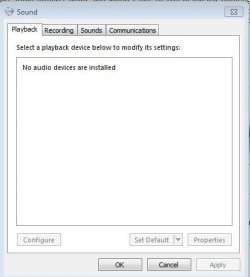
So I have had windows 7 for a while and I was using my computer when it got and I must have overloaded it and it gave me a blue screen. My audio doesn't work and when I got to the playback devices its empty I have the boxes checked off to show all the devices but it shows absolutely nothing. I reinstalled the drivers, and got a new sound card but it still doesn't work. I can't do a system restore either because it didn't save one before the problem. I'm also wondering is it possible that a file/program is interfering with it?
 

My Computer My Computer

At a glance

Windows 7 Ultimate x64AMD Phenom II x4 960T8GB of RAMNvidia Gefore 550 Ti
Computer type
PC/Desktop
Computer Manufacturer/Model Number
Custom Build
OS
Windows 7 Ultimate x64
CPU
AMD Phenom II x4 960T
Motherboard
AMD
Memory
8GB of RAM
Graphics Card(s)
Nvidia Gefore 550 Ti
Screen Resolution
1920x1080
Hard Drives
1TB HDD and a 500GB HDD
Antivirus
McAfee
Browser
Chrome, Srware Iron, Firefox, Waterfox
Hi arcanehack,

Please share the status of 'audio devices' in the 'Device Manager'. A screen shot of that page would be most useful.

To access 'Device Manager' page, follow the steps listed below:
Click 'Start' > In 'Search programs and files' text-box type 'devmgmt.msc' (without quotations) > Tap 'Enter'

Also share the name/details of 'sound card' that you installed; would like to know about the drivers that you installed. (Did you install the drivers using an installation disk or a link on the internet)

Do reply with the details; would be glad to assist.
 

My Computer My Computer

At a glance

Windows 7 64bit
OS
Windows 7 64bit
SIIG sound wave 7.1 PCI, I installed them from the internet and the disk (sorry didn't read the whole question)
 

Attachments

  • Capture.JPG
    Capture.JPG
    36.6 KB · Views: 14
  • Capture 2.JPG
    Capture 2.JPG
    23.3 KB · Views: 8
Last edited:

My Computer My Computer

At a glance

Windows 7 Ultimate x64AMD Phenom II x4 960T8GB of RAMNvidia Gefore 550 Ti
Computer type
PC/Desktop
Computer Manufacturer/Model Number
Custom Build
OS
Windows 7 Ultimate x64
CPU
AMD Phenom II x4 960T
Motherboard
AMD
Memory
8GB of RAM
Graphics Card(s)
Nvidia Gefore 550 Ti
Screen Resolution
1920x1080
Hard Drives
1TB HDD and a 500GB HDD
Antivirus
McAfee
Browser
Chrome, Srware Iron, Firefox, Waterfox
Hi arcanehack,

There are '3 sound cards' listed in the 'Device Manager':
- Integrated 'Realtek HD Audio'
- C Media PCI
- SIIG sound wave 7.1 PCI

Please install the 'drivers' for SIIG audio card using the following link: Downloads
- Enter the 'part number/product number' of your device to install the related driver
- Remove the 'C Media PCI' adapter and check results

Do reply with the results; would be glad to assist.
 

My Computer My Computer

At a glance

Windows 7 64bit
OS
Windows 7 64bit
Nope did not work, as soon as I installed it and restarted says it's corrupted or missing
 

My Computer My Computer

At a glance

Windows 7 Ultimate x64AMD Phenom II x4 960T8GB of RAMNvidia Gefore 550 Ti
Computer type
PC/Desktop
Computer Manufacturer/Model Number
Custom Build
OS
Windows 7 Ultimate x64
CPU
AMD Phenom II x4 960T
Motherboard
AMD
Memory
8GB of RAM
Graphics Card(s)
Nvidia Gefore 550 Ti
Screen Resolution
1920x1080
Hard Drives
1TB HDD and a 500GB HDD
Antivirus
McAfee
Browser
Chrome, Srware Iron, Firefox, Waterfox
Download Auslogics Registry cleaner and install

Uninstall all the soundcard drivers in control panel > Programs and Features

Go to Computer Management > device manager > rt click on each yellowed item left and 'uninstall'

Reboot pc after
Go into bios and make sure any onboard sound is switched off.
Let Win 7 refind any items

After Win 7 screen is back up > run the registry cleaner
Reboot pc

Reinstall new soundcard drivers Win 7 64bit - if you have a choice (latest ones from manufacturer website preferably - not from disk)
 

My Computer My Computer

At a glance

WIN7 Ultimate 64bitAMD FX8150/Trinity A10-5700G-Skill 2400 x2 @ 1866 (both pc's)Sapphire (factory OC version) AMD 7770
Computer type
PC/Desktop
Computer Manufacturer/Model Number
D.I.Y.
OS
WIN7 Ultimate 64bit
CPU
AMD FX8150/Trinity A10-5700
Motherboard
Asus Sabertooth v.1 /Asus F2A85-M Pro
Memory
G-Skill 2400 x2 @ 1866 (both pc's)
Graphics Card(s)
Sapphire (factory OC version) AMD 7770
Sound Card
onboard
Monitor(s) Displays
T260 Samsung
Screen Resolution
1920x1080
Hard Drives
Western Digital Sata 2TB/1TB Caviar Blacks
Buffalo 1TB usb (excellent drive)
PSU
Be-Quiet 700W E-9/Be-Quiet 550W E-9(E-9 = built by FSP)
Case
Antec P183/Antec P180mini
Cooling
x2 Xigmatek SXHH7-U01 + C-Master R4-EXBB-20PK-R0 120mm Fans
Keyboard
Cherry
Mouse
MS Explorer 3.0
Other Info
LG Blu ray combo
Pioneer 207D/208 Blu ray burners
The cleaner said that there were no more errors but my sound still isn't working.
 

My Computer My Computer

At a glance

Windows 7 Ultimate x64AMD Phenom II x4 960T8GB of RAMNvidia Gefore 550 Ti
Computer type
PC/Desktop
Computer Manufacturer/Model Number
Custom Build
OS
Windows 7 Ultimate x64
CPU
AMD Phenom II x4 960T
Motherboard
AMD
Memory
8GB of RAM
Graphics Card(s)
Nvidia Gefore 550 Ti
Screen Resolution
1920x1080
Hard Drives
1TB HDD and a 500GB HDD
Antivirus
McAfee
Browser
Chrome, Srware Iron, Firefox, Waterfox
Is the rest of your pc running properly?
Is lead/optical plugged in ok?

Did you follow thru my list - so onboard sound is now off?
What highlight/yellowed drivers are there in device manager?

You can try swapping souncard to another port in case there is a conflict (which is sometimes why they won't install)

Can you stick your pc specs down pleeze
esp exact motherboard name/serial ie deluxe etc and version (if you know)

Malware deletes restore points
Have you run thru two different virus checkers? Full scan
 

My Computer My Computer

At a glance

WIN7 Ultimate 64bitAMD FX8150/Trinity A10-5700G-Skill 2400 x2 @ 1866 (both pc's)Sapphire (factory OC version) AMD 7770
Computer type
PC/Desktop
Computer Manufacturer/Model Number
D.I.Y.
OS
WIN7 Ultimate 64bit
CPU
AMD FX8150/Trinity A10-5700
Motherboard
Asus Sabertooth v.1 /Asus F2A85-M Pro
Memory
G-Skill 2400 x2 @ 1866 (both pc's)
Graphics Card(s)
Sapphire (factory OC version) AMD 7770
Sound Card
onboard
Monitor(s) Displays
T260 Samsung
Screen Resolution
1920x1080
Hard Drives
Western Digital Sata 2TB/1TB Caviar Blacks
Buffalo 1TB usb (excellent drive)
PSU
Be-Quiet 700W E-9/Be-Quiet 550W E-9(E-9 = built by FSP)
Case
Antec P183/Antec P180mini
Cooling
x2 Xigmatek SXHH7-U01 + C-Master R4-EXBB-20PK-R0 120mm Fans
Keyboard
Cherry
Mouse
MS Explorer 3.0
Other Info
LG Blu ray combo
Pioneer 207D/208 Blu ray burners
All that is ok let me see if I can change some files to see if something is messing with it. If that doesn't work then I'm just gonna reinstall win7
 

My Computer My Computer

At a glance

Windows 7 Ultimate x64AMD Phenom II x4 960T8GB of RAMNvidia Gefore 550 Ti
Computer type
PC/Desktop
Computer Manufacturer/Model Number
Custom Build
OS
Windows 7 Ultimate x64
CPU
AMD Phenom II x4 960T
Motherboard
AMD
Memory
8GB of RAM
Graphics Card(s)
Nvidia Gefore 550 Ti
Screen Resolution
1920x1080
Hard Drives
1TB HDD and a 500GB HDD
Antivirus
McAfee
Browser
Chrome, Srware Iron, Firefox, Waterfox
Hi arcanehack,

Thank you for the reply.

You may also try to disable the 'discreet audio cards' in the BIOS; and enable on-board audio to see if that works. Also install the drivers for the on-board audio using the following link: Realtek

Alternatively, you may access the 'drivers' from the 'computer manufacturer website' if it is an OEM product.

Good luck.
 

My Computer My Computer

At a glance

Windows 7 64bit
OS
Windows 7 64bit
Back
Top