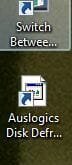
Auslogics icon problem

aston

New member
Local time
3:31 PM
Messages
2
My Auslogics icon doesn't appear properly in Desktop, I have tried icon cache rebuild and it doesn't correct the problem. Help please.
 

Attachments

  • Capture1.JPG
    Capture1.JPG
    10.5 KB · Views: 634

My Computer

Computer Manufacturer/Model Number
Compaq-Presario/VS273AA-ABU CQ5226UK
OS
Windows7 X64
CPU
Pentium Dual Core E5300 2.6GHz
Memory
2GB
Graphics Card(s)
Intel(R)G41 Express Chipset
Screen Resolution
1366x768
Hard Drives
320GB
Hello Aston, and welcome to Seven Forums.

You might see if changing the shortcut's icon to itself, click OK, and repeat a couple of times may be able to restore it for you.

Hope this helps,
Shawn
 

My Computer

Computer type
PC/Desktop
Computer Manufacturer/Model Number
Self built custom
OS
64-bit Windows 11 Pro for Workstations
CPU
Intel i7-8700K OC'd to 5 GHz
Motherboard
ASUS ROG Maximus XI Formula Z390
Memory
64 GB (4x16GB) G.SKILL TridentZ RGB DDR4 3600 MHz
Graphics Card(s)
ASUS ROG-STRIX-GTX1080TI-O11G-GAMING
Sound Card
Integrated
Monitor(s) Displays
2 x Samsung Odyssey G7 27"
Screen Resolution
2560x1440
Hard Drives
1TB Samsung 990 PRO M.2,
4TB Samsung 990 PRO PRO M.2,
TerraMaster F8 SSD Plus NAS
PSU
Seasonic Prime Titanium 850W
Case
Thermaltake Core P3
Cooling
Corsair Hydro H115i
Keyboard
Logitech wireless K800
Mouse
Logitech MX Master 4
Internet Speed
2 Gb/s Download and 100 Mb/s Upload
Antivirus
Malwarebyte Anti-Malware Premium
Browser
Google Chrome
Other Info
Logitech Z625 speaker system,
Logitech BRIO 4K Pro webcam,
HP Color LaserJet Pro MFP M477fdn,
APC SMART-UPS RT 1000 XL - SURT1000XLI,
Galaxy S23 Plus phone
Hmm, I had this problem on Vista. Check if the executable file has anymore it's icon. If yes, delete the shortcut and make a new shortcut to your application. Also try Properties > Change Icon on the shortcut and select the .ico file in your application folder(if there is one). Hope this will help you
 

My Computer

Computer Manufacturer/Model Number
Intel 945GC1055
OS
Windows 7
CPU
Intel Dual Core @ 2.2ghz
Motherboard
ECS
Memory
2 x Apacer 1GB DDR2
Graphics Card(s)
nVidia Geforce 9400GT 512mb DDR2 128bits
Sound Card
Realtek HD Audio 7.1
Monitor(s) Displays
15'' Default Monitor
Screen Resolution
1152x864
Hard Drives
Maxtor 250GB
PSU
ALINE 500w
Case
XTYLING
Cooling
Intel branded coolers
Keyboard
GENIUS ZM791xxxxxxxxxx
Mouse
Chicony MS-9656
Internet Speed
6 Mbs DL / 512 kb UP
Thanks very much Brink, it was very nice of you. You can make the thread solved.
 

My Computer

Computer Manufacturer/Model Number
Compaq-Presario/VS273AA-ABU CQ5226UK
OS
Windows7 X64
CPU
Pentium Dual Core E5300 2.6GHz
Memory
2GB
Graphics Card(s)
Intel(R)G41 Express Chipset
Screen Resolution
1366x768
Hard Drives
320GB
You're most welcome Aston. I'm happy to hear that you got it sorted. :)
 

My Computer

Computer type
PC/Desktop
Computer Manufacturer/Model Number
Self built custom
OS
64-bit Windows 11 Pro for Workstations
CPU
Intel i7-8700K OC'd to 5 GHz
Motherboard
ASUS ROG Maximus XI Formula Z390
Memory
64 GB (4x16GB) G.SKILL TridentZ RGB DDR4 3600 MHz
Graphics Card(s)
ASUS ROG-STRIX-GTX1080TI-O11G-GAMING
Sound Card
Integrated
Monitor(s) Displays
2 x Samsung Odyssey G7 27"
Screen Resolution
2560x1440
Hard Drives
1TB Samsung 990 PRO M.2,
4TB Samsung 990 PRO PRO M.2,
TerraMaster F8 SSD Plus NAS
PSU
Seasonic Prime Titanium 850W
Case
Thermaltake Core P3
Cooling
Corsair Hydro H115i
Keyboard
Logitech wireless K800
Mouse
Logitech MX Master 4
Internet Speed
2 Gb/s Download and 100 Mb/s Upload
Antivirus
Malwarebyte Anti-Malware Premium
Browser
Google Chrome
Other Info
Logitech Z625 speaker system,
Logitech BRIO 4K Pro webcam,
HP Color LaserJet Pro MFP M477fdn,
APC SMART-UPS RT 1000 XL - SURT1000XLI,
Galaxy S23 Plus phone
Back
Top