Authentec Drivers

Okay, let's give this a try. I haven't figured out how to place the images in text, so I 'll have to do this as a series of replies.

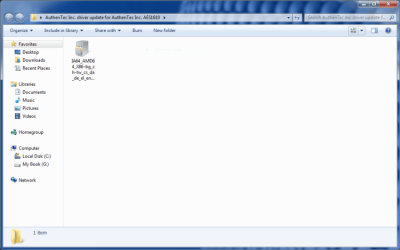
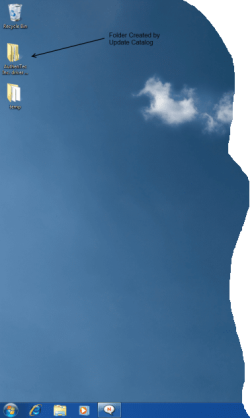
First of all, when I downloaded the file from the Windows Update Catalog site, it created the following folder on my desktop:
 

Attachments
  • desktop.PNG
    desktop.PNG
    57.7 KB · Views: 14

My Computer My Computer

At a glance

Windows 7 x64 (RTM via MSDN)Intel Core 2 Duo T9300 (2.5 GHz)4 GB SODIMMS (System Max)nVidia 8600M GS 256MB
Computer Manufacturer/Model Number
MPC Transport T2500 Laptop
OS
Windows 7 x64 (RTM via MSDN)
CPU
Intel Core 2 Duo T9300 (2.5 GHz)
Motherboard
MPC
Memory
4 GB SODIMMS (System Max)
Graphics Card(s)
nVidia 8600M GS 256MB
Sound Card
Realtek On-Board
Monitor(s) Displays
15.4" LCD with a Dell 2005FPW 20" attached
Screen Resolution
1680x1050 (15.4") and 1680x1050 (20")
Hard Drives
Toshiba 2.5" 320 GB 7200 RPM
In this folder, there is a single .cab file in this folder.
 

Attachments

  • folder.PNG
    folder.PNG
    25.7 KB · Views: 14

My Computer My Computer

At a glance

Windows 7 x64 (RTM via MSDN)Intel Core 2 Duo T9300 (2.5 GHz)4 GB SODIMMS (System Max)nVidia 8600M GS 256MB
Computer Manufacturer/Model Number
MPC Transport T2500 Laptop
OS
Windows 7 x64 (RTM via MSDN)
CPU
Intel Core 2 Duo T9300 (2.5 GHz)
Motherboard
MPC
Memory
4 GB SODIMMS (System Max)
Graphics Card(s)
nVidia 8600M GS 256MB
Sound Card
Realtek On-Board
Monitor(s) Displays
15.4" LCD with a Dell 2005FPW 20" attached
Screen Resolution
1680x1050 (15.4") and 1680x1050 (20")
Hard Drives
Toshiba 2.5" 320 GB 7200 RPM
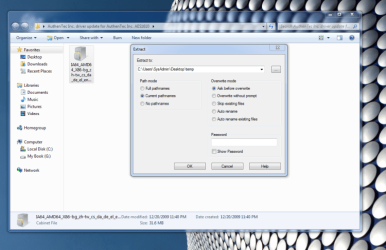
I used 7zip to extract this .cab file to a temp file on my desktop.
 

Attachments

  • extracting.PNG
    extracting.PNG
    67.1 KB · Views: 13

My Computer My Computer

At a glance

Windows 7 x64 (RTM via MSDN)Intel Core 2 Duo T9300 (2.5 GHz)4 GB SODIMMS (System Max)nVidia 8600M GS 256MB
Computer Manufacturer/Model Number
MPC Transport T2500 Laptop
OS
Windows 7 x64 (RTM via MSDN)
CPU
Intel Core 2 Duo T9300 (2.5 GHz)
Motherboard
MPC
Memory
4 GB SODIMMS (System Max)
Graphics Card(s)
nVidia 8600M GS 256MB
Sound Card
Realtek On-Board
Monitor(s) Displays
15.4" LCD with a Dell 2005FPW 20" attached
Screen Resolution
1680x1050 (15.4") and 1680x1050 (20")
Hard Drives
Toshiba 2.5" 320 GB 7200 RPM
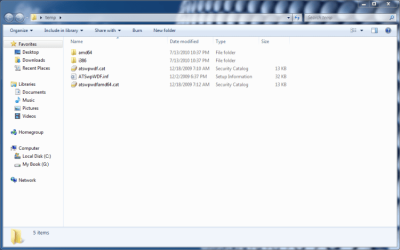
The contents of the Temp folder should now look like this:
 

Attachments

  • temp-content.PNG
    temp-content.PNG
    31.8 KB · Views: 12

My Computer My Computer

At a glance

Windows 7 x64 (RTM via MSDN)Intel Core 2 Duo T9300 (2.5 GHz)4 GB SODIMMS (System Max)nVidia 8600M GS 256MB
Computer Manufacturer/Model Number
MPC Transport T2500 Laptop
OS
Windows 7 x64 (RTM via MSDN)
CPU
Intel Core 2 Duo T9300 (2.5 GHz)
Motherboard
MPC
Memory
4 GB SODIMMS (System Max)
Graphics Card(s)
nVidia 8600M GS 256MB
Sound Card
Realtek On-Board
Monitor(s) Displays
15.4" LCD with a Dell 2005FPW 20" attached
Screen Resolution
1680x1050 (15.4") and 1680x1050 (20")
Hard Drives
Toshiba 2.5" 320 GB 7200 RPM
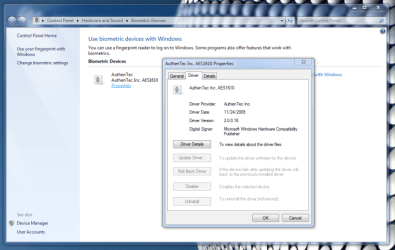
Now, go to the biometric device control applet (I just hit the start button and type "biometric" and hit enter)

click on the properties link and you should get the following options.

I would remove your current drivers, then update to the new ones.
 

Attachments

  • biometric properties.PNG
    biometric properties.PNG
    52.2 KB · Views: 23

My Computer My Computer

At a glance

Windows 7 x64 (RTM via MSDN)Intel Core 2 Duo T9300 (2.5 GHz)4 GB SODIMMS (System Max)nVidia 8600M GS 256MB
Computer Manufacturer/Model Number
MPC Transport T2500 Laptop
OS
Windows 7 x64 (RTM via MSDN)
CPU
Intel Core 2 Duo T9300 (2.5 GHz)
Motherboard
MPC
Memory
4 GB SODIMMS (System Max)
Graphics Card(s)
nVidia 8600M GS 256MB
Sound Card
Realtek On-Board
Monitor(s) Displays
15.4" LCD with a Dell 2005FPW 20" attached
Screen Resolution
1680x1050 (15.4") and 1680x1050 (20")
Hard Drives
Toshiba 2.5" 320 GB 7200 RPM
I think I got it figured out. I downloaded it here at work, unzipped the CAB, and then emailed myself the files, had to split it into two emails since the size exceeded the 25 MB limit for gmail. It wouldn't let me send one, because it contained an executable,ATSwpWDF.sys, but I saved it as a draft, and the files are there, so I can open them from gmail when I get home.
 

My Computer My Computer

At a glance

Windows 7 Ultimate 64 bitIntel T94004GBNvidia 9600 GM
Computer Manufacturer/Model Number
ASUS M70Vm-C1
OS
Windows 7 Ultimate 64 bit
CPU
Intel T9400
Memory
4GB
Graphics Card(s)
Nvidia 9600 GM
Monitor(s) Displays
17" WUXGA
Hard Drives
(2) 500GB 7200Rpm Seagate
I used 7zip to extract this .cab file to a temp file on my desktop.
I knew something was wrong. Your files show a size associated with them, mine did not.
 

My Computer My Computer

At a glance

Windows 7 Ultimate 64 bitIntel T94004GBNvidia 9600 GM
Computer Manufacturer/Model Number
ASUS M70Vm-C1
OS
Windows 7 Ultimate 64 bit
CPU
Intel T9400
Memory
4GB
Graphics Card(s)
Nvidia 9600 GM
Monitor(s) Displays
17" WUXGA
Hard Drives
(2) 500GB 7200Rpm Seagate
Now, go to the biometric device control applet (I just hit the start button and type "biometric" and hit enter)

click on the properties link and you should get the following options.

I would remove your current drivers, then update to the new ones.
Ok, back to removing the existing drivers, how do I do that? I don't want to mess something up.
 

My Computer My Computer

At a glance

Windows 7 Ultimate 64 bitIntel T94004GBNvidia 9600 GM
Computer Manufacturer/Model Number
ASUS M70Vm-C1
OS
Windows 7 Ultimate 64 bit
CPU
Intel T9400
Memory
4GB
Graphics Card(s)
Nvidia 9600 GM
Monitor(s) Displays
17" WUXGA
Hard Drives
(2) 500GB 7200Rpm Seagate
Now, go to the biometric device control applet (I just hit the start button and type "biometric" and hit enter)

click on the properties link and you should get the following options.

I would remove your current drivers, then update to the new ones.
Ok, back to removing the existing drivers, how do I do that? I don't want to mess something up.

If you look on the last image with the biometric device properties, there is a button to remove drivers. Actually it says uninstall drivers. Follow the prompts.
 

My Computer My Computer

At a glance

Windows 7 x64 (RTM via MSDN)Intel Core 2 Duo T9300 (2.5 GHz)4 GB SODIMMS (System Max)nVidia 8600M GS 256MB
Computer Manufacturer/Model Number
MPC Transport T2500 Laptop
OS
Windows 7 x64 (RTM via MSDN)
CPU
Intel Core 2 Duo T9300 (2.5 GHz)
Motherboard
MPC
Memory
4 GB SODIMMS (System Max)
Graphics Card(s)
nVidia 8600M GS 256MB
Sound Card
Realtek On-Board
Monitor(s) Displays
15.4" LCD with a Dell 2005FPW 20" attached
Screen Resolution
1680x1050 (15.4") and 1680x1050 (20")
Hard Drives
Toshiba 2.5" 320 GB 7200 RPM
Now, go to the biometric device control applet (I just hit the start button and type "biometric" and hit enter)

click on the properties link and you should get the following options.

I would remove your current drivers, then update to the new ones.
Ok, back to removing the existing drivers, how do I do that? I don't want to mess something up.

If you look on the last image with the biometric device properties, there is a button to remove drivers. Actually it says uninstall drivers. Follow the prompts.
Thank you sir. There were 10 total files I extracted from the single CAB file. I see the one labeled "ATSwpWDF.inf". I will load them all into one new folder so when I look for drivers, hopefully I can point it to the file. Will I need to specify individual files, or will it just look in the folder and get what it needs?
 

My Computer My Computer

At a glance

Windows 7 Ultimate 64 bitIntel T94004GBNvidia 9600 GM
Computer Manufacturer/Model Number
ASUS M70Vm-C1
OS
Windows 7 Ultimate 64 bit
CPU
Intel T9400
Memory
4GB
Graphics Card(s)
Nvidia 9600 GM
Monitor(s) Displays
17" WUXGA
Hard Drives
(2) 500GB 7200Rpm Seagate
Hopefully this will work. I'm keeping my fingers crossed.
 

My Computer My Computer

At a glance

Windows 7 Ultimate 64 bitIntel T94004GBNvidia 9600 GM
Computer Manufacturer/Model Number
ASUS M70Vm-C1
OS
Windows 7 Ultimate 64 bit
CPU
Intel T9400
Memory
4GB
Graphics Card(s)
Nvidia 9600 GM
Monitor(s) Displays
17" WUXGA
Hard Drives
(2) 500GB 7200Rpm Seagate
Ok, back to removing the existing drivers, how do I do that? I don't want to mess something up.

If you look on the last image with the biometric device properties, there is a button to remove drivers. Actually it says uninstall drivers. Follow the prompts.
Thank you sir. There were 10 total files I extracted from the single CAB file. I see the one labeled "ATSwpWDF.inf". I will load them all into one new folder so when I look for drivers, hopefully I can point it to the file. Will I need to specify individual files, or will it just look in the folder and get what it needs?

Make sure that the i386 and the AMD64 folders are there. Some of the files in them have the same name.

It will probably just find the folder with the .inf in it.
 

My Computer My Computer

At a glance

Windows 7 x64 (RTM via MSDN)Intel Core 2 Duo T9300 (2.5 GHz)4 GB SODIMMS (System Max)nVidia 8600M GS 256MB
Computer Manufacturer/Model Number
MPC Transport T2500 Laptop
OS
Windows 7 x64 (RTM via MSDN)
CPU
Intel Core 2 Duo T9300 (2.5 GHz)
Motherboard
MPC
Memory
4 GB SODIMMS (System Max)
Graphics Card(s)
nVidia 8600M GS 256MB
Sound Card
Realtek On-Board
Monitor(s) Displays
15.4" LCD with a Dell 2005FPW 20" attached
Screen Resolution
1680x1050 (15.4") and 1680x1050 (20")
Hard Drives
Toshiba 2.5" 320 GB 7200 RPM
If you look on the last image with the biometric device properties, there is a button to remove drivers. Actually it says uninstall drivers. Follow the prompts.
Thank you sir. There were 10 total files I extracted from the single CAB file. I see the one labeled "ATSwpWDF.inf". I will load them all into one new folder so when I look for drivers, hopefully I can point it to the file. Will I need to specify individual files, or will it just look in the folder and get what it needs?

Make sure that the i386 and the AMD64 folders are there. Some of the files in them have the same name.

It will probably just find the folder with the .inf in it.
Yes, I have all the files, 14 total, from the AMD64 and i386 folders.
 

My Computer My Computer

At a glance

Windows 7 Ultimate 64 bitIntel T94004GBNvidia 9600 GM
Computer Manufacturer/Model Number
ASUS M70Vm-C1
OS
Windows 7 Ultimate 64 bit
CPU
Intel T9400
Memory
4GB
Graphics Card(s)
Nvidia 9600 GM
Monitor(s) Displays
17" WUXGA
Hard Drives
(2) 500GB 7200Rpm Seagate
Well I got a problem, when I deleted the drivers in preparation for the new ones, the device disappeared from the device manager. Now what do I do???
 

My Computer My Computer

At a glance

Windows 7 Ultimate 64 bitIntel T94004GBNvidia 9600 GM
Computer Manufacturer/Model Number
ASUS M70Vm-C1
OS
Windows 7 Ultimate 64 bit
CPU
Intel T9400
Memory
4GB
Graphics Card(s)
Nvidia 9600 GM
Monitor(s) Displays
17" WUXGA
Hard Drives
(2) 500GB 7200Rpm Seagate
You should be able to have Win7 re-add the device. On the Start Menu, go to Devices and Printers. When that opens, go to add a device. Windows will search for un-attached devices. Follow the prompts.
 

My Computer My Computer

At a glance

Windows 7 x64 (RTM via MSDN)Intel Core 2 Duo T9300 (2.5 GHz)4 GB SODIMMS (System Max)nVidia 8600M GS 256MB
Computer Manufacturer/Model Number
MPC Transport T2500 Laptop
OS
Windows 7 x64 (RTM via MSDN)
CPU
Intel Core 2 Duo T9300 (2.5 GHz)
Motherboard
MPC
Memory
4 GB SODIMMS (System Max)
Graphics Card(s)
nVidia 8600M GS 256MB
Sound Card
Realtek On-Board
Monitor(s) Displays
15.4" LCD with a Dell 2005FPW 20" attached
Screen Resolution
1680x1050 (15.4") and 1680x1050 (20")
Hard Drives
Toshiba 2.5" 320 GB 7200 RPM
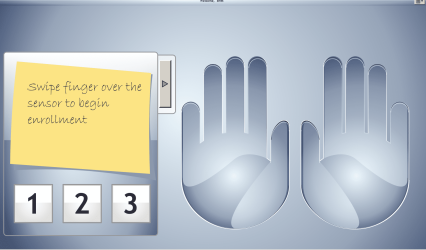
well I got it back in th list, and successfully updated the drivers, but now I can't enroll fingerprints. I click manage
your fingerprint data, it opens TrueSuite, but when I swipe my finger, nothing happens. It doesn't even give me a red X, I get nothing. Now what do you suggest? Before at least it would work, and you could save the data, but now nothing.
 

My Computer My Computer

At a glance

Windows 7 Ultimate 64 bitIntel T94004GBNvidia 9600 GM
Computer Manufacturer/Model Number
ASUS M70Vm-C1
OS
Windows 7 Ultimate 64 bit
CPU
Intel T9400
Memory
4GB
Graphics Card(s)
Nvidia 9600 GM
Monitor(s) Displays
17" WUXGA
Hard Drives
(2) 500GB 7200Rpm Seagate
Can you take a screen shot of what true suite is showing you?
 

My Computer My Computer

At a glance

Windows 7 x64 (RTM via MSDN)Intel Core 2 Duo T9300 (2.5 GHz)4 GB SODIMMS (System Max)nVidia 8600M GS 256MB
Computer Manufacturer/Model Number
MPC Transport T2500 Laptop
OS
Windows 7 x64 (RTM via MSDN)
CPU
Intel Core 2 Duo T9300 (2.5 GHz)
Motherboard
MPC
Memory
4 GB SODIMMS (System Max)
Graphics Card(s)
nVidia 8600M GS 256MB
Sound Card
Realtek On-Board
Monitor(s) Displays
15.4" LCD with a Dell 2005FPW 20" attached
Screen Resolution
1680x1050 (15.4") and 1680x1050 (20")
Hard Drives
Toshiba 2.5" 320 GB 7200 RPM
Here it is, but there would be a "blue" dot on the finger you choose
 

Attachments

  • CaptureTS.PNG
    CaptureTS.PNG
    284.2 KB · Views: 6

My Computer My Computer

At a glance

Windows 7 Ultimate 64 bitIntel T94004GBNvidia 9600 GM
Computer Manufacturer/Model Number
ASUS M70Vm-C1
OS
Windows 7 Ultimate 64 bit
CPU
Intel T9400
Memory
4GB
Graphics Card(s)
Nvidia 9600 GM
Monitor(s) Displays
17" WUXGA
Hard Drives
(2) 500GB 7200Rpm Seagate
Yea, That's how it works for me. Just double click on the finger you want to enroll, swipe 3 times, and close.
 

My Computer My Computer

At a glance

Windows 7 x64 (RTM via MSDN)Intel Core 2 Duo T9300 (2.5 GHz)4 GB SODIMMS (System Max)nVidia 8600M GS 256MB
Computer Manufacturer/Model Number
MPC Transport T2500 Laptop
OS
Windows 7 x64 (RTM via MSDN)
CPU
Intel Core 2 Duo T9300 (2.5 GHz)
Motherboard
MPC
Memory
4 GB SODIMMS (System Max)
Graphics Card(s)
nVidia 8600M GS 256MB
Sound Card
Realtek On-Board
Monitor(s) Displays
15.4" LCD with a Dell 2005FPW 20" attached
Screen Resolution
1680x1050 (15.4") and 1680x1050 (20")
Hard Drives
Toshiba 2.5" 320 GB 7200 RPM
Yea, That's how it works for me. Just double click on the finger you want to enroll, swipe 3 times, and close.

Right but after you scan three times, the dot is supposed to turn "green" and you see a check mark over each successful scan, I don't get any of that.
 

My Computer My Computer

At a glance

Windows 7 Ultimate 64 bitIntel T94004GBNvidia 9600 GM
Computer Manufacturer/Model Number
ASUS M70Vm-C1
OS
Windows 7 Ultimate 64 bit
CPU
Intel T9400
Memory
4GB
Graphics Card(s)
Nvidia 9600 GM
Monitor(s) Displays
17" WUXGA
Hard Drives
(2) 500GB 7200Rpm Seagate
Back
Top