Authentec Drivers

Yes, my model the M70Vm-C1 is supposed to have it, see the ad for my model, it mentions the TPM. I went into BIOS, I saw nothing under security labeled TPM, and when I put TPM.msconfig in the run line I got the other screen shot where it said it found no TPM, so its not there. Why couldn't Asus ad it, they made the motherboard, they surely could solder the chip on and alter the BIOS.
 

My Computer

Computer Manufacturer/Model Number
ASUS M70Vm-C1
OS
Windows 7 Ultimate 64 bit
CPU
Intel T9400
Memory
4GB
Graphics Card(s)
Nvidia 9600 GM
Monitor(s) Displays
17" WUXGA
Hard Drives
(2) 500GB 7200Rpm Seagate
They wouldn't do that (solder a TPM onto the system). How old is the system? If you still have any warranty left, you could contact ASUS and they might send you a new motherboard with a TPM.

Otherwise, you are stuck using 32-bit to use the finger pad, or 64-bit, but no login via fingerprint.

I've never worked with ASUS laptops before, but now that we use HPs at my company, I can tell you that model numbers are a moving target. It is very frustrating. I can get a particular model number sent to me and 6 months later, that same model number is a different unit internally. It is very frustrating!
 

My Computer

Computer Manufacturer/Model Number
MPC Transport T2500 Laptop
OS
Windows 7 x64 (RTM via MSDN)
CPU
Intel Core 2 Duo T9300 (2.5 GHz)
Motherboard
MPC
Memory
4 GB SODIMMS (System Max)
Graphics Card(s)
nVidia 8600M GS 256MB
Sound Card
Realtek On-Board
Monitor(s) Displays
15.4" LCD with a Dell 2005FPW 20" attached
Screen Resolution
1680x1050 (15.4") and 1680x1050 (20")
Hard Drives
Toshiba 2.5" 320 GB 7200 RPM
This is what I got from Authentec on this:
Don,

TrueSuite Starter 2.0.0.39 is a pre-released bootleg version. This version was never released to the public. Here’s what I recommend.

Uninstall TrueSuite Starter and manually delete the device driver from your system. Once this is done, run windows update. Microsoft Windows Update will automatically install TrueSuite Starter on your PC.

Navigate to Control Panel > Windows Update and look for TrueSuite.

Accept the windows update for AuthenTec TrueSuite.

Once TrueSuite is installed, navigate to windows 7 Control Panel > Hardware and Sound > Biometric Devices and click “manage your fingerprint data” to start TrueSuite. TrueSuite Starter supports windows log on only.

AuthenTec will offer a 60-day premium trial version in the near future. You'll be able to purchase an upgrade to TrueSuite Premium once that application is installed.
TPM is not required.

TrueSuite Starter supports windows 7 32 & 64-bit.

TrueSuite Starter does not support Windows Vista

Regards,
TrueSuite Team
 

My Computer

Computer Manufacturer/Model Number
ASUS M70Vm-C1
OS
Windows 7 Ultimate 64 bit
CPU
Intel T9400
Memory
4GB
Graphics Card(s)
Nvidia 9600 GM
Monitor(s) Displays
17" WUXGA
Hard Drives
(2) 500GB 7200Rpm Seagate
So now I really don't know what to think.
 

My Computer

Computer Manufacturer/Model Number
ASUS M70Vm-C1
OS
Windows 7 Ultimate 64 bit
CPU
Intel T9400
Memory
4GB
Graphics Card(s)
Nvidia 9600 GM
Monitor(s) Displays
17" WUXGA
Hard Drives
(2) 500GB 7200Rpm Seagate
Did you remove the TrueSuite that was in your Program Files before you did the update? My version of TrueSuite is 2.0.0.57.

I agree with the TrueSuite guys, remove everything associated with Authentec on the Laptop. In the Control Panel, use the Remove Program option and remove the software.

Then like we did earlier, go to the Biometic device properties and Uninstall the driver. This will probably also disable the sensor hardware. Logoff and log back on. Go to Devices and Printers and use the Add Device option. This should find the sensor. When it asks to find the driver, let it go online to find it. That should install every thing.

The key is to make sure all the TrueSuite components are off the machine.
 

My Computer

Computer Manufacturer/Model Number
MPC Transport T2500 Laptop
OS
Windows 7 x64 (RTM via MSDN)
CPU
Intel Core 2 Duo T9300 (2.5 GHz)
Motherboard
MPC
Memory
4 GB SODIMMS (System Max)
Graphics Card(s)
nVidia 8600M GS 256MB
Sound Card
Realtek On-Board
Monitor(s) Displays
15.4" LCD with a Dell 2005FPW 20" attached
Screen Resolution
1680x1050 (15.4") and 1680x1050 (20")
Hard Drives
Toshiba 2.5" 320 GB 7200 RPM
I thought when I removed the Authentec drivers before, it got rid of everything, I guess it didn't. So I can't just remove TrueSuite from programs and re-install it? I have to remove EVERYTHING? Crap!
 

My Computer

Computer Manufacturer/Model Number
ASUS M70Vm-C1
OS
Windows 7 Ultimate 64 bit
CPU
Intel T9400
Memory
4GB
Graphics Card(s)
Nvidia 9600 GM
Monitor(s) Displays
17" WUXGA
Hard Drives
(2) 500GB 7200Rpm Seagate
I'll have to delete the drivers I brought back to my machine through email, or otherwise it will find them won't it, or it will say I have the latest on my machine when I go to windows update?
 

My Computer

Computer Manufacturer/Model Number
ASUS M70Vm-C1
OS
Windows 7 Ultimate 64 bit
CPU
Intel T9400
Memory
4GB
Graphics Card(s)
Nvidia 9600 GM
Monitor(s) Displays
17" WUXGA
Hard Drives
(2) 500GB 7200Rpm Seagate
You shouldn't have to delete the drivers. Those are the latest drivers from windows update. The problem with your setup was for some reason, when we updated the drivers, they did not update the TrueSuite software. I think they wrote the inf setup with the assumption that this would be a fresh install. Because you still had the App in the Program Files folder, it only updated drivers, not the app itself.

If you remove eveything, you really should be fine this time.

To clarify, I mean no need to delete the files you downloaded from Windows Update Catalog. You do need to uninstall the drivers (even though they are the latest) and the TrueSuite app so that Windows thinks this is a fresh install.

Then let Windows update just do its thing
 
Last edited:

My Computer

Computer Manufacturer/Model Number
MPC Transport T2500 Laptop
OS
Windows 7 x64 (RTM via MSDN)
CPU
Intel Core 2 Duo T9300 (2.5 GHz)
Motherboard
MPC
Memory
4 GB SODIMMS (System Max)
Graphics Card(s)
nVidia 8600M GS 256MB
Sound Card
Realtek On-Board
Monitor(s) Displays
15.4" LCD with a Dell 2005FPW 20" attached
Screen Resolution
1680x1050 (15.4") and 1680x1050 (20")
Hard Drives
Toshiba 2.5" 320 GB 7200 RPM
Well using Windows update doesn't work, at least not on this machine. It said no new updates, even though the fingerprint reader had the original drivers from 2008, they re-installed when the machine re-booted after uninstalling them. Can't get it to find TrueSuite. Went to MS updates, no help.
 

My Computer

Computer Manufacturer/Model Number
ASUS M70Vm-C1
OS
Windows 7 Ultimate 64 bit
CPU
Intel T9400
Memory
4GB
Graphics Card(s)
Nvidia 9600 GM
Monitor(s) Displays
17" WUXGA
Hard Drives
(2) 500GB 7200Rpm Seagate
Straight form Authentec:Microsoft Windows Update will automatically install TrueSuite Starter on your PC, no it doesn't.
 

My Computer

Computer Manufacturer/Model Number
ASUS M70Vm-C1
OS
Windows 7 Ultimate 64 bit
CPU
Intel T9400
Memory
4GB
Graphics Card(s)
Nvidia 9600 GM
Monitor(s) Displays
17" WUXGA
Hard Drives
(2) 500GB 7200Rpm Seagate
To clarify, I mean no need to delete the files you downloaded from Windows Update Catalog. You do need to uninstall the drivers (even though they are the latest) and the TrueSuite app so that Windows thinks this is a fresh install.

Then let Windows update just do its thing
You give Windows Update too much credit.
 

My Computer

Computer Manufacturer/Model Number
ASUS M70Vm-C1
OS
Windows 7 Ultimate 64 bit
CPU
Intel T9400
Memory
4GB
Graphics Card(s)
Nvidia 9600 GM
Monitor(s) Displays
17" WUXGA
Hard Drives
(2) 500GB 7200Rpm Seagate
The problen is that the old drivers are reinstalling. You need to remove them from the machine. You will probably need to remove TrueSuite manually, also.
 

My Computer

Computer Manufacturer/Model Number
MPC Transport T2500 Laptop
OS
Windows 7 x64 (RTM via MSDN)
CPU
Intel Core 2 Duo T9300 (2.5 GHz)
Motherboard
MPC
Memory
4 GB SODIMMS (System Max)
Graphics Card(s)
nVidia 8600M GS 256MB
Sound Card
Realtek On-Board
Monitor(s) Displays
15.4" LCD with a Dell 2005FPW 20" attached
Screen Resolution
1680x1050 (15.4") and 1680x1050 (20")
Hard Drives
Toshiba 2.5" 320 GB 7200 RPM
I did remove Truesuite manually. I went into programs and uninstalled it. As far as the drivers, those are the ones the machine shipped with from Asus, I have no idea where they are hidden, so I can't remove them.
 

My Computer

Computer Manufacturer/Model Number
ASUS M70Vm-C1
OS
Windows 7 Ultimate 64 bit
CPU
Intel T9400
Memory
4GB
Graphics Card(s)
Nvidia 9600 GM
Monitor(s) Displays
17" WUXGA
Hard Drives
(2) 500GB 7200Rpm Seagate
I went into device manager just now, and uninstalled the drivers again, and now the scanner is gone. No Biometrics show up, at all.
 

My Computer

Computer Manufacturer/Model Number
ASUS M70Vm-C1
OS
Windows 7 Ultimate 64 bit
CPU
Intel T9400
Memory
4GB
Graphics Card(s)
Nvidia 9600 GM
Monitor(s) Displays
17" WUXGA
Hard Drives
(2) 500GB 7200Rpm Seagate
Have the machine searching for new devices, but it has found the reader yet.
 

My Computer

Computer Manufacturer/Model Number
ASUS M70Vm-C1
OS
Windows 7 Ultimate 64 bit
CPU
Intel T9400
Memory
4GB
Graphics Card(s)
Nvidia 9600 GM
Monitor(s) Displays
17" WUXGA
Hard Drives
(2) 500GB 7200Rpm Seagate
I just knew this was going to be a pain in the butt, nothing works like anyone thinks, especially MS crap.
 

My Computer

Computer Manufacturer/Model Number
ASUS M70Vm-C1
OS
Windows 7 Ultimate 64 bit
CPU
Intel T9400
Memory
4GB
Graphics Card(s)
Nvidia 9600 GM
Monitor(s) Displays
17" WUXGA
Hard Drives
(2) 500GB 7200Rpm Seagate
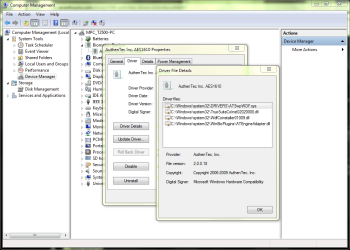
Go to Driver Details in the Biometric Devide properties. They will show you where the drivers are.
 

Attachments

  • Driver Details.PNG
    Driver Details.PNG
    53.5 KB · Views: 109

My Computer

Computer Manufacturer/Model Number
MPC Transport T2500 Laptop
OS
Windows 7 x64 (RTM via MSDN)
CPU
Intel Core 2 Duo T9300 (2.5 GHz)
Motherboard
MPC
Memory
4 GB SODIMMS (System Max)
Graphics Card(s)
nVidia 8600M GS 256MB
Sound Card
Realtek On-Board
Monitor(s) Displays
15.4" LCD with a Dell 2005FPW 20" attached
Screen Resolution
1680x1050 (15.4") and 1680x1050 (20")
Hard Drives
Toshiba 2.5" 320 GB 7200 RPM
Go to Driver Details in the Biometric Devide properties. They will show you where the drivers are.
I would if I had any biometrics showing up at all, but they are gone.
 

My Computer

Computer Manufacturer/Model Number
ASUS M70Vm-C1
OS
Windows 7 Ultimate 64 bit
CPU
Intel T9400
Memory
4GB
Graphics Card(s)
Nvidia 9600 GM
Monitor(s) Displays
17" WUXGA
Hard Drives
(2) 500GB 7200Rpm Seagate
When you uninstall the drivers, does Windows give you some options?
 

My Computer

Computer Manufacturer/Model Number
MPC Transport T2500 Laptop
OS
Windows 7 x64 (RTM via MSDN)
CPU
Intel Core 2 Duo T9300 (2.5 GHz)
Motherboard
MPC
Memory
4 GB SODIMMS (System Max)
Graphics Card(s)
nVidia 8600M GS 256MB
Sound Card
Realtek On-Board
Monitor(s) Displays
15.4" LCD with a Dell 2005FPW 20" attached
Screen Resolution
1680x1050 (15.4") and 1680x1050 (20")
Hard Drives
Toshiba 2.5" 320 GB 7200 RPM
You need to logoff and back on again after removing the drivers. BTW, your drivers are probably in the same spot as mine, so use the information in the image I placed in the last reply and look in the System32 folder.
 

My Computer

Computer Manufacturer/Model Number
MPC Transport T2500 Laptop
OS
Windows 7 x64 (RTM via MSDN)
CPU
Intel Core 2 Duo T9300 (2.5 GHz)
Motherboard
MPC
Memory
4 GB SODIMMS (System Max)
Graphics Card(s)
nVidia 8600M GS 256MB
Sound Card
Realtek On-Board
Monitor(s) Displays
15.4" LCD with a Dell 2005FPW 20" attached
Screen Resolution
1680x1050 (15.4") and 1680x1050 (20")
Hard Drives
Toshiba 2.5" 320 GB 7200 RPM
Back
Top