Authentec Drivers

Ok,. got it back, found the driver file, deleted it, so now exactly what should I do?
 

My Computer

Computer Manufacturer/Model Number
ASUS M70Vm-C1
OS
Windows 7 Ultimate 64 bit
CPU
Intel T9400
Memory
4GB
Graphics Card(s)
Nvidia 9600 GM
Monitor(s) Displays
17" WUXGA
Hard Drives
(2) 500GB 7200Rpm Seagate
I rebooted, but windows didn't update automatically, nor did updates do anything after I ran it.
 

My Computer

Computer Manufacturer/Model Number
ASUS M70Vm-C1
OS
Windows 7 Ultimate 64 bit
CPU
Intel T9400
Memory
4GB
Graphics Card(s)
Nvidia 9600 GM
Monitor(s) Displays
17" WUXGA
Hard Drives
(2) 500GB 7200Rpm Seagate
should I just right click on the reader and tell it to update the driver since Windows isn't doing it automatically, or should I try to find TrueSuite first and install it, or will that happen when the drivers update?
 

My Computer

Computer Manufacturer/Model Number
ASUS M70Vm-C1
OS
Windows 7 Ultimate 64 bit
CPU
Intel T9400
Memory
4GB
Graphics Card(s)
Nvidia 9600 GM
Monitor(s) Displays
17" WUXGA
Hard Drives
(2) 500GB 7200Rpm Seagate
That happens with the driver install.
 

My Computer

Computer Manufacturer/Model Number
MPC Transport T2500 Laptop
OS
Windows 7 x64 (RTM via MSDN)
CPU
Intel Core 2 Duo T9300 (2.5 GHz)
Motherboard
MPC
Memory
4 GB SODIMMS (System Max)
Graphics Card(s)
nVidia 8600M GS 256MB
Sound Card
Realtek On-Board
Monitor(s) Displays
15.4" LCD with a Dell 2005FPW 20" attached
Screen Resolution
1680x1050 (15.4") and 1680x1050 (20")
Hard Drives
Toshiba 2.5" 320 GB 7200 RPM
yeah, I gave up and did what I asked, looks like I have the new drivers and new version of TrueSuite now. I will re-enroll my prints and see what happens.
 

My Computer

Computer Manufacturer/Model Number
ASUS M70Vm-C1
OS
Windows 7 Ultimate 64 bit
CPU
Intel T9400
Memory
4GB
Graphics Card(s)
Nvidia 9600 GM
Monitor(s) Displays
17" WUXGA
Hard Drives
(2) 500GB 7200Rpm Seagate
well first time failed. So I came back in and repeated the process. I noticed with this version of TrueSuite, every finger you enroll, you have to type your password for it, is that normal?
 

My Computer

Computer Manufacturer/Model Number
ASUS M70Vm-C1
OS
Windows 7 Ultimate 64 bit
CPU
Intel T9400
Memory
4GB
Graphics Card(s)
Nvidia 9600 GM
Monitor(s) Displays
17" WUXGA
Hard Drives
(2) 500GB 7200Rpm Seagate
I think I'm going to be disappointed. I think this will turn out to be a huge waste of time, and I think Authentec is full of sh*t, and so is their support personnel. I think TPM is going to be need to make this work with the 64 bit systems, regardless of what Authentec said.
 

My Computer

Computer Manufacturer/Model Number
ASUS M70Vm-C1
OS
Windows 7 Ultimate 64 bit
CPU
Intel T9400
Memory
4GB
Graphics Card(s)
Nvidia 9600 GM
Monitor(s) Displays
17" WUXGA
Hard Drives
(2) 500GB 7200Rpm Seagate
well first time failed. So I came back in and repeated the process. I noticed with this version of TrueSuite, every finger you enroll, you have to type your password for it, is that normal?
\

I don't remember that, but it's been awhile since I enrolled.
 

My Computer

Computer Manufacturer/Model Number
MPC Transport T2500 Laptop
OS
Windows 7 x64 (RTM via MSDN)
CPU
Intel Core 2 Duo T9300 (2.5 GHz)
Motherboard
MPC
Memory
4 GB SODIMMS (System Max)
Graphics Card(s)
nVidia 8600M GS 256MB
Sound Card
Realtek On-Board
Monitor(s) Displays
15.4" LCD with a Dell 2005FPW 20" attached
Screen Resolution
1680x1050 (15.4") and 1680x1050 (20")
Hard Drives
Toshiba 2.5" 320 GB 7200 RPM
yeah this crap didn't work. I'm done. Those a$$holes at authentec don't know $hit from shinola.
 

My Computer

Computer Manufacturer/Model Number
ASUS M70Vm-C1
OS
Windows 7 Ultimate 64 bit
CPU
Intel T9400
Memory
4GB
Graphics Card(s)
Nvidia 9600 GM
Monitor(s) Displays
17" WUXGA
Hard Drives
(2) 500GB 7200Rpm Seagate
I'm sure your correct about the TPM. I'm going to crawl up Asus' lying a$$es and make them fix this, or so help me God, I'm going to sue their collective, misleading, false advertising a$$es and make them wish they had spent the $5 to put the TPM module in this damn thing.
 

My Computer

Computer Manufacturer/Model Number
ASUS M70Vm-C1
OS
Windows 7 Ultimate 64 bit
CPU
Intel T9400
Memory
4GB
Graphics Card(s)
Nvidia 9600 GM
Monitor(s) Displays
17" WUXGA
Hard Drives
(2) 500GB 7200Rpm Seagate
Have a good night, and thanks again for all your help and information.
 

My Computer

Computer Manufacturer/Model Number
ASUS M70Vm-C1
OS
Windows 7 Ultimate 64 bit
CPU
Intel T9400
Memory
4GB
Graphics Card(s)
Nvidia 9600 GM
Monitor(s) Displays
17" WUXGA
Hard Drives
(2) 500GB 7200Rpm Seagate
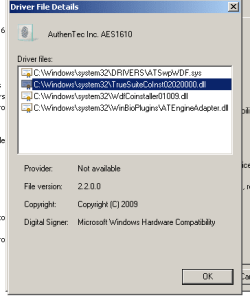
One last question, did you remove all 4 of the driver files used by the 1610? When you go to the driver details page, it lists 4 driver files associated with the hardware. Did you remove all 4 of them?
 

My Computer

Computer Manufacturer/Model Number
MPC Transport T2500 Laptop
OS
Windows 7 x64 (RTM via MSDN)
CPU
Intel Core 2 Duo T9300 (2.5 GHz)
Motherboard
MPC
Memory
4 GB SODIMMS (System Max)
Graphics Card(s)
nVidia 8600M GS 256MB
Sound Card
Realtek On-Board
Monitor(s) Displays
15.4" LCD with a Dell 2005FPW 20" attached
Screen Resolution
1680x1050 (15.4") and 1680x1050 (20")
Hard Drives
Toshiba 2.5" 320 GB 7200 RPM
One last question, did you remove all 4 of the driver files used by the 1610? When you go to the driver details page, it lists 4 driver files associated with the hardware. Did you remove all 4 of them?

Well after I deleted the drivers, I clicked the details page and it said there were no drivers, so I guess I did. These are the drivers that are on there now, do they look like yours?
 

Attachments

  • Capturedrivers.PNG
    Capturedrivers.PNG
    4.9 KB · Views: 18

My Computer

Computer Manufacturer/Model Number
ASUS M70Vm-C1
OS
Windows 7 Ultimate 64 bit
CPU
Intel T9400
Memory
4GB
Graphics Card(s)
Nvidia 9600 GM
Monitor(s) Displays
17" WUXGA
Hard Drives
(2) 500GB 7200Rpm Seagate
should I go through the whole mess again? Do you really think it will help? Frankly, I'm skeptical.
 

My Computer

Computer Manufacturer/Model Number
ASUS M70Vm-C1
OS
Windows 7 Ultimate 64 bit
CPU
Intel T9400
Memory
4GB
Graphics Card(s)
Nvidia 9600 GM
Monitor(s) Displays
17" WUXGA
Hard Drives
(2) 500GB 7200Rpm Seagate
Well, as far as going back and doing it again, I'll tell you that has worked for me many, many times. I will swear up and down that I am simply repeating thesamething over and over, and suddenly the fifth or sixth time it works and I can't explain it.

You have the basic process down now. The key is to remove everything and anything related to TrueSuite and the drivers from your machine. Logoff and back on. Infact, it might be better to do a complete shutdown-restart.

You might surprise yourself.

Good luck.

Look on the bright side, you probably know far more about driver installation than you ever wanted to;)
 

My Computer

Computer Manufacturer/Model Number
MPC Transport T2500 Laptop
OS
Windows 7 x64 (RTM via MSDN)
CPU
Intel Core 2 Duo T9300 (2.5 GHz)
Motherboard
MPC
Memory
4 GB SODIMMS (System Max)
Graphics Card(s)
nVidia 8600M GS 256MB
Sound Card
Realtek On-Board
Monitor(s) Displays
15.4" LCD with a Dell 2005FPW 20" attached
Screen Resolution
1680x1050 (15.4") and 1680x1050 (20")
Hard Drives
Toshiba 2.5" 320 GB 7200 RPM
Well no surprises here. I un-installed the drivers again, checked in the driver details, nothing there, and of course the sensor vanished, deleted truesuite. Shut down, and rebooted. When the computer comes up it loads the drivers for the sensor, but it's an old driver, thought I got rid of those before when I found the folder you mentioned and deleted it, so I don't know where the computer is getting them from. But I go ahead, and update drivers, using the folder with the new drivers, they install. I look at the biometric devices, click on the use prints to log onto windows, it says I'm enrolled. How can I be enrolled, since I deleted evertyhting. So I go into manage fingerprint data, turn off biometrics, thus deleting all the enrollment data. Open TrueSuite, and re-enroll my prints, do a shut down and re-boot, and still can't use the sensor. The fact that the system finds the older drivers, may be the root problem, but since I have no clue as to how to fix it, I quit. Maybe it is getting it from the 32 bit folder for my Vista, even though it's on a seperate HDD, I don't know, but I'm tired of trying. It's just easier to give up and just type a password than going through all this headache to try and get the stupid thing to work. Thanks again.

 

My Computer

Computer Manufacturer/Model Number
ASUS M70Vm-C1
OS
Windows 7 Ultimate 64 bit
CPU
Intel T9400
Memory
4GB
Graphics Card(s)
Nvidia 9600 GM
Monitor(s) Displays
17" WUXGA
Hard Drives
(2) 500GB 7200Rpm Seagate
thanks for your help renezito, but my system is an Asus and HP drivers won't work.
 

My Computer

Computer Manufacturer/Model Number
ASUS M70Vm-C1
OS
Windows 7 Ultimate 64 bit
CPU
Intel T9400
Memory
4GB
Graphics Card(s)
Nvidia 9600 GM
Monitor(s) Displays
17" WUXGA
Hard Drives
(2) 500GB 7200Rpm Seagate
dbsimms,

That's not necessarily true. It may be that HP has packaged their exe to do a proper removal and install. I have used Dell updates to fix stuff on my non-Dell laptop.

It's worth a try. Worst case, the installer won't run.

By now, you know how to remove the driver and re-install.
 

My Computer

Computer Manufacturer/Model Number
MPC Transport T2500 Laptop
OS
Windows 7 x64 (RTM via MSDN)
CPU
Intel Core 2 Duo T9300 (2.5 GHz)
Motherboard
MPC
Memory
4 GB SODIMMS (System Max)
Graphics Card(s)
nVidia 8600M GS 256MB
Sound Card
Realtek On-Board
Monitor(s) Displays
15.4" LCD with a Dell 2005FPW 20" attached
Screen Resolution
1680x1050 (15.4") and 1680x1050 (20")
Hard Drives
Toshiba 2.5" 320 GB 7200 RPM
I guess your right. I got a file from Authentec, TSPremiumTrial64 4.0.0.251.zip, to try. It downloaded a very nice version of TrueSuite and it updated the fingerprint drivers to 9.1.0.489, but it still won't work. I guess I'll try it and see.
 

My Computer

Computer Manufacturer/Model Number
ASUS M70Vm-C1
OS
Windows 7 Ultimate 64 bit
CPU
Intel T9400
Memory
4GB
Graphics Card(s)
Nvidia 9600 GM
Monitor(s) Displays
17" WUXGA
Hard Drives
(2) 500GB 7200Rpm Seagate
Back
Top