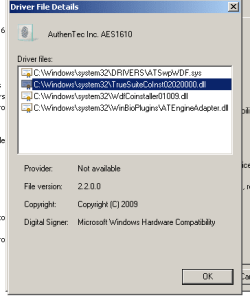
Well no surprises here. I un-installed the drivers again, checked in the driver details, nothing there, and of course the sensor vanished, deleted truesuite. Shut down, and rebooted. When the computer comes up it loads the drivers for the sensor, but it's an old driver, thought I got rid of those before when I found the folder you mentioned and deleted it, so I don't know where the computer is getting them from. But I go ahead, and update drivers, using the folder with the new drivers, they install. I look at the biometric devices, click on the use prints to log onto windows, it says I'm enrolled. How can I be enrolled, since I deleted evertyhting. So I go into manage fingerprint data, turn off biometrics, thus deleting all the enrollment data. Open TrueSuite, and re-enroll my prints, do a shut down and re-boot, and still can't use the sensor. The fact that the system finds the older drivers, may be the root problem, but since I have no clue as to how to fix it, I quit. Maybe it is getting it from the 32 bit folder for my Vista, even though it's on a seperate HDD, I don't know, but I'm tired of trying. It's just easier to give up and just type a password than going through all this headache to try and get the stupid thing to work. Thanks again.