Solved Auto Extract Rar/Zip files

Digital7

New member
Member
VIP
Local time
9:31 AM
Messages
86
Location
USA
Hello Folks,
I turn to you yet again for some guidance for a tool or software which will auto extract rar and zip files once they complete in vuze/azures. I would like to have option to extract each files in their own folder instead of one big folder.

Thanks for guidance. :geek::cool:
 

My Computer

Computer Manufacturer/Model Number
AlienWare GodFatheriZed!
OS
WIN 7 x64
CPU
I7 550
Memory
8 GB DDR3
Graphics Card(s)
9800 GTX Turbo Dual
Monitor(s) Displays
21" Samsung True Colors HD + 25 SYNC Master
Screen Resolution
1680*1050
Hard Drives
Total 1.5 TB

My Computer

Computer Manufacturer/Model Number
HP ProBook 4540s
OS
Microsoft Windows 7 Ultimate 64-bit
CPU
Intel Core i3-3110M @ 2.40 Ghz Ivy Bridge 22nm Technology
Motherboard
Hewlett-Packard 17F6 (U3E1)
Memory
4.00 GB Dual-Channel DDR3 @ 665MHz (9-9-9-24)
Graphics Card(s)
Intel HD Graphics 4000
Sound Card
IDT High Definition Audio CODEC
Monitor(s) Displays
Generic PnP Monitor
Screen Resolution
1366x768@60Hz
Hard Drives
466GB Hitachi HTS727550A9E364 (SATA)
Keyboard
Standard PS/2 Keyboard Fixed
Mouse
Dell HID-compliant mouse
Internet Speed
3 Mbs/s Down, 1Mbs/s Up.
Other Info
Bought by Laptop on 24 December 2012, after making sure the world wasn't going to end.
Yeah Utorrent and me don't work very vell...and i have paid vuze pro so i rather use that...and i have searched forms on Vuze but u r right no one is interested!
 

My Computer

Computer Manufacturer/Model Number
AlienWare GodFatheriZed!
OS
WIN 7 x64
CPU
I7 550
Memory
8 GB DDR3
Graphics Card(s)
9800 GTX Turbo Dual
Monitor(s) Displays
21" Samsung True Colors HD + 25 SYNC Master
Screen Resolution
1680*1050
Hard Drives
Total 1.5 TB
Here's a plugin that might help with Forz19's answer - Azureus, now called Vuze : Plugin Details for Command Runner

You may like to write your own .bat file making use of the %D and %K parameters in particular.
%D gives you the option of storing the bat file where ever you like.

Not sure about the %K if it tells if it's a single file or multiple files in a torrent or something else. It could be useful if it's tells single/multiple files as it could be you to determine what to extract. For example with a RAR file split into multiple parts you wouldn't tell the bat file to extract all rar files you'll only need the first.

I don't use Vuze but I did check it out on a Virtual PC so I might be able to help if you know nothing about .bat files but you could use VB Script or PowerShell if you know them.
 

My Computer

Computer Manufacturer/Model Number
Self built
OS
Windows 7 Ultimate x64
CPU
Intel Pentium Dual Core E5200 2.5GHz (3.77GHz OC)
Motherboard
Asus P5Q-E
Memory
Corsair 4GB DDR2 (4x1GB CM2X1024-6400C4)
Graphics Card(s)
Palit GeForce GTS 250 (1024MB)
Sound Card
On Board (ADI AD2000B 8ch HD)
Monitor(s) Displays
Samsung 32in LCD TV
Screen Resolution
1360x768
Hard Drives
2 x 1TB Samsung 103SJ (Raid0)
2 x External 500GB Samsung 502IJ (NexStar 3 HD Enclosures)
PSU
550W Antec Neo HE 550
Case
Antec P180
Cooling
Xigmatex Red Scorpion CPU Cooler. 3x120mm Fans
Keyboard
Logitech MX5000 Laser (Combo)
Mouse
Logitech MX5000 Laser (Combo)
Internet Speed
ADSL2+ (avg 10 Mbps Down, 0.80 Mbps up)
Other Info
Gigabyte GN-WP01GS 54g Wireless Lan Card
You could use this CMD file,

Code:
@REM ------- BEGIN demo.cmd ----------------
@setlocal
@echo off
set path="%programfiles%\WinRAR";%path%
for /F %%i in ('dir /s/b *.rar') do call :do_extract "%%i"
goto :eof

:do_extract
echo %1
mkdir %~1.extracted
pushd %~1.extracted
unrar e %1
popd

REM ------- END demo.cmd ------------------

Store it wherever you want, and point the Command Runner Plugin mentioned by Duzzy to it. For example I'll make that D:\unrar.cmd. Then I'll point Command Runner to

Code:
D:\unrar.cmd "%D\%F"

Code courtesy of "anon" from this forum.
 
Last edited:

My Computer

Computer Manufacturer/Model Number
HP ProBook 4540s
OS
Microsoft Windows 7 Ultimate 64-bit
CPU
Intel Core i3-3110M @ 2.40 Ghz Ivy Bridge 22nm Technology
Motherboard
Hewlett-Packard 17F6 (U3E1)
Memory
4.00 GB Dual-Channel DDR3 @ 665MHz (9-9-9-24)
Graphics Card(s)
Intel HD Graphics 4000
Sound Card
IDT High Definition Audio CODEC
Monitor(s) Displays
Generic PnP Monitor
Screen Resolution
1366x768@60Hz
Hard Drives
466GB Hitachi HTS727550A9E364 (SATA)
Keyboard
Standard PS/2 Keyboard Fixed
Mouse
Dell HID-compliant mouse
Internet Speed
3 Mbs/s Down, 1Mbs/s Up.
Other Info
Bought by Laptop on 24 December 2012, after making sure the world wasn't going to end.
Here's a plugin that might help with Forz19's answer - Azureus, now called Vuze : Plugin Details for Command Runner

You may like to write your own .bat file making use of the %D and %K parameters in particular.
%D gives you the option of storing the bat file where ever you like.

Not sure about the %K if it tells if it's a single file or multiple files in a torrent or something else. It could be useful if it's tells single/multiple files as it could be you to determine what to extract. For example with a RAR file split into multiple parts you wouldn't tell the bat file to extract all rar files you'll only need the first.

I don't use Vuze but I did check it out on a Virtual PC so I might be able to help if you know nothing about .bat files but you could use VB Script or PowerShell if you know them.

You could use this CMD file,

Code:
@REM ------- BEGIN demo.cmd ----------------
@setlocal
@echo off
set path="%programfiles%\WinRAR";%path%
for /F %%i in ('dir /s/b *.rar') do call :do_extract "%%i"
goto :eof

:do_extract
echo %1
mkdir %~1.extracted
pushd %~1.extracted
unrar e %1
popd

REM ------- END demo.cmd ------------------
Store it wherever you want, and point the Command Runner Plugin mentioned by Duzzy to it. For example I'll make that D:\unrar.cmd. Then I'll point Command Runner to

Code:
D:\unrar.cmd "%D\%F"
Code courtesy of "anon" form this forum.

Wow is all i can say since i have no idea on how to use either one of them. bat file or cmd prompt...it's been long! But i would appreciate either one of you walking me through steps on how to set this up so i can extract each file in their own folder...my drive is D and folder is _Download and then each TV show has their own folders...so i wanna be able to extract each show in their directory. :cry: sorry if i am making it too complicated guys! :o:geek:
 

My Computer

Computer Manufacturer/Model Number
AlienWare GodFatheriZed!
OS
WIN 7 x64
CPU
I7 550
Memory
8 GB DDR3
Graphics Card(s)
9800 GTX Turbo Dual
Monitor(s) Displays
21" Samsung True Colors HD + 25 SYNC Master
Screen Resolution
1680*1050
Hard Drives
Total 1.5 TB
Ok...Don't know if this'll work...

Open Notepad.
Enter this code

Code:
@REM ------- BEGIN demo.cmd ----------------
@setlocal
@echo off
set path="%programfiles%\WinRAR";%path%
for /F %%i in ('dir /s/b *.rar') do call :do_extract "%%i"
goto :eof

:do_extract
echo %1
mkdir %~1.extracted
pushd %~1.extracted
unrar e %1
popd

REM ------- END demo.cmd ------------------

in the file.
Save it as unrar.bat in D:/ drive
Install the Command Runner Plugin Duzzy mentioned if you haven't already.
Point Command Runner Plugin (I dunno - maybe in it's options?) to

Code:
D:\unrar.cmd "%D\%F"

and try it out.
Hope that works, if not then i'm sure Duzzy'll be able to guide you better.


Code courtesy of "anon" from this forum.
 

My Computer

Computer Manufacturer/Model Number
HP ProBook 4540s
OS
Microsoft Windows 7 Ultimate 64-bit
CPU
Intel Core i3-3110M @ 2.40 Ghz Ivy Bridge 22nm Technology
Motherboard
Hewlett-Packard 17F6 (U3E1)
Memory
4.00 GB Dual-Channel DDR3 @ 665MHz (9-9-9-24)
Graphics Card(s)
Intel HD Graphics 4000
Sound Card
IDT High Definition Audio CODEC
Monitor(s) Displays
Generic PnP Monitor
Screen Resolution
1366x768@60Hz
Hard Drives
466GB Hitachi HTS727550A9E364 (SATA)
Keyboard
Standard PS/2 Keyboard Fixed
Mouse
Dell HID-compliant mouse
Internet Speed
3 Mbs/s Down, 1Mbs/s Up.
Other Info
Bought by Laptop on 24 December 2012, after making sure the world wasn't going to end.
Ok...Don't know if this'll work...

Open Notepad.
Enter this code

Code:
@REM ------- BEGIN demo.cmd ----------------
@setlocal
@echo off
set path="%programfiles%\WinRAR";%path%
for /F %%i in ('dir /s/b *.rar') do call :do_extract "%%i"
goto :eof

:do_extract
echo %1
mkdir %~1.extracted
pushd %~1.extracted
unrar e %1
popd

REM ------- END demo.cmd ------------------
in the file.
Save it as unrar.bat in D:/ drive
Install the Command Runner Plugin Duzzy mentioned if you haven't already.
Point Command Runner Plugin (I dunno - maybe in it's options?) to

Code:
D:\unrar.cmd "%D\%F"
and try it out.
Hope that works, if not then i'm sure Duzzy'll be able to guide you better.


Code courtesy of "anon" from this forum.

Tried it but it just make directory of dl file in the file it self but noting in there...so lets say i downloaded a file that has 5 .rar file with name abc.rar so when that command i run manually by clicking the bat file it just makes a folder name abc.rar/abc/ but noting in the folder. also i cannot set it up in vuze...if someone can make lil screenshot on how to install and run it correctly would be greatly appreciated...thanks for your help guys so far!
 

My Computer

Computer Manufacturer/Model Number
AlienWare GodFatheriZed!
OS
WIN 7 x64
CPU
I7 550
Memory
8 GB DDR3
Graphics Card(s)
9800 GTX Turbo Dual
Monitor(s) Displays
21" Samsung True Colors HD + 25 SYNC Master
Screen Resolution
1680*1050
Hard Drives
Total 1.5 TB
Give me day maybe 2.
 

My Computer

Computer Manufacturer/Model Number
Self built
OS
Windows 7 Ultimate x64
CPU
Intel Pentium Dual Core E5200 2.5GHz (3.77GHz OC)
Motherboard
Asus P5Q-E
Memory
Corsair 4GB DDR2 (4x1GB CM2X1024-6400C4)
Graphics Card(s)
Palit GeForce GTS 250 (1024MB)
Sound Card
On Board (ADI AD2000B 8ch HD)
Monitor(s) Displays
Samsung 32in LCD TV
Screen Resolution
1360x768
Hard Drives
2 x 1TB Samsung 103SJ (Raid0)
2 x External 500GB Samsung 502IJ (NexStar 3 HD Enclosures)
PSU
550W Antec Neo HE 550
Case
Antec P180
Cooling
Xigmatex Red Scorpion CPU Cooler. 3x120mm Fans
Keyboard
Logitech MX5000 Laser (Combo)
Mouse
Logitech MX5000 Laser (Combo)
Internet Speed
ADSL2+ (avg 10 Mbps Down, 0.80 Mbps up)
Other Info
Gigabyte GN-WP01GS 54g Wireless Lan Card
ok i will just keep checking...if u need i can send u ss of my set up of hard drive and vuze installation folder!
 

My Computer

Computer Manufacturer/Model Number
AlienWare GodFatheriZed!
OS
WIN 7 x64
CPU
I7 550
Memory
8 GB DDR3
Graphics Card(s)
9800 GTX Turbo Dual
Monitor(s) Displays
21" Samsung True Colors HD + 25 SYNC Master
Screen Resolution
1680*1050
Hard Drives
Total 1.5 TB
First download the plugin, I downloaded the version 1.3 not 1.3_CVS, not sure of the difference.

1. Next open Vuze, go to "Tools > Plugins > Installation Wizard".
2. Select "By File" and click next.
3. Browse to the downloaded plugin and select it then click next.
4. Installation Type is your choice.
5. Click Finish then Install then Close and Close again.

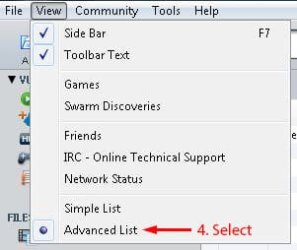
The plugin has been installed but I could only find how to use it by clicking on View in Vuze's menu bar and clicking Advanced List then I could right click a torrent under downloads, not libary or new, and find "Command Runner" just over half way down the context menu.

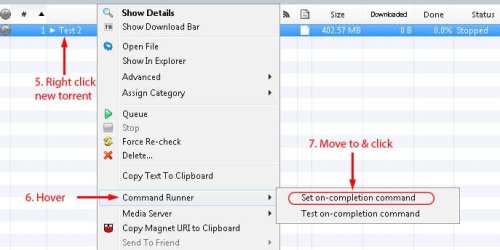
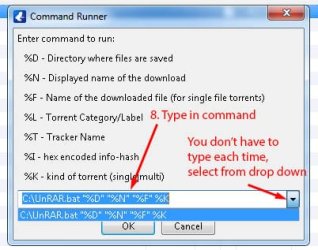
Hover over that and move to and select "Set on-completion command" then type in:
C:\UnRAR.bat "%D" "%N" "%F" %K

Replace C:\ with the location where you place the bat file, for example if you want it in your My Documents folder type in C:\Users\USERNAME\Documents\UnRAR.bat "%D" "%N" "%F" %K

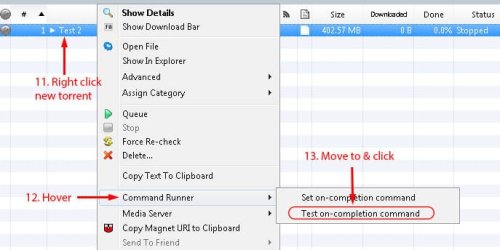
To test the bat file from within Vuze I found the file could not be completed or "Command Runner" would not be on the context menu, so to test I added a torrent file for one that was complete but saved it to a different location, stopped the torrent in Vuze then copied the completed files to the new location then ran "Test on-completion command" from "Command Runner" on the context menu.

To test outside Vuze run it from the command promt or Start menu > Run (Win Key + R) with the required info,
eg. C:\UnRAR.bat "D:\Download\File Save location" "" "FILENAME" Single
eg. C:\UnRAR.bat "D:\Download\File Save location" "" "" Multi

The Display Name ("" in above commands) was used for multi but I changed it to use the filename instead but I left it in the bat file anyway.

BATCH FILE
The bat file is messy and probably over complicated, my batch skills are little. I've thrown in a few comments to try to help you understand in case you need to modify it in the future, they're the lines starting with REM.

I've tested it with single RAR torrents, multi RAR torrents ending with .rar, multi RAR torrents ending with .r01, r02, etc... and files/folders with spaces. Single and multi have different sections for extraction so if a single RAR is saved in a folder with other RAR's it should on process the new one, multi RAR's need their own folder or it may process the wrong RAR.

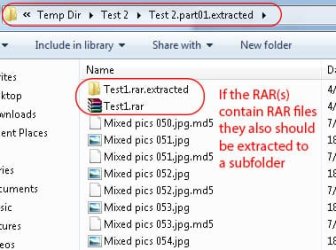
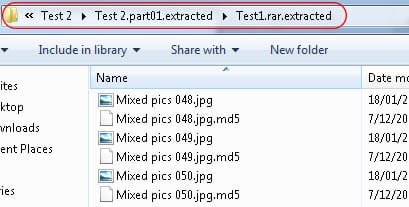
It also processes subfolders for torrents that contain RAR's inside a RAR. It appears to work ok but with subfolders it may try to extract every RAR for split RAR's but I think I prevented that. UnRAR is set not to overwrite files but if UnRAR stops to prompt for any other reason then the bat file will stall and you'll have to End Task for CMD and UnRAR in task manager as when run from Vuze it runs in the background hidden from the user.

I tried to test most scenarios but can't guarantee it will work for everything especially filenames with special characters.

Copy the following code into Notepad and save as UnRAR.bat. I hope you can understand everything and it works great. Let us know how you go.

Code:
@echo off

REM Usage
REM UnRAR.bat "%D" "%N" "%F" %K

REM %D (%1) = Directory where files are saved
REM %N (%2) = Display name of download
REM %F (%3) = Name of downloaded file (For single file torrents) 
REM %K (%4) = Single/Multi

set WINRAR="C:\Program Files\WinRAR\UnRAR"

REM Strip quotes from %1, %2 and %3 to make it easier.
set FOLDER=%1
set FOLDER=%FOLDER:~1,-1%
set DISNAME=%2
set DISNAME=%DISNAME:~1,-1%
set FILENAME=%3
set FILENAME=%FILENAME:~1,-1%

REM Test if the directory where files are saved contains a RAR file
if not exist "%FOLDER%\*.rar" exit

if /i %4==Multi goto MULTI

REM -------------------------------------------------

:Single
REM Make a sub directory as filename.extracted
REM and change the CMD prompt to it.

mkdir "%FOLDER%\%FILENAME%.extracted"
cd /d "%FOLDER%\%FILENAME%.extracted"

%WINRAR% e -o- "%FOLDER%\%FILENAME%"

goto SUBFOLDERS


REM -------------------------------------------------

:MULTI
REM For multi file torrent
REM Get first RAR's filename
REM Make a sub directory as filename.extracted and change the CMD prompt to it.

for  %%a in ("%FOLDER%\*.rar") do (
set "FILE=%%a"
mkdir "%FOLDER%\%%~na.extracted"
cd /d "%FOLDER%\%%~na.extracted"
goto :DONE
)
:DONE

%WINRAR% e -o- "%FILE%"

REM -------------------------------------------------

:SUBFOLDERS
for /f "tokens=*" %%a in ('dir /b *.rar ^| find /i /v ".part"') do (
mkdir "%%a.extracted"
cd "%%a.extracted"
%WINRAR% e -o- "%%~fa"
cd..
)
for /f "tokens=*" %%a in ('dir /b *.rar ^| find /i ".part01"') do (
mkdir "%%a.extracted"
cd "%%a.extracted"
%WINRAR% e -o- "%%~fa"
cd..
)
for /f "tokens=*" %%a in ('dir /b /ad') do (
cd "%%a"
call :SUBFOLDERS
cd..
)
If you download a torrent that has multiple individual RAR's not a split rar this will only extract one and rather than modify this, which would be difficult, I would use a seperate one.

 
Last edited:

My Computer

Computer Manufacturer/Model Number
Self built
OS
Windows 7 Ultimate x64
CPU
Intel Pentium Dual Core E5200 2.5GHz (3.77GHz OC)
Motherboard
Asus P5Q-E
Memory
Corsair 4GB DDR2 (4x1GB CM2X1024-6400C4)
Graphics Card(s)
Palit GeForce GTS 250 (1024MB)
Sound Card
On Board (ADI AD2000B 8ch HD)
Monitor(s) Displays
Samsung 32in LCD TV
Screen Resolution
1360x768
Hard Drives
2 x 1TB Samsung 103SJ (Raid0)
2 x External 500GB Samsung 502IJ (NexStar 3 HD Enclosures)
PSU
550W Antec Neo HE 550
Case
Antec P180
Cooling
Xigmatex Red Scorpion CPU Cooler. 3x120mm Fans
Keyboard
Logitech MX5000 Laser (Combo)
Mouse
Logitech MX5000 Laser (Combo)
Internet Speed
ADSL2+ (avg 10 Mbps Down, 0.80 Mbps up)
Other Info
Gigabyte GN-WP01GS 54g Wireless Lan Card
First download the plugin, I downloaded the version 1.3 not 1.3_CVS, not sure of the difference.

1. Next open Vuze, go to "Tools > Plugins > Installation Wizard".
2. Select "By File" and click next.
3. Browse to the downloaded plugin and select it then click next.
4. Installation Type is your choice.
5. Click Finish then Install then Close and Close again.

The plugin has been installed but I could only find how to use it by clicking on View in Vuze's menu bar and clicking Advanced List then I could right click a torrent under downloads, not libary or new, and find "Command Runner" just over half way down the context menu.

Hover over that and move to and select "Set on-completion command" then type in:
C:\UnRAR.bat "%D" "%N" "%F" %K

Replace C:\ with the location where you place the bat file, for example if you want it in your My Documents folder type in C:\Users\USERNAME\Documents\UnRAR.bat "%D" "%N" "%F" %K

To test the bat file from within Vuze I found the file could not be completed or "Command Runner" would not be on the context menu, so to test I added a torrent file for one that was complete but saved it to a different location, stopped the torrent in Vuze then copied the completed files to the new location then ran "Test on-completion command" from "Command Runner" on the context menu.

To test outside Vuze run it from the command promt or Start menu > Run (Win Key + R) with the required info,
eg. C:\UnRAR.bat "D:\Download\File Save location" "" "FILENAME" Single
eg. C:\UnRAR.bat "D:\Download\File Save location" "" "" Multi

The Display Name ("" in above commands) was used for multi but I changed it to use the filename instead but I left it in the bat file anyway.

BATCH FILE
The bat file is messy and probably over complicated, my batch skills are little. I've thrown in a few comments to try to help you understand in case you need to modify it in the future, they're the lines starting with REM.

I've tested it with single RAR torrents, multi RAR torrents ending with .rar, multi RAR torrents ending with .r01, r02, etc... and files/folders with spaces. Single and multi have different sections for extraction so if a single RAR is saved in a folder with other RAR's it should on process the new one, multi RAR's need their own folder or it may process the wrong RAR.

It also processes subfolders for torrents that contain RAR's inside a RAR. It appears to work ok but with subfolders it may try to extract every RAR for split RAR's but I think I prevented that. UnRAR is set not to overwrite files but if UnRAR stops to prompt for any other reason then the bat file will stall and you'll have to End Task for CMD and UnRAR in task manager as when run from Vuze it runs in the background hidden from the user.

I tried to test most scenarios but can't guarantee it will work for everything especially filenames with special characters.

Copy the following code into Notepad and save as UnRAR.bat. I hope you can understand everything and it works great. Let us know how you go.

Code:
@echo off

REM Usage
REM UnRAR.bat "%D" "%N" "%F" %K

REM %D (%1) = Directory where files are saved
REM %N (%2) = Display name of download
REM %F (%3) = Name of downloaded file (For single file torrents) 
REM %K (%4) = Single/Multi

set WINRAR="C:\Program Files\WinRAR\UnRAR"

REM Strip quotes from %1, %2 and %3 to make it easier.
set FOLDER=%1
set FOLDER=%FOLDER:~1,-1%
set DISNAME=%2
set DISNAME=%DISNAME:~1,-1%
set FILENAME=%3
set FILENAME=%FILENAME:~1,-1%


if /i %4==Multi goto MULTI

REM -------------------------------------------------

:Single
REM Make a sub directory as filename.extracted
REM and change the CMD prompt to it.

mkdir "%FOLDER%\%FILENAME%.extracted"
cd /d "%FOLDER%\%FILENAME%.extracted"

%WINRAR% e -o- "%FOLDER%\%FILENAME%"

goto SUBFOLDERS


REM -------------------------------------------------

:MULTI
REM For multi file torrent
REM Get first RAR's filename
REM Make a sub directory as filename.extracted and change the CMD prompt to it.

for  %%a in ("%FOLDER%\*.rar") do (
set "FILE=%%a"
mkdir "%FOLDER%\%%~na.extracted"
cd /d "%FOLDER%\%%~na.extracted"
goto :DONE
)
:DONE

%WINRAR% e -o- "%FILE%"

REM -------------------------------------------------

:SUBFOLDERS
for /f "tokens=*" %%a in ('dir /b *.rar ^| find /i /v ".part"') do (
mkdir "%%a.extracted"
cd "%%a.extracted"
%WINRAR% e -o- "%%~fa"
cd..
)
for /f "tokens=*" %%a in ('dir /b *.rar ^| find /i ".part01"') do (
mkdir "%%a.extracted"
cd "%%a.extracted"
%WINRAR% e -o- "%%~fa"
cd..
)
for /f "tokens=*" %%a in ('dir /b /ad') do (
cd "%%a"
call :SUBFOLDERS
cd..
)
If you download a torrent that has multiple individual RAR's not a split rar this will only extract one and rather than modify this, which would be difficult, I would use a seperate one.

hrzlvm.jpg


I lost you after Install!
 

My Computer

Computer Manufacturer/Model Number
AlienWare GodFatheriZed!
OS
WIN 7 x64
CPU
I7 550
Memory
8 GB DDR3
Graphics Card(s)
9800 GTX Turbo Dual
Monitor(s) Displays
21" Samsung True Colors HD + 25 SYNC Master
Screen Resolution
1680*1050
Hard Drives
Total 1.5 TB
Looks like you got it install but I did not realise it had those options in Vuze's options. Setting it there though looks like it will run it for all torrents even those without RAR's. I don't think you should run it from there as it would create subfolders in every torrents save location. To stop that just untick the Enabled checkbox you can see in your screenshot.

Close Vuze's options and I hope with what I have already written and the following screenshots and info will help,

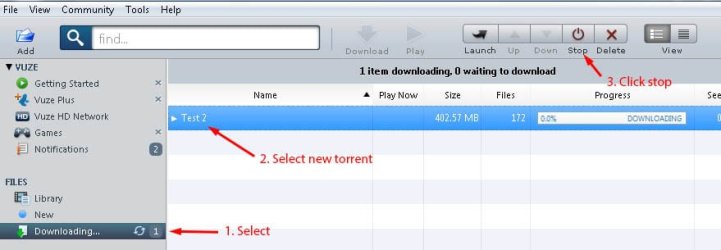
Start by doing a test. Add a new torrent or remove one thats completed and add it again but save to a different temporary folder, I'm using one I created. After adding stop it downloading immediately.

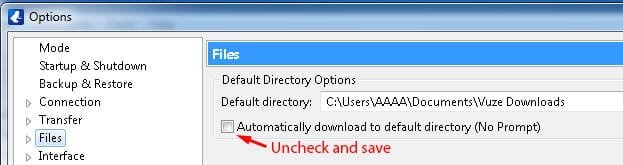
To save to a temp when adding the torrent do this first and after testing undo it.
VuzePrompt.jpg

Now add the new torrent and follow,

Vuze1.jpg

Vuze2.jpg

Vuze3.jpg

Vuze4.jpg

Vuze5.jpg

Vuze6.jpg

Vuze7.jpg

Vuze8.jpg

Vuze9.jpg

Vuze10.jpg

If all was successful then for all torrents that you wish this to run for you only need to complete steps 5 - 8, current uncompleted ones and new ones.

EDIT
After all that I made a edit to the bat file so copy everything in the code box in my last post to notepad again and save as UnRAR.bat to replace the one you have. The edit I made test the directory where the files are saved contains a RAR file and if it doesn't then it quits. So I guess it wouldn't hurt to run it for all torrents now.

PS. Make sure your commands the same as mine as your missing the %K in your screenshot and %K does not require quotes. All must be in the same order as mine and other than %K they all must be surrounded by quotes.
 
Last edited:

My Computer

Computer Manufacturer/Model Number
Self built
OS
Windows 7 Ultimate x64
CPU
Intel Pentium Dual Core E5200 2.5GHz (3.77GHz OC)
Motherboard
Asus P5Q-E
Memory
Corsair 4GB DDR2 (4x1GB CM2X1024-6400C4)
Graphics Card(s)
Palit GeForce GTS 250 (1024MB)
Sound Card
On Board (ADI AD2000B 8ch HD)
Monitor(s) Displays
Samsung 32in LCD TV
Screen Resolution
1360x768
Hard Drives
2 x 1TB Samsung 103SJ (Raid0)
2 x External 500GB Samsung 502IJ (NexStar 3 HD Enclosures)
PSU
550W Antec Neo HE 550
Case
Antec P180
Cooling
Xigmatex Red Scorpion CPU Cooler. 3x120mm Fans
Keyboard
Logitech MX5000 Laser (Combo)
Mouse
Logitech MX5000 Laser (Combo)
Internet Speed
ADSL2+ (avg 10 Mbps Down, 0.80 Mbps up)
Other Info
Gigabyte GN-WP01GS 54g Wireless Lan Card
Just another thing there's no need to quote the full post just the specific info you wish to address or just refer to the post number.
 

My Computer

Computer Manufacturer/Model Number
Self built
OS
Windows 7 Ultimate x64
CPU
Intel Pentium Dual Core E5200 2.5GHz (3.77GHz OC)
Motherboard
Asus P5Q-E
Memory
Corsair 4GB DDR2 (4x1GB CM2X1024-6400C4)
Graphics Card(s)
Palit GeForce GTS 250 (1024MB)
Sound Card
On Board (ADI AD2000B 8ch HD)
Monitor(s) Displays
Samsung 32in LCD TV
Screen Resolution
1360x768
Hard Drives
2 x 1TB Samsung 103SJ (Raid0)
2 x External 500GB Samsung 502IJ (NexStar 3 HD Enclosures)
PSU
550W Antec Neo HE 550
Case
Antec P180
Cooling
Xigmatex Red Scorpion CPU Cooler. 3x120mm Fans
Keyboard
Logitech MX5000 Laser (Combo)
Mouse
Logitech MX5000 Laser (Combo)
Internet Speed
ADSL2+ (avg 10 Mbps Down, 0.80 Mbps up)
Other Info
Gigabyte GN-WP01GS 54g Wireless Lan Card
I lost your in step 9 and 10...i have a D Drive where all stuff gets downloaded. and Unrar.bat file is sitting in D drive...so how does that step change form me :/ just little confused!
 

My Computer

Computer Manufacturer/Model Number
AlienWare GodFatheriZed!
OS
WIN 7 x64
CPU
I7 550
Memory
8 GB DDR3
Graphics Card(s)
9800 GTX Turbo Dual
Monitor(s) Displays
21" Samsung True Colors HD + 25 SYNC Master
Screen Resolution
1680*1050
Hard Drives
Total 1.5 TB
P.S. I tried running the torrent after step 8...it made empty folder with .extracted at the end of it but no files in folder!
 

My Computer

Computer Manufacturer/Model Number
AlienWare GodFatheriZed!
OS
WIN 7 x64
CPU
I7 550
Memory
8 GB DDR3
Graphics Card(s)
9800 GTX Turbo Dual
Monitor(s) Displays
21" Samsung True Colors HD + 25 SYNC Master
Screen Resolution
1680*1050
Hard Drives
Total 1.5 TB
Did you do the step below when you added a torrent?
To save to a temp when adding the torrent do this first and after testing undo it.
View attachment 248357
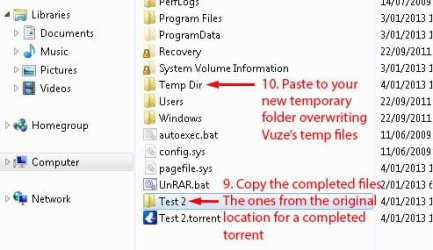
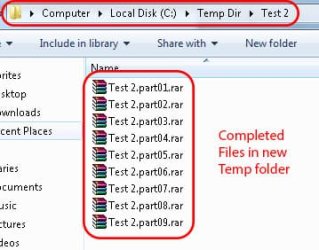
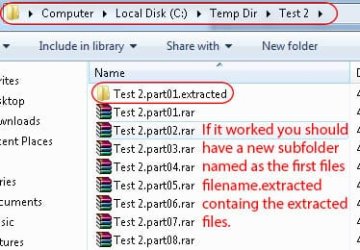
The "Test 2" folder in my screenshot are the files from a completed torrent one that is finished or seeding, any one that contains a RAR file.

So you need to remove any torrent of yours containing a RAR file from Vuze but only "Remove from Library" not from Computer then add it back into Vuze. If you did the step above then when you add the torrent it should ask where to save it. In my case I chose the folder "Temp Dir", you can create any folder you like and after you test it it can be deleted.

When you get to step 9 & 10 you copy the files from where you originally saved the torrents files (the completed files) to the Temp folder you created.

In my case the "Test 2" torrent contains a folder "Test 2" with the RAR files in it so when I added the torrent and chose the "Temp Dir" folder it created the subfolder Test and the files in it. The file were incomplete that it created, there's a option to pre-allocate the files I think so yours might not get created.

So I simply copied the whole "Test 2" folder to "Temp Dir" (my temp folder) overwriting the pre-allocated files. In your case your torrent probably only contains RAR files that are not in a folder so you would only copy the RAR files to your temp folder, not the folder their in.

I hope that makes sense as I'm going to bed now so I won't respond for around 15 hours or a couple more as it's going to be really hot today so I don't like to run the computer because it just heats the house up.

Good luck and I'll check in when it cools down.

EDIT
Bummer I wasn't quick enough, you were still on when I started typing. Sorry.
 

My Computer

Computer Manufacturer/Model Number
Self built
OS
Windows 7 Ultimate x64
CPU
Intel Pentium Dual Core E5200 2.5GHz (3.77GHz OC)
Motherboard
Asus P5Q-E
Memory
Corsair 4GB DDR2 (4x1GB CM2X1024-6400C4)
Graphics Card(s)
Palit GeForce GTS 250 (1024MB)
Sound Card
On Board (ADI AD2000B 8ch HD)
Monitor(s) Displays
Samsung 32in LCD TV
Screen Resolution
1360x768
Hard Drives
2 x 1TB Samsung 103SJ (Raid0)
2 x External 500GB Samsung 502IJ (NexStar 3 HD Enclosures)
PSU
550W Antec Neo HE 550
Case
Antec P180
Cooling
Xigmatex Red Scorpion CPU Cooler. 3x120mm Fans
Keyboard
Logitech MX5000 Laser (Combo)
Mouse
Logitech MX5000 Laser (Combo)
Internet Speed
ADSL2+ (avg 10 Mbps Down, 0.80 Mbps up)
Other Info
Gigabyte GN-WP01GS 54g Wireless Lan Card
Duzzy do me favor when u get on pm me i am on here for another 4 hours or so...i rather have u walk me if i have question then in messenger or something!
 

My Computer

Computer Manufacturer/Model Number
AlienWare GodFatheriZed!
OS
WIN 7 x64
CPU
I7 550
Memory
8 GB DDR3
Graphics Card(s)
9800 GTX Turbo Dual
Monitor(s) Displays
21" Samsung True Colors HD + 25 SYNC Master
Screen Resolution
1680*1050
Hard Drives
Total 1.5 TB
Well it's still hot but I thought of something when I got into bed. I wrote that last post pretty quick as I was going to bed so I wasn't thinking to hard.

Because you ran it and it created the filename.extracted folder it sounds like it found the rar files but you might check if your running the 32bit WinRAR. Check if the WinRAR folder exist in "C:\Program Files" or "C:\Program Files (x86)" and the UnRAR.exe exist in the WinRAR folder then adjust the line - set WINRAR="C:\Program Files\WinRAR\UnRAR", to the correct folder if it's not.

If that still fails download the attached bat file and place in C:\ then press the Windows Key + R to open the run box and input the command,

For single RAR - C:\UnRAR.bat "%D" "" "%F" %K

For split RAR - C:\UnRAR.bat "%D" "" "" %K

but replace %D with the temp folder that contains the RAR file(s), %F with the filename for a single RAR and %K with Multi for a split RAR or Single for a single rar. For example,

For single RAR - C:\UnRAR.bat "D:\Temp" "" "MyRar" Single

For split RAR - C:\UnRAR.bat "D:\Temp" "" "" Multi

The RAR files would be in D:\Temp not in a subfolder in Temp.

Then hit ok and when it runs it pauses a couple of times so you can read the output. The first time it pauses scroll back to the top of the cmd Window, right click the window, click Mark and drag a white selection box from one side to the other right down to the last line then press enter. Now open notepad and paste, this should copy the output from the cmd window to notepad, then save and upload here so I can take a look.
 

Attachments

Last edited:

My Computer

Computer Manufacturer/Model Number
Self built
OS
Windows 7 Ultimate x64
CPU
Intel Pentium Dual Core E5200 2.5GHz (3.77GHz OC)
Motherboard
Asus P5Q-E
Memory
Corsair 4GB DDR2 (4x1GB CM2X1024-6400C4)
Graphics Card(s)
Palit GeForce GTS 250 (1024MB)
Sound Card
On Board (ADI AD2000B 8ch HD)
Monitor(s) Displays
Samsung 32in LCD TV
Screen Resolution
1360x768
Hard Drives
2 x 1TB Samsung 103SJ (Raid0)
2 x External 500GB Samsung 502IJ (NexStar 3 HD Enclosures)
PSU
550W Antec Neo HE 550
Case
Antec P180
Cooling
Xigmatex Red Scorpion CPU Cooler. 3x120mm Fans
Keyboard
Logitech MX5000 Laser (Combo)
Mouse
Logitech MX5000 Laser (Combo)
Internet Speed
ADSL2+ (avg 10 Mbps Down, 0.80 Mbps up)
Other Info
Gigabyte GN-WP01GS 54g Wireless Lan Card
Duzzy do me favor when u get on pm me i am on here for another 4 hours or so...i rather have u walk me if i have question then in messenger or something!
Problem is we're on different time zones, I've been checking in here and there during the night but you havn't been on. I'm getting off the computer now I need to go to bed earlier, it was about 6am yesterday and now it's 1:30am.

Not sure what time I'll be on tonight but if we're lucky we might get on at the same time. If not hopefully you can manage to post the output from the command window and I can take a look and see if I can find out where things are going wrong.
 
Last edited:

My Computer

Computer Manufacturer/Model Number
Self built
OS
Windows 7 Ultimate x64
CPU
Intel Pentium Dual Core E5200 2.5GHz (3.77GHz OC)
Motherboard
Asus P5Q-E
Memory
Corsair 4GB DDR2 (4x1GB CM2X1024-6400C4)
Graphics Card(s)
Palit GeForce GTS 250 (1024MB)
Sound Card
On Board (ADI AD2000B 8ch HD)
Monitor(s) Displays
Samsung 32in LCD TV
Screen Resolution
1360x768
Hard Drives
2 x 1TB Samsung 103SJ (Raid0)
2 x External 500GB Samsung 502IJ (NexStar 3 HD Enclosures)
PSU
550W Antec Neo HE 550
Case
Antec P180
Cooling
Xigmatex Red Scorpion CPU Cooler. 3x120mm Fans
Keyboard
Logitech MX5000 Laser (Combo)
Mouse
Logitech MX5000 Laser (Combo)
Internet Speed
ADSL2+ (avg 10 Mbps Down, 0.80 Mbps up)
Other Info
Gigabyte GN-WP01GS 54g Wireless Lan Card
Back
Top