
Auto Sign off? Please help

Takaaaa

New member
Member
Local time
2:41 PM
Messages
77
So all of the sudden my computer would sign off by its self. I think sign off is the right term. I have to press the space bar and put my password, and its keeps what ever windows were up and stuff.

I thought it might be my screen saver, so I turned it off. But still happens.
I dont know whats the problem.
 

My Computer

Computer Manufacturer/Model Number
HP DV7-2185dx
OS
Microsoft Windows 7 Ultimate 64-bit 7600 Multiprocessor Free
CPU
Intel(R) Core(TM)2 Quad CPU Q9000 @ 2.00GHz
Motherboard
Quanta 3624
Memory
DDR-2 2.00 GB/ DDR-2 4.00 GB
Graphics Card(s)
ATI Mobility Radeon HD 4650
Sound Card
(1) AMD High Definition Audio Device (2) High Definition A
Hard Drives
FUJITSU MJA2500BH G2 ATA Device 465.76 GB
did you mean log off computer auto??
 

My Computer

Computer Manufacturer/Model Number
built up
OS
windows 7
CPU
Phenom II AMD Dragon 3.5Ghz
Memory
DDR3 4GB
Graphics Card(s)
ATI Radeon 512Mb
Monitor(s) Displays
HP L1506
Screen Resolution
1152 x 864
Hard Drives
WDC 1 TB SATA-II Green Power
Keyboard
HP wireless keyboard
Mouse
HP Optic
Internet Speed
1GB
Idk I thought log off was that everything has to load again.
 

My Computer

Computer Manufacturer/Model Number
HP DV7-2185dx
OS
Microsoft Windows 7 Ultimate 64-bit 7600 Multiprocessor Free
CPU
Intel(R) Core(TM)2 Quad CPU Q9000 @ 2.00GHz
Motherboard
Quanta 3624
Memory
DDR-2 2.00 GB/ DDR-2 4.00 GB
Graphics Card(s)
ATI Mobility Radeon HD 4650
Sound Card
(1) AMD High Definition Audio Device (2) High Definition A
Hard Drives
FUJITSU MJA2500BH G2 ATA Device 465.76 GB
hello
sorry i didn't understand what you means.
you mean your computer log off or restart or turn off by itself??
 

My Computer

Computer Manufacturer/Model Number
built up
OS
windows 7
CPU
Phenom II AMD Dragon 3.5Ghz
Memory
DDR3 4GB
Graphics Card(s)
ATI Radeon 512Mb
Monitor(s) Displays
HP L1506
Screen Resolution
1152 x 864
Hard Drives
WDC 1 TB SATA-II Green Power
Keyboard
HP wireless keyboard
Mouse
HP Optic
Internet Speed
1GB
Normally for my screen saver, I just move the mouse and it comes back on. But when it "logs me off" I have to press the space bar. then it goes to my log in screen, I put my password and it goes back to everything that was up before it "logged off" (All my windows are up, my AIM is still logged in, etc)

How do i turn this (auto "log off") off? or is somthing making it log itself out?
 

My Computer

Computer Manufacturer/Model Number
HP DV7-2185dx
OS
Microsoft Windows 7 Ultimate 64-bit 7600 Multiprocessor Free
CPU
Intel(R) Core(TM)2 Quad CPU Q9000 @ 2.00GHz
Motherboard
Quanta 3624
Memory
DDR-2 2.00 GB/ DDR-2 4.00 GB
Graphics Card(s)
ATI Mobility Radeon HD 4650
Sound Card
(1) AMD High Definition Audio Device (2) High Definition A
Hard Drives
FUJITSU MJA2500BH G2 ATA Device 465.76 GB
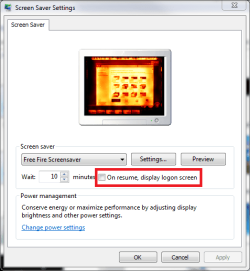
The simplest explanation is that you have screen saver set to to display logon screen on resume. If this is your case, the computer locks itself when going to screen saver and asks logon credentials when you resume the computer.

Go to Screen Saver settings and uncheck the option On resume, display logon screen.

Kari
 

Attachments

  • screensaver_1.PNG
    screensaver_1.PNG
    22.5 KB · Views: 5

My Computer

Computer type
Laptop
Computer Manufacturer/Model Number
HP ENVY 17-1150eg
OS
Windows 10 Pro x64 EN-GB
CPU
1.6 GHz Intel Core i7-720QM Processor
Memory
6 GB
Graphics Card(s)
ATI Mobility Radeon HD 5850 Graphics
Sound Card
Beats sound system with integrated subwoofer
Monitor(s) Displays
17" laptop display, 22" LED and 32" Full HD TV through HDMI
Screen Resolution
1600*900 (1), 1920*1080 (2&3)
Hard Drives
Internal: 2 x 500 GB SATA Hard Disk Drive 7200 rpm
External: 2TB for backups, 3TB USB3 network drive for media
Cooling
As Envy runs a bit warm, I have it on a Cooler Master pad
Keyboard
Logitech diNovo Media Desktop Laser (bluetooth)
Mouse
Logitech Performance Mouse MX
Internet Speed
50/10 Mbps VDSL
Antivirus
Windows Defender 4.3.9431.0
Browser
Maxthon 3.5.2., IE11
I turned off my screen saver and the "On,resume display logon screen" is already unchecked.
 

My Computer

Computer Manufacturer/Model Number
HP DV7-2185dx
OS
Microsoft Windows 7 Ultimate 64-bit 7600 Multiprocessor Free
CPU
Intel(R) Core(TM)2 Quad CPU Q9000 @ 2.00GHz
Motherboard
Quanta 3624
Memory
DDR-2 2.00 GB/ DDR-2 4.00 GB
Graphics Card(s)
ATI Mobility Radeon HD 4650
Sound Card
(1) AMD High Definition Audio Device (2) High Definition A
Hard Drives
FUJITSU MJA2500BH G2 ATA Device 465.76 GB
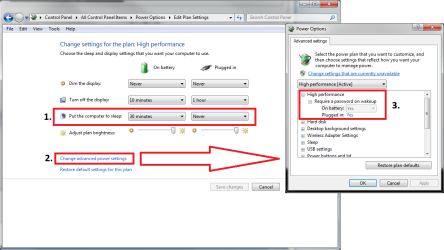
OK. The next thing to check is the Power Options.

Open the Power Options and click Change plan options. Check if your computer is set to go to sleep after a certain amount of time of inactivity (1.). Click Change advanced power settings (2.).

Choose your power plan from the list, check if it is set up to ask password on wakeup (3.).

Kari
 

Attachments

  • PowerOptions1.PNG
    PowerOptions1.PNG
    40.6 KB · Views: 35

My Computer

Computer type
Laptop
Computer Manufacturer/Model Number
HP ENVY 17-1150eg
OS
Windows 10 Pro x64 EN-GB
CPU
1.6 GHz Intel Core i7-720QM Processor
Memory
6 GB
Graphics Card(s)
ATI Mobility Radeon HD 5850 Graphics
Sound Card
Beats sound system with integrated subwoofer
Monitor(s) Displays
17" laptop display, 22" LED and 32" Full HD TV through HDMI
Screen Resolution
1600*900 (1), 1920*1080 (2&3)
Hard Drives
Internal: 2 x 500 GB SATA Hard Disk Drive 7200 rpm
External: 2TB for backups, 3TB USB3 network drive for media
Cooling
As Envy runs a bit warm, I have it on a Cooler Master pad
Keyboard
Logitech diNovo Media Desktop Laser (bluetooth)
Mouse
Logitech Performance Mouse MX
Internet Speed
50/10 Mbps VDSL
Antivirus
Windows Defender 4.3.9431.0
Browser
Maxthon 3.5.2., IE11
Ok I set it and ill see if it still does it. But thanks a lot Kari for the excellent, fast help! :D
 

My Computer

Computer Manufacturer/Model Number
HP DV7-2185dx
OS
Microsoft Windows 7 Ultimate 64-bit 7600 Multiprocessor Free
CPU
Intel(R) Core(TM)2 Quad CPU Q9000 @ 2.00GHz
Motherboard
Quanta 3624
Memory
DDR-2 2.00 GB/ DDR-2 4.00 GB
Graphics Card(s)
ATI Mobility Radeon HD 4650
Sound Card
(1) AMD High Definition Audio Device (2) High Definition A
Hard Drives
FUJITSU MJA2500BH G2 ATA Device 465.76 GB
Back
Top