Automatic sync when external hard drive is plugged in

D34dGh0st

New member
Local time
10:24 AM
Messages
3
Is there any free program, that can automatically synchronize the file changes in the specific folder (including all the subfolders) in my internal hard drive to my external hard drive when it's plugged in? I mean, that I use my external hard drive only when I'm copying files to it, not all the time. It's so laborious to copy the changed files file by file to the external hard drive with Windows :shock:. I'm using Windows 7 Home Premium x64.
 

My Computer My Computer

OS
Windows 7 Home Premium x64
I was searching for a free program, not a trial.
 

My Computer My Computer

OS
Windows 7 Home Premium x64
I hear Windows Seven ignores AutoRun.inf now. So it's not "automatic." But a simple free solution is
FreeCommander - freeware file manager

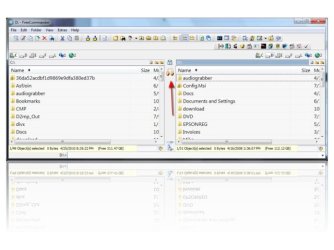
Set the drive on each side then press the button indicated by the arrow in the screen shot to sync.

FreeCommanderShot.jpg

After you press the button you get an options screen. Include subdirectories etc..

After that you get a screen showing which files will be copied in which direction. You can remove any from the list you don't want copied. Then hit the Go button to sync. It's very simple and effective.

Only thing is it's a 32 bit file manager. Therefore some folder redirection by Windows may prevent it from seeing certain system folders.

A 64 bit version is in the works. But it's likely to be awhile until a stable 64 bit is released.

It's rather useless to back up system files by copying anyway. For the system itself you should use an image backup program. For syncing a data partition FreeCommander sync should be perfect. I used it to sync my source code trees for programming. Hundreds of small files and it synced them very easily and simply.
 

My Computer My Computer

Computer Manufacturer/Model Number
HP Media Center
OS
Windows 7 32 bit
CPU
AMD 5200+ dual core
Memory
2 GB
Graphics Card(s)
NVidia GeForce 6150SE 128 MB
Monitor(s) Displays
CRT
Screen Resolution
1280x1024
Hard Drives
500 GB Sata internal :

SIIG USB 3.0 docking stations w/WD Caviar Black 6 Gb/s drives
Keyboard
PS/2
Mouse
PS/2 Wheel Mouse
Other Info
SIIG USB 3.0 PCIexpress card.
Only thing is it's a 32 bit file manager. Therefore some folder redirection by Windows may prevent it from seeing certain system folders.

A 64 bit version is in the works. But it's likely to be awhile until a stable 64 bit is released.

I'm not copying any system files, but I need to copy a bunch of music, movies, games and photos.
 

My Computer My Computer

OS
Windows 7 Home Premium x64
Then FreeCommander is the way to go. I've been using it across various PCs for 10 years I think. Works on XP and later. It's easy to use. Just select the root folders on each side and hit the sync button. It can sync in both directions at once using file modification dates. The confirmation display has arrows for each file showing which way the copy will go before you commit to the copying. Fool proof.

It's also a good file manager. Has a simple to use multiple file rename tool built in. You can add programs to the toolbar that work with selected files, has a command prompt at the bottom of the window so you don't have to open a command window to run a command line program with the current folder as working directory. Lots of features. And it's been around a long time. Nothing flaky.
 

My Computer My Computer

Computer Manufacturer/Model Number
HP Media Center
OS
Windows 7 32 bit
CPU
AMD 5200+ dual core
Memory
2 GB
Graphics Card(s)
NVidia GeForce 6150SE 128 MB
Monitor(s) Displays
CRT
Screen Resolution
1280x1024
Hard Drives
500 GB Sata internal :

SIIG USB 3.0 docking stations w/WD Caviar Black 6 Gb/s drives
Keyboard
PS/2
Mouse
PS/2 Wheel Mouse
Other Info
SIIG USB 3.0 PCIexpress card.
Back
Top