
AutoPlay - Turn On or Off

How to Turn AutoPlay On or Off in Windows 7

   Information
AutoPlay lets you choose which action or program to use automatically for different kinds of digital media when connected, such as music CDs or pictures from your digital camera.

When you turn AutoPlay on, you can choose what should happen when you insert different types of digital media into your computer. For example, you can choose which digital media player is used to play CDs.

When AutoPlay is turned off, you are no longer prompted by AutoPlay to choose what you want to do when you insert digital media into your computer.

This tutorial will show you how to turn AutoPlay on or off in Windows 7.

   Note
When a CD/DVD disc is inserted or a USB drive is connected to your system, Windows looks in the root directory of the new disc or drive for a file named autorun.inf. If found, Windows executes the instructions (keys) in that file.

For more about: Autorun vs Autoplay – What’s the Difference?

In Windows 7, Vista, and XP, two important changes were made to help improve security:

NOTE: For more on this, see: AutoRun changes in Windows 7 - Security Research & Defense - Site Home - TechNet Blogs
  1. AutoPlay will no longer support the AutoRun functionality for non-optical removable media. In other words, AutoPlay will still work for CD/DVDs but it will no longer work for USB drives. For example, if an infected USB drive is inserted on a machine then the AutoRun task will not be displayed. This will block the increasing social engineer threat highlighted in the SIR. The dialogs below highlight the difference that users will see after this change. Before the change, the malware is leveraging AutoRun (box in red) to confuse the user. After the change, AutoRun will no longer work, so the AutoPlay options are safe.
  2. A dialog change was done to clarify that the program being executed is running from external media.
By default in Windows 7, Vista, and XP now, the only [Autorun] keys available for USB/removable drives are below. The rest of the keys are ignored.
  • label - This key is responsible for displaying a custom name (label) for a CD/DVD or USB drive in Computer when a CD/DVD is inserted or a USB drive is connected.
  • icon - This key is responsible for displaying a custom icon for a CD/DVD or USB drive in Computer when a CD/DVD is inserted or a USB drive is connected.
   Warning
AutoPlay requires the Shell Hardware Detection service to be set to Started and Automatic to run.


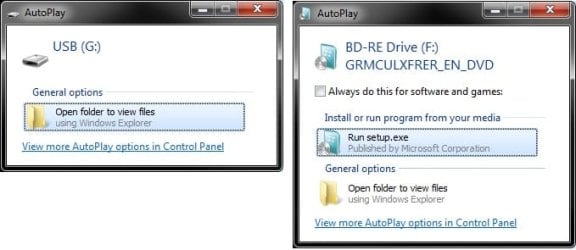
EXAMPLE: AutoPlay pop-up
NOTE: These are just examples of the AutoPlay pop-up dialog that you will see when you connect say a USB flash drive or a DVD. The options you have in the AutoPlay window will depend on what you connected or inserted, and what action you have selected for it in the AutoPlay settings below. Example.jpg


OPTION ONE

To Turn AutoPlay On or Off in Control Panel

1. Open the control panel (icons view), and click on the AutoPlay icon.

2. To Turn On AutoPlay
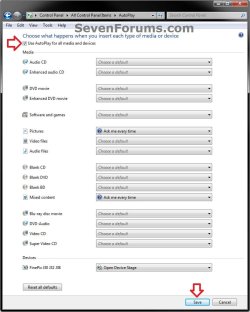
NOTE: This is the default setting. A) Check the Use AutoPlay for all media and devices box. (see screenshot below)

B) In the drop down menu for each type of media or device, you can choose a default action to happen when these types are connected. (see screenshot below)

C) Go to step 4.
3. To Turn Off AutoPlay Completely A) Uncheck the Use AutoPlay for all media and devices box. (see screenshot below)
4. Click on the Save button, and close the control panel. (see screenshot below) AutoPlay.jpg
5. You may also wish to check to see if you wanted to enable or disable AutoPlay and/or Enable AutoPlay for non-volume devices as well.


OPTION TWO

To Turn AutoPlay On or Off using a REG File Download


1. Do Step 2 or 3 below for what you would like to do.

2. To Turn On AutoPlay
NOTE: This is the default setting. A) Click on the Download button below to download the file below, and go to step 4 below. Turn_On_AutoPlay.reg

Download


3. To Completely Turn Off AutoPlay A) Click on the Download button below to download the file below, and go to step 4 below. Turn_Off_AutoPlay.reg

Download


4. Save the .reg file to your desktop.

5. Double click on the downloaded .reg file to merge it.

6. When prompted, click on Run, Yes (UAC), Yes, and OK to approve merging the .reg file.

7. You can now delete the downloaded .reg file if you like.

8. You may also wish to check to see if you wanted to enable or disable AutoPlay and/or Enable AutoPlay for non-volume devices as well.
That's it,
Shawn


Attachments

Last edited:
I have trid that several times it still is a nogo.
 

My Computer

Computer type
PC/Desktop
Computer Manufacturer/Model Number
Home Brew
OS
Windows 10 64bit
CPU
Amd Phenom II X4 925 Deneb 2.8 GHz 4X512KBL2 Cache 6MBL3
Motherboard
Asus M4A79XTD EVO AMD 790X ATX AMD
Memory
Mushkin Enhanced Blackline 8GB (4X2GB) 240-Pin SDRAM
Graphics Card(s)
XFS PVT95GYAJ2 Geforce 9500 GT 512MB
Sound Card
None
Monitor(s) Displays
Samsung T220/T220G Digital
Hard Drives
(1) ST3500320AS ATA Device
(2) WDC WD5000AACS-61M6B2 ATA Device
PSU
Corsair 600W
Case
Ulta Gladiator Clear Side Blk
Keyboard
Microsoft 4000
Mouse
Logitech Laser Cordless
Internet Speed
3
Other Info
LG Super Multi DVD Rewriter - Epson Workforce 845

My Computer

Computer type
PC/Desktop
Computer Manufacturer/Model Number
Custom Asus Build
OS
Microsoft Windows 8.1 Pro 64-bit
CPU
Intel(R) Core(TM) i3-4130 CPU @ 3.40GHz
Motherboard
B85M-E
Memory
8.00 GB
Graphics Card(s)
None
Sound Card
Realtek High Definition Audio
Monitor(s) Displays
Asus 23.6" Monitor
Screen Resolution
1920 x 1080 x 32 bits (4294967296 colors) @ 60 Hz
Hard Drives
INTEL SSDSC2BW180A4
Samsung SSD 840 PRO Series
PSU
Seasonic S12II-380Bronze
Case
Lian Li
Cooling
Fan, Passive
Keyboard
Logitech K120
Mouse
Microsoft Touch Mouse
Internet Speed
4ms Ping, 19.0 Mbps Download, 19.0 Mbps Upload
Antivirus
Eset Endpoint
Browser
Internet Explorer, Chrome
Windows Registry Editor Version 5.00

[HKEY_CURRENT_USER\Software\Microsoft\Windows\CurrentVersion\Explorer\AutoplayHandlers]
"DisableAutoplay"=dword:00000001
 

My Computer

OS
windows7 ultimate x32
CPU
DualCore Intel Core 2 Duo E8400, 3000 MHz (9 x 333)
Motherboard
ASRock 4Core1333-GLAN (3 PCI,1 PCI-E x16,4 DDR2 DIMM...)
Memory
4Gb (1x4 DDR2-800 DDR2 SDRAM)
Graphics Card(s)
NVIDIA GeForce 9600 GT (512 mb)
Sound Card
onboard
Monitor(s) Displays
lg flatron w2242t
Screen Resolution
1680 x 1050
Hard Drives
WDC WD5000AAJS-00YFA0 ATA Device
PSU
-
Case
-
Cooling
-
Other Info
d-link dir100
Thank you Nalbe. Added as OPTION TWO. :)
 

My Computer

Computer type
PC/Desktop
Computer Manufacturer/Model Number
Self built custom
OS
64-bit Windows 11 Pro for Workstations
CPU
Intel i7-8700K OC'd to 5 GHz
Motherboard
ASUS ROG Maximus XI Formula Z390
Memory
64 GB (4x16GB) G.SKILL TridentZ RGB DDR4 3600 MHz
Graphics Card(s)
ASUS ROG-STRIX-GTX1080TI-O11G-GAMING
Sound Card
Integrated
Monitor(s) Displays
2 x Samsung Odyssey G7 27"
Screen Resolution
2560x1440
Hard Drives
1TB Samsung 990 PRO M.2,
4TB Samsung 990 PRO PRO M.2,
TerraMaster F8 SSD Plus NAS
PSU
Seasonic Prime Titanium 850W
Case
Thermaltake Core P3
Cooling
Corsair Hydro H115i
Keyboard
Logitech wireless K800
Mouse
Logitech MX Master 4
Internet Speed
2 Gb/s Download and 100 Mb/s Upload
Antivirus
Malwarebyte Anti-Malware Premium
Browser
Google Chrome
Other Info
Logitech Z625 speaker system,
Logitech BRIO 4K Pro webcam,
HP Color LaserJet Pro MFP M477fdn,
APC SMART-UPS RT 1000 XL - SURT1000XLI,
Galaxy S23 Plus phone
Windows Registry Editor Version 5.00

[HKEY_CURRENT_USER\Software\Microsoft\Windows\CurrentVersion\Explorer\AutoplayHandlers]
"DisableAutoplay"=dword:00000001

My regedit is version 6 and there is no DisableAutoplay in it.
 

My Computer

Computer type
PC/Desktop
Computer Manufacturer/Model Number
Home Brew
OS
Windows 10 64bit
CPU
Amd Phenom II X4 925 Deneb 2.8 GHz 4X512KBL2 Cache 6MBL3
Motherboard
Asus M4A79XTD EVO AMD 790X ATX AMD
Memory
Mushkin Enhanced Blackline 8GB (4X2GB) 240-Pin SDRAM
Graphics Card(s)
XFS PVT95GYAJ2 Geforce 9500 GT 512MB
Sound Card
None
Monitor(s) Displays
Samsung T220/T220G Digital
Hard Drives
(1) ST3500320AS ATA Device
(2) WDC WD5000AACS-61M6B2 ATA Device
PSU
Corsair 600W
Case
Ulta Gladiator Clear Side Blk
Keyboard
Microsoft 4000
Mouse
Logitech Laser Cordless
Internet Speed
3
Other Info
LG Super Multi DVD Rewriter - Epson Workforce 845
Hello Dakota,

Having the DWORD DisableAutoplay either set to 0 or deleted has the same effect as turning on AutoPlay. Only when the DWORD DisableAutoplay is set to 1 will AutoPlay be turned off.

The current version of the regedit.exe file itself is 6.1.7600.6385, but when you export a entry from the registy then edit it, you'll notice that it does indeed show Windows Registry Editor Version 5.00.
 

My Computer

Computer type
PC/Desktop
Computer Manufacturer/Model Number
Self built custom
OS
64-bit Windows 11 Pro for Workstations
CPU
Intel i7-8700K OC'd to 5 GHz
Motherboard
ASUS ROG Maximus XI Formula Z390
Memory
64 GB (4x16GB) G.SKILL TridentZ RGB DDR4 3600 MHz
Graphics Card(s)
ASUS ROG-STRIX-GTX1080TI-O11G-GAMING
Sound Card
Integrated
Monitor(s) Displays
2 x Samsung Odyssey G7 27"
Screen Resolution
2560x1440
Hard Drives
1TB Samsung 990 PRO M.2,
4TB Samsung 990 PRO PRO M.2,
TerraMaster F8 SSD Plus NAS
PSU
Seasonic Prime Titanium 850W
Case
Thermaltake Core P3
Cooling
Corsair Hydro H115i
Keyboard
Logitech wireless K800
Mouse
Logitech MX Master 4
Internet Speed
2 Gb/s Download and 100 Mb/s Upload
Antivirus
Malwarebyte Anti-Malware Premium
Browser
Google Chrome
Other Info
Logitech Z625 speaker system,
Logitech BRIO 4K Pro webcam,
HP Color LaserJet Pro MFP M477fdn,
APC SMART-UPS RT 1000 XL - SURT1000XLI,
Galaxy S23 Plus phone
Hello Dakota,

Having the DWORD DisableAutoplay either set to 0 or deleted has the same effect as turning on AutoPlay. Only when the DWORD DisableAutoplay is set to 1 will AutoPlay be turned off.

The current version of the regedit.exe file itself is 6.1.7600.6385, but when you export a entry from the registy then edit it, you'll notice that it does indeed show Windows Registry Editor Version 5.00.

So if mine is deleted, as there is none in the registry means turned on then it still is not working. A blank disc or one that has something on it or a USB drive or flash drive, does not start automatically, which I want. Thanks for reply though. Anything else that I can try?
 

My Computer

Computer type
PC/Desktop
Computer Manufacturer/Model Number
Home Brew
OS
Windows 10 64bit
CPU
Amd Phenom II X4 925 Deneb 2.8 GHz 4X512KBL2 Cache 6MBL3
Motherboard
Asus M4A79XTD EVO AMD 790X ATX AMD
Memory
Mushkin Enhanced Blackline 8GB (4X2GB) 240-Pin SDRAM
Graphics Card(s)
XFS PVT95GYAJ2 Geforce 9500 GT 512MB
Sound Card
None
Monitor(s) Displays
Samsung T220/T220G Digital
Hard Drives
(1) ST3500320AS ATA Device
(2) WDC WD5000AACS-61M6B2 ATA Device
PSU
Corsair 600W
Case
Ulta Gladiator Clear Side Blk
Keyboard
Microsoft 4000
Mouse
Logitech Laser Cordless
Internet Speed
3
Other Info
LG Super Multi DVD Rewriter - Epson Workforce 845
Dakota,

What you are describing sounds like AutoRun instead of AutoPlay. AutoRun is where, for example, the setup program will run automatically when you insert a DVD or USB flash drive.


In Windows 7, Vista, and XP, two important changes were made to help improve security:

NOTE: For more on this, see: AutoRun changes in Windows 7 - Security Research & Defense - Site Home - TechNet Blogs
  1. AutoPlay will no longer support the AutoRun functionality for non-optical removable media. In other words, AutoPlay will still work for CD/DVDs but it will no longer work for USB drives. For example, if an infected USB drive is inserted on a machine then the AutoRun task will not be displayed. This will block the increasing social engineer threat highlighted in the SIR. The dialogs below highlight the difference that users will see after this change. Before the change, the malware is leveraging AutoRun (box in red) to confuse the user. After the change, AutoRun will no longer work, so the AutoPlay options are safe.
  2. A dialog change was done to clarify that the program being executed is running from external media.


If you did mean the AutoPlay type pop-up dialogs like in the example screenshots in the tutorial above, then try turning AutoPlay on using OPTION TWO first. Then check to see if you have the Ask me every time action selected in the AutoPlay control panel window for the media you want this for.
 

My Computer

Computer type
PC/Desktop
Computer Manufacturer/Model Number
Self built custom
OS
64-bit Windows 11 Pro for Workstations
CPU
Intel i7-8700K OC'd to 5 GHz
Motherboard
ASUS ROG Maximus XI Formula Z390
Memory
64 GB (4x16GB) G.SKILL TridentZ RGB DDR4 3600 MHz
Graphics Card(s)
ASUS ROG-STRIX-GTX1080TI-O11G-GAMING
Sound Card
Integrated
Monitor(s) Displays
2 x Samsung Odyssey G7 27"
Screen Resolution
2560x1440
Hard Drives
1TB Samsung 990 PRO M.2,
4TB Samsung 990 PRO PRO M.2,
TerraMaster F8 SSD Plus NAS
PSU
Seasonic Prime Titanium 850W
Case
Thermaltake Core P3
Cooling
Corsair Hydro H115i
Keyboard
Logitech wireless K800
Mouse
Logitech MX Master 4
Internet Speed
2 Gb/s Download and 100 Mb/s Upload
Antivirus
Malwarebyte Anti-Malware Premium
Browser
Google Chrome
Other Info
Logitech Z625 speaker system,
Logitech BRIO 4K Pro webcam,
HP Color LaserJet Pro MFP M477fdn,
APC SMART-UPS RT 1000 XL - SURT1000XLI,
Galaxy S23 Plus phone
Dakota,

What you are describing sounds like AutoRun instead of AutoPlay. AutoRun is where, for example, the setup program will run automatically when you insert a DVD or USB flash drive.


In Windows 7, Vista, and XP, two important changes were made to help improve security:

NOTE: For more on this, see: AutoRun changes in Windows 7 - Security Research & Defense - Site Home - TechNet Blogs
  1. AutoPlay will no longer support the AutoRun functionality for non-optical removable media. In other words, AutoPlay will still work for CD/DVDs but it will no longer work for USB drives. For example, if an infected USB drive is inserted on a machine then the AutoRun task will not be displayed. This will block the increasing social engineer threat highlighted in the SIR. The dialogs below highlight the difference that users will see after this change. Before the change, the malware is leveraging AutoRun (box in red) to confuse the user. After the change, AutoRun will no longer work, so the AutoPlay options are safe.
  2. A dialog change was done to clarify that the program being executed is running from external media.
If you did mean the AutoPlay type pop-up dialogs like in the example screenshots in the tutorial above, then try turning AutoPlay on using OPTION TWO first. Then check to see if you have the Ask me every time action selected in the AutoPlay control panel window for the media you want this for.

Yes autoplay is what I want, but I don't seem to understand what to do to get it back. I have everything set at ask me first in the autoplay feature, but am lost as to how to edit the DVD drive. I read the instructions and still can't figure it out.
 

My Computer

Computer type
PC/Desktop
Computer Manufacturer/Model Number
Home Brew
OS
Windows 10 64bit
CPU
Amd Phenom II X4 925 Deneb 2.8 GHz 4X512KBL2 Cache 6MBL3
Motherboard
Asus M4A79XTD EVO AMD 790X ATX AMD
Memory
Mushkin Enhanced Blackline 8GB (4X2GB) 240-Pin SDRAM
Graphics Card(s)
XFS PVT95GYAJ2 Geforce 9500 GT 512MB
Sound Card
None
Monitor(s) Displays
Samsung T220/T220G Digital
Hard Drives
(1) ST3500320AS ATA Device
(2) WDC WD5000AACS-61M6B2 ATA Device
PSU
Corsair 600W
Case
Ulta Gladiator Clear Side Blk
Keyboard
Microsoft 4000
Mouse
Logitech Laser Cordless
Internet Speed
3
Other Info
LG Super Multi DVD Rewriter - Epson Workforce 845
Do you get a AutoPlay pop-up when you connect or insert other forms of devices/media?

If you have not already, see if turning off AutoPlay completely and turning back on may toggle it to work again.

In addition, double check with the tutorial below to see if your AutoPlay may have been disabled by using OPTION ONE to enable AutoPlay.

http://www.sevenforums.com/tutorials/216706-autoplay-enable-disable.html#post1816519
 
Last edited:

My Computer

Computer type
PC/Desktop
Computer Manufacturer/Model Number
Self built custom
OS
64-bit Windows 11 Pro for Workstations
CPU
Intel i7-8700K OC'd to 5 GHz
Motherboard
ASUS ROG Maximus XI Formula Z390
Memory
64 GB (4x16GB) G.SKILL TridentZ RGB DDR4 3600 MHz
Graphics Card(s)
ASUS ROG-STRIX-GTX1080TI-O11G-GAMING
Sound Card
Integrated
Monitor(s) Displays
2 x Samsung Odyssey G7 27"
Screen Resolution
2560x1440
Hard Drives
1TB Samsung 990 PRO M.2,
4TB Samsung 990 PRO PRO M.2,
TerraMaster F8 SSD Plus NAS
PSU
Seasonic Prime Titanium 850W
Case
Thermaltake Core P3
Cooling
Corsair Hydro H115i
Keyboard
Logitech wireless K800
Mouse
Logitech MX Master 4
Internet Speed
2 Gb/s Download and 100 Mb/s Upload
Antivirus
Malwarebyte Anti-Malware Premium
Browser
Google Chrome
Other Info
Logitech Z625 speaker system,
Logitech BRIO 4K Pro webcam,
HP Color LaserJet Pro MFP M477fdn,
APC SMART-UPS RT 1000 XL - SURT1000XLI,
Galaxy S23 Plus phone
I get no pop-up dialog box at all. Will try the turn off and on later as I have to go right now.
 
Last edited by a moderator:

My Computer

Computer type
PC/Desktop
Computer Manufacturer/Model Number
Home Brew
OS
Windows 10 64bit
CPU
Amd Phenom II X4 925 Deneb 2.8 GHz 4X512KBL2 Cache 6MBL3
Motherboard
Asus M4A79XTD EVO AMD 790X ATX AMD
Memory
Mushkin Enhanced Blackline 8GB (4X2GB) 240-Pin SDRAM
Graphics Card(s)
XFS PVT95GYAJ2 Geforce 9500 GT 512MB
Sound Card
None
Monitor(s) Displays
Samsung T220/T220G Digital
Hard Drives
(1) ST3500320AS ATA Device
(2) WDC WD5000AACS-61M6B2 ATA Device
PSU
Corsair 600W
Case
Ulta Gladiator Clear Side Blk
Keyboard
Microsoft 4000
Mouse
Logitech Laser Cordless
Internet Speed
3
Other Info
LG Super Multi DVD Rewriter - Epson Workforce 845
Ok. :)
 

My Computer

Computer type
PC/Desktop
Computer Manufacturer/Model Number
Self built custom
OS
64-bit Windows 11 Pro for Workstations
CPU
Intel i7-8700K OC'd to 5 GHz
Motherboard
ASUS ROG Maximus XI Formula Z390
Memory
64 GB (4x16GB) G.SKILL TridentZ RGB DDR4 3600 MHz
Graphics Card(s)
ASUS ROG-STRIX-GTX1080TI-O11G-GAMING
Sound Card
Integrated
Monitor(s) Displays
2 x Samsung Odyssey G7 27"
Screen Resolution
2560x1440
Hard Drives
1TB Samsung 990 PRO M.2,
4TB Samsung 990 PRO PRO M.2,
TerraMaster F8 SSD Plus NAS
PSU
Seasonic Prime Titanium 850W
Case
Thermaltake Core P3
Cooling
Corsair Hydro H115i
Keyboard
Logitech wireless K800
Mouse
Logitech MX Master 4
Internet Speed
2 Gb/s Download and 100 Mb/s Upload
Antivirus
Malwarebyte Anti-Malware Premium
Browser
Google Chrome
Other Info
Logitech Z625 speaker system,
Logitech BRIO 4K Pro webcam,
HP Color LaserJet Pro MFP M477fdn,
APC SMART-UPS RT 1000 XL - SURT1000XLI,
Galaxy S23 Plus phone
Okay, I just turned off auto-play and disabled all sources of media, then rebooted and turned it back on and set all media to ask me every time, and it still does not give a pop-up. I guess the next thing to do is download some of those files and try them. Will wait for an answer from you first.
 

My Computer

Computer type
PC/Desktop
Computer Manufacturer/Model Number
Home Brew
OS
Windows 10 64bit
CPU
Amd Phenom II X4 925 Deneb 2.8 GHz 4X512KBL2 Cache 6MBL3
Motherboard
Asus M4A79XTD EVO AMD 790X ATX AMD
Memory
Mushkin Enhanced Blackline 8GB (4X2GB) 240-Pin SDRAM
Graphics Card(s)
XFS PVT95GYAJ2 Geforce 9500 GT 512MB
Sound Card
None
Monitor(s) Displays
Samsung T220/T220G Digital
Hard Drives
(1) ST3500320AS ATA Device
(2) WDC WD5000AACS-61M6B2 ATA Device
PSU
Corsair 600W
Case
Ulta Gladiator Clear Side Blk
Keyboard
Microsoft 4000
Mouse
Logitech Laser Cordless
Internet Speed
3
Other Info
LG Super Multi DVD Rewriter - Epson Workforce 845
Yep, double check with the tutorial below to see if your AutoPlay may have been disabled by using OPTION ONE to enable AutoPlay.

AutoPlay - Enable or Disable
 
Last edited:

My Computer

Computer type
PC/Desktop
Computer Manufacturer/Model Number
Self built custom
OS
64-bit Windows 11 Pro for Workstations
CPU
Intel i7-8700K OC'd to 5 GHz
Motherboard
ASUS ROG Maximus XI Formula Z390
Memory
64 GB (4x16GB) G.SKILL TridentZ RGB DDR4 3600 MHz
Graphics Card(s)
ASUS ROG-STRIX-GTX1080TI-O11G-GAMING
Sound Card
Integrated
Monitor(s) Displays
2 x Samsung Odyssey G7 27"
Screen Resolution
2560x1440
Hard Drives
1TB Samsung 990 PRO M.2,
4TB Samsung 990 PRO PRO M.2,
TerraMaster F8 SSD Plus NAS
PSU
Seasonic Prime Titanium 850W
Case
Thermaltake Core P3
Cooling
Corsair Hydro H115i
Keyboard
Logitech wireless K800
Mouse
Logitech MX Master 4
Internet Speed
2 Gb/s Download and 100 Mb/s Upload
Antivirus
Malwarebyte Anti-Malware Premium
Browser
Google Chrome
Other Info
Logitech Z625 speaker system,
Logitech BRIO 4K Pro webcam,
HP Color LaserJet Pro MFP M477fdn,
APC SMART-UPS RT 1000 XL - SURT1000XLI,
Galaxy S23 Plus phone
I tried opt 2 but I came up with this:
Clipboard01.jpg
 
Last edited by a moderator:

My Computer

Computer type
PC/Desktop
Computer Manufacturer/Model Number
Home Brew
OS
Windows 10 64bit
CPU
Amd Phenom II X4 925 Deneb 2.8 GHz 4X512KBL2 Cache 6MBL3
Motherboard
Asus M4A79XTD EVO AMD 790X ATX AMD
Memory
Mushkin Enhanced Blackline 8GB (4X2GB) 240-Pin SDRAM
Graphics Card(s)
XFS PVT95GYAJ2 Geforce 9500 GT 512MB
Sound Card
None
Monitor(s) Displays
Samsung T220/T220G Digital
Hard Drives
(1) ST3500320AS ATA Device
(2) WDC WD5000AACS-61M6B2 ATA Device
PSU
Corsair 600W
Case
Ulta Gladiator Clear Side Blk
Keyboard
Microsoft 4000
Mouse
Logitech Laser Cordless
Internet Speed
3
Other Info
LG Super Multi DVD Rewriter - Epson Workforce 845
Last edited:

My Computer

Computer type
PC/Desktop
Computer Manufacturer/Model Number
Self built custom
OS
64-bit Windows 11 Pro for Workstations
CPU
Intel i7-8700K OC'd to 5 GHz
Motherboard
ASUS ROG Maximus XI Formula Z390
Memory
64 GB (4x16GB) G.SKILL TridentZ RGB DDR4 3600 MHz
Graphics Card(s)
ASUS ROG-STRIX-GTX1080TI-O11G-GAMING
Sound Card
Integrated
Monitor(s) Displays
2 x Samsung Odyssey G7 27"
Screen Resolution
2560x1440
Hard Drives
1TB Samsung 990 PRO M.2,
4TB Samsung 990 PRO PRO M.2,
TerraMaster F8 SSD Plus NAS
PSU
Seasonic Prime Titanium 850W
Case
Thermaltake Core P3
Cooling
Corsair Hydro H115i
Keyboard
Logitech wireless K800
Mouse
Logitech MX Master 4
Internet Speed
2 Gb/s Download and 100 Mb/s Upload
Antivirus
Malwarebyte Anti-Malware Premium
Browser
Google Chrome
Other Info
Logitech Z625 speaker system,
Logitech BRIO 4K Pro webcam,
HP Color LaserJet Pro MFP M477fdn,
APC SMART-UPS RT 1000 XL - SURT1000XLI,
Galaxy S23 Plus phone
Sorry Dakota,

I meant to do step 2 in OPTION ONE instead. :o


That one I had already done. So guess I will try the file I downloaded. BTW, appreciate you hanging in with me on this.
 

My Computer

Computer type
PC/Desktop
Computer Manufacturer/Model Number
Home Brew
OS
Windows 10 64bit
CPU
Amd Phenom II X4 925 Deneb 2.8 GHz 4X512KBL2 Cache 6MBL3
Motherboard
Asus M4A79XTD EVO AMD 790X ATX AMD
Memory
Mushkin Enhanced Blackline 8GB (4X2GB) 240-Pin SDRAM
Graphics Card(s)
XFS PVT95GYAJ2 Geforce 9500 GT 512MB
Sound Card
None
Monitor(s) Displays
Samsung T220/T220G Digital
Hard Drives
(1) ST3500320AS ATA Device
(2) WDC WD5000AACS-61M6B2 ATA Device
PSU
Corsair 600W
Case
Ulta Gladiator Clear Side Blk
Keyboard
Microsoft 4000
Mouse
Logitech Laser Cordless
Internet Speed
3
Other Info
LG Super Multi DVD Rewriter - Epson Workforce 845
Brink, thanks for all the help. I downloaded that file and merged it and ran it and it seems like all is well now. Thanks again.
 

My Computer

Computer type
PC/Desktop
Computer Manufacturer/Model Number
Home Brew
OS
Windows 10 64bit
CPU
Amd Phenom II X4 925 Deneb 2.8 GHz 4X512KBL2 Cache 6MBL3
Motherboard
Asus M4A79XTD EVO AMD 790X ATX AMD
Memory
Mushkin Enhanced Blackline 8GB (4X2GB) 240-Pin SDRAM
Graphics Card(s)
XFS PVT95GYAJ2 Geforce 9500 GT 512MB
Sound Card
None
Monitor(s) Displays
Samsung T220/T220G Digital
Hard Drives
(1) ST3500320AS ATA Device
(2) WDC WD5000AACS-61M6B2 ATA Device
PSU
Corsair 600W
Case
Ulta Gladiator Clear Side Blk
Keyboard
Microsoft 4000
Mouse
Logitech Laser Cordless
Internet Speed
3
Other Info
LG Super Multi DVD Rewriter - Epson Workforce 845
That's great news Dakota. I'm happy to hear that it's working fine now. :)
 

My Computer

Computer type
PC/Desktop
Computer Manufacturer/Model Number
Self built custom
OS
64-bit Windows 11 Pro for Workstations
CPU
Intel i7-8700K OC'd to 5 GHz
Motherboard
ASUS ROG Maximus XI Formula Z390
Memory
64 GB (4x16GB) G.SKILL TridentZ RGB DDR4 3600 MHz
Graphics Card(s)
ASUS ROG-STRIX-GTX1080TI-O11G-GAMING
Sound Card
Integrated
Monitor(s) Displays
2 x Samsung Odyssey G7 27"
Screen Resolution
2560x1440
Hard Drives
1TB Samsung 990 PRO M.2,
4TB Samsung 990 PRO PRO M.2,
TerraMaster F8 SSD Plus NAS
PSU
Seasonic Prime Titanium 850W
Case
Thermaltake Core P3
Cooling
Corsair Hydro H115i
Keyboard
Logitech wireless K800
Mouse
Logitech MX Master 4
Internet Speed
2 Gb/s Download and 100 Mb/s Upload
Antivirus
Malwarebyte Anti-Malware Premium
Browser
Google Chrome
Other Info
Logitech Z625 speaker system,
Logitech BRIO 4K Pro webcam,
HP Color LaserJet Pro MFP M477fdn,
APC SMART-UPS RT 1000 XL - SURT1000XLI,
Galaxy S23 Plus phone
Back
Top