Avast and Windows Defender

WyattWhiteEagle

Member
Member
VIP
Local time
10:17 AM
Messages
166
I use Avast Free AntiVirus.

Is there a way to enable Windows Defender for use along-side Avast?
 
Last edited:

My Computer

Computer type
Laptop
Computer Manufacturer/Model Number
Acer Aspire E1-532
OS
Microsoft Windows 7 Home Premium 64-bit 7601 Multiprocessor Free Service Pack 1
CPU
Intel(R) Celeron(R) 2957U @ 1.40GHz
Motherboard
Acer EA50_HW
Memory
8.00 GB
Graphics Card(s)
Intel(R) HD Graphics
Sound Card
High Definition Audio Device
Screen Resolution
1366 x 768 x 32 bits (4294967296 colors) @ 59 Hz
Hard Drives
TOSHIBA MQ01ABD100 ATA Device
Hi

simple answer no. As soon as the os detects a second AV it automatically turns it Off.

note Did you mean Defender or MSE, defender is only anti-spyware


Roy
 

My Computer

Computer type
PC/Desktop
Computer Manufacturer/Model Number
medionl/Aspire 6930G/acer x55a
OS
W7 home premium 32bit/W7HP 64bit/w10 tp insider ring
CPU
E5300 dual core
Motherboard
medion MS7366
Memory
3gb
Graphics Card(s)
Nvidia Geforce 7100 Nforce 630i
Monitor(s) Displays
avixc
Internet Speed
n (isp resticted to 72)
Antivirus
mse/pands
Browser
palemoon
Other Info
Belkin Fd7050 n USB using Railink RT2870 drivers, more upto date
Hi

simple answer no. As soon as the os detects a second AV it automatically turns it Off.

note Did you mean Defender or MSE, defender is only anti-spyware


Roy

Thanks for the reply.

I meant Windows Defender and not Security Essentials.

A lot of the sites I go to which contains valuable information for the well-being of my family and I has a lot of 3rd-party tracking cookies and keyloggers in their default ads.

Any tips would be appreciated.
 

My Computer

Computer type
Laptop
Computer Manufacturer/Model Number
Acer Aspire E1-532
OS
Microsoft Windows 7 Home Premium 64-bit 7601 Multiprocessor Free Service Pack 1
CPU
Intel(R) Celeron(R) 2957U @ 1.40GHz
Motherboard
Acer EA50_HW
Memory
8.00 GB
Graphics Card(s)
Intel(R) HD Graphics
Sound Card
High Definition Audio Device
Screen Resolution
1366 x 768 x 32 bits (4294967296 colors) @ 59 Hz
Hard Drives
TOSHIBA MQ01ABD100 ATA Device
Hi

Ah now we're into the browser realm.

Which do you use.

I actually use 2,
major
contains all with logons which require both ID's and specific cookies.
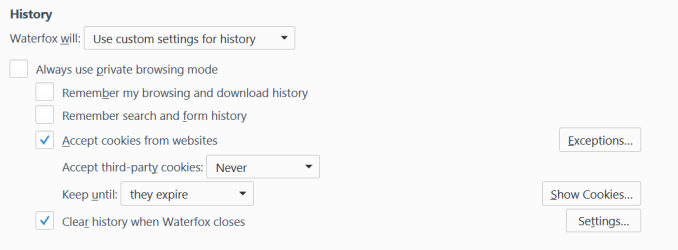
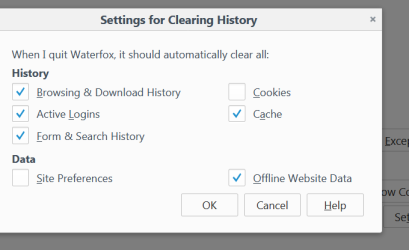
But i use its inbuilt cookie controller and set the defaults i want
minor
No logon credentials No history No cookies remembered

see screenshot for more info

Also look up In-Private Browsing options for yours

Big note,
you should now have IE11 turned OFF, via Turn features on/off (top left) in Programs & Features


Roy


Note read up on Private browsing mode for yours
 

Attachments

  • www1.PNG
    www1.PNG
    21.8 KB · Views: 0
  • www2.PNG
    www2.PNG
    19.2 KB · Views: 39

My Computer

Computer type
PC/Desktop
Computer Manufacturer/Model Number
medionl/Aspire 6930G/acer x55a
OS
W7 home premium 32bit/W7HP 64bit/w10 tp insider ring
CPU
E5300 dual core
Motherboard
medion MS7366
Memory
3gb
Graphics Card(s)
Nvidia Geforce 7100 Nforce 630i
Monitor(s) Displays
avixc
Internet Speed
n (isp resticted to 72)
Antivirus
mse/pands
Browser
palemoon
Other Info
Belkin Fd7050 n USB using Railink RT2870 drivers, more upto date
I use these 2 browsers in Windows 7 Professional SP1 64-bit (is up-to-date to April 2020):
Internet Explorer 11.0.185
Mozilla Firefox 76.0

Both are set up to delete browsing history and temporary files when I close them.

I use this antivirus app because it's light-weight and user-friendly:
Microsoft Security Essentials 4.10.209.0
I'll keep using it as long as it continues to provide definition updates.
 

My Computer

Computer type
PC/Desktop
Computer Manufacturer/Model Number
Dell OptiPlex 9020
OS
Windows 7 Professional SP1 64-bit
CPU
Intel Core i7-4790 3.60 GHz
Memory
32 GB DDR3-1600 MHz
Graphics Card(s)
Integrated Intel HD Graphics 4600
Monitor(s) Displays
Viewsonic 32" LCD
Hard Drives
Kingston SATA 3 240 GB SSD
Internet Speed
Spectrum Internet 1000 Mbps
Hi

Ah now we're into the browser realm.

Which do you use.

Until now, I use Google Chrome. After seeing Chrome's activities when certain settings are set, I'm considering moving to a more private, more secure and more user-friendly browser.

Anybody got any suggestions?

I know about IE, FireFox, Brave, unsure about WaterFox, never heard of PaleMoon until I seen your Specs.
 

My Computer

Computer type
Laptop
Computer Manufacturer/Model Number
Acer Aspire E1-532
OS
Microsoft Windows 7 Home Premium 64-bit 7601 Multiprocessor Free Service Pack 1
CPU
Intel(R) Celeron(R) 2957U @ 1.40GHz
Motherboard
Acer EA50_HW
Memory
8.00 GB
Graphics Card(s)
Intel(R) HD Graphics
Sound Card
High Definition Audio Device
Screen Resolution
1366 x 768 x 32 bits (4294967296 colors) @ 59 Hz
Hard Drives
TOSHIBA MQ01ABD100 ATA Device
Until now, I use Google Chrome. After seeing Chrome's activities when certain settings are set, I'm considering moving to a more private, more secure and more user-friendly browser.

Anybody got any suggestions?

I know about IE, FireFox, Brave, unsure about WaterFox, never heard of PaleMoon until I seen your Specs.

You say you know about Brave? That has been my evolving choice over the last 18 months or so for my main browser. Some people seem to have some issues with it and in some cases it is still work in progress but I very rarely need to use Firefox which is my back up. Go into settngs and have a play around but it is great for stopping ads out of the box. :thumbsup:
I have de-googled my pc and smart phone completely.........just need to find that tin foil........
 

My Computer

Computer type
PC/Desktop
OS
Windows 7 Home Premium 32 and 64bit
Jaidee -hi! I just saw your post and can't resist asking: How did you manage to de-google your PC? I want to do this too, but find it hard to avoid. I don't use Chrome or Google or Gmail, but every time you are forced to use a Captcha, your are interacting with Google. It drives me nuts.
I saw in my pretty virgin refurbished laptop there is already a "Google" folder in Program Files, so far empty.
Are there any special measures you haven taken?


My browser erases cookies upon closing and doesn't save history, and I know how to clean the cache, but what else is there that I can do?


Thanks.
 

My Computer

Computer type
PC/Desktop
OS
Win7, 64 bit, home premium
How did you manage to de-google your PC? I want to do this too, but find it hard to avoid

My comment was slightly tongue in cheek as regards the pc. But pretty much what you are doing. Plus I have some entries on the hosts file but yes it is pretty much impossible to avoid.
 

My Computer

Computer type
PC/Desktop
OS
Windows 7 Home Premium 32 and 64bit
Back
Top