avast,MSE and windows firewall

StealthyBoss

Banned
Local time
3:20 AM
Messages
183
is it safe to have all these running at the same time?
or shall i just stick to mse and windows firewall
 

My Computer

Computer Manufacturer/Model Number
Acer Aspire 5935G
OS
Windows 7 Ultimate 32 Bit and 64 bit
CPU
intel core 2 duo
Memory
3.00GB
Graphics Card(s)
Intel powersaving gpu, ATI RADEON HD 4570
Screen Resolution
15.6" HD LED LCD
Hard Drives
320 GB
is there any other security software i should use?
 

My Computer

Computer Manufacturer/Model Number
Acer Aspire 5935G
OS
Windows 7 Ultimate 32 Bit and 64 bit
CPU
intel core 2 duo
Memory
3.00GB
Graphics Card(s)
Intel powersaving gpu, ATI RADEON HD 4570
Screen Resolution
15.6" HD LED LCD
Hard Drives
320 GB
you should never have more than one antivirus running at one time. I would suggest to you to remove avast. MSE is faster and has a better interface (in my opinion) and avast could have problems, being a third-party solution. Whatever you chose as your configuration, simply remember that you should have ONE, not zero, not two, ONE firewall, antivirus, and spyware running at the same time :)

btw, you shouldn't be afraid to install your windows 7 ultimate 64 bit ^^ I am using 64 bit right now and I find it much improved :D
 

My Computer

Computer Manufacturer/Model Number
Dell Studio XPS 8000
OS
Windows 7 Home Premium
is it safe to have all these running at the same time?
or shall i just stick to mse and windows firewall

no !

as Pichu stated use only one antivirus at any one time :geek:
 

My Computer

Computer Manufacturer/Model Number
built my own
OS
win7 ultimate / virtual box
CPU
Intel Core i7 3770K,1155, Ivy Bridge
Motherboard
MSI Z77A-G43
Memory
GSkill Ripjaws Z Series 1600 CL 9.0 16GB
Graphics Card(s)
KFA2 GeForce GTX 670 EX OC 2048MB GDDR5 PCI-E gfx card
Sound Card
onboard Nvidia HDMI audio
Monitor(s) Displays
ASUS VK222H 22" widescreen LCD monitor
Screen Resolution
1680x1050
Hard Drives
Kingston 128gb SSD
OCZ Vertex 90gb SSD
500GB WDCaviar 16mb 5000KS
320GB WDCaviar 16mb 3200AAKS sata 2
1TB Samsung 16mb HD103SJ sata 2
PSU
Corsair HX 750W ATX2.2 Modular
Cooling
Antec 25 Kuhler H2O 620
Keyboard
logitech
Mouse
logitech MX518
Internet Speed
7mb adsl
is it safe to have all these running at the same time?
or shall i just stick to mse and windows firewall

No need for Avast if you have MSE.
 

My Computer

OS
Windows 7 Home Premium x64
CPU
Intel Core 2 Quad Q9450 @ 3.2GHz
Motherboard
Asus P5Q PRO Turbo
Memory
4GB DDR2-800
Graphics Card(s)
MSI Radeon HD 5850
Sound Card
Creative Labs Audigy2 ZS
Monitor(s) Displays
Samsung 225BW
Hard Drives
(2) 1TB Samsung F1, (2) 1.5TB Samsung F2, 1TB Samsung F2, 2TB Samsung F3
PSU
Corsair HX650
Case
Antec Nine Hundred
you should never have more than one antivirus running at one time. I would suggest to you to remove avast. MSE is faster and has a better interface (in my opinion) and avast could have problems, being a third-party solution. Whatever you chose as your configuration, simply remember that you should have ONE, not zero, not two, ONE firewall, antivirus, and spyware running at the same time :)

btw, you shouldn't be afraid to install your windows 7 ultimate 64 bit ^^ I am using 64 bit right now and I find it much improved :D

thanks :D
 

My Computer

Computer Manufacturer/Model Number
Acer Aspire 5935G
OS
Windows 7 Ultimate 32 Bit and 64 bit
CPU
intel core 2 duo
Memory
3.00GB
Graphics Card(s)
Intel powersaving gpu, ATI RADEON HD 4570
Screen Resolution
15.6" HD LED LCD
Hard Drives
320 GB
im just using mse and windows firewall, with hitman pro.
ill plan on installing x64 soon :) thanks
 

My Computer

Computer Manufacturer/Model Number
Acer Aspire 5935G
OS
Windows 7 Ultimate 32 Bit and 64 bit
CPU
intel core 2 duo
Memory
3.00GB
Graphics Card(s)
Intel powersaving gpu, ATI RADEON HD 4570
Screen Resolution
15.6" HD LED LCD
Hard Drives
320 GB
is it safe to have all these running at the same time?
or shall i just stick to mse and windows firewall
Yes its is absolutely safe and its a very tight security setup.
 

My Computer

Computer Manufacturer/Model Number
Samsung NP530U4B-S02IN
OS
Windows® 8 Pro (64-bit)
CPU
Intel® Core™ i5 Processor 2467M (1.60GHz, 3MB L3 Cache)
Motherboard
Samsung Electronics
Memory
6GB DDR3 System Memory at 1,333MHz (on BD 4GB + 2GB x 1)
Graphics Card(s)
AMD Radeon™ HD7550M 1GB DDR3 (Ext. Graphic)
Sound Card
Realtek High Definition Audio
Monitor(s) Displays
35.56cm (14.0) SuperBright 300nit HD LED Display
Screen Resolution
1366x768
Hard Drives
1TB S-ATA II Hard Drive (5400RPM) with ExpressCache 16GB SSD
Internet Speed
sucks
Antivirus
Microsoft Security Essentials
Browser
Google Chrome (Sync enabled)
is it safe to have all these running at the same time?
or shall i just stick to mse and windows firewall
Yes its is absolutely safe and its a very tight security setup.

Dinesh, not to be critical, but isn't it bad to ever have more than one real-time protection at one time? :confused: I haven't heard of anybody that suggested more than one antivirus. They will interfere with each other. One virus will pop up. Antivirus A tries to block it. It quarantines it. Antivirus B notices that the virus is on the computer but it doesn't know that the virus is being quarantined. So it quarantines the definitions of antivirus A. Antivirus A, notices what it deems suspicious behavior from antivirus B. Antivirus attempts to quarantine antivirus B. In the meanwhile, a virus comes into the computer, because neither antivirus are doing anything besides to each other.
In conclusion, multiple real-time protections, make computer less secure (gives user a false sense of additional security) and also makes computer tragically slow...
Well,there you have it, what might happen when you have two active antiviruses. :shock: It reduces the security.

Now, you can have an active real-time protection and an inactive antivirus, like a scanner, or online scanner, or removal tools.
 

My Computer

Computer Manufacturer/Model Number
Dell Studio XPS 8000
OS
Windows 7 Home Premium
Your concept is wrong. Antivirus A cannot scan the quarantine folder of Antivirus B as its locked.
Besides, Avast is certified to run alongside MSE without any issues. Infact, there are many such couples which runs side by side at a time without any issues. ;)
 

My Computer

Computer Manufacturer/Model Number
Samsung NP530U4B-S02IN
OS
Windows® 8 Pro (64-bit)
CPU
Intel® Core™ i5 Processor 2467M (1.60GHz, 3MB L3 Cache)
Motherboard
Samsung Electronics
Memory
6GB DDR3 System Memory at 1,333MHz (on BD 4GB + 2GB x 1)
Graphics Card(s)
AMD Radeon™ HD7550M 1GB DDR3 (Ext. Graphic)
Sound Card
Realtek High Definition Audio
Monitor(s) Displays
35.56cm (14.0) SuperBright 300nit HD LED Display
Screen Resolution
1366x768
Hard Drives
1TB S-ATA II Hard Drive (5400RPM) with ExpressCache 16GB SSD
Internet Speed
sucks
Antivirus
Microsoft Security Essentials
Browser
Google Chrome (Sync enabled)
Your concept is wrong. Antivirus A cannot scan the quarantine folder of Antivirus B as its locked.
Besides, Avast is certified to run alongside MSE without any issues. Infact, there are many such couples which runs side by side at a time without any issues. ;)

:confused:Do you have any proof that avast is certified to run alongside mse without any issues?
Check out this question somebody posted on microsoft's website
Running MSE together with Avast! Anti Virus

Perhaps, you didn't have any issues but seriously, cleaning up those two antivirus would be a nightmare...
 

My Computer

Computer Manufacturer/Model Number
Dell Studio XPS 8000
OS
Windows 7 Home Premium
Your concept is wrong. Antivirus A cannot scan the quarantine folder of Antivirus B as its locked.
Besides, Avast is certified to run alongside MSE without any issues. Infact, there are many such couples which runs side by side at a time without any issues. ;)

:confused:Do you have any proof that avast is certified to run alongside mse without any issues?
Check out this question somebody posted on microsoft's website
Running MSE together with Avast! Anti Virus

Perhaps, you didn't have any issues but seriously, cleaning up those two antivirus would be a nightmare...
Wait I will search the proof. I saw it the other day on some thread. Hold on.
 

My Computer

Computer Manufacturer/Model Number
Samsung NP530U4B-S02IN
OS
Windows® 8 Pro (64-bit)
CPU
Intel® Core™ i5 Processor 2467M (1.60GHz, 3MB L3 Cache)
Motherboard
Samsung Electronics
Memory
6GB DDR3 System Memory at 1,333MHz (on BD 4GB + 2GB x 1)
Graphics Card(s)
AMD Radeon™ HD7550M 1GB DDR3 (Ext. Graphic)
Sound Card
Realtek High Definition Audio
Monitor(s) Displays
35.56cm (14.0) SuperBright 300nit HD LED Display
Screen Resolution
1366x768
Hard Drives
1TB S-ATA II Hard Drive (5400RPM) with ExpressCache 16GB SSD
Internet Speed
sucks
Antivirus
Microsoft Security Essentials
Browser
Google Chrome (Sync enabled)

My Computer

Computer Manufacturer/Model Number
Samsung NP530U4B-S02IN
OS
Windows® 8 Pro (64-bit)
CPU
Intel® Core™ i5 Processor 2467M (1.60GHz, 3MB L3 Cache)
Motherboard
Samsung Electronics
Memory
6GB DDR3 System Memory at 1,333MHz (on BD 4GB + 2GB x 1)
Graphics Card(s)
AMD Radeon™ HD7550M 1GB DDR3 (Ext. Graphic)
Sound Card
Realtek High Definition Audio
Monitor(s) Displays
35.56cm (14.0) SuperBright 300nit HD LED Display
Screen Resolution
1366x768
Hard Drives
1TB S-ATA II Hard Drive (5400RPM) with ExpressCache 16GB SSD
Internet Speed
sucks
Antivirus
Microsoft Security Essentials
Browser
Google Chrome (Sync enabled)

Because of your documentation proof..:p...you are right...However, I still feel that, and I think a majority of people here feel that, antiviruses should never be run together. It is simply a wrong concept.

So to the thread starter: yes, you may run them together. however, this concept does not apply to all types of antiviruses. a huge majority of antiviruses cannot do this...I am surprised that avast gone so far.

As for me, I wouldn't run them together even if they could. :D The slowdown is not worth it in my opinion, and if one antivirus can already protect you from 99.7 percent of viruses, even if two antiviruses only make that 99.8 or 99.85, I'm willing to bet with that odds.

For those who take statistics class, I'm sure you know the area under a curve at .997, lying in the range of alpha =).....thus, it is statistically significant :geek:,....which means not significant at all....
 

My Computer

Computer Manufacturer/Model Number
Dell Studio XPS 8000
OS
Windows 7 Home Premium
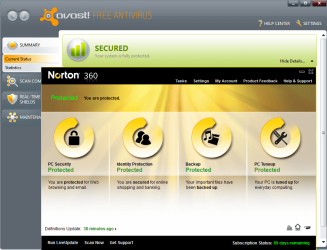
For home users, I strongly recommend running only 1 antivirus at a time. However, I keep downlaoding and executing viruses on my PC hence I feel that it gives me a layered approach towards security. Also, I like testing antivirus softwares hence I run two at a time for fun. ATM, I have Norton 360 V4 and Avast 5 together with NO issues. ;)

Capture.PNG
 

My Computer

Computer Manufacturer/Model Number
Samsung NP530U4B-S02IN
OS
Windows® 8 Pro (64-bit)
CPU
Intel® Core™ i5 Processor 2467M (1.60GHz, 3MB L3 Cache)
Motherboard
Samsung Electronics
Memory
6GB DDR3 System Memory at 1,333MHz (on BD 4GB + 2GB x 1)
Graphics Card(s)
AMD Radeon™ HD7550M 1GB DDR3 (Ext. Graphic)
Sound Card
Realtek High Definition Audio
Monitor(s) Displays
35.56cm (14.0) SuperBright 300nit HD LED Display
Screen Resolution
1366x768
Hard Drives
1TB S-ATA II Hard Drive (5400RPM) with ExpressCache 16GB SSD
Internet Speed
sucks
Antivirus
Microsoft Security Essentials
Browser
Google Chrome (Sync enabled)
For home users, I strongly recommend running only 1 antivirus at a time. However, I keep downlaoding and executing viruses on my PC hence I feel that it gives me a layered approach towards security. Also, I like testing antivirus softwares hence I run two at a time for fun. ATM, I have Norton 360 V4 and Avast 5 together with NO issues. ;)

View attachment 58721

:poh yeah, who says there wouldn't be issues later :rolleyes: lol jking.
But you got your point across. A majority of us don't need the extra layered security. I don't go online and download viruses and execute them for the heck of it :cry: thats like finding the right gun to blow yourself up and seeing which antivirus fixes you back the best:shock: I guess curiosity gets the best of you eh?

I would recommend you to do that on virtual machines, because that significantly helps you avoid catastrophes XD. I'm guessing, since you are very reckless with your computer that you don't keep many important data on your computer. I keep all the videos, animes, homework, documents, pictures (tons), music (even more) on my computer. There are cases where viruses will kill off these files even if they are on an external hdd. So, I tend to avoid viruses where I could =). Now, i do sometimes run into rogue antivirus sites and malicious sites, and I like to download the exe files and test them, but on vms only otherwise, I would kill myself. :devil:

I find that MSE, windows firewall, and sophos scanner are more than enough for protection for average home user, and windows virtual pc or virtualbox for testing any software (including viruses) before installing on the host.

btw, Im repping you because I respect the fact that you supported your point, not that I agree with you =.=

 

My Computer

Computer Manufacturer/Model Number
Dell Studio XPS 8000
OS
Windows 7 Home Premium

My Computer

Computer Manufacturer/Model Number
Samsung NP530U4B-S02IN
OS
Windows® 8 Pro (64-bit)
CPU
Intel® Core™ i5 Processor 2467M (1.60GHz, 3MB L3 Cache)
Motherboard
Samsung Electronics
Memory
6GB DDR3 System Memory at 1,333MHz (on BD 4GB + 2GB x 1)
Graphics Card(s)
AMD Radeon™ HD7550M 1GB DDR3 (Ext. Graphic)
Sound Card
Realtek High Definition Audio
Monitor(s) Displays
35.56cm (14.0) SuperBright 300nit HD LED Display
Screen Resolution
1366x768
Hard Drives
1TB S-ATA II Hard Drive (5400RPM) with ExpressCache 16GB SSD
Internet Speed
sucks
Antivirus
Microsoft Security Essentials
Browser
Google Chrome (Sync enabled)
I never even heard of that shadowdefender....? :confused:The claims the company makes are the same claims that every security company makes. How do you know you're safe?
 

My Computer

Computer Manufacturer/Model Number
Dell Studio XPS 8000
OS
Windows 7 Home Premium

My Computer

OS
XP Pro and Windows7 32 bit
Back
Top