avg 9 Update ?

no problem dude :D
 

My Computer

Computer Manufacturer/Model Number
self built
OS
Windows 7 Professional 64-bit
CPU
Intel E8400 3GHz
Motherboard
Intel DX48BT2
Memory
Kingston PC3-10700H 4Gb
Graphics Card(s)
XFX Radeon HD 5850 BlackEd.
Sound Card
Asus Xonar DG
Monitor(s) Displays
2x Samsung SM-T220HD 22"
Screen Resolution
1680x1050 on two monitors
Hard Drives
OCZ Vertex 2 120gb 3.5" (OS)
Seagate Momentus XT 500gb
Samsung F3 1Tb (games)
2x Samsung F1 1Tb
PSU
Thermaltake ToughPower 850w
Case
Thermaltake Armor
Cooling
Scythe Mugen II
Keyboard
Microsoft Comfort Curve USB
Mouse
Razer Diamondback 3G
Internet Speed
8128/443
AVG 9?

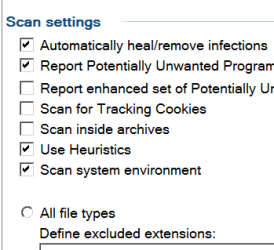
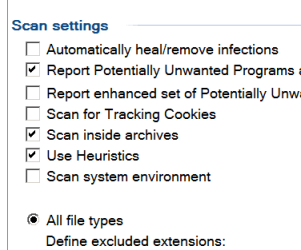
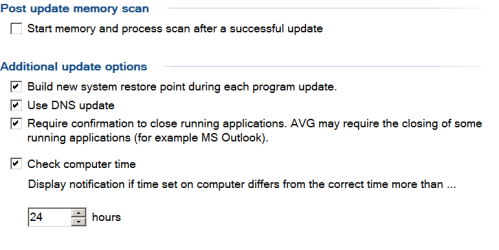
JMH I am a disabled person not technical forgive my typing can you tell me not sure on posting snips of exactly what you mean.I can explain free version In advance AVG settings under scans pull down each scan sub catagories scan whole computer and shell extention scan which should be checked and under update pull down each sub catagories can you tell me Start memorey process scan after a successful update means and do I uncheck build new system which should be checked ?
 

My Computer

OS
w7
brightsun,
A FYI.
If you have a Snipping Tool you can find it via the Start orb > in 'Start Search' type 'Snipping Tool'. You will then see it listed at the top.

For info on this Snipping Tool go back to Start > refer right hand menu 'Help & Support' > Snipping Tool > type 'Snipping Tool' > read info.

Should you ever require help with your computer, it is a good idea to post a snip with your questions so that we know exactly what you are referring to.

The same applies to your System Specs that I asked you to fill in earlier. By doing this it allows us to help you in a more efficient way.
 

My Computer

Computer Manufacturer/Model Number
LAPTOP. HP Pavilion dv7-4010TX .
OS
Win 7 Ultimate 64-bit. SP1.
CPU
Intel i7 -720QM.[1.6GHz Turbo Boost 2.8GHz. 6MB Cache.]
Memory
8 DDR 3 RAM. 1066MHZ
Graphics Card(s)
ATI 1024 MB. DDR3. Radeon HD5650
Monitor(s) Displays
17.3" High Definition Brightview LCD. LED Backlit.
Screen Resolution
1600 x 900.
Hard Drives
640GB
Case
Laptop / notebook.
Mouse
Logitech Anywhere mouse. MX.
Internet Speed
ADSL [ but too slow ]
JMH I captured the snip can you tell me the steps to get it in the forum here ?
 

My Computer

OS
w7

My Computer

Computer Manufacturer/Model Number
Hewlett Packard Compaq Presario CQ60-305au
OS
Windows Seven Home Premium 32bit SP1
CPU
AMD Athlon QI46 2.1Ghz
Motherboard
Wistron 303c
Memory
2048 Mb DDR2 SD RAM
Graphics Card(s)
NVidea GE GoForce 8200M G/256mb dedicated graphics memory
Sound Card
MCP78S NVidea high definition
Monitor(s) Displays
15.6" High definition Brightview Widescreen
Screen Resolution
1336x768
Hard Drives
Toshiba MK2555GSX ATA
  • Like
Reactions: JMH
which do I Check
 

Attachments

  • Capture.PNG
    Capture.PNG
    5.3 KB · Views: 0

My Computer

OS
w7
For you, I would suggest ticking each of the seven boxes. ;)
Snip any others sections you need clarification of too.....
 

My Computer

Computer Manufacturer/Model Number
LAPTOP. HP Pavilion dv7-4010TX .
OS
Win 7 Ultimate 64-bit. SP1.
CPU
Intel i7 -720QM.[1.6GHz Turbo Boost 2.8GHz. 6MB Cache.]
Memory
8 DDR 3 RAM. 1066MHZ
Graphics Card(s)
ATI 1024 MB. DDR3. Radeon HD5650
Monitor(s) Displays
17.3" High Definition Brightview LCD. LED Backlit.
Screen Resolution
1600 x 900.
Hard Drives
640GB
Case
Laptop / notebook.
Mouse
Logitech Anywhere mouse. MX.
Internet Speed
ADSL [ but too slow ]
AVG 9?

JMH I have more screenshot I will try to put it in one thread
 

My Computer

OS
w7
Hallo brightsun, i am really unclear as to what you are asking and i can only help so much as it has been a few years since i used AVG and because of this i can not answer whether you should get a pop up after updating or not.

So long as you have not changed any of your settings from default you should be all good.

I have copied the screenshot of AVG control panel from one of JMH posts.
If you look at the bit i highlighted with the green tick and yours is like this it means AVG is up to date & is actively protecting your computer & their is no problems or anything to be worried about.
The other bit i highlighted is where you can manually update AVG;

View attachment 76326

I hope this helps answer your concerns :)
 
Last edited:

My Computer

Computer Manufacturer/Model Number
Hewlett Packard Compaq Presario CQ60-305au
OS
Windows Seven Home Premium 32bit SP1
CPU
AMD Athlon QI46 2.1Ghz
Motherboard
Wistron 303c
Memory
2048 Mb DDR2 SD RAM
Graphics Card(s)
NVidea GE GoForce 8200M G/256mb dedicated graphics memory
Sound Card
MCP78S NVidea high definition
Monitor(s) Displays
15.6" High definition Brightview Widescreen
Screen Resolution
1336x768
Hard Drives
Toshiba MK2555GSX ATA

My Computer

Computer Manufacturer/Model Number
LAPTOP. HP Pavilion dv7-4010TX .
OS
Win 7 Ultimate 64-bit. SP1.
CPU
Intel i7 -720QM.[1.6GHz Turbo Boost 2.8GHz. 6MB Cache.]
Memory
8 DDR 3 RAM. 1066MHZ
Graphics Card(s)
ATI 1024 MB. DDR3. Radeon HD5650
Monitor(s) Displays
17.3" High Definition Brightview LCD. LED Backlit.
Screen Resolution
1600 x 900.
Hard Drives
640GB
Case
Laptop / notebook.
Mouse
Logitech Anywhere mouse. MX.
Internet Speed
ADSL [ but too slow ]
JMH sorry for the threads which should be checked and which should not be please Capture.PNG
 

My Computer

OS
w7
brightsun,
Your post 31 is the same as your post26. I answered that in my post 27.
Apart from that the rest should be ok. ;)
 

My Computer

Computer Manufacturer/Model Number
LAPTOP. HP Pavilion dv7-4010TX .
OS
Win 7 Ultimate 64-bit. SP1.
CPU
Intel i7 -720QM.[1.6GHz Turbo Boost 2.8GHz. 6MB Cache.]
Memory
8 DDR 3 RAM. 1066MHZ
Graphics Card(s)
ATI 1024 MB. DDR3. Radeon HD5650
Monitor(s) Displays
17.3" High Definition Brightview LCD. LED Backlit.
Screen Resolution
1600 x 900.
Hard Drives
640GB
Case
Laptop / notebook.
Mouse
Logitech Anywhere mouse. MX.
Internet Speed
ADSL [ but too slow ]
AVG 9?

JMH post 31 is the same as post26. I know it is their is to different sub cat under scan do I check em in both ? and in post 33 Start memory can you tell me if it is checked dose it scan after update? and in post 33 should build be unchecked
 

My Computer

OS
w7
brightsun I did confirm in my post 34 that all appeared to be ok. In other words leave them how they are.
Re the System Restore Point being created [your post 35] - How often do you scan your system?
 

My Computer

Computer Manufacturer/Model Number
LAPTOP. HP Pavilion dv7-4010TX .
OS
Win 7 Ultimate 64-bit. SP1.
CPU
Intel i7 -720QM.[1.6GHz Turbo Boost 2.8GHz. 6MB Cache.]
Memory
8 DDR 3 RAM. 1066MHZ
Graphics Card(s)
ATI 1024 MB. DDR3. Radeon HD5650
Monitor(s) Displays
17.3" High Definition Brightview LCD. LED Backlit.
Screen Resolution
1600 x 900.
Hard Drives
640GB
Case
Laptop / notebook.
Mouse
Logitech Anywhere mouse. MX.
Internet Speed
ADSL [ but too slow ]
JMH my automatic update question here is a snip of settings question is when updates starts & finishes it dose not popup in tray as popup are settings set to popup ?Capture.PNG
 

My Computer

OS
w7
brightsun,
I suggest you refer back to my post 9.
Does yours do the same?
If it does, that is the only pop up that will happen / is necessary.
If it doesn't that is of no great concern.

Should you still be worried, you could join the free forum & address your question there - or uninstall AVG & download a new program to see if that corrects your annoyance.
Let us know what you decide.
 

My Computer

Computer Manufacturer/Model Number
LAPTOP. HP Pavilion dv7-4010TX .
OS
Win 7 Ultimate 64-bit. SP1.
CPU
Intel i7 -720QM.[1.6GHz Turbo Boost 2.8GHz. 6MB Cache.]
Memory
8 DDR 3 RAM. 1066MHZ
Graphics Card(s)
ATI 1024 MB. DDR3. Radeon HD5650
Monitor(s) Displays
17.3" High Definition Brightview LCD. LED Backlit.
Screen Resolution
1600 x 900.
Hard Drives
640GB
Case
Laptop / notebook.
Mouse
Logitech Anywhere mouse. MX.
Internet Speed
ADSL [ but too slow ]
AVG 9?

JMH I just did a manual update to my AVG Anti Virus free version & noted that there was a "pop up"at the end as it downloads the updates. However I mean automatic updates there is no pop up that says "Update starts and completed successfully."dose it do it for you on automatic updates ?


My Computer

OS
w7
To the best of my knowledge the same thing applies as with manual updates.
Reality here is I don't have the spare time to watch my computer doing what it is set to do automatically.

May I ask why you are so concerned over such a small issue?
Note in your snip "Balloon Tray Notifications" it says "Display Tray Notifications about Update."
This does not imply it should show a pop up before & after the update.
 

My Computer

Computer Manufacturer/Model Number
LAPTOP. HP Pavilion dv7-4010TX .
OS
Win 7 Ultimate 64-bit. SP1.
CPU
Intel i7 -720QM.[1.6GHz Turbo Boost 2.8GHz. 6MB Cache.]
Memory
8 DDR 3 RAM. 1066MHZ
Graphics Card(s)
ATI 1024 MB. DDR3. Radeon HD5650
Monitor(s) Displays
17.3" High Definition Brightview LCD. LED Backlit.
Screen Resolution
1600 x 900.
Hard Drives
640GB
Case
Laptop / notebook.
Mouse
Logitech Anywhere mouse. MX.
Internet Speed
ADSL [ but too slow ]
Back
Top