Back up system?

Hi, here is a screen print of my options and there is an option of both, well thats what I think.

I think I will do Create a System Image. And the a back up of pics music, etc, just in case.

How will it be moved? It would only be copied?
or am I missing something?
I have never had a problem with the Windows Backup and Imaging Utility. It is simple (and without many advanced features) compared to the paid utilities available, but it suits my simple needs.

I have my computer re-imaged once each week and stored on a second hard drive. The files can be moved anywhere (I suggest putting them in an identifying folder) but must be located in the root of a hard drive (internal or external, and not in a folder) before Windows can find them:
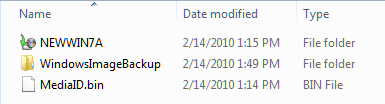
backup_image.png

A couple of options, if in the worst case senerio the hard drive crashes and must be replaced, the DVD can restore your image to a blank hard drive, or you can reinstall Windows to re-create the exact partition sizes then restore your image.

Cheers!
Robert
 
Last edited:

My Computer

OS
...
Hi All and thanks.

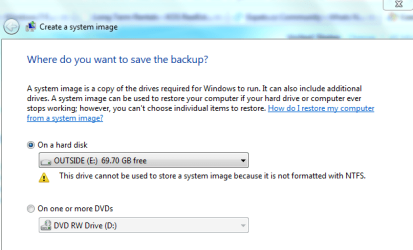
I am going to send the laptop to service on Monday and I am NOW trying to Create a System Image to an external harddrive.

My problem now is, the Ext HD says it is not formatted to NTFS??

I have used this drive before to do a back up but not Create a System Image:confused:

I can make more space on the Ext HD, but I dont think that is the problem?

Need some help with this please.

Thanks in advance.
 

Attachments

  • Capture back up 2.PNG
    Capture back up 2.PNG
    20.6 KB · Views: 2

My Computer

Computer type
Laptop
Computer Manufacturer/Model Number
Acer 7738G
OS
Acer Aspire 7738G Win 7 X64 bit Home Premium
Hi All and thanks.

I am going to send the laptop to service on Monday and I am NOW trying to Create a System Image to an external harddrive.

My problem now is, the Ext HD says it is not formatted to NTFS??

I have used this drive before to do a back up but not Create a System Image:confused:

I can make more space on the Ext HD, but I dont think that is the problem?

Need some help with this please.

Thanks in advance.
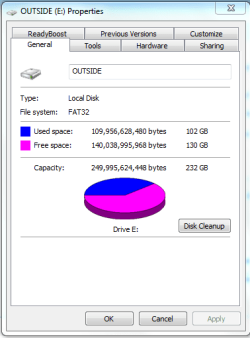
Can we have a look at the external drive with Windows Explorer (not IE) and Disk Management drive map?
 

My Computer

OS
...
Is this what you require?

Not sure about Disk Management drive??
 

Attachments

  • Capture Back up 3.PNG
    Capture Back up 3.PNG
    12.6 KB · Views: 2

My Computer

Computer type
Laptop
Computer Manufacturer/Model Number
Acer 7738G
OS
Acer Aspire 7738G Win 7 X64 bit Home Premium
Is this what you require?

Not sure about Disk Management drive??
Well ... based on the error message you received, you are going to have to create the Image Backup on a NTFS partition, either on a partition on an internal drive, or reformat (at least part of) the external drive?

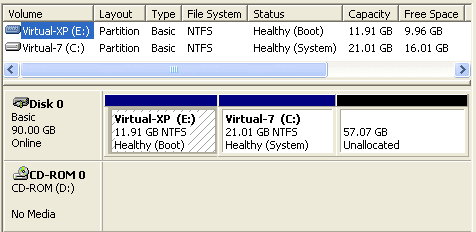
Example Disk Management:

XP_plus_7_01.png

Cheers!
Robert
 

My Computer

OS
...

My Computer

Computer Manufacturer/Model Number
Toshiba L505
OS
Windows 7 64x
CPU
AMD Turion II Dual-Core Mobile M520 2.30 GHz
Memory
4GB
Graphics Card(s)
ATI Radeon HD 4200
OK

Can I create a partition on my Ext hard drive and have both Fat 32 and NTFS? Or do I have to format it and then make it NTFS??
How do I do this? Either way?

Macrium Reflect is it good, can you rely on it? Will it store to my Ext HD with it being FAT32?

Thanks
 

My Computer

Computer type
Laptop
Computer Manufacturer/Model Number
Acer 7738G
OS
Acer Aspire 7738G Win 7 X64 bit Home Premium
OK

Can I create a partition on my Ext hard drive and have both Fat 32 and NTFS? Or do I have to format it and then make it NTFS??
How do I do this? Either way?

Macrium Reflect is it good, can you rely on it? Will it store to my Ext HD with it being FAT32?

Thanks
With your external hard drive plugged in, type disk management in the start search box. You will see something similar to the screen shot I just posted. Right click on the external drive, select "Shrink". Then create a new partition in the empty space and format it as NTFS. You will have two partitions on your external hard drive, one FAT32, and one NTFS.

Cheers!
 

My Computer

OS
...
Shrink volume and extend volume are greyed out, I cannot do anything with it? Only delete volume is available?
Do I have to format it and start from scratch?
 

My Computer

Computer type
Laptop
Computer Manufacturer/Model Number
Acer 7738G
OS
Acer Aspire 7738G Win 7 X64 bit Home Premium
Shrink volume and extend volume are greyed out, I cannot do anything with it? Only delete volume is available?
Do I have to format it and start from scratch?
I must confess, I have not formatted anything in FAT32 in a long time. However, my Windows 7 Disk Management will format in FAT32. Likewise, I have not tried to format an external usb drive either.

So I leave it to you, if you are in a hurry and there is nothing on your external drive you must save, you could try to reformat the existing partition in NTFS?

Can you easily remove the hard drive from the external case and plug it into the computer? It may be possible to shrink and format an internal drive?
 

My Computer

OS
...
OK I give it a go.
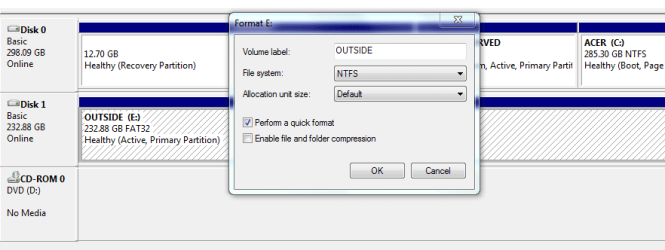
When I come to format, it gives me the file option of exFAT ot NTFS? Choose NTFS and format??
And leave allocation unit size as default?
 

Attachments

  • Capture back up 4.PNG
    Capture back up 4.PNG
    14.4 KB · Views: 3

My Computer

Computer type
Laptop
Computer Manufacturer/Model Number
Acer 7738G
OS
Acer Aspire 7738G Win 7 X64 bit Home Premium
OK I give it a go.
When I come to format, it gives me the file option of exFAT ot NTFS? Choose NTFS and format??
And leave allocation unit size as default?
Yes, that should give you an external hard drive you can create your Image Backup with?
 

My Computer

OS
...
OK all converted now creating image.:party:

Thanks again.:D

I will let you know the results:D
 

My Computer

Computer type
Laptop
Computer Manufacturer/Model Number
Acer 7738G
OS
Acer Aspire 7738G Win 7 X64 bit Home Premium
Is it worth doing a NEW Create Image every 2 weeks or so and not to bother with the back ups that I have done previously? Or is there something in favour of backups?

I have all of my pictures on DVD anyhow, but as a week to week thing?
 

My Computer

Computer type
Laptop
Computer Manufacturer/Model Number
Acer 7738G
OS
Acer Aspire 7738G Win 7 X64 bit Home Premium
Is it worth doing a NEW Create Image every 2 weeks or so and not to bother with the back ups that I have done previously? Or is there something in favour of backups?

I have all of my pictures on DVD anyhow, but as a week to week thing?
I wish I knew more about the Windows Backup. I have never used it until 7. But as I understand things, and no doubt others can add more info, you have a trio of backups working for you. Restore Points are automatic, with a change to your system. The Image can restore your entire system all at once to a hard drive. Backup is more flexible and will allow you to extract parts and pieces (at least it seemed to offer this when I last experimented with Backup?) so you can adapt a plan best suited for your needs. Weekly, biweekly, monthly ... however you arrange it, what are you prepared to lose if you have to restore your system using the backup of your choice?
 

My Computer

OS
...
Last Q?
It has now asked if I want to create a system repair disc, which I am doing.
Do I need to use this CD when and if I want to re install the image I just created?
 

My Computer

Computer type
Laptop
Computer Manufacturer/Model Number
Acer 7738G
OS
Acer Aspire 7738G Win 7 X64 bit Home Premium
Last Q?
It has now asked if I want to create a system repair disc, which I am doing.
Do I need to use this CD when and if I want to re install the image I just created?
Questions are always welcome!

You can use the Install DVD or the "System Repair" CD to restore an Image. Also other useful utilities shared by both. I have copies of both.

Cheers!
Robert
 

My Computer

OS
...
Thanks.

If I do regular Create System Images (every 2 weeks say as a backup) do I need to create a new CD everytime?
 

My Computer

Computer type
Laptop
Computer Manufacturer/Model Number
Acer 7738G
OS
Acer Aspire 7738G Win 7 X64 bit Home Premium
Back
Top