Back up system?

Thanks.

If I do regular Create System Images (every 2 weeks say as a backup) do I need to create a new CD everytime?
No. The CD only contains utilities ... no backup files. This is what is on the CD, and shared by the DVD:

What Is Windows RE?

Cheers!
Robert
OK so I just renew the image whenever, that updates new data, pics, music, etc and do not update repair CD, that will not change?

What do you mean when you mention DVD? Is it the equivalent as the location Ext HD that I used to store the image?
 

My Computer

Computer type
Laptop
Computer Manufacturer/Model Number
Acer 7738G
OS
Acer Aspire 7738G Win 7 X64 bit Home Premium
Thanks.

If I do regular Create System Images (every 2 weeks say as a backup) do I need to create a new CD everytime?
No. The CD only contains utilities ... no backup files. This is what is on the CD, and shared by the DVD:

What Is Windows RE?

Cheers!
Robert
OK so I just renew the image whenever, that updates new data, pics, music, etc and do not update repair CD, that will not change?

What do you mean when you mention DVD? Is it the equivalent as the location Ext HD that I used to store the image?
Please have a look at this link. When you boot to the DVD or now your new CD, this is what you will see:

http://www.sevenforums.com/performance-maintenance/51100-repair-cd-system-repair-disk.html

Cheers!
Robert
 

My Computer

OS
...
newtonjohn,
I've used Win7's Backup & Restore intensively and successfully. You will encounter no problems.

By all means, make that System Repair CD. It can be a life saver. Correct, you only need to make the CD once.

After making the Cd, boot from the CD. After seeing what is available, you can exit out.

With the System Repair CD, I've restored completely my laptop a couple of times with not problems. You see, I have done extensive testing of the backup and restore capabilities of Win 7. Works like a charm and can be life-saver.

With Backup and Restore you can choose to backup only files rather than doing a full system backup. Since I test out many different features, then I'm in the habit of simply doing a full system image backup although this takes much longer than simply backing up files.

Now you ask: How do I just back up files?

  1. WIN key (that's the one with the funny looking, wavy flag on it)
  2. Control Panel
  3. Backup and Restore
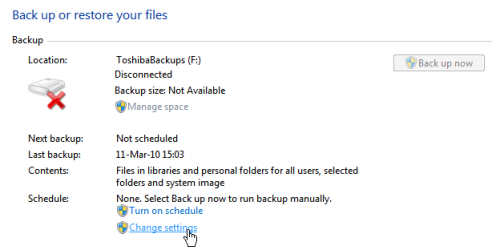
  4. Select "Change Settings"
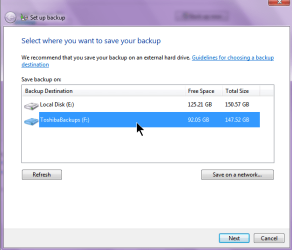
  5. Select where you to backup to and hit Next button
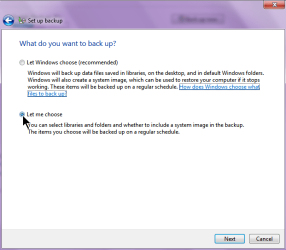
  6. Select "Let me choose" radio button and hit Next button
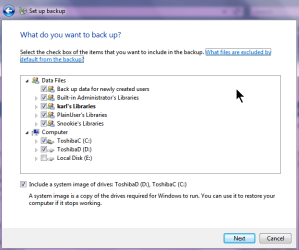
  7. Select the items you would like to backup and hit Next button
    Don't worry if you've over-selected, Backup and
    Restore will only store one copy of what's needed.
I've included several snapshots made with SnagIt.
 

Attachments

  • Backup&Restore Change Settings.png
    Backup&Restore Change Settings.png
    7.5 KB · Views: 2
  • Backup&Restore Select where.png
    Backup&Restore Select where.png
    17.8 KB · Views: 3
  • Backup&Restore Let me choose.png
    Backup&Restore Let me choose.png
    17.7 KB · Views: 2
  • Backup&Restore What do you want to backup.png
    Backup&Restore What do you want to backup.png
    19.7 KB · Views: 2

My Computer

Computer Manufacturer/Model Number
Toshiba Satellite S875D-S7239 laptop
OS
MS Windows 7 Ultimate SP1 64-bit
CPU
AMD A10-4600M
Motherboard
AMD Pumori (Socket FT1)
Memory
6.00 GB Dual-Channel DDR3 @ 798MHz (11-11-12-28)
Graphics Card(s)
AMD Radeon HD 7660G
Sound Card
High Definition Audio Device
Monitor(s) Displays
Generic PnP Monitor (1600x900@60Hz)
Screen Resolution
1600x900@60Hz
Hard Drives
SSD 119GB Corsair CSSD-V128GB2 ATA Device
Keyboard
Standard PS/2 Keyboard
Mouse
HP Wireless Optical Mobile Mouse Model FHA-3410
Internet Speed
What the local pub, local coffee shop offers.
Other Info
Optical Drive:MATSHITA BD-CMB UJ160B ATA Device


Also have an Asus ha1002xp netbook with Win 7 Ultimate installed.
Thanks iseeuu.

You have been really helpful, thank you for your time. Now lets see if the people at Acer service are the same??

karlsnooks.

Thank you too for your reply.

And to all here.
Thanks
 

My Computer

Computer type
Laptop
Computer Manufacturer/Model Number
Acer 7738G
OS
Acer Aspire 7738G Win 7 X64 bit Home Premium
Thanks iseeuu.

You have been really helpful, thank you for your time. Now lets see if the people at Acer service are the same??

karlsnooks.

Thank you too for your reply.

And to all here.
Thanks

In future you may want to look at something like Macrium Reflect. Even the free version lets you mount the backup image as a drive with a letter in explorer. You look though all the files just as if they were on a drive in explorer. Every file on the partition you back up will be on there except for stuff like the swap file, hibernate file, that you wouldn't look through anyway.

The nice thing about easy to use 3rd party utilities, esp. if they are free, is if you have more than one computer running more than one flavor of Windows, the program acts the same. You don't have to remember the little differences from version to version how stuff works.
 

My Computer

Computer Manufacturer/Model Number
HP Media Center
OS
Windows 7 32 bit
CPU
AMD 5200+ dual core
Memory
2 GB
Graphics Card(s)
NVidia GeForce 6150SE 128 MB
Monitor(s) Displays
CRT
Screen Resolution
1280x1024
Hard Drives
500 GB Sata internal :

SIIG USB 3.0 docking stations w/WD Caviar Black 6 Gb/s drives
Keyboard
PS/2
Mouse
PS/2 Wheel Mouse
Other Info
SIIG USB 3.0 PCIexpress card.
jonesnewton,
Glad to hear that we've been helpful. When all is over with, let us know how things went.
 

My Computer

Computer Manufacturer/Model Number
Toshiba Satellite S875D-S7239 laptop
OS
MS Windows 7 Ultimate SP1 64-bit
CPU
AMD A10-4600M
Motherboard
AMD Pumori (Socket FT1)
Memory
6.00 GB Dual-Channel DDR3 @ 798MHz (11-11-12-28)
Graphics Card(s)
AMD Radeon HD 7660G
Sound Card
High Definition Audio Device
Monitor(s) Displays
Generic PnP Monitor (1600x900@60Hz)
Screen Resolution
1600x900@60Hz
Hard Drives
SSD 119GB Corsair CSSD-V128GB2 ATA Device
Keyboard
Standard PS/2 Keyboard
Mouse
HP Wireless Optical Mobile Mouse Model FHA-3410
Internet Speed
What the local pub, local coffee shop offers.
Other Info
Optical Drive:MATSHITA BD-CMB UJ160B ATA Device


Also have an Asus ha1002xp netbook with Win 7 Ultimate installed.
Hi,
Acer were really good, I got the laptop back within 4 days, all sorted and they did not wipe the OS.
Thanks.

I would like to ask now, (I have now filled up my 220GB Ext HD with my stuff and would like to free up some space) can I save ONLY my Win 7 OS to the Ext HD, basically the working stuff of the laptop and not the data?
I currently have a system image of about 100GB which would be good to delete, it includes all of data at the time of image, but I also saved the data as well into their seperate folders and would like to continue along this route, just add data as and when.

I have re read this thread, I assume that I should do a BACKUP now and not an IMAGE, but I am unsure about exactly what to select in BACKUP?

Any advice or help?
 

My Computer

Computer type
Laptop
Computer Manufacturer/Model Number
Acer 7738G
OS
Acer Aspire 7738G Win 7 X64 bit Home Premium
Back
Top