Backup Complete Computer - Create an Image Backup

How to Create a System Image Backup in Windows 7

   Information
A system image is an exact copy of a drive. By default, a system image includes the drives required for Windows to run. A system image would include all NTFS formatted partitions with an operating system installed on it (ex: C ), as well as the System Reserved partition. These system partitions cannot be unselected. It also includes Windows and your system settings, programs, and files. You can use a system image to restore the contents of your computer if your hard disk or computer ever stops working. When you restore your computer from a system image, it's a complete restoration—you can't choose individual items to restore, and all of your current programs, system settings, and files are replaced with the contents of the system image.

This tutorial will show you how to create a system image (clone) backup of the entire hard drive or partition that Windows 7 is on, and any other selected drive or partition. You can use this image to be able to do a system image recovery to restore the hard drive or partition at boot back to the way it was at the time the backup image was created.

If you want to include additional drives in the system image, you can manually create a system image. If you manually create a system image, it can be saved on a USB flash drive, CDs, DVDs, or a hard drive.

If a system image was created through Windows Backup instead with the Include a System Image of Drives box checked, you can set Windows to retain as many system images as it has space for on the backup disk or to only keep the most recent system image.

   Note
Keeping different versions of system images

If you're saving your system images on an internal or external drive, or on CDs or DVDs, you can keep several versions of system images. On internal and external hard drives, older system images will be deleted when the drive runs out of space. To help conserve disk space, you can manually delete older system images.

Backup images are saved as backup periods in this format at the selected saved to location like the example below.

drive letter:\WindowsImageBackup\computer name\Backup YYYY-MM-DD HHMMSS

For example, if your computer name is Computer, your backup image location is on hard disk or partition (network or local) D: , and you backed up on 11/22/2008 at 1:00:50 PM (It uses 24 hour time), then that backup image would be located in the folder below.
D:\WindowsImageBackup\Computer\Backup 2008-11-22 130050
If you're saving your system images in a network location, you can only keep the most current system image for each computer. If you have an existing system image for a computer and are creating a new one for the same computer, the new system image will overwrite the existing one.


   Tip
If you want to keep multiple system image versions on the same drive or partition, then you can use either method below to do so.

METHOD ONE:
Change the maximum space used for system images on the drive letter you are saving the Windows Backup to by changing the maximum space used by System Protection for the same drive letter. This is the same setting.

You do not have to have System Protection turned on for the drive letter, but do need to adjust the maximum space to what you like.

The size of a system image can be quite large since it will include all system drives in the image by default plus any drives you have included. If you want to keep multiple system images, be sure to increase the max size accordingly.

METHOD TWO:

1. Navigate to the backup location above for where you saved a system image that you want to keep before creating a new system image.

2. Right click, or press and hold, on the WindowsImageBackup folder, and click/tap on Rename.

3. Rename it to something like WindowsImageBackup-Copy-1, press Enter, and click//tap on Yes if prompted by UAC.
NOTE: This way you can just easily change the 1 an the end of the name to 2, 3, 4, etc... for each new system image that you make a copy of.

4. You now have a different system image version that you can leave at this location to be able to keep multiple versions.


warnsmall.png
NOTE: When you want to restore a system image in a renamed WindowsImageBackup-Copy-1 folder in the future, then you must rename the current WindowsImageBackup folder first, then rename the WindowsImageBackup-Copy-1 folder back to WindowsImageBackup in order to be able to restore it. The WindowsImageBackup folder must be in the root directory of the drive, and not within another folder.

   Warning

  • Windows 7 can only include drives formatted with the NTFS file system in the system image.
  • Windows 7 cannot include the partition or drive that you are saving the backup image to in the image.
  • All "system" or "boot" drives/partitions are included in the system image by default, so you will not be able to save the system image to a system or boot drive/partition.
  • If you are saving the system image to a HDD or partition, then you can only save the system image on a separate hard drive (recommended) or partition than what Windows 7 is installed on. It cannot be saved to the C: drive.
  • Only the Windows 7 Professional, Ultimate, and Enterprise editions can backup to a network location.
  • You cannot restore a 64-bit Windows 7 backup image on a 32-bit system.
  • You cannot restore a 64-bit Windows 7 backup image with a 32 bit Windows 7 installation DVD or recovery partition, or the other way around. You must use the same 32-bit or 64-bit Windows 7 installation DVD or recovery partition as the backup image is.
  • A system image that was created on a computer using EFI cannot be restored on a computer using BIOS. It can only be restored on a computer using EFI.
  • When restoring a system image from a dynamic volume, the disks on your computer cannot be formatted to match the layout of the disks on the backup. To have full functionality, select a volume (partition) on a basic disk as your backup location instead.
  • I would recommend to create a system image on a separate HDD, or a separate partition on a separate HDD, for the best reliability to restore from it. CDs or DVDs are just not as reliable. A scratch one just one of them could ruin the whole image.


Here's How:
1. Open the Control Panel (icons view).

2. Click on the Backup and Restore icon.

3. Click on the Create a system image link. (See screenshot below)
Step1.jpg
4. If prompted by UAC, click on Yes.

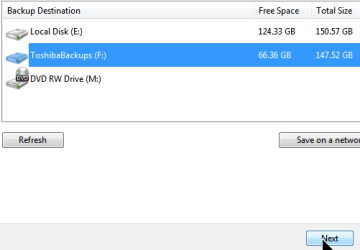
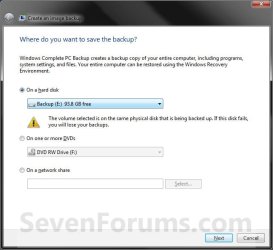
5. Select the location to where you would like to save the backup image at, and click on the Next button. (See screenshot below)
NOTE: See the Warning box at the top of the tutorial. Only the Windows 7 Professional, Ultimate, and Enterprise editions can backup to a network location.
Step2.jpg
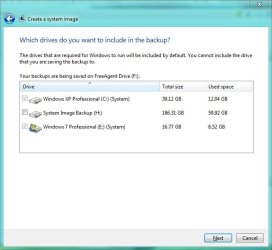
6. If available, check any additional hard drives or partitions (ex: Vista) that you would like to include in the backup image with the Windows 7 (System and C: ) partition or hard drive, and click on the Next button. (See screenshot below)
NOTE: See the WARNING box at the top of the tutorial. If you do not want to add any additional hard drives or partitions, then just leave the others unchecked. You will not see this, if you do not have any other OS installed other than Windows 7.
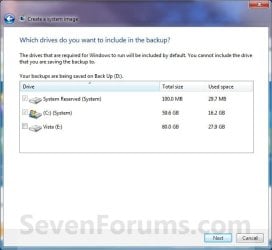
Step3.jpg
7. Click on the Start backup button. (See screenshot below)
Step4.jpg
8. You will now see this window. (See screenshot below)
NOTE: If you wish to stop creating the backup image during this point, click on the Stop backup, Stop, and Close buttons.
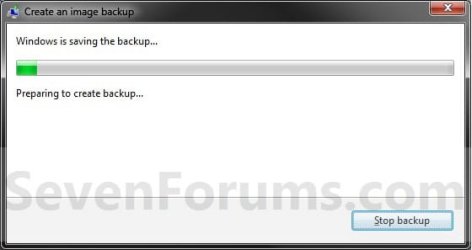
Step5.jpg
9. When it is finished you will see this create a System Repair disc pop-up window. Click on No. (See screenshot below)
NOTE: For how to always hide or show this message, see this tutorial.
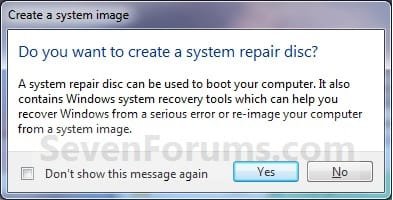
Step7.jpg
10. Click on the Close button. (See screenshot below)
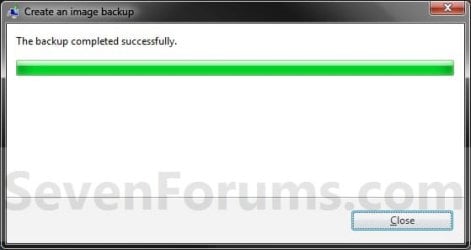
Step8.jpg
11. Close the Backup and Restore window. (See screenshot below step 3)
That's it,
Shawn


Last edited:
Hello Mcleod,

There's no need to disconnect the Vista drive since you could just leave it unchecked and not have it included in the system image backup if that is why you wanted to disconnect it.

Hope this helps,
Shawn
If others are like mine, he would have to disconnect to un-select it. Options for drive/partitions with OS in windows system Image are checked and grayed out.
 

My Computer

Computer Manufacturer/Model Number
Averatec 6130HS-20
OS
Windows 7 Professional 32-bit (6.1, Build 7600)
CPU
Intel(R) Pentium(R) 4 3.00 GHz HT
Memory
2.0 GB
Graphics Card(s)
ATI Mobility Radeon 9600 64MB
Sound Card
Realtek AC'97 Audio
Screen Resolution
1280 x 800
Hard Drives
Seagate 96023A 60GB 7200RPM -
Seagate FreeAgentDesktop 250GB
Cooling
20 Inch Box Fan
Mouse
Targus PAWM10 Wireless Optical Laptop Mouse
Hello Greg,

Strange, I had the option to select or not the Vista partition in the screenshot under step 6. :confused:
 

My Computer

Computer type
PC/Desktop
Computer Manufacturer/Model Number
Self built custom
OS
64-bit Windows 11 Pro for Workstations
CPU
Intel i7-8700K OC'd to 5 GHz
Motherboard
ASUS ROG Maximus XI Formula Z390
Memory
64 GB (4x16GB) G.SKILL TridentZ RGB DDR4 3600 MHz
Graphics Card(s)
ASUS ROG-STRIX-GTX1080TI-O11G-GAMING
Sound Card
Integrated
Monitor(s) Displays
2 x Samsung Odyssey G7 27"
Screen Resolution
2560x1440
Hard Drives
1TB Samsung 990 PRO M.2,
4TB Samsung 990 PRO PRO M.2,
TerraMaster F8 SSD Plus NAS
PSU
Seasonic Prime Titanium 850W
Case
Thermaltake Core P3
Cooling
Corsair Hydro H115i
Keyboard
Logitech wireless K800
Mouse
Logitech MX Master 4
Internet Speed
2 Gb/s Download and 100 Mb/s Upload
Antivirus
Malwarebyte Anti-Malware Premium
Browser
Google Chrome
Other Info
Logitech Z625 speaker system,
Logitech BRIO 4K Pro webcam,
HP Color LaserJet Pro MFP M477fdn,
APC SMART-UPS RT 1000 XL - SURT1000XLI,
Galaxy S23 Plus phone
Hello Greg,

Strange, I had the option to select or not the Vista partition in the screenshot under step 6. :confused:

Hmm, it may just be me then.

Untitled.jpg
 

My Computer

Computer Manufacturer/Model Number
Averatec 6130HS-20
OS
Windows 7 Professional 32-bit (6.1, Build 7600)
CPU
Intel(R) Pentium(R) 4 3.00 GHz HT
Memory
2.0 GB
Graphics Card(s)
ATI Mobility Radeon 9600 64MB
Sound Card
Realtek AC'97 Audio
Screen Resolution
1280 x 800
Hard Drives
Seagate 96023A 60GB 7200RPM -
Seagate FreeAgentDesktop 250GB
Cooling
20 Inch Box Fan
Mouse
Targus PAWM10 Wireless Optical Laptop Mouse
Ah, ok I see now why. The reason why you can't and I can is because XP was installed first as the C: drive, then Windows 7 on your system. Since XP is on the C: drive, it's the boot drive and must be included. I had Windows 7 installed first, then Vista.
 

My Computer

Computer type
PC/Desktop
Computer Manufacturer/Model Number
Self built custom
OS
64-bit Windows 11 Pro for Workstations
CPU
Intel i7-8700K OC'd to 5 GHz
Motherboard
ASUS ROG Maximus XI Formula Z390
Memory
64 GB (4x16GB) G.SKILL TridentZ RGB DDR4 3600 MHz
Graphics Card(s)
ASUS ROG-STRIX-GTX1080TI-O11G-GAMING
Sound Card
Integrated
Monitor(s) Displays
2 x Samsung Odyssey G7 27"
Screen Resolution
2560x1440
Hard Drives
1TB Samsung 990 PRO M.2,
4TB Samsung 990 PRO PRO M.2,
TerraMaster F8 SSD Plus NAS
PSU
Seasonic Prime Titanium 850W
Case
Thermaltake Core P3
Cooling
Corsair Hydro H115i
Keyboard
Logitech wireless K800
Mouse
Logitech MX Master 4
Internet Speed
2 Gb/s Download and 100 Mb/s Upload
Antivirus
Malwarebyte Anti-Malware Premium
Browser
Google Chrome
Other Info
Logitech Z625 speaker system,
Logitech BRIO 4K Pro webcam,
HP Color LaserJet Pro MFP M477fdn,
APC SMART-UPS RT 1000 XL - SURT1000XLI,
Galaxy S23 Plus phone
wallyinnc
HD's are finally fully tested and fine. I fully see your point, but I am also thinking that if it is really a mobo issue(s), then even a clean install on this machine will be unhelpful, and that is why I try to prepare for a migration to a new rig.
 

My Computer

OS
w7 Ultimate 32bit
CPU
q6700
Motherboard
P5w DH deluxe
Memory
4gb
Graphics Card(s)
HD5850 Sapphire
Sound Card
Realtek
Monitor(s) Displays
Samsung XL2370
Screen Resolution
1920*1080
Hard Drives
WD EADS 1TB
WD 500GB
PSU
BeQuiet 550w
Case
Silverstone LC20M
Cooling
3 case 80mm fans, 2 power 80 fans, Zalman9500Led
Keyboard
Microsoft wireless laser 7000
Mouse
Microsoft wireless laser 7000
Internet Speed
12gb
abax, I meant a clean install in the new one. Basically trash the problematic install and the mobo causing it and start over, transferring your files. You will then have a clean system, and I think you will be much happier with it
 

My Computer

Computer Manufacturer/Model Number
Wally, Innc.
OS
Windows 7 x64 finally!
CPU
AMD Athlon II X2 240
Motherboard
Biostar TA790GX XE
Memory
OCZ Platinum 4GB DDR2 1066 (will not work past 800MHz)
Graphics Card(s)
MSI R4670-MD1G Radeon HD 4670 1GB 128-bit GDDR3
Sound Card
ATI High Definition Audio Device Realtek ALC888
Monitor(s) Displays
HP w19e
Screen Resolution
1440x900
Hard Drives
Western Digital Caviar Green WD5000AADS 500GB SATA
Western Digital Caviar Blue WD5000AAKS 500GB SATA
PSU
Athena Power Micro ATX 400W
Case
HEC 6T 6T10BB Black MicroATX Mini Tower
Cooling
stock
Keyboard
wired, many keys
Mouse
HP wireless, 2 buttons, 1 wheel
Internet Speed
DSL 2Mb (recently getting 1.65M!)
wallyinnc,
Think you're right. I'll give it a last shot and then move to this direction.
Appreciate your support.
 

My Computer

OS
w7 Ultimate 32bit
CPU
q6700
Motherboard
P5w DH deluxe
Memory
4gb
Graphics Card(s)
HD5850 Sapphire
Sound Card
Realtek
Monitor(s) Displays
Samsung XL2370
Screen Resolution
1920*1080
Hard Drives
WD EADS 1TB
WD 500GB
PSU
BeQuiet 550w
Case
Silverstone LC20M
Cooling
3 case 80mm fans, 2 power 80 fans, Zalman9500Led
Keyboard
Microsoft wireless laser 7000
Mouse
Microsoft wireless laser 7000
Internet Speed
12gb
Hey Brink, I would like to use this function to re-install my laptop the way it is at this point in time on my new laptop, and also would like a disc. So I would say yes to the system repair disc, install win7 on my new laptop and run my system repair disc? Bottom Line is: I want my new one EXACTLY like my old one. Am I on the right track?
TKS RJBuild
 

My Computer

Computer Manufacturer/Model Number
Owner Builder
OS
Win 7 64 Bit
CPU
AMD AthlonII X3
Motherboard
BIOSTAR A880G+ AM3 AMD 880G HDMI Micro ATX AMD
Memory
G.SKILL Ripjaws X Series 8GB (2 x 4GB) 240-Pin DDR3 SDRAM DD
Graphics Card(s)
ATI Radeon HD 4250 (On Board)
Sound Card
Realtek ALC662 6-Channel HD Audio
Monitor(s) Displays
Dell S2409W
Screen Resolution
1920X1080
Hard Drives
Samsung HD 322gb sata (win 7)
Seagate Barracuda 500gb sata (storage)
Seagate HD 20 gig IDE (win XP PRO)
PSU
Antec BP 500 Watt
Case
Cool Master Elite 430
Cooling
5ea. 120 mm. Fans ( 2intake and 3 Exhaust)
Keyboard
Microsoft Wireless Comfort Keyboard 1.0A
Mouse
Wireless Optical Mouse 2.0
Internet Speed
3MB DSL ( Bellsouth's Answer to BLINDING SPEED)
Hello RJ, and welcome to Seven Forums.

Unless they are the exact same brand and model laptop, you would not be able to restore the system image backup to the new laptop and be able to use it. This is because the backup is for the old laptop and its motherboard and drivers. These will not work with the new laptop since it's most likely not the same model.

Sorry, :(
Shawn
 

My Computer

Computer type
PC/Desktop
Computer Manufacturer/Model Number
Self built custom
OS
64-bit Windows 11 Pro for Workstations
CPU
Intel i7-8700K OC'd to 5 GHz
Motherboard
ASUS ROG Maximus XI Formula Z390
Memory
64 GB (4x16GB) G.SKILL TridentZ RGB DDR4 3600 MHz
Graphics Card(s)
ASUS ROG-STRIX-GTX1080TI-O11G-GAMING
Sound Card
Integrated
Monitor(s) Displays
2 x Samsung Odyssey G7 27"
Screen Resolution
2560x1440
Hard Drives
1TB Samsung 990 PRO M.2,
4TB Samsung 990 PRO PRO M.2,
TerraMaster F8 SSD Plus NAS
PSU
Seasonic Prime Titanium 850W
Case
Thermaltake Core P3
Cooling
Corsair Hydro H115i
Keyboard
Logitech wireless K800
Mouse
Logitech MX Master 4
Internet Speed
2 Gb/s Download and 100 Mb/s Upload
Antivirus
Malwarebyte Anti-Malware Premium
Browser
Google Chrome
Other Info
Logitech Z625 speaker system,
Logitech BRIO 4K Pro webcam,
HP Color LaserJet Pro MFP M477fdn,
APC SMART-UPS RT 1000 XL - SURT1000XLI,
Galaxy S23 Plus phone
Shawn,
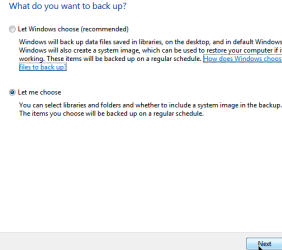
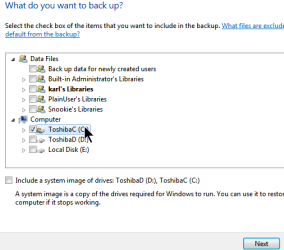
I realize that one doesn't get the same thing and maybe this is covered in your files backup tutorial, but one can backup entire drive.

Have also recently done some various backups using Acronis True Image Home 2010. This is still not a product which I consider to be friendly for the non-technical person. Positive to relate is that I've found Acronis online chat and their support to be responsive and helpful.
 

Attachments

  • BackupChangeSettings.png
    BackupChangeSettings.png
    3.5 KB · Views: 159
  • Backkup Select location.png
    Backkup Select location.png
    13.7 KB · Views: 150
  • Backup Let me choose.png
    Backup Let me choose.png
    13 KB · Views: 142
  • Backup What do you want.png
    Backup What do you want.png
    19.1 KB · Views: 156

My Computer

Computer Manufacturer/Model Number
Toshiba Satellite S875D-S7239 laptop
OS
MS Windows 7 Ultimate SP1 64-bit
CPU
AMD A10-4600M
Motherboard
AMD Pumori (Socket FT1)
Memory
6.00 GB Dual-Channel DDR3 @ 798MHz (11-11-12-28)
Graphics Card(s)
AMD Radeon HD 7660G
Sound Card
High Definition Audio Device
Monitor(s) Displays
Generic PnP Monitor (1600x900@60Hz)
Screen Resolution
1600x900@60Hz
Hard Drives
SSD 119GB Corsair CSSD-V128GB2 ATA Device
Keyboard
Standard PS/2 Keyboard
Mouse
HP Wireless Optical Mobile Mouse Model FHA-3410
Internet Speed
What the local pub, local coffee shop offers.
Other Info
Optical Drive:MATSHITA BD-CMB UJ160B ATA Device


Also have an Asus ha1002xp netbook with Win 7 Ultimate installed.
Hello Karl,

Thank you, but yep it's covered in step 9 in this tutorial. :)
 

My Computer

Computer type
PC/Desktop
Computer Manufacturer/Model Number
Self built custom
OS
64-bit Windows 11 Pro for Workstations
CPU
Intel i7-8700K OC'd to 5 GHz
Motherboard
ASUS ROG Maximus XI Formula Z390
Memory
64 GB (4x16GB) G.SKILL TridentZ RGB DDR4 3600 MHz
Graphics Card(s)
ASUS ROG-STRIX-GTX1080TI-O11G-GAMING
Sound Card
Integrated
Monitor(s) Displays
2 x Samsung Odyssey G7 27"
Screen Resolution
2560x1440
Hard Drives
1TB Samsung 990 PRO M.2,
4TB Samsung 990 PRO PRO M.2,
TerraMaster F8 SSD Plus NAS
PSU
Seasonic Prime Titanium 850W
Case
Thermaltake Core P3
Cooling
Corsair Hydro H115i
Keyboard
Logitech wireless K800
Mouse
Logitech MX Master 4
Internet Speed
2 Gb/s Download and 100 Mb/s Upload
Antivirus
Malwarebyte Anti-Malware Premium
Browser
Google Chrome
Other Info
Logitech Z625 speaker system,
Logitech BRIO 4K Pro webcam,
HP Color LaserJet Pro MFP M477fdn,
APC SMART-UPS RT 1000 XL - SURT1000XLI,
Galaxy S23 Plus phone
Hey Shawn
Tks For the quick answer and the welcome,I sort-a figured that would be the case, the 2 having to be identical TKS. I have put my back-up on a total of 5 dvd+r discs 4 being my image file and the last a System Repair Disc. How will these be used in the future if needed, are the disc's complete with instruction, do they have a prompt, will the be ran from safe mode?
TKS ahead of time.
RJ
 

My Computer

Computer Manufacturer/Model Number
Owner Builder
OS
Win 7 64 Bit
CPU
AMD AthlonII X3
Motherboard
BIOSTAR A880G+ AM3 AMD 880G HDMI Micro ATX AMD
Memory
G.SKILL Ripjaws X Series 8GB (2 x 4GB) 240-Pin DDR3 SDRAM DD
Graphics Card(s)
ATI Radeon HD 4250 (On Board)
Sound Card
Realtek ALC662 6-Channel HD Audio
Monitor(s) Displays
Dell S2409W
Screen Resolution
1920X1080
Hard Drives
Samsung HD 322gb sata (win 7)
Seagate Barracuda 500gb sata (storage)
Seagate HD 20 gig IDE (win XP PRO)
PSU
Antec BP 500 Watt
Case
Cool Master Elite 430
Cooling
5ea. 120 mm. Fans ( 2intake and 3 Exhaust)
Keyboard
Microsoft Wireless Comfort Keyboard 1.0A
Mouse
Wireless Optical Mouse 2.0
Internet Speed
3MB DSL ( Bellsouth's Answer to BLINDING SPEED)
RJ,

When you're ready or need to do a System Image Recovery using the backup DVD's, you would just need to insert the last system image DVD from the set when prompted while doing the system image recovery. :)

Backing up the system image to another partition or hard drive, if it's an available option, is much more reliable that DVDs though.
 

My Computer

Computer type
PC/Desktop
Computer Manufacturer/Model Number
Self built custom
OS
64-bit Windows 11 Pro for Workstations
CPU
Intel i7-8700K OC'd to 5 GHz
Motherboard
ASUS ROG Maximus XI Formula Z390
Memory
64 GB (4x16GB) G.SKILL TridentZ RGB DDR4 3600 MHz
Graphics Card(s)
ASUS ROG-STRIX-GTX1080TI-O11G-GAMING
Sound Card
Integrated
Monitor(s) Displays
2 x Samsung Odyssey G7 27"
Screen Resolution
2560x1440
Hard Drives
1TB Samsung 990 PRO M.2,
4TB Samsung 990 PRO PRO M.2,
TerraMaster F8 SSD Plus NAS
PSU
Seasonic Prime Titanium 850W
Case
Thermaltake Core P3
Cooling
Corsair Hydro H115i
Keyboard
Logitech wireless K800
Mouse
Logitech MX Master 4
Internet Speed
2 Gb/s Download and 100 Mb/s Upload
Antivirus
Malwarebyte Anti-Malware Premium
Browser
Google Chrome
Other Info
Logitech Z625 speaker system,
Logitech BRIO 4K Pro webcam,
HP Color LaserJet Pro MFP M477fdn,
APC SMART-UPS RT 1000 XL - SURT1000XLI,
Galaxy S23 Plus phone
Shawn,
I put the 28 gigs of image files on 4 DVD's to conserve the 84 or so gigs of free space on my harddrive, making a partition will decrease my 84 to a lower value correct? Or am I not Getting this
TKS RJ
 

My Computer

Computer Manufacturer/Model Number
Owner Builder
OS
Win 7 64 Bit
CPU
AMD AthlonII X3
Motherboard
BIOSTAR A880G+ AM3 AMD 880G HDMI Micro ATX AMD
Memory
G.SKILL Ripjaws X Series 8GB (2 x 4GB) 240-Pin DDR3 SDRAM DD
Graphics Card(s)
ATI Radeon HD 4250 (On Board)
Sound Card
Realtek ALC662 6-Channel HD Audio
Monitor(s) Displays
Dell S2409W
Screen Resolution
1920X1080
Hard Drives
Samsung HD 322gb sata (win 7)
Seagate Barracuda 500gb sata (storage)
Seagate HD 20 gig IDE (win XP PRO)
PSU
Antec BP 500 Watt
Case
Cool Master Elite 430
Cooling
5ea. 120 mm. Fans ( 2intake and 3 Exhaust)
Keyboard
Microsoft Wireless Comfort Keyboard 1.0A
Mouse
Wireless Optical Mouse 2.0
Internet Speed
3MB DSL ( Bellsouth's Answer to BLINDING SPEED)
You're fine. That was only if you had the extra HDD space, or extra HDD to put them on instead. :)
 

My Computer

Computer type
PC/Desktop
Computer Manufacturer/Model Number
Self built custom
OS
64-bit Windows 11 Pro for Workstations
CPU
Intel i7-8700K OC'd to 5 GHz
Motherboard
ASUS ROG Maximus XI Formula Z390
Memory
64 GB (4x16GB) G.SKILL TridentZ RGB DDR4 3600 MHz
Graphics Card(s)
ASUS ROG-STRIX-GTX1080TI-O11G-GAMING
Sound Card
Integrated
Monitor(s) Displays
2 x Samsung Odyssey G7 27"
Screen Resolution
2560x1440
Hard Drives
1TB Samsung 990 PRO M.2,
4TB Samsung 990 PRO PRO M.2,
TerraMaster F8 SSD Plus NAS
PSU
Seasonic Prime Titanium 850W
Case
Thermaltake Core P3
Cooling
Corsair Hydro H115i
Keyboard
Logitech wireless K800
Mouse
Logitech MX Master 4
Internet Speed
2 Gb/s Download and 100 Mb/s Upload
Antivirus
Malwarebyte Anti-Malware Premium
Browser
Google Chrome
Other Info
Logitech Z625 speaker system,
Logitech BRIO 4K Pro webcam,
HP Color LaserJet Pro MFP M477fdn,
APC SMART-UPS RT 1000 XL - SURT1000XLI,
Galaxy S23 Plus phone
Shawn
Cool TKS For the help , got it now apreciate it
Have a great day
RJ
 

My Computer

Computer Manufacturer/Model Number
Owner Builder
OS
Win 7 64 Bit
CPU
AMD AthlonII X3
Motherboard
BIOSTAR A880G+ AM3 AMD 880G HDMI Micro ATX AMD
Memory
G.SKILL Ripjaws X Series 8GB (2 x 4GB) 240-Pin DDR3 SDRAM DD
Graphics Card(s)
ATI Radeon HD 4250 (On Board)
Sound Card
Realtek ALC662 6-Channel HD Audio
Monitor(s) Displays
Dell S2409W
Screen Resolution
1920X1080
Hard Drives
Samsung HD 322gb sata (win 7)
Seagate Barracuda 500gb sata (storage)
Seagate HD 20 gig IDE (win XP PRO)
PSU
Antec BP 500 Watt
Case
Cool Master Elite 430
Cooling
5ea. 120 mm. Fans ( 2intake and 3 Exhaust)
Keyboard
Microsoft Wireless Comfort Keyboard 1.0A
Mouse
Wireless Optical Mouse 2.0
Internet Speed
3MB DSL ( Bellsouth's Answer to BLINDING SPEED)
You're welcome RJ. I hope you have a great day as well. :)
 

My Computer

Computer type
PC/Desktop
Computer Manufacturer/Model Number
Self built custom
OS
64-bit Windows 11 Pro for Workstations
CPU
Intel i7-8700K OC'd to 5 GHz
Motherboard
ASUS ROG Maximus XI Formula Z390
Memory
64 GB (4x16GB) G.SKILL TridentZ RGB DDR4 3600 MHz
Graphics Card(s)
ASUS ROG-STRIX-GTX1080TI-O11G-GAMING
Sound Card
Integrated
Monitor(s) Displays
2 x Samsung Odyssey G7 27"
Screen Resolution
2560x1440
Hard Drives
1TB Samsung 990 PRO M.2,
4TB Samsung 990 PRO PRO M.2,
TerraMaster F8 SSD Plus NAS
PSU
Seasonic Prime Titanium 850W
Case
Thermaltake Core P3
Cooling
Corsair Hydro H115i
Keyboard
Logitech wireless K800
Mouse
Logitech MX Master 4
Internet Speed
2 Gb/s Download and 100 Mb/s Upload
Antivirus
Malwarebyte Anti-Malware Premium
Browser
Google Chrome
Other Info
Logitech Z625 speaker system,
Logitech BRIO 4K Pro webcam,
HP Color LaserJet Pro MFP M477fdn,
APC SMART-UPS RT 1000 XL - SURT1000XLI,
Galaxy S23 Plus phone
Hello everyone, I have a small issue that I can't seem to figure out. Any input would be of great help to me.

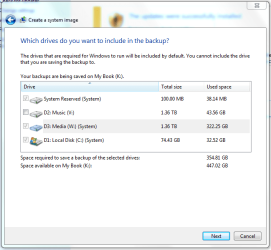
One of my storage hard drives is showing up as being part of the "System." I don't want to back up everything on this storage drive in addition to the system drive. But since it's showing up as "System," I cannot uncheck it. I uploaded a screenshot, in case I'm not clear.

Windows 7 is on my 80GB SSD, and the other two are 1.5tb drives. The 2nd 1.5tb drive is showing up as part of the system and I can't uncheck it. I did put that hard drive as the default download location for most of my applications (firefox, internet explorer, etc.). That's the only reason that comes to mind. There are no important files on it, only EAC FLAC backups, a few movies, etc.
 

Attachments

  • capturecu.png
    capturecu.png
    79.4 KB · Views: 227

My Computer

OS
Mac OSX
Hello Taiyoyuden,

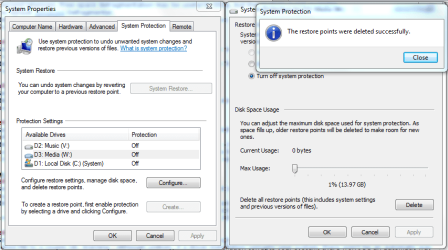
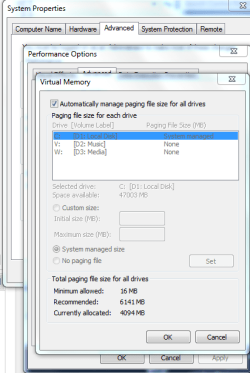
Do you have anything like the page file, restore points, or user folders moved to be stored on this hard drive instead of the default C: drive?
 

My Computer

Computer type
PC/Desktop
Computer Manufacturer/Model Number
Self built custom
OS
64-bit Windows 11 Pro for Workstations
CPU
Intel i7-8700K OC'd to 5 GHz
Motherboard
ASUS ROG Maximus XI Formula Z390
Memory
64 GB (4x16GB) G.SKILL TridentZ RGB DDR4 3600 MHz
Graphics Card(s)
ASUS ROG-STRIX-GTX1080TI-O11G-GAMING
Sound Card
Integrated
Monitor(s) Displays
2 x Samsung Odyssey G7 27"
Screen Resolution
2560x1440
Hard Drives
1TB Samsung 990 PRO M.2,
4TB Samsung 990 PRO PRO M.2,
TerraMaster F8 SSD Plus NAS
PSU
Seasonic Prime Titanium 850W
Case
Thermaltake Core P3
Cooling
Corsair Hydro H115i
Keyboard
Logitech wireless K800
Mouse
Logitech MX Master 4
Internet Speed
2 Gb/s Download and 100 Mb/s Upload
Antivirus
Malwarebyte Anti-Malware Premium
Browser
Google Chrome
Other Info
Logitech Z625 speaker system,
Logitech BRIO 4K Pro webcam,
HP Color LaserJet Pro MFP M477fdn,
APC SMART-UPS RT 1000 XL - SURT1000XLI,
Galaxy S23 Plus phone
I just checked and there should not be any paging/restore files on the drive. Screenshots attached.
 

Attachments

  • restore.PNG
    restore.PNG
    124.9 KB · Views: 135
  • paging.PNG
    paging.PNG
    81.5 KB · Views: 183

My Computer

OS
Mac OSX
Back
Top