
Solved Backup Error code: 0x81000019

socrgy9

New member
Power User
Local time
10:23 AM
Messages
306
Hi,

since day one of having my new computer, my windows backup has never worked even once. i'm starting to get into upgrading hardware and such within my desktop, but i really don't want to go much further before creating a good solid back up and system image to have as my safety.

after each fail i get the same error message: "A shadow copy could not be created. Please check "VSS" and "SPP" application event logs for more information.
Details: Insufficient storage available to create either the shadow copy storage file or other shadow copy data." and then it gives the options to try to run backup again or change backup settings.

when i expand the details at the bottom, this is all i get:
Backup time: (date/time i attempted)
Backup location: Expansion Drive (J: ) my external hard drive.
Error code: 0x81000019

i have a 2Tb external hard drive so i'm pretty sure it shouldn't be a space issue.

please help
thanks
 
Last edited by a moderator:

My Computer

Computer type
PC/Desktop
Computer Manufacturer/Model Number
Custom Build and MSI GE60 0ND laptop
OS
windows 7 64bit on both
CPU
AMD FX-8350 @4.6GHz/Intel Core i7-3610QM @2.3GHz
Motherboard
ASUS M5A99X EVO R2.0/MS-16GA
Memory
16GB G.Skill 1866MHz/8GB dual channel 1600MHz
Graphics Card(s)
two Sapphire HD7970 OC 3Gb in crossfire/GTX660M 2Gb
Sound Card
Realtek HD Audio/Realtek HD Audio with THX TruStudio Pro
Monitor(s) Displays
Hanns-G 27" 1080p /Generic PnP Monitor
Screen Resolution
both 1920x1080p 60Hz
Hard Drives
250GB Samsung 840 EVO SSD,
1TB WD Blue
3x2TB WD Greens
/Samsung 840 EVO mSATA
PSU
Corsair HX750/laptop psu
Case
NZXT Source 530
Cooling
CoolerMaster Hyper 212 Evo
Keyboard
Logitech G710+/laptop keyboard by steelseries
Mouse
Logitec G500s/Logitec G500
Internet Speed
50Mbps down/1-3 Mbps up
Other Info
Scythe Kaze Master Pro 5.25 fan controller; APC Back-UPS XS 1500
Try this.

Start> Right click Computer> Manage
Select Storage> Disk management
Verify that you have a System Reserved partition of 100 MB
If yes, right click on this volume and select Properties.
View used and free space.

You must have around 40 MB free space for backup to complete successfully

A Guy
 

My Computer

Computer type
PC/Desktop
OS
Windows 10 Home x64
CPU
INTEL Core i5-750 Quad-Core 3.37GHz
Motherboard
ASUS P7P55D
Memory
HyperX Fury Black Series 8GB (2 x 4GB) 1866Mhz
Graphics Card(s)
EVGA GeForce GTX 750 Superclocked 1GB 128-Bit GDDR5
Monitor(s) Displays
LG 32MA68HY 32" IPS
Screen Resolution
1920 x 1080
Hard Drives
Samsung 840 Evo 120GB, SEAGATE 500GB Barracuda® 7200.12, SATA 3 Gb/s, 7200 RPM, 16MB cache
PSU
ANTEC TruePower New TP-550, 80 PLUS, 550W
Case
ANTEC Three Hundred Illusion
Cooling
COOLER MASTER Hyper 212 Plus, 4 x 120mm 1 x 140mm Noctua's
Internet Speed
85 + Mbps
Antivirus
Avast
Browser
Vivaldi
Try this.

Start> Right click Computer> Manage
Select Storage> Disk management
Verify that you have a System Reserved partition of 100 MB
If yes, right click on this volume and select Properties.
View used and free space.

You must have around 40 MB free space for backup to complete successfully

A Guy

thanks for your reply.

i found where you said to go and it says i have 37.7 mb free. ...? how can i fix that.

i also have a "FACTORY_IMAGE (D: )" that is only 10.89 Gb total. not sure if that matters
 
Last edited:

My Computer

Computer type
PC/Desktop
Computer Manufacturer/Model Number
Custom Build and MSI GE60 0ND laptop
OS
windows 7 64bit on both
CPU
AMD FX-8350 @4.6GHz/Intel Core i7-3610QM @2.3GHz
Motherboard
ASUS M5A99X EVO R2.0/MS-16GA
Memory
16GB G.Skill 1866MHz/8GB dual channel 1600MHz
Graphics Card(s)
two Sapphire HD7970 OC 3Gb in crossfire/GTX660M 2Gb
Sound Card
Realtek HD Audio/Realtek HD Audio with THX TruStudio Pro
Monitor(s) Displays
Hanns-G 27" 1080p /Generic PnP Monitor
Screen Resolution
both 1920x1080p 60Hz
Hard Drives
250GB Samsung 840 EVO SSD,
1TB WD Blue
3x2TB WD Greens
/Samsung 840 EVO mSATA
PSU
Corsair HX750/laptop psu
Case
NZXT Source 530
Cooling
CoolerMaster Hyper 212 Evo
Keyboard
Logitech G710+/laptop keyboard by steelseries
Mouse
Logitec G500s/Logitec G500
Internet Speed
50Mbps down/1-3 Mbps up
Other Info
Scythe Kaze Master Pro 5.25 fan controller; APC Back-UPS XS 1500
WIN key | type Disk Cleanup | Enter key

Be sure to under the More Options tab, in the System Restore and Shadow Copies section to click on the Cleanup Button.


Another "trick":
WIN + E | in that long address bar at the top, type %temp% | ENTER key

Now use Ctrl + A to select all
Right-click on any selected file/folder and select DELETE

Let us know how much space this gets you.
 

My Computer

Computer Manufacturer/Model Number
Toshiba Satellite S875D-S7239 laptop
OS
MS Windows 7 Ultimate SP1 64-bit
CPU
AMD A10-4600M
Motherboard
AMD Pumori (Socket FT1)
Memory
6.00 GB Dual-Channel DDR3 @ 798MHz (11-11-12-28)
Graphics Card(s)
AMD Radeon HD 7660G
Sound Card
High Definition Audio Device
Monitor(s) Displays
Generic PnP Monitor (1600x900@60Hz)
Screen Resolution
1600x900@60Hz
Hard Drives
SSD 119GB Corsair CSSD-V128GB2 ATA Device
Keyboard
Standard PS/2 Keyboard
Mouse
HP Wireless Optical Mobile Mouse Model FHA-3410
Internet Speed
What the local pub, local coffee shop offers.
Other Info
Optical Drive:MATSHITA BD-CMB UJ160B ATA Device


Also have an Asus ha1002xp netbook with Win 7 Ultimate installed.
Start> Type in Disk Management> Create and format hard drive partitions

Right click on the System Reserved partition and see if Extend Volume is available of grayed out. If it is available, suggest you resize it to 490MB. This should allow plenty of space should the used area grow. this is a known issue and I don't know if it was ever fixed. If you can resize, try to do a backup. If you cannot resize, post back, and I'll look for a fix. A Guy

Edit: I see karlsnooks has some good advice. If you can free up space on the original 100MB SR partition, you'd be better served.
 

My Computer

Computer type
PC/Desktop
OS
Windows 10 Home x64
CPU
INTEL Core i5-750 Quad-Core 3.37GHz
Motherboard
ASUS P7P55D
Memory
HyperX Fury Black Series 8GB (2 x 4GB) 1866Mhz
Graphics Card(s)
EVGA GeForce GTX 750 Superclocked 1GB 128-Bit GDDR5
Monitor(s) Displays
LG 32MA68HY 32" IPS
Screen Resolution
1920 x 1080
Hard Drives
Samsung 840 Evo 120GB, SEAGATE 500GB Barracuda® 7200.12, SATA 3 Gb/s, 7200 RPM, 16MB cache
PSU
ANTEC TruePower New TP-550, 80 PLUS, 550W
Case
ANTEC Three Hundred Illusion
Cooling
COOLER MASTER Hyper 212 Plus, 4 x 120mm 1 x 140mm Noctua's
Internet Speed
85 + Mbps
Antivirus
Avast
Browser
Vivaldi

My Computer

Computer Manufacturer/Model Number
Toshiba Satellite S875D-S7239 laptop
OS
MS Windows 7 Ultimate SP1 64-bit
CPU
AMD A10-4600M
Motherboard
AMD Pumori (Socket FT1)
Memory
6.00 GB Dual-Channel DDR3 @ 798MHz (11-11-12-28)
Graphics Card(s)
AMD Radeon HD 7660G
Sound Card
High Definition Audio Device
Monitor(s) Displays
Generic PnP Monitor (1600x900@60Hz)
Screen Resolution
1600x900@60Hz
Hard Drives
SSD 119GB Corsair CSSD-V128GB2 ATA Device
Keyboard
Standard PS/2 Keyboard
Mouse
HP Wireless Optical Mobile Mouse Model FHA-3410
Internet Speed
What the local pub, local coffee shop offers.
Other Info
Optical Drive:MATSHITA BD-CMB UJ160B ATA Device


Also have an Asus ha1002xp netbook with Win 7 Ultimate installed.
i just did everything you guys said and still no change. only 37.7mb free and the option to "Extend Volume" is grayed out and won't let me select it.

more ideas?
 

My Computer

Computer type
PC/Desktop
Computer Manufacturer/Model Number
Custom Build and MSI GE60 0ND laptop
OS
windows 7 64bit on both
CPU
AMD FX-8350 @4.6GHz/Intel Core i7-3610QM @2.3GHz
Motherboard
ASUS M5A99X EVO R2.0/MS-16GA
Memory
16GB G.Skill 1866MHz/8GB dual channel 1600MHz
Graphics Card(s)
two Sapphire HD7970 OC 3Gb in crossfire/GTX660M 2Gb
Sound Card
Realtek HD Audio/Realtek HD Audio with THX TruStudio Pro
Monitor(s) Displays
Hanns-G 27" 1080p /Generic PnP Monitor
Screen Resolution
both 1920x1080p 60Hz
Hard Drives
250GB Samsung 840 EVO SSD,
1TB WD Blue
3x2TB WD Greens
/Samsung 840 EVO mSATA
PSU
Corsair HX750/laptop psu
Case
NZXT Source 530
Cooling
CoolerMaster Hyper 212 Evo
Keyboard
Logitech G710+/laptop keyboard by steelseries
Mouse
Logitec G500s/Logitec G500
Internet Speed
50Mbps down/1-3 Mbps up
Other Info
Scythe Kaze Master Pro 5.25 fan controller; APC Back-UPS XS 1500
I find it very unusual that those actions did not get you some more free space.

However, here are a couple of more things:
WIN | type cmd.exe | do NOT hit enter key | right-click on cmd.exe in the list shown | click on Run as Administrator

You are now at a command prompt.
Type POWERCFG - H OFF
hit Enter key
type EXIT
hit Enter key

Now SHUTDOWN your computer.

Turn you computer on.

What you just did is turn off hibernation, consequently, MS deleted the hibernate file.

You can always turn hibernate back on by using POWERCFG -H ON instead of the previous command.

You can also turn of the generation of a paging file which will decrease performance speed but will gain you more space.

After turning off powercfg and paging file, make a snippet of the output of DISKMGMT.MSC and include in your next post please.

To turn off paging file generation:
WIN + Pause/Break key | in the left-hand task pane, click on "Advanced system setting" |
in the PERFORMANCE section, click on SETTINGS |
ADVANCED tab | VIRTUAL MEMORY section | CHANGE button |
uncheck "Automatically manage paging file size for all drives |
click on the "NO PAGING FILE" radio button |
click on the SET button |
click on the YES button |
click on OK | click on OK | click on OK
Shutdown your computer
power on your computer.

You can always go back and let Windows automatically manage paging files which you should do after this problem is gone.
 

My Computer

Computer Manufacturer/Model Number
Toshiba Satellite S875D-S7239 laptop
OS
MS Windows 7 Ultimate SP1 64-bit
CPU
AMD A10-4600M
Motherboard
AMD Pumori (Socket FT1)
Memory
6.00 GB Dual-Channel DDR3 @ 798MHz (11-11-12-28)
Graphics Card(s)
AMD Radeon HD 7660G
Sound Card
High Definition Audio Device
Monitor(s) Displays
Generic PnP Monitor (1600x900@60Hz)
Screen Resolution
1600x900@60Hz
Hard Drives
SSD 119GB Corsair CSSD-V128GB2 ATA Device
Keyboard
Standard PS/2 Keyboard
Mouse
HP Wireless Optical Mobile Mouse Model FHA-3410
Internet Speed
What the local pub, local coffee shop offers.
Other Info
Optical Drive:MATSHITA BD-CMB UJ160B ATA Device


Also have an Asus ha1002xp netbook with Win 7 Ultimate installed.
well, i'm not sure what you mean by "make a snippet," but i just got done with those last instructions and still no change.
 

My Computer

Computer type
PC/Desktop
Computer Manufacturer/Model Number
Custom Build and MSI GE60 0ND laptop
OS
windows 7 64bit on both
CPU
AMD FX-8350 @4.6GHz/Intel Core i7-3610QM @2.3GHz
Motherboard
ASUS M5A99X EVO R2.0/MS-16GA
Memory
16GB G.Skill 1866MHz/8GB dual channel 1600MHz
Graphics Card(s)
two Sapphire HD7970 OC 3Gb in crossfire/GTX660M 2Gb
Sound Card
Realtek HD Audio/Realtek HD Audio with THX TruStudio Pro
Monitor(s) Displays
Hanns-G 27" 1080p /Generic PnP Monitor
Screen Resolution
both 1920x1080p 60Hz
Hard Drives
250GB Samsung 840 EVO SSD,
1TB WD Blue
3x2TB WD Greens
/Samsung 840 EVO mSATA
PSU
Corsair HX750/laptop psu
Case
NZXT Source 530
Cooling
CoolerMaster Hyper 212 Evo
Keyboard
Logitech G710+/laptop keyboard by steelseries
Mouse
Logitec G500s/Logitec G500
Internet Speed
50Mbps down/1-3 Mbps up
Other Info
Scythe Kaze Master Pro 5.25 fan controller; APC Back-UPS XS 1500

My Computer

Computer type
PC/Desktop
Computer Manufacturer/Model Number
Self Built
OS
Win 10 Pro x64
CPU
Intel I5-2500K @3.3GHz
Motherboard
Asrock P67 Extreme4
Memory
16GB G.Skill Ripjaws X (4x4GB)
Graphics Card(s)
EVGA GeForce 750 Ti SC 2GB
Sound Card
ASUS Xonar DG 5.1 Channels 24-bit 96KHz PCI Interface Sound
Monitor(s) Displays
auria eq2367
Screen Resolution
1920 x 1080
Hard Drives
250GB Samsung 850 EVO SSD
1TB WD Blue
1TB Hitachi
PSU
SeaSonic X 650W 80 Plus Gold
Case
Corsair Obsidian 750D
Cooling
Corsair H60, Three 140mm case fans
Keyboard
Logitech Wireless Keyboard K520
Mouse
Logitech Wireless Mouse M310
Internet Speed
Wave Broadband ~ 100 dn 5 up
Antivirus
Windows Defender, Malwarebytes Premium
Browser
Edge, IE11, Chrome
Other Info
Laptop specs: HP g7-1365dx /
CPU: AMD A6-3420M APU with Radeon(tm) HD Graphics /
RAM: Crucial 8Gb (2x4Gb) /
SSD: Crucial M4-CT128M4SSD2 ATA Device/ FW 000F /
GFX: AMD Radeon HD 6520G /
OS: Windows 10 Pro x64
socgry,

An interesting tool in Windows 7 is the "Snipping" tool.

The Snipping tool enables you to take a snapshot of the rectangular area you select.

I keep the Snipping tool on my taskbar for convenience.

To run the snipping tool:
WIN key | type snipping | Enter key

Experiment with it. The picture will be saved as a .PNG file which is a graphics file format.

Now let's see if I can find that link explaining the procedure for including a file with your post.

http://www.sevenforums.com/tutorials/9733-how-post-screenshot-seven-forums.html
 

My Computer

Computer Manufacturer/Model Number
Toshiba Satellite S875D-S7239 laptop
OS
MS Windows 7 Ultimate SP1 64-bit
CPU
AMD A10-4600M
Motherboard
AMD Pumori (Socket FT1)
Memory
6.00 GB Dual-Channel DDR3 @ 798MHz (11-11-12-28)
Graphics Card(s)
AMD Radeon HD 7660G
Sound Card
High Definition Audio Device
Monitor(s) Displays
Generic PnP Monitor (1600x900@60Hz)
Screen Resolution
1600x900@60Hz
Hard Drives
SSD 119GB Corsair CSSD-V128GB2 ATA Device
Keyboard
Standard PS/2 Keyboard
Mouse
HP Wireless Optical Mobile Mouse Model FHA-3410
Internet Speed
What the local pub, local coffee shop offers.
Other Info
Optical Drive:MATSHITA BD-CMB UJ160B ATA Device


Also have an Asus ha1002xp netbook with Win 7 Ultimate installed.
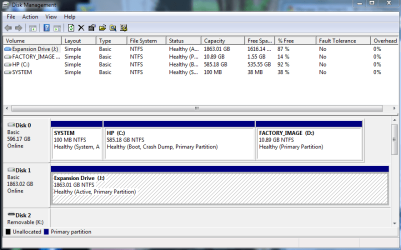
wow! amazing how much you can learn everyday! thanks for the help everyone!! ok, back to the topic. i've done everything you've said so far. here is the snippet of disk management.
 

Attachments

  • disk mgmt.png
    disk mgmt.png
    107 KB · Views: 671

My Computer

Computer type
PC/Desktop
Computer Manufacturer/Model Number
Custom Build and MSI GE60 0ND laptop
OS
windows 7 64bit on both
CPU
AMD FX-8350 @4.6GHz/Intel Core i7-3610QM @2.3GHz
Motherboard
ASUS M5A99X EVO R2.0/MS-16GA
Memory
16GB G.Skill 1866MHz/8GB dual channel 1600MHz
Graphics Card(s)
two Sapphire HD7970 OC 3Gb in crossfire/GTX660M 2Gb
Sound Card
Realtek HD Audio/Realtek HD Audio with THX TruStudio Pro
Monitor(s) Displays
Hanns-G 27" 1080p /Generic PnP Monitor
Screen Resolution
both 1920x1080p 60Hz
Hard Drives
250GB Samsung 840 EVO SSD,
1TB WD Blue
3x2TB WD Greens
/Samsung 840 EVO mSATA
PSU
Corsair HX750/laptop psu
Case
NZXT Source 530
Cooling
CoolerMaster Hyper 212 Evo
Keyboard
Logitech G710+/laptop keyboard by steelseries
Mouse
Logitec G500s/Logitec G500
Internet Speed
50Mbps down/1-3 Mbps up
Other Info
Scythe Kaze Master Pro 5.25 fan controller; APC Back-UPS XS 1500
socgry,

Ok now I see what the problem is.

You have marked the 100 MB partition as the "active" drive.

What needs to be done is for that 100 mb partition to be made inactive and the C to be made active.

Now I'm very tired right now (it's nearly 0300 hours here) and I don't want to make a mistake on this. If we are lucky Greg Rocker will come along and explain the procedure. After grabbing some shuteye, I'll check back in.

If it was my machine I'd delete that 100 mb partition. I don't have one myself on this notebook and I don't have a manufacturer's restore partition either. But that's all personal preferences.
 

My Computer

Computer Manufacturer/Model Number
Toshiba Satellite S875D-S7239 laptop
OS
MS Windows 7 Ultimate SP1 64-bit
CPU
AMD A10-4600M
Motherboard
AMD Pumori (Socket FT1)
Memory
6.00 GB Dual-Channel DDR3 @ 798MHz (11-11-12-28)
Graphics Card(s)
AMD Radeon HD 7660G
Sound Card
High Definition Audio Device
Monitor(s) Displays
Generic PnP Monitor (1600x900@60Hz)
Screen Resolution
1600x900@60Hz
Hard Drives
SSD 119GB Corsair CSSD-V128GB2 ATA Device
Keyboard
Standard PS/2 Keyboard
Mouse
HP Wireless Optical Mobile Mouse Model FHA-3410
Internet Speed
What the local pub, local coffee shop offers.
Other Info
Optical Drive:MATSHITA BD-CMB UJ160B ATA Device


Also have an Asus ha1002xp netbook with Win 7 Ultimate installed.
OK, I found this, a method to create a new System Reserved partition. It won't hurt if it doesn't fix your original problem, as it can be changed back.

If the System reserved partition cannot be extended using Disk Management because of lack of contigous space adjacent to it, creating a new system volume is the workaround. Here are the steps to move the system volume to any other volume:


1. Choose where you want to have your system volume. Few things you need to keep in mind:
a. System volume can only be created on a primary partition of MBR disk.
b. If system volume & boot volume are together, then BitLocker feature cannot be used to encrypt volumes on your machine.

2. Suggest creating a new volume (say F: ) on the same disk that contains the boot partition of size of about 490 MB (be careful to keep it less than 500 MB).

3. Assuming Windows 7 is installed on C: on your machine. From an elevated command-prompt run: bcdboot.exe /s C:\Windows /s F:.

4. From elevated command-prompt run: DISKPART

5. From the disk part command-prompt:
DISKPART> select volume F
DISKPART> active


Now you can reboot your machine and F: will become the system volume. You can undo this by repeating the same steps using the original system volume (you have to assign drive-letter to it) to revert to your previous configuration.

Also, does system restore work on your system? That seems to also be an issue when your problem occurs. A Guy
 

My Computer

Computer type
PC/Desktop
OS
Windows 10 Home x64
CPU
INTEL Core i5-750 Quad-Core 3.37GHz
Motherboard
ASUS P7P55D
Memory
HyperX Fury Black Series 8GB (2 x 4GB) 1866Mhz
Graphics Card(s)
EVGA GeForce GTX 750 Superclocked 1GB 128-Bit GDDR5
Monitor(s) Displays
LG 32MA68HY 32" IPS
Screen Resolution
1920 x 1080
Hard Drives
Samsung 840 Evo 120GB, SEAGATE 500GB Barracuda® 7200.12, SATA 3 Gb/s, 7200 RPM, 16MB cache
PSU
ANTEC TruePower New TP-550, 80 PLUS, 550W
Case
ANTEC Three Hundred Illusion
Cooling
COOLER MASTER Hyper 212 Plus, 4 x 120mm 1 x 140mm Noctua's
Internet Speed
85 + Mbps
Antivirus
Avast
Browser
Vivaldi
HELP! i saw what karlsnooks was talking about by changing the C drive to the active drive instead of the 100mb partition. i right clicked the C drive and made it the active drive instead of "SYSTEM." i then remembered i needed to change my page filing back to windows regulated and did so, then re-booted the system.

my desktop now won't boot up. it goes to a black screen saying "BOOTMGR is missing, press ctrl+alt+del to restart"

i tried system restore and it finished completely, then when it tried to boot up it went back to the same black screen
 
Last edited:

My Computer

Computer type
PC/Desktop
Computer Manufacturer/Model Number
Custom Build and MSI GE60 0ND laptop
OS
windows 7 64bit on both
CPU
AMD FX-8350 @4.6GHz/Intel Core i7-3610QM @2.3GHz
Motherboard
ASUS M5A99X EVO R2.0/MS-16GA
Memory
16GB G.Skill 1866MHz/8GB dual channel 1600MHz
Graphics Card(s)
two Sapphire HD7970 OC 3Gb in crossfire/GTX660M 2Gb
Sound Card
Realtek HD Audio/Realtek HD Audio with THX TruStudio Pro
Monitor(s) Displays
Hanns-G 27" 1080p /Generic PnP Monitor
Screen Resolution
both 1920x1080p 60Hz
Hard Drives
250GB Samsung 840 EVO SSD,
1TB WD Blue
3x2TB WD Greens
/Samsung 840 EVO mSATA
PSU
Corsair HX750/laptop psu
Case
NZXT Source 530
Cooling
CoolerMaster Hyper 212 Evo
Keyboard
Logitech G710+/laptop keyboard by steelseries
Mouse
Logitec G500s/Logitec G500
Internet Speed
50Mbps down/1-3 Mbps up
Other Info
Scythe Kaze Master Pro 5.25 fan controller; APC Back-UPS XS 1500
To recover System MBR from 100mb partition into Win7:

Boot Win7 DVD Repair Console or Repair CD, Press SHift F10 at first screen, type in Command box:

DISKPART
LIST DISK
SELECT DISK 0 (confirm this is Win7 HD)
LIST PARTITION
SELECT PARTITION 1 (confirm this is 100mb Sys Reserved)
INACTIVE
SELECT PARTITION 2 (confirm this is Win7 partition)
ACTIVE
SELECT DISK 1 (confirm this is 2 tb data drive)
LIST PARTITION
SELECT PARTITION 1 (confirm this is data partition)
INACTIVE
EXIT

Now enter DVD/CD Repair console, click through to Recovery Tools list to run Startup Repair up to 3 separate times with reboots to write the MBR to Win7 partition until Win7 starts.

Now try saving a Win7 backup image to data drive.

Once you're sure you don't want 100mb any longer, you can use free Partition Wizard bootable CD to delete 100mb partition and Resize Win7 into its space.
 
ok, i managed to fix the boot problem with gregrocker's DISKPART. i don't have a repair disk or any windows 7 disks from when i purchased my desktop, but i was able to use a different windows 7 disk i had previously installed on another computer that has since been ruined. so now i guess i should try creating a new SYSTEM partition that is 490mb, right?
 

My Computer

Computer type
PC/Desktop
Computer Manufacturer/Model Number
Custom Build and MSI GE60 0ND laptop
OS
windows 7 64bit on both
CPU
AMD FX-8350 @4.6GHz/Intel Core i7-3610QM @2.3GHz
Motherboard
ASUS M5A99X EVO R2.0/MS-16GA
Memory
16GB G.Skill 1866MHz/8GB dual channel 1600MHz
Graphics Card(s)
two Sapphire HD7970 OC 3Gb in crossfire/GTX660M 2Gb
Sound Card
Realtek HD Audio/Realtek HD Audio with THX TruStudio Pro
Monitor(s) Displays
Hanns-G 27" 1080p /Generic PnP Monitor
Screen Resolution
both 1920x1080p 60Hz
Hard Drives
250GB Samsung 840 EVO SSD,
1TB WD Blue
3x2TB WD Greens
/Samsung 840 EVO mSATA
PSU
Corsair HX750/laptop psu
Case
NZXT Source 530
Cooling
CoolerMaster Hyper 212 Evo
Keyboard
Logitech G710+/laptop keyboard by steelseries
Mouse
Logitec G500s/Logitec G500
Internet Speed
50Mbps down/1-3 Mbps up
Other Info
Scythe Kaze Master Pro 5.25 fan controller; APC Back-UPS XS 1500
Why would you do that? Isn't Win7 partition System Active now that you completed the steps given and it started?

Will Win7 Backup create an Image for you now to store on data drive?

Please post back a screenshot of Disk Management drive map and listings using Snipping Tool in Start Menu.

I linked the Repair CD ISO file for you to burn if needed, or Win7 backup will create one.
 
Hi,

since day one of having my new computer, my windows backup has never worked even once. i'm starting to get into upgrading hardware and such within my desktop, but i really don't want to go much further before creating a good solid back up and system image to have as my safety.

after each fail i get the same error message: "A shadow copy could not be created. Please check "VSS" and "SPP" application event logs for more information.
Details: Insufficient storage available to create either the shadow copy storage file or other shadow copy data." and then it gives the options to try to run backup again or change backup settings.

when i expand the details at the bottom, this is all i get:
Backup time: (date/time i attempted)
Backup location: Expansion Drive (J: ) my external hard drive.
Error code: 0x81000019

i have a 2Tb external hard drive so i'm pretty sure it shouldn't be a space issue.

please help
thanks

"Quote: Originally Posted by A Guy
Try this.

Start> Right click Computer> Manage
Select Storage> Disk management
Verify that you have a System Reserved partition of 100 MB
If yes, right click on this volume and select Properties.
View used and free space.

You must have around 40 MB free space for backup to complete successfully

A Guy"


i'm just trying to make my windows backup work so i can finally use it
 

My Computer

Computer type
PC/Desktop
Computer Manufacturer/Model Number
Custom Build and MSI GE60 0ND laptop
OS
windows 7 64bit on both
CPU
AMD FX-8350 @4.6GHz/Intel Core i7-3610QM @2.3GHz
Motherboard
ASUS M5A99X EVO R2.0/MS-16GA
Memory
16GB G.Skill 1866MHz/8GB dual channel 1600MHz
Graphics Card(s)
two Sapphire HD7970 OC 3Gb in crossfire/GTX660M 2Gb
Sound Card
Realtek HD Audio/Realtek HD Audio with THX TruStudio Pro
Monitor(s) Displays
Hanns-G 27" 1080p /Generic PnP Monitor
Screen Resolution
both 1920x1080p 60Hz
Hard Drives
250GB Samsung 840 EVO SSD,
1TB WD Blue
3x2TB WD Greens
/Samsung 840 EVO mSATA
PSU
Corsair HX750/laptop psu
Case
NZXT Source 530
Cooling
CoolerMaster Hyper 212 Evo
Keyboard
Logitech G710+/laptop keyboard by steelseries
Mouse
Logitec G500s/Logitec G500
Internet Speed
50Mbps down/1-3 Mbps up
Other Info
Scythe Kaze Master Pro 5.25 fan controller; APC Back-UPS XS 1500
Hi,

since day one of having my new computer, my windows backup has never worked even once. i'm starting to get into upgrading hardware and such within my desktop, but i really don't want to go much further before creating a good solid back up and system image to have as my safety.

after each fail i get the same error message: "A shadow copy could not be created. Please check "VSS" and "SPP" application event logs for more information.
Details: Insufficient storage available to create either the shadow copy storage file or other shadow copy data." and then it gives the options to try to run backup again or change backup settings.

when i expand the details at the bottom, this is all i get:
Backup time: (date/time i attempted)
Backup location: Expansion Drive (J: ) my external hard drive.
Error code: 0x81000019

i have a 2Tb external hard drive so i'm pretty sure it shouldn't be a space issue.

please help
thanks

"Quote: Originally Posted by A Guy
Try this.

Start> Right click Computer> Manage
Select Storage> Disk management
Verify that you have a System Reserved partition of 100 MB
If yes, right click on this volume and select Properties.
View used and free space.

You must have around 40 MB free space for backup to complete successfully

A Guy"


i'm just trying to make my windows backup work so i can finally use it

Follow Gregs instructions. I was trying to correct the SR partition. As per Gregs advice, you won't need one. You should be able to create an image without one. A Guy
 

My Computer

Computer type
PC/Desktop
OS
Windows 10 Home x64
CPU
INTEL Core i5-750 Quad-Core 3.37GHz
Motherboard
ASUS P7P55D
Memory
HyperX Fury Black Series 8GB (2 x 4GB) 1866Mhz
Graphics Card(s)
EVGA GeForce GTX 750 Superclocked 1GB 128-Bit GDDR5
Monitor(s) Displays
LG 32MA68HY 32" IPS
Screen Resolution
1920 x 1080
Hard Drives
Samsung 840 Evo 120GB, SEAGATE 500GB Barracuda® 7200.12, SATA 3 Gb/s, 7200 RPM, 16MB cache
PSU
ANTEC TruePower New TP-550, 80 PLUS, 550W
Case
ANTEC Three Hundred Illusion
Cooling
COOLER MASTER Hyper 212 Plus, 4 x 120mm 1 x 140mm Noctua's
Internet Speed
85 + Mbps
Antivirus
Avast
Browser
Vivaldi
Back
Top