Backup to External drive

Well, now I am havinbg problems with scannow. If I enter the commands in the 'Run' nothing seems to happen and ceratinly I get no results. If I open the Dos window it tells me that I am not an administrator. I am!

The computer is new (two weeks old) and I would be surprised if there is any corruption already.

qim

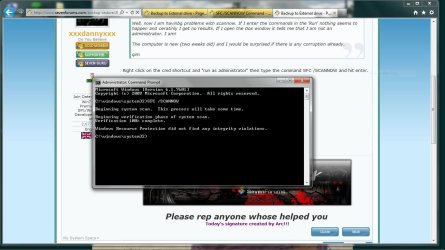
Right click on the cmd shortcut and "run as administrator" then type the command SFC /SCANNOW and hit enter.
 

My Computer

Computer Manufacturer/Model Number
acer aspire 5935g
OS
Windows 7 Home Premium x64 SP1
CPU
intel(R)core(TM)2 duo CPU T6600 @ 2.20GHz
Motherboard
intel gm45/gm47 revision 07
Memory
3 gb ddr3
Graphics Card(s)
ati radeon hd4570/512mb
Monitor(s) Displays
lop156wh2-tle1 15.3 flat
Screen Resolution
1366x768
Hard Drives
OCZ-Agility3 60gig ssd
320gig external hdd
500gig external hdd
Mouse
Optical
Internet Speed
30Mbps Down/30Mbps Up
No problems with SFC. Any other ideas?

Regards

qim
 

Attachments

  • sfc.JPG
    sfc.JPG
    120 KB · Views: 3

My Computer

OS
windows 7 Home premium 64 bit
Did you choose whilst setting your backup properties "let windows choose whats best to back up".
Whilst searching that error others say that they solved it by choosing themselves what to back up. Just manually select all your user folders etc and try that. If not I will ask for some more help here mate

Danny
 

My Computer

Computer Manufacturer/Model Number
acer aspire 5935g
OS
Windows 7 Home Premium x64 SP1
CPU
intel(R)core(TM)2 duo CPU T6600 @ 2.20GHz
Motherboard
intel gm45/gm47 revision 07
Memory
3 gb ddr3
Graphics Card(s)
ati radeon hd4570/512mb
Monitor(s) Displays
lop156wh2-tle1 15.3 flat
Screen Resolution
1366x768
Hard Drives
OCZ-Agility3 60gig ssd
320gig external hdd
500gig external hdd
Mouse
Optical
Internet Speed
30Mbps Down/30Mbps Up
I tried several options under the 'let me choose' but with no success. I keep getting the same message.

qin
 

My Computer

OS
windows 7 Home premium 64 bit
It's difficult to add to what Danny has said but a couple of things.
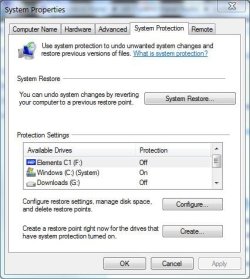
I have my system protection setup like this
sysconfig.JPG
F: is a partition on an external HDD I stored Windows images and file/folder backups on. I recommend you turn protection off if you had it on.

I would do a file system check on your external HDD partions
Computer>right click on partition>properties>tools>check now>automatically fix file system errors.

If all ok then you may need to go into Backup & Restore, go back into change setting and make sure you have set the backup partition. In my case it would be F:. As Danny said use the "let me choose" option and untick create a system image. System images are best mad manually by using the "Create a system image" from the main Backup & Restore Window (IMO).
 

My Computer

Computer type
PC/Desktop
Computer Manufacturer/Model Number
Own build
OS
Windows 7x64 Home Premium SP1
CPU
Intel i7 2600k
Motherboard
ASUS P8Z68 Deluxe
Memory
G.Skill Ripjaws (DDR3-1600) 2x4GB
Graphics Card(s)
Nvidia GeForce GTS 450; Intel HD Graphics 3000(GT2+)
Monitor(s) Displays
Dell Ultrasharp IPS panel U2311H, Samsung SyncMaster P2350
Screen Resolution
1920x1080
Hard Drives
Samsung 850 Pro SSD 256GB, Samsung SSD 840 120GB, Seagates 1TB Barracuda ST31000528AS x2
PSU
Seasonic M12II 520W
Case
Lian Li Lancool PC-K60
Cooling
Case: 1x120mm, 3x140mm CPU: Hyper 212+
Keyboard
Logitech MK520 (wireless)
Mouse
Logitech MK520
Internet Speed
6-7 Mbps
Antivirus
Norton Security Premium, Malwarebytes on 2 (MSE on 3rd PC)
Browser
FireFox
Other Info
Audio: Logitech Z523 2.1
Tnaks MJF

In the process of following your instructions I came up upon a new possibly related problem: when I went into Control Panel/ back up your computer an error came up

Backup or restore your files

( RED Cross) An internal error has occurred

The parameter is incorrect (0x80070057)

Any further help appreciated.

qim

Meanwhile I found this link, but can't understand it...
http://social.technet.microsoft.com...l/thread/d1d5e820-4b3f-4848-8861-8c0736c5fd1a
 
Last edited:

My Computer

OS
windows 7 Home premium 64 bit

My Computer

Computer Manufacturer/Model Number
acer aspire 5935g
OS
Windows 7 Home Premium x64 SP1
CPU
intel(R)core(TM)2 duo CPU T6600 @ 2.20GHz
Motherboard
intel gm45/gm47 revision 07
Memory
3 gb ddr3
Graphics Card(s)
ati radeon hd4570/512mb
Monitor(s) Displays
lop156wh2-tle1 15.3 flat
Screen Resolution
1366x768
Hard Drives
OCZ-Agility3 60gig ssd
320gig external hdd
500gig external hdd
Mouse
Optical
Internet Speed
30Mbps Down/30Mbps Up
Back
Top