
You are using an out of date browser. It may not display this or other websites correctly.
You should upgrade or use an alternative browser.
You should upgrade or use an alternative browser.
Backup
- Thread starter ukthesis
- Start date

For more detailed steps, see the links at: http://www.sevenforums.com/backup-restore/168971-backup.html#post1444116
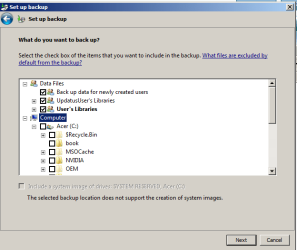
To get to Desktop in your last screenshot, you would click on the + sign to expand the Acer C: drive under Computer, then continue expanding until you see your C:\Users\(user-name)\Desktop folder so you could check the Desktop folder.

To get to Desktop in your last screenshot, you would click on the + sign to expand the Acer C: drive under Computer, then continue expanding until you see your C:\Users\(user-name)\Desktop folder so you could check the Desktop folder.
My Computer
- Computer type
- PC/Desktop
- Computer Manufacturer/Model Number
- Self built custom
- OS
- 64-bit Windows 11 Pro for Workstations
- CPU
- Intel i7-8700K OC'd to 5 GHz
- Motherboard
- ASUS ROG Maximus XI Formula Z390
- Memory
- 64 GB (4x16GB) G.SKILL TridentZ RGB DDR4 3600 MHz
- Graphics Card(s)
- ASUS ROG-STRIX-GTX1080TI-O11G-GAMING
- Sound Card
- Integrated
- Monitor(s) Displays
- 2 x Samsung Odyssey G7 27"
- Screen Resolution
- 2560x1440
- Hard Drives
- 1TB Samsung 990 PRO M.2,
4TB Samsung 990 PRO PRO M.2,
TerraMaster F8 SSD Plus NAS
- PSU
- Seasonic Prime Titanium 850W
- Case
- Thermaltake Core P3
- Cooling
- Corsair Hydro H115i
- Keyboard
- Logitech wireless K800
- Mouse
- Logitech MX Master 4
- Internet Speed
- 2 Gb/s Download and 100 Mb/s Upload
- Antivirus
- Malwarebyte Anti-Malware Premium
- Browser
- Google Chrome
- Other Info
- Logitech Z625 speaker system,
Logitech BRIO 4K Pro webcam,
HP Color LaserJet Pro MFP M477fdn,
APC SMART-UPS RT 1000 XL - SURT1000XLI,
Galaxy S23 Plus phone
This is confusing: "For the Desktop, you would need to manually navigate (expand) there under Computer to C:\Users\(user-name)\Desktop in your bottom screenshot." I know almost nothing about the technicalities (less than you must imagine) but I am persevering. If you can supply screen shots to show me EXACTLY what you mean, that will be best. Alternatively, which screen shots do you want me to display to you can show me clearly what you mean? I want to get this resolved asap and I need it going through in clear and very simple steps.
My Computer
- OS
- 64 bit
Keep clicking on the + expand symbol and it will fan out to the folder you want.
See here I place a folder called "Utility Plans" on my desktop to demonstrate.
See the red circled folder - this gets ticked to include.
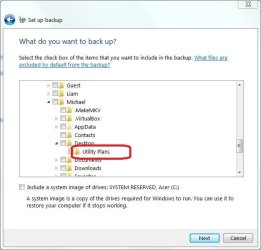
See here I place a folder called "Utility Plans" on my desktop to demonstrate.
See the red circled folder - this gets ticked to include.
My Computer
- Computer type
- PC/Desktop
- Computer Manufacturer/Model Number
- Own build
- OS
- Windows 7x64 Home Premium SP1
- CPU
- Intel i7 2600k
- Motherboard
- ASUS P8Z68 Deluxe
- Memory
- G.Skill Ripjaws (DDR3-1600) 2x4GB
- Graphics Card(s)
- Nvidia GeForce GTS 450; Intel HD Graphics 3000(GT2+)
- Monitor(s) Displays
- Dell Ultrasharp IPS panel U2311H, Samsung SyncMaster P2350
- Screen Resolution
- 1920x1080
- Hard Drives
- Samsung 850 Pro SSD 256GB, Samsung SSD 840 120GB, Seagates 1TB Barracuda ST31000528AS x2
- PSU
- Seasonic M12II 520W
- Case
- Lian Li Lancool PC-K60
- Cooling
- Case: 1x120mm, 3x140mm CPU: Hyper 212+
- Keyboard
- Logitech MK520 (wireless)
- Mouse
- Logitech MK520
- Internet Speed
- 6-7 Mbps
- Antivirus
- Norton Security Premium, Malwarebytes on 2 (MSE on 3rd PC)
- Browser
- FireFox
- Other Info
- Audio: Logitech Z523 2.1
My Computer
- OS
- 64 bit
Now that you have expanded Computer by clicking on the + sign, scroll down and repeat the for each folder in the path below until you do see the Desktop folder. When you see the Desktop Folder, check it.
Users\(your user account's name)
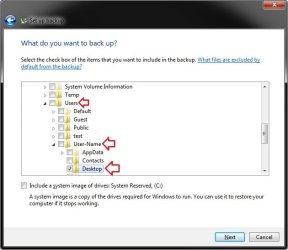
Users\(your user account's name)
My Computer
- Computer type
- PC/Desktop
- Computer Manufacturer/Model Number
- Self built custom
- OS
- 64-bit Windows 11 Pro for Workstations
- CPU
- Intel i7-8700K OC'd to 5 GHz
- Motherboard
- ASUS ROG Maximus XI Formula Z390
- Memory
- 64 GB (4x16GB) G.SKILL TridentZ RGB DDR4 3600 MHz
- Graphics Card(s)
- ASUS ROG-STRIX-GTX1080TI-O11G-GAMING
- Sound Card
- Integrated
- Monitor(s) Displays
- 2 x Samsung Odyssey G7 27"
- Screen Resolution
- 2560x1440
- Hard Drives
- 1TB Samsung 990 PRO M.2,
4TB Samsung 990 PRO PRO M.2,
TerraMaster F8 SSD Plus NAS
- PSU
- Seasonic Prime Titanium 850W
- Case
- Thermaltake Core P3
- Cooling
- Corsair Hydro H115i
- Keyboard
- Logitech wireless K800
- Mouse
- Logitech MX Master 4
- Internet Speed
- 2 Gb/s Download and 100 Mb/s Upload
- Antivirus
- Malwarebyte Anti-Malware Premium
- Browser
- Google Chrome
- Other Info
- Logitech Z625 speaker system,
Logitech BRIO 4K Pro webcam,
HP Color LaserJet Pro MFP M477fdn,
APC SMART-UPS RT 1000 XL - SURT1000XLI,
Galaxy S23 Plus phone
You will find a folder called
>Users
then under that you will find names of each user account say Fred
>Users
.......>Fred
................
..............>Desktop
.........................>a folder on the desktop
Every account has a desktop which is the visible kind of folder that you normally see along with a bunch of shortcuts and subfolders if you have them. You have one of these folders which I have called "a folder on the desktop". The Desktop folder will let you expand it if you have such a folder and then you simply select it.
>Users
then under that you will find names of each user account say Fred
>Users
.......>Fred
................
..............>Desktop
.........................>a folder on the desktop
Every account has a desktop which is the visible kind of folder that you normally see along with a bunch of shortcuts and subfolders if you have them. You have one of these folders which I have called "a folder on the desktop". The Desktop folder will let you expand it if you have such a folder and then you simply select it.
My Computer
- Computer type
- PC/Desktop
- Computer Manufacturer/Model Number
- Own build
- OS
- Windows 7x64 Home Premium SP1
- CPU
- Intel i7 2600k
- Motherboard
- ASUS P8Z68 Deluxe
- Memory
- G.Skill Ripjaws (DDR3-1600) 2x4GB
- Graphics Card(s)
- Nvidia GeForce GTS 450; Intel HD Graphics 3000(GT2+)
- Monitor(s) Displays
- Dell Ultrasharp IPS panel U2311H, Samsung SyncMaster P2350
- Screen Resolution
- 1920x1080
- Hard Drives
- Samsung 850 Pro SSD 256GB, Samsung SSD 840 120GB, Seagates 1TB Barracuda ST31000528AS x2
- PSU
- Seasonic M12II 520W
- Case
- Lian Li Lancool PC-K60
- Cooling
- Case: 1x120mm, 3x140mm CPU: Hyper 212+
- Keyboard
- Logitech MK520 (wireless)
- Mouse
- Logitech MK520
- Internet Speed
- 6-7 Mbps
- Antivirus
- Norton Security Premium, Malwarebytes on 2 (MSE on 3rd PC)
- Browser
- FireFox
- Other Info
- Audio: Logitech Z523 2.1
Ukthesis,
Please do not take this wrong or be offended, but do you have someone/friend that has a bit more knowledge about computers that could come over and help guide you along with this? We would like to be able to help you more on this and solve your issue, but since you do not seem to understand, it may make it easier to help you with a friend at your side to help with what we are trying to show you.
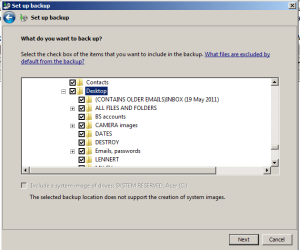
Could you post a screenshot of the expanded area where your user accoun'ts Desktop folder is suppose to be like in my screenshot above?
Please do not take this wrong or be offended, but do you have someone/friend that has a bit more knowledge about computers that could come over and help guide you along with this? We would like to be able to help you more on this and solve your issue, but since you do not seem to understand, it may make it easier to help you with a friend at your side to help with what we are trying to show you.
Could you post a screenshot of the expanded area where your user accoun'ts Desktop folder is suppose to be like in my screenshot above?
My Computer
- Computer type
- PC/Desktop
- Computer Manufacturer/Model Number
- Self built custom
- OS
- 64-bit Windows 11 Pro for Workstations
- CPU
- Intel i7-8700K OC'd to 5 GHz
- Motherboard
- ASUS ROG Maximus XI Formula Z390
- Memory
- 64 GB (4x16GB) G.SKILL TridentZ RGB DDR4 3600 MHz
- Graphics Card(s)
- ASUS ROG-STRIX-GTX1080TI-O11G-GAMING
- Sound Card
- Integrated
- Monitor(s) Displays
- 2 x Samsung Odyssey G7 27"
- Screen Resolution
- 2560x1440
- Hard Drives
- 1TB Samsung 990 PRO M.2,
4TB Samsung 990 PRO PRO M.2,
TerraMaster F8 SSD Plus NAS
- PSU
- Seasonic Prime Titanium 850W
- Case
- Thermaltake Core P3
- Cooling
- Corsair Hydro H115i
- Keyboard
- Logitech wireless K800
- Mouse
- Logitech MX Master 4
- Internet Speed
- 2 Gb/s Download and 100 Mb/s Upload
- Antivirus
- Malwarebyte Anti-Malware Premium
- Browser
- Google Chrome
- Other Info
- Logitech Z625 speaker system,
Logitech BRIO 4K Pro webcam,
HP Color LaserJet Pro MFP M477fdn,
APC SMART-UPS RT 1000 XL - SURT1000XLI,
Galaxy S23 Plus phone
My Computer
- OS
- 64 bit
Yes but..
Do you want everything on your desktop selected?
and
Give us a screeshot above the one you posted. That is from C:\ down.
If you have all that stuff ticked then you have a problem.
Do you want everything on your desktop selected?
and
Give us a screeshot above the one you posted. That is from C:\ down.
If you have all that stuff ticked then you have a problem.
My Computer
- Computer type
- PC/Desktop
- Computer Manufacturer/Model Number
- Own build
- OS
- Windows 7x64 Home Premium SP1
- CPU
- Intel i7 2600k
- Motherboard
- ASUS P8Z68 Deluxe
- Memory
- G.Skill Ripjaws (DDR3-1600) 2x4GB
- Graphics Card(s)
- Nvidia GeForce GTS 450; Intel HD Graphics 3000(GT2+)
- Monitor(s) Displays
- Dell Ultrasharp IPS panel U2311H, Samsung SyncMaster P2350
- Screen Resolution
- 1920x1080
- Hard Drives
- Samsung 850 Pro SSD 256GB, Samsung SSD 840 120GB, Seagates 1TB Barracuda ST31000528AS x2
- PSU
- Seasonic M12II 520W
- Case
- Lian Li Lancool PC-K60
- Cooling
- Case: 1x120mm, 3x140mm CPU: Hyper 212+
- Keyboard
- Logitech MK520 (wireless)
- Mouse
- Logitech MK520
- Internet Speed
- 6-7 Mbps
- Antivirus
- Norton Security Premium, Malwarebytes on 2 (MSE on 3rd PC)
- Browser
- FireFox
- Other Info
- Audio: Logitech Z523 2.1
Okay, we're making progress. Here is the folder All files and folders that I want to automatically save daily to external hard drive. So what happens now I've "found" it?
This window is where you check (select) specific folders that you want the contents (files) of to be backed up when you do a backup, or allow a scheduled backup.
That's all this is for.
My Computer
- Computer type
- PC/Desktop
- Computer Manufacturer/Model Number
- Self built custom
- OS
- 64-bit Windows 11 Pro for Workstations
- CPU
- Intel i7-8700K OC'd to 5 GHz
- Motherboard
- ASUS ROG Maximus XI Formula Z390
- Memory
- 64 GB (4x16GB) G.SKILL TridentZ RGB DDR4 3600 MHz
- Graphics Card(s)
- ASUS ROG-STRIX-GTX1080TI-O11G-GAMING
- Sound Card
- Integrated
- Monitor(s) Displays
- 2 x Samsung Odyssey G7 27"
- Screen Resolution
- 2560x1440
- Hard Drives
- 1TB Samsung 990 PRO M.2,
4TB Samsung 990 PRO PRO M.2,
TerraMaster F8 SSD Plus NAS
- PSU
- Seasonic Prime Titanium 850W
- Case
- Thermaltake Core P3
- Cooling
- Corsair Hydro H115i
- Keyboard
- Logitech wireless K800
- Mouse
- Logitech MX Master 4
- Internet Speed
- 2 Gb/s Download and 100 Mb/s Upload
- Antivirus
- Malwarebyte Anti-Malware Premium
- Browser
- Google Chrome
- Other Info
- Logitech Z625 speaker system,
Logitech BRIO 4K Pro webcam,
HP Color LaserJet Pro MFP M477fdn,
APC SMART-UPS RT 1000 XL - SURT1000XLI,
Galaxy S23 Plus phone
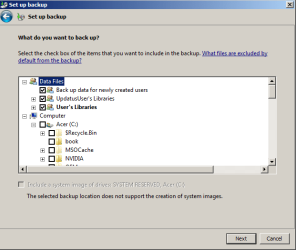
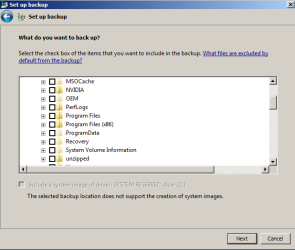
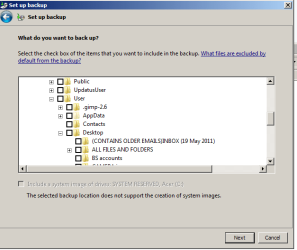
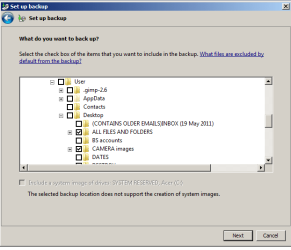
Well as it stands now. Strictly speaking I suppose so.Is this correct? Is this it? Then I press the Next button to Save Settings and Exit.
I'd have this material in libraries under Documents and Pictures. Then the issue wouldn't have arisen in the first place.
My Computer
- Computer type
- PC/Desktop
- Computer Manufacturer/Model Number
- Own build
- OS
- Windows 7x64 Home Premium SP1
- CPU
- Intel i7 2600k
- Motherboard
- ASUS P8Z68 Deluxe
- Memory
- G.Skill Ripjaws (DDR3-1600) 2x4GB
- Graphics Card(s)
- Nvidia GeForce GTS 450; Intel HD Graphics 3000(GT2+)
- Monitor(s) Displays
- Dell Ultrasharp IPS panel U2311H, Samsung SyncMaster P2350
- Screen Resolution
- 1920x1080
- Hard Drives
- Samsung 850 Pro SSD 256GB, Samsung SSD 840 120GB, Seagates 1TB Barracuda ST31000528AS x2
- PSU
- Seasonic M12II 520W
- Case
- Lian Li Lancool PC-K60
- Cooling
- Case: 1x120mm, 3x140mm CPU: Hyper 212+
- Keyboard
- Logitech MK520 (wireless)
- Mouse
- Logitech MK520
- Internet Speed
- 6-7 Mbps
- Antivirus
- Norton Security Premium, Malwarebytes on 2 (MSE on 3rd PC)
- Browser
- FireFox
- Other Info
- Audio: Logitech Z523 2.1
Ukthesis,
Yep, pretty much. After clicking on Next, you would be at step 11 in the tutorial below to finish up and create a backup when you like with these new settings.
http://www.sevenforums.com/tutorials/615-backup-user-system-files.html
Congratulations mate. We knew that you would get it all setup.
Yep, pretty much. After clicking on Next, you would be at step 11 in the tutorial below to finish up and create a backup when you like with these new settings.
http://www.sevenforums.com/tutorials/615-backup-user-system-files.html
Congratulations mate. We knew that you would get it all setup.
My Computer
- Computer type
- PC/Desktop
- Computer Manufacturer/Model Number
- Self built custom
- OS
- 64-bit Windows 11 Pro for Workstations
- CPU
- Intel i7-8700K OC'd to 5 GHz
- Motherboard
- ASUS ROG Maximus XI Formula Z390
- Memory
- 64 GB (4x16GB) G.SKILL TridentZ RGB DDR4 3600 MHz
- Graphics Card(s)
- ASUS ROG-STRIX-GTX1080TI-O11G-GAMING
- Sound Card
- Integrated
- Monitor(s) Displays
- 2 x Samsung Odyssey G7 27"
- Screen Resolution
- 2560x1440
- Hard Drives
- 1TB Samsung 990 PRO M.2,
4TB Samsung 990 PRO PRO M.2,
TerraMaster F8 SSD Plus NAS
- PSU
- Seasonic Prime Titanium 850W
- Case
- Thermaltake Core P3
- Cooling
- Corsair Hydro H115i
- Keyboard
- Logitech wireless K800
- Mouse
- Logitech MX Master 4
- Internet Speed
- 2 Gb/s Download and 100 Mb/s Upload
- Antivirus
- Malwarebyte Anti-Malware Premium
- Browser
- Google Chrome
- Other Info
- Logitech Z625 speaker system,
Logitech BRIO 4K Pro webcam,
HP Color LaserJet Pro MFP M477fdn,
APC SMART-UPS RT 1000 XL - SURT1000XLI,
Galaxy S23 Plus phone
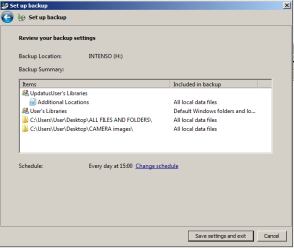
Hopefully got there. But if you see what it saved, there are several other folders up there aside from the two I ticked. Presumably it will also save those to the external drive. Why? Are they perhaps essential to the running of the system? I didn't select them, so this is odd. Can (and should) remove them? I have no idea what they contain and I don't use them. And if I didn't select them, why are they there?
Attachments
My Computer
- OS
- 64 bit
Looking at your screenshot below from above, it looks like you did have them selected.

My Computer
- Computer type
- PC/Desktop
- Computer Manufacturer/Model Number
- Self built custom
- OS
- 64-bit Windows 11 Pro for Workstations
- CPU
- Intel i7-8700K OC'd to 5 GHz
- Motherboard
- ASUS ROG Maximus XI Formula Z390
- Memory
- 64 GB (4x16GB) G.SKILL TridentZ RGB DDR4 3600 MHz
- Graphics Card(s)
- ASUS ROG-STRIX-GTX1080TI-O11G-GAMING
- Sound Card
- Integrated
- Monitor(s) Displays
- 2 x Samsung Odyssey G7 27"
- Screen Resolution
- 2560x1440
- Hard Drives
- 1TB Samsung 990 PRO M.2,
4TB Samsung 990 PRO PRO M.2,
TerraMaster F8 SSD Plus NAS
- PSU
- Seasonic Prime Titanium 850W
- Case
- Thermaltake Core P3
- Cooling
- Corsair Hydro H115i
- Keyboard
- Logitech wireless K800
- Mouse
- Logitech MX Master 4
- Internet Speed
- 2 Gb/s Download and 100 Mb/s Upload
- Antivirus
- Malwarebyte Anti-Malware Premium
- Browser
- Google Chrome
- Other Info
- Logitech Z625 speaker system,
Logitech BRIO 4K Pro webcam,
HP Color LaserJet Pro MFP M477fdn,
APC SMART-UPS RT 1000 XL - SURT1000XLI,
Galaxy S23 Plus phone
I've just unticked the top three though. All I want to save are the two folders below them. I assume that unticking the top three won't matter?
One other thing. This is something that happens with my Intenso external hard drive anyhow. If you want to replace an old folder saved on it with an updated file (same file name) saved on the desktop, you FIRST have to delete the old version of the folder from there (the Intenso external drive). Then you copy and past into it the update taken from the desktop. If you leave the old version on Intenso, you can't replace it with an updated version from desktop. (You might think you have, but when you check, the old version is still there on Intenso.) Not sure if this is going to be a problem with this automatic update and backup facility we're talking of.
One other thing. This is something that happens with my Intenso external hard drive anyhow. If you want to replace an old folder saved on it with an updated file (same file name) saved on the desktop, you FIRST have to delete the old version of the folder from there (the Intenso external drive). Then you copy and past into it the update taken from the desktop. If you leave the old version on Intenso, you can't replace it with an updated version from desktop. (You might think you have, but when you check, the old version is still there on Intenso.) Not sure if this is going to be a problem with this automatic update and backup facility we're talking of.
My Computer
- OS
- 64 bit
Similar threads

- Replies
- 1
- Views
- 583

- Replies
- 0
- Views
- 2K


