
Acer desktop, Win 7 64bit, 4Gb RAM
I've recently developed a problem with my anti-virus Avira (Free version).
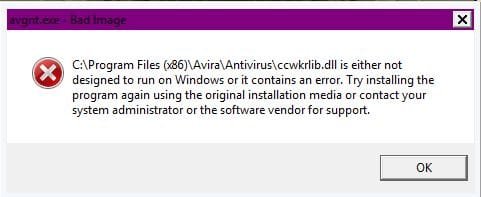
Every time I restart my computer I get a bad image error. I done some research on-line but my only option seems to be to reinstall Avira. I don't want to do this every time I have to restart my system. Tech support for Avira's Free version is practically non-existent.
The system tray icon is gone but avgnt.exe *32, avguuard.exe *32, Avira.Systray.exe*32, and avshadow.exe is still running in the background.
I cannot open the interface either through the all programs, desktop icons or the one in the control panel.
So I can't be sure the program is running properly at all. Except for reinstall anybody know anyway to fix this? Restoring from backups not a option either if I have to keep on doing it. My only other option seems to switch anti-virus programs. Any suggestions?
I've recently developed a problem with my anti-virus Avira (Free version).
Every time I restart my computer I get a bad image error. I done some research on-line but my only option seems to be to reinstall Avira. I don't want to do this every time I have to restart my system. Tech support for Avira's Free version is practically non-existent.
The system tray icon is gone but avgnt.exe *32, avguuard.exe *32, Avira.Systray.exe*32, and avshadow.exe is still running in the background.
I cannot open the interface either through the all programs, desktop icons or the one in the control panel.
So I can't be sure the program is running properly at all. Except for reinstall anybody know anyway to fix this? Restoring from backups not a option either if I have to keep on doing it. My only other option seems to switch anti-virus programs. Any suggestions?
Attachments
My Computer
At a glance
Windows 7 Home x64dual core 1.65 GHz4 GBAMD Radeon HD 6320 Graphics
- Computer type
- PC/Desktop
- Computer Manufacturer/Model Number
- Acer
- OS
- Windows 7 Home x64
- CPU
- dual core 1.65 GHz
- Motherboard
- Acer Aspire X1430
- Memory
- 4 GB
- Graphics Card(s)
- AMD Radeon HD 6320 Graphics
- Sound Card
- AMD High Definition Audio Device
- Monitor(s) Displays
- hp w1707
- Hard Drives
- 500 GB
- Internet Speed
- Eastlink 20 Mbps
- Antivirus
- Avira
- Browser
- Opera 28


