
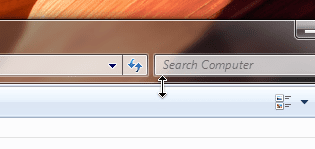
Base of Menu bar showing in Explorer windows

Manyk

New member
Local time
1:08 AM
Messages
7
Location
Canada
I have just recently noticed that the bottom of the menu bar is always showing in my explorer windows. I have tried switching themes, rebooting, changing performance settings etc, all to no avail.

When I mouse over the base the cursor changes to the vertical resize and when I click the menu base disappears and shows a shadow.

When I set folder options to always display the menu, everything is fine, but typically I do not want it showing and only pull it up with the ALT key if I need it.

Has anyone else experienced this? Possible things to try?
 

Attachments
  • sshot-1.png
    sshot-1.png
    8 KB · Views: 594

My Computer My Computer

At a glance

Windows 7 Ultimate (x86)Intel Core 2 Duo E84004 GB DDR2 (1GB x 4)nVidia Geforce 7300 GT
Computer Manufacturer/Model Number
Self-Built
OS
Windows 7 Ultimate (x86)
CPU
Intel Core 2 Duo E8400
Motherboard
Gigabyte GA-P35-DS3P
Memory
4 GB DDR2 (1GB x 4)
Graphics Card(s)
nVidia Geforce 7300 GT
Sound Card
Onboard ALC889A
Monitor(s) Displays
Lacie 526
Screen Resolution
1920x1200 @60Hz
Hard Drives
Seagate ST31000340A SATA,
Seagate ST3320620A SATA,
Seagate ST3320620A SATA
Case
Antec Solo
Cooling
Standard
Keyboard
Logitech Illuminated
Mouse
Logitech MX Revolution
Internet Speed
Cable
I was going to suggest turning on the old menus, but see you already located that function. given that, not sure what else to suggest. Are you running any other graphical customization software now, or were you before..?
 

My Computer My Computer

At a glance

Windows 7 UltimateAmd 5400+ dual core overclocked to 3.0 ghz8gb 5-5-5-5-15 g-skillNvidia 9800gt 512mb
Computer Manufacturer/Model Number
Custom
OS
Windows 7 Ultimate
CPU
Amd 5400+ dual core overclocked to 3.0 ghz
Motherboard
EVGA 590 sli aM2
Memory
8gb 5-5-5-5-15 g-skill
Graphics Card(s)
Nvidia 9800gt 512mb
Sound Card
M-Audio Delta 2496
Monitor(s) Displays
Acer 22 inch lcd
Screen Resolution
1680 x 1050
Hard Drives
Hmm

4.0 terabytes total..
PSU
650 watts
Case
Antec Sonata II
Cooling
Zallmen Xpu cooler
Keyboard
some rubbish I found in my garage
Mouse
logitech
Internet Speed
caps at about 650kb down, 50kb up . Gigabit local network.
I am not running anything to customize 7. There are no shell extensions and certainly no toolbar enhancements at all running.
 

My Computer My Computer

At a glance

Windows 7 Ultimate (x86)Intel Core 2 Duo E84004 GB DDR2 (1GB x 4)nVidia Geforce 7300 GT
Computer Manufacturer/Model Number
Self-Built
OS
Windows 7 Ultimate (x86)
CPU
Intel Core 2 Duo E8400
Motherboard
Gigabyte GA-P35-DS3P
Memory
4 GB DDR2 (1GB x 4)
Graphics Card(s)
nVidia Geforce 7300 GT
Sound Card
Onboard ALC889A
Monitor(s) Displays
Lacie 526
Screen Resolution
1920x1200 @60Hz
Hard Drives
Seagate ST31000340A SATA,
Seagate ST3320620A SATA,
Seagate ST3320620A SATA
Case
Antec Solo
Cooling
Standard
Keyboard
Logitech Illuminated
Mouse
Logitech MX Revolution
Internet Speed
Cable
6.1.7600.16385
 

My Computer My Computer

At a glance

Windows 7 Ultimate (x86)Intel Core 2 Duo E84004 GB DDR2 (1GB x 4)nVidia Geforce 7300 GT
Computer Manufacturer/Model Number
Self-Built
OS
Windows 7 Ultimate (x86)
CPU
Intel Core 2 Duo E8400
Motherboard
Gigabyte GA-P35-DS3P
Memory
4 GB DDR2 (1GB x 4)
Graphics Card(s)
nVidia Geforce 7300 GT
Sound Card
Onboard ALC889A
Monitor(s) Displays
Lacie 526
Screen Resolution
1920x1200 @60Hz
Hard Drives
Seagate ST31000340A SATA,
Seagate ST3320620A SATA,
Seagate ST3320620A SATA
Case
Antec Solo
Cooling
Standard
Keyboard
Logitech Illuminated
Mouse
Logitech MX Revolution
Internet Speed
Cable
Good idea. I don't know WHY I didn't thing of the file checker before. Alas, everything checks out 100% and my issue remains.
 

My Computer My Computer

At a glance

Windows 7 Ultimate (x86)Intel Core 2 Duo E84004 GB DDR2 (1GB x 4)nVidia Geforce 7300 GT
Computer Manufacturer/Model Number
Self-Built
OS
Windows 7 Ultimate (x86)
CPU
Intel Core 2 Duo E8400
Motherboard
Gigabyte GA-P35-DS3P
Memory
4 GB DDR2 (1GB x 4)
Graphics Card(s)
nVidia Geforce 7300 GT
Sound Card
Onboard ALC889A
Monitor(s) Displays
Lacie 526
Screen Resolution
1920x1200 @60Hz
Hard Drives
Seagate ST31000340A SATA,
Seagate ST3320620A SATA,
Seagate ST3320620A SATA
Case
Antec Solo
Cooling
Standard
Keyboard
Logitech Illuminated
Mouse
Logitech MX Revolution
Internet Speed
Cable
OK I think it is at least partially fixed now. I noticed that the setting for the menubar was not locked ... when you right click on the toolbar and select "Lock the toolbars."

So, with the toolbar locked, it no longer shows the base of the menubar when I have it hidden. And, the mouse cursor no longer changes when hovering over the bottom edge.

Question though, is this normal?? I honestly do not remember this behaviour with RC1.
 

My Computer My Computer

At a glance

Windows 7 Ultimate (x86)Intel Core 2 Duo E84004 GB DDR2 (1GB x 4)nVidia Geforce 7300 GT
Computer Manufacturer/Model Number
Self-Built
OS
Windows 7 Ultimate (x86)
CPU
Intel Core 2 Duo E8400
Motherboard
Gigabyte GA-P35-DS3P
Memory
4 GB DDR2 (1GB x 4)
Graphics Card(s)
nVidia Geforce 7300 GT
Sound Card
Onboard ALC889A
Monitor(s) Displays
Lacie 526
Screen Resolution
1920x1200 @60Hz
Hard Drives
Seagate ST31000340A SATA,
Seagate ST3320620A SATA,
Seagate ST3320620A SATA
Case
Antec Solo
Cooling
Standard
Keyboard
Logitech Illuminated
Mouse
Logitech MX Revolution
Internet Speed
Cable
Back
Top