
Hi all,
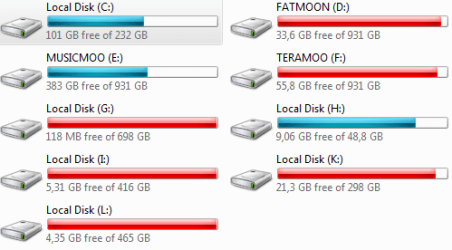
so I've been trying out build 7100 for a few days on my system, which includes quite a bunch of hard drives (usually around 8 of them) and ever since I got to run Windows 7 for the first time, most HDDs are listed as "Local Disk" in its explorer, while they're obviously supposed to be named something else (screenshots included below).
The thing is, even when I try to rename them, nothing changes in explorer. But there's a twist. If I have a look at the disk management utility in the control panel, everything looks fine! Labels are here and even get updated as I try to rename them through explorer although nothing seems to happen.
I've really tried out a lot of things already (ie : matching the security permissions of a working disk with the other ones, checking out if this has to do with the various sata chipsets those drives depend from) and I'm definitely running out of ideas. I couldn't find any consistent link between the working drives until this hit me right in the face... The only drives actually showing their names in explorer are of the same size, which is also the biggest one (1 Tb)!
Did anyone else ran into in this issue? Any ideas how to to fix this?
Oh yeah, one last thing : this only seems to affect my Sata drives. My IDE DVD drive and my usb flashdrive show labels correctly. And just in case, all those drives are showing up fine when I boot Windows XP instead.
so I've been trying out build 7100 for a few days on my system, which includes quite a bunch of hard drives (usually around 8 of them) and ever since I got to run Windows 7 for the first time, most HDDs are listed as "Local Disk" in its explorer, while they're obviously supposed to be named something else (screenshots included below).
The thing is, even when I try to rename them, nothing changes in explorer. But there's a twist. If I have a look at the disk management utility in the control panel, everything looks fine! Labels are here and even get updated as I try to rename them through explorer although nothing seems to happen.
I've really tried out a lot of things already (ie : matching the security permissions of a working disk with the other ones, checking out if this has to do with the various sata chipsets those drives depend from) and I'm definitely running out of ideas. I couldn't find any consistent link between the working drives until this hit me right in the face... The only drives actually showing their names in explorer are of the same size, which is also the biggest one (1 Tb)!
Did anyone else ran into in this issue? Any ideas how to to fix this?
Oh yeah, one last thing : this only seems to affect my Sata drives. My IDE DVD drive and my usb flashdrive show labels correctly. And just in case, all those drives are showing up fine when I boot Windows XP instead.
Attachments

My Computer
At a glance
Dual-Boot Windows XP / Windows 7Core2Duo E67504gb Corsair TwinxGeForce 8800GTS + GeForce 8400 GS
- OS
- Dual-Boot Windows XP / Windows 7
- CPU
- Core2Duo E6750
- Motherboard
- Abit QuadGT
- Memory
- 4gb Corsair Twinx
- Graphics Card(s)
- GeForce 8800GTS + GeForce 8400 GS
- Sound Card
- M-Audio Delta Audiophile + Realtek HD Audio
- Monitor(s) Displays
- 3 monitor setup + hdtv


