Battery not wanting to charge

Laith

Otaku Pride
Guru
Gold Member
VIP
Local time
5:19 AM
Messages
2,751
As the title said, my dads ASUS A52F refuses to charge. It dosen't charge anything. I bought a battery some months ago on eBay, didn't work. I bought another one from eBay(not the same seller) and the same result happened, it didn't want to charge. Note that it dosen't charge the original battery either. Is this a problem with the computer or the batteries?
 

My Computer My Computer

Computer type
PC/Desktop
Computer Manufacturer/Model Number
me!
OS
Windows 10 Pro x64
CPU
AMD Ryzen 5 1600 @ [email protected]
Motherboard
ASUS B350 PRIME-PLUS
Memory
G.Skill Flare X 16GB (2x8GB) DDR4-2400 @ 2666MHz
Graphics Card(s)
Sapphire Radeon Vega 56 NITRO+
Sound Card
None
Monitor(s) Displays
ASUS VG248QZ
Screen Resolution
1920x1080
Hard Drives
Samsung 850 EVO 250GB*, 1TB Seagate Constellation ES, 2x Samsung 840 250GB in RAID0*

*Thanks ICIT2LOL for supplying me with all of these drives!
PSU
Corsair VS550
Case
Corsair Crystal 460X
Cooling
AMD Wraith Spire
Keyboard
Ducky Shine 6 w/ MX Browns and PBT keycaps
Mouse
Xtrfy M1-Ice
Internet Speed
100MBit/s down, 20MBit/s up
Antivirus
Bitdefender
Browser
Google Chrome
Hello Laith mate sounds very much like the charging circuitry has gone south. First up I would check the terminals for signs of wear or arcing or straight forward damage. If there are no visible signs extrenally you may have to go looking inside the machine to see if there are any signs of scorching on the PCB's or dry joints.

You may need a multimeter to test the rails in that circuit too.
 

My Computer My Computer

Computer type
PC/Desktop
Computer Manufacturer/Model Number
Own build (new) Desk1 / Asus ROG Win 7 / Desk2 1st build
OS
Desk1 7 Home Prem / Desk2 10 Pro / Main lap Asus ROG 10 Pro 2 laptop Toshiba 7 Pro Asus P2520 7 & 10
CPU
Desk1 i5 3750K / Laptop i7 GTX 860M / Desk2 i5 2500
Motherboard
Desk1 Asus P877-V / Desk2 Gigabyte H67 UD3H / Laptop ?
Memory
Desk1 8GB (1866) / Desk2 16GB (1333) / Laptop 8Gb DDR3
Graphics Card(s)
Desk 1& 2NVidia GTX 650 & Laptops on board Intel
Sound Card
Desk 1 & 2 -XONAR DG Realtek High Def audio Laptop
Monitor(s) Displays
Desk 1 Benq HD 2450 / Desk2 Philips 24" / Laptop 17.5"
Screen Resolution
1920x1080 D1 & D2 & Laptop 1
Hard Drives
Desk1 Samsung 120GB 830 SSD
Asus ROG 256GB 850 Pro SSD
Desk2 Samsung 840 256 SSD
Toshiba 120GB EVO
PSU
Desk 1 Corsair HX 1050/ Laptop ? / Desk 2 Corsair HX 650
Case
Desk 1 Cooler HAF XM ? Toshiba laptop / Desk2 Coolermaster
Cooling
Fans on all Desk1 -2 Desk2 - all Coolermasters 5 Laptop ?
Keyboard
Desk 1 MS Sidewinder X6 Desk 2 MS Sidewinder X 4
Mouse
Desk 1&2 - Gigabyte MS 900 gamer - laptop - Logitec wireless
Internet Speed
ADSL2+
Other Info
One other Desktop (tester) and spare Toshba laptop both with SSD's
Running Kaspersky 2016 ISS on all machines config'd identically
Logitec audio stereo systems on each machine (x3)
Canon MG5250MFC
Router/modem TP-Link running WPA2SK
Is there a guide that goes deeper into this? Because i have no idea about a laptops battery department etc.
 

My Computer My Computer

Computer type
PC/Desktop
Computer Manufacturer/Model Number
me!
OS
Windows 10 Pro x64
CPU
AMD Ryzen 5 1600 @ [email protected]
Motherboard
ASUS B350 PRIME-PLUS
Memory
G.Skill Flare X 16GB (2x8GB) DDR4-2400 @ 2666MHz
Graphics Card(s)
Sapphire Radeon Vega 56 NITRO+
Sound Card
None
Monitor(s) Displays
ASUS VG248QZ
Screen Resolution
1920x1080
Hard Drives
Samsung 850 EVO 250GB*, 1TB Seagate Constellation ES, 2x Samsung 840 250GB in RAID0*

*Thanks ICIT2LOL for supplying me with all of these drives!
PSU
Corsair VS550
Case
Corsair Crystal 460X
Cooling
AMD Wraith Spire
Keyboard
Ducky Shine 6 w/ MX Browns and PBT keycaps
Mouse
Xtrfy M1-Ice
Internet Speed
100MBit/s down, 20MBit/s up
Antivirus
Bitdefender
Browser
Google Chrome
Also, you might want to try this if ICIT2LOL suggestion doesn't work. It's from an older thread regarding a similar problem.

> Disconnect AC
> Shutdown
> Remove battery
> Connect AC
> Startup
> In Device Manager, Under the Batteries category, right-click all of the Microsoft ACPI Compliant Control Method Battery listings, and select Uninstall (it’s ok if you only have 1).
> Shutdown
> Disconnect AC
> Insert battery
> Connect AC
> Startup
 
Last edited:

My Computer My Computer

Computer type
PC/Desktop
OS
Windows 7 Home 64-bit
Yes that is worth a try too Laith the charging circuitry is almost certain to be on the board so hence why i suggested looking for any scorch marks or maybe dry joints.

To be honest I ahven;t had much to do with that particular issue it could be something as simple as a detached connection form the power jack or actually within the charging circuitry which of course regulates the charge rate ie a flat battery will charge quite quickly at first then slow down to almost nil when full - just being topped up to keep the required voltage and capacity.
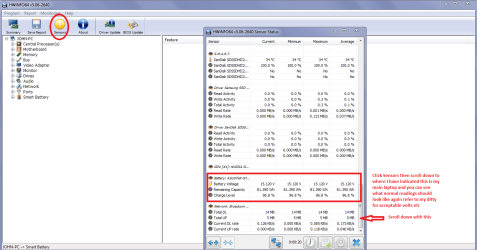
See my ditty that you probably know close the first windows and click Sensors and then scroll down to where I have in the pic of my machine here.
Using HW Info
PART A:
You can test the volts on the PSU with HW Info HWiNFO, HWiNFO32/64 - Download < download the right bit version and close the right hand window select Sensors and scroll down to the power section where you will see what the volts are doing see my pic. In my pic the section (Nuvoton) with VBATT is a dead give away you are in the section for the rail voltages. There are other section titles and one that pops up often is ITE
Now the voltage on the different rails have to be within 5% =+/- of what is required or the machine will not work properly if at all.
See this for the rail voltage info
Power Supply 101: A Reference Of Specifications - Power Supplies (Section 2.)
The original right hand window shows the machine running and is handy for that but for looking at the components in some detail close it and use the main left hand side panel
FOR OTHER COMPONENTS
PART B:
Open each small square with + in it on the section the components are in and then click on the individual component/s (it will highlight in blue) - in the right hand side will appear all sorts of details including brands speeds and other essential info that particular device. See pic for example.
Disregard PART B:
 

Attachments

  • BATTERY CONDITION.PNG
    BATTERY CONDITION.PNG
    48 KB · Views: 3

My Computer My Computer

Computer type
PC/Desktop
Computer Manufacturer/Model Number
Own build (new) Desk1 / Asus ROG Win 7 / Desk2 1st build
OS
Desk1 7 Home Prem / Desk2 10 Pro / Main lap Asus ROG 10 Pro 2 laptop Toshiba 7 Pro Asus P2520 7 & 10
CPU
Desk1 i5 3750K / Laptop i7 GTX 860M / Desk2 i5 2500
Motherboard
Desk1 Asus P877-V / Desk2 Gigabyte H67 UD3H / Laptop ?
Memory
Desk1 8GB (1866) / Desk2 16GB (1333) / Laptop 8Gb DDR3
Graphics Card(s)
Desk 1& 2NVidia GTX 650 & Laptops on board Intel
Sound Card
Desk 1 & 2 -XONAR DG Realtek High Def audio Laptop
Monitor(s) Displays
Desk 1 Benq HD 2450 / Desk2 Philips 24" / Laptop 17.5"
Screen Resolution
1920x1080 D1 & D2 & Laptop 1
Hard Drives
Desk1 Samsung 120GB 830 SSD
Asus ROG 256GB 850 Pro SSD
Desk2 Samsung 840 256 SSD
Toshiba 120GB EVO
PSU
Desk 1 Corsair HX 1050/ Laptop ? / Desk 2 Corsair HX 650
Case
Desk 1 Cooler HAF XM ? Toshiba laptop / Desk2 Coolermaster
Cooling
Fans on all Desk1 -2 Desk2 - all Coolermasters 5 Laptop ?
Keyboard
Desk 1 MS Sidewinder X6 Desk 2 MS Sidewinder X 4
Mouse
Desk 1&2 - Gigabyte MS 900 gamer - laptop - Logitec wireless
Internet Speed
ADSL2+
Other Info
One other Desktop (tester) and spare Toshba laptop both with SSD's
Running Kaspersky 2016 ISS on all machines config'd identically
Logitec audio stereo systems on each machine (x3)
Canon MG5250MFC
Router/modem TP-Link running WPA2SK
Back
Top