Solved bcd/bcdedit problems and others after Acronis DD11

front360

New member
Member
Local time
6:33 AM
Messages
87
My problem is that the Boot tab in msconfig is blank, and the default os is also blank in advanced system settings/advanced/startup and recovery.

Somehow Acronis Disk Director 11 messed up my windows 7 bootloader thing. I am able to boot windows 7 which is good, but after I uninstalled DD11 things are messed up. When I type bcdedit in elevated CMD Prompt, it says "The boot configuration data store could not be opened.The system cannot find the file specified." But if I use CMD Prompt from my Windows 7 Repair Disk, it works fine. And it also works fine from within windows, if I assign the 100mb hidden system partition a letter.

I tried bootrec /fixmbr /fixboot and /rebuildbcd but they didn't help.

The hidden system partition is marked "Active" and "System" and my OS partition is shown as "Boot" from Windows Disk Management. Are these correct? Can anyone help me sort out these issues? Thanks in advance, to anyone willing to help me out.
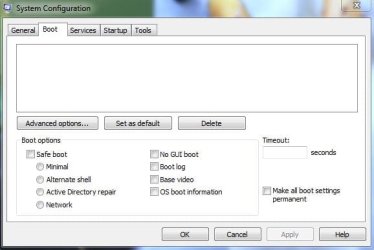
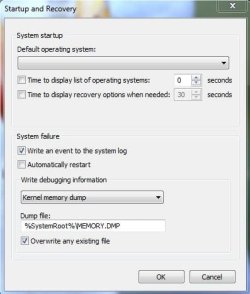
msconfig_boot.JPGStartupRecovery.JPG
 
Last edited:

My Computer My Computer

Computer Manufacturer/Model Number
Aus G73JH-RBBX05
OS
Windows 7 SP1 Home Premium x64
CPU
Intel Core i7 720QM
Motherboard
Asus (Intel HM55 Chipset)
Memory
Kingston 8 GB
Graphics Card(s)
ATI Mobility Radeon HD 5870
Sound Card
Realtek
Monitor(s) Displays
LG
Screen Resolution
1600X900
Hard Drives
Crucial M4 256GB
(Seagate Momentus ST9500420AS)Currently Disabled
Mouse
Razer Naga
Internet Speed
Cable

My Computer My Computer

Computer Manufacturer/Model Number
DELL SXPS 1640
OS
Windows 7 x64 Professional SP1
CPU
Intel C2D T9550 2.66 GHz @ 2.793 GHz (Thanks ThrottleStop!!)
Motherboard
Intel PM45
Memory
8 GB DDR3
Graphics Card(s)
ATI MOBILITY RADEON 4670
Sound Card
CREATIVE XFI AUDIO NOTEBOOK
Monitor(s) Displays
16.1 WLED
Screen Resolution
1920x1080
Hard Drives
Seagate ST9500420AS 500GB (465GiBi) 7200 RPM Drive

External Drives:-
2 TB WD Essentials x 3
1 TB WD Mybook Gen 1
1 TB WD Mybook Gen 2
1 TB Seagate
1 TB Seagate
320 GB WD Scorpio Black (enclosed)
PSU
90W Dell Power Brick
Case
Dell Chassis
Cooling
Coolermaster Cooling Pad
Keyboard
Built-in backlighted Keyboard
Mouse
Logitech Wireless Mini Mouse
Internet Speed
4/0.5
I have tried startup repair before but it didn't help. I'll try running it 3 times with restarting windows in between the 3 repairs now.

Is the registry involved with the boot tab in msconfig, or the startup and recovery tab?

edit:Running 3 times did not help
 
Last edited:

My Computer My Computer

Computer Manufacturer/Model Number
Aus G73JH-RBBX05
OS
Windows 7 SP1 Home Premium x64
CPU
Intel Core i7 720QM
Motherboard
Asus (Intel HM55 Chipset)
Memory
Kingston 8 GB
Graphics Card(s)
ATI Mobility Radeon HD 5870
Sound Card
Realtek
Monitor(s) Displays
LG
Screen Resolution
1600X900
Hard Drives
Crucial M4 256GB
(Seagate Momentus ST9500420AS)Currently Disabled
Mouse
Razer Naga
Internet Speed
Cable
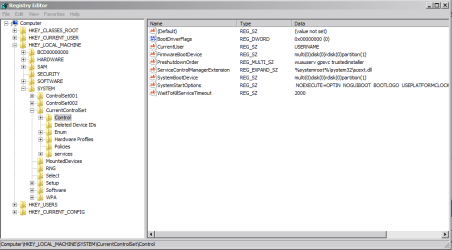
AFAIK, the registry contains some entries relating to your startup options in the startup and recovery tab

Capture1.PNG Capture2.PNG Capture3.PNG

EDIT:-


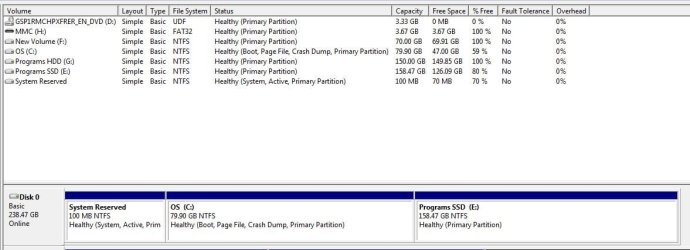
The hidden system partition is marked "Active" and "System" and my OS partition is shown as "Boot" from Windows Disk Management. Are these correct?
Yes. This is normal.

92983d1282667524-startup-repair-run-3-separate-times-dm.jpg
 

My Computer My Computer

Computer Manufacturer/Model Number
DELL SXPS 1640
OS
Windows 7 x64 Professional SP1
CPU
Intel C2D T9550 2.66 GHz @ 2.793 GHz (Thanks ThrottleStop!!)
Motherboard
Intel PM45
Memory
8 GB DDR3
Graphics Card(s)
ATI MOBILITY RADEON 4670
Sound Card
CREATIVE XFI AUDIO NOTEBOOK
Monitor(s) Displays
16.1 WLED
Screen Resolution
1920x1080
Hard Drives
Seagate ST9500420AS 500GB (465GiBi) 7200 RPM Drive

External Drives:-
2 TB WD Essentials x 3
1 TB WD Mybook Gen 1
1 TB WD Mybook Gen 2
1 TB Seagate
1 TB Seagate
320 GB WD Scorpio Black (enclosed)
PSU
90W Dell Power Brick
Case
Dell Chassis
Cooling
Coolermaster Cooling Pad
Keyboard
Built-in backlighted Keyboard
Mouse
Logitech Wireless Mini Mouse
Internet Speed
4/0.5
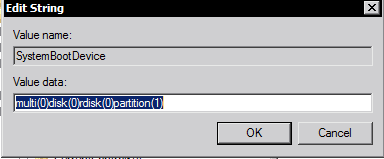
Hmm, in your first pic my FirmwareBootDevice is the same as yours, but my SystemBootDevice is different. Mine shows multi(0)disk(0)rdisk(0)partition(2). Is the partition(2) my problem? If I change it to (1) will that point to my hidden "system reserved" partition? Is this correct?

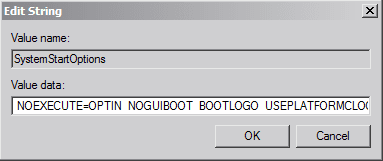
And my SystemStartOptions is blank, is this correct if I didn't check off noguiboot, etc. or should there still be something there?

Control_Reg.JPG DiskMan.JPG
 

My Computer My Computer

Computer Manufacturer/Model Number
Aus G73JH-RBBX05
OS
Windows 7 SP1 Home Premium x64
CPU
Intel Core i7 720QM
Motherboard
Asus (Intel HM55 Chipset)
Memory
Kingston 8 GB
Graphics Card(s)
ATI Mobility Radeon HD 5870
Sound Card
Realtek
Monitor(s) Displays
LG
Screen Resolution
1600X900
Hard Drives
Crucial M4 256GB
(Seagate Momentus ST9500420AS)Currently Disabled
Mouse
Razer Naga
Internet Speed
Cable
Hmm, in your first pic my FirmwareBootDevice is the same as yours, but my SystemBootDevice is different. Mine shows multi(0)disk(0)rdisk(0)partition(2). Is the partition(2) my problem? If I change it to (1) will that point to my hidden "system reserved" partition? Is this correct?

Mine is set to (1) because i do not have a hidden system reserved partition on my system that is created during the Windows installation.

(2) is most definitely the correct partition to boot from in a configuration like yours.

A blank SystemStartOptions would be normal if you did not select any special options during boot up..

Hmm... have you considered trying EasyBCD to add in the missing entry for your Windows 7 installation entry?

EasyBCD - Take control of your boot loader | NeoSmart Technologies

It's quite easy to use and user-friendly with a GUI interface..
 

My Computer My Computer

Computer Manufacturer/Model Number
DELL SXPS 1640
OS
Windows 7 x64 Professional SP1
CPU
Intel C2D T9550 2.66 GHz @ 2.793 GHz (Thanks ThrottleStop!!)
Motherboard
Intel PM45
Memory
8 GB DDR3
Graphics Card(s)
ATI MOBILITY RADEON 4670
Sound Card
CREATIVE XFI AUDIO NOTEBOOK
Monitor(s) Displays
16.1 WLED
Screen Resolution
1920x1080
Hard Drives
Seagate ST9500420AS 500GB (465GiBi) 7200 RPM Drive

External Drives:-
2 TB WD Essentials x 3
1 TB WD Mybook Gen 1
1 TB WD Mybook Gen 2
1 TB Seagate
1 TB Seagate
320 GB WD Scorpio Black (enclosed)
PSU
90W Dell Power Brick
Case
Dell Chassis
Cooling
Coolermaster Cooling Pad
Keyboard
Built-in backlighted Keyboard
Mouse
Logitech Wireless Mini Mouse
Internet Speed
4/0.5
Mine is set to (1) because i do not have a hidden system reserved partition on my system that is created during the Windows installation.

Oh ok, I thought the Disk Management pic you posted was yours.

I installed EasyBCD and when I run it I get an error that I pasted below:
EasybcdError.JPG
After I click no, I can't located my BCD file until after I assign the "System Reserved" partition a letter. Should I also have a BCD file in my c: (OS) drive, or just the hidden partition?
 

My Computer My Computer

Computer Manufacturer/Model Number
Aus G73JH-RBBX05
OS
Windows 7 SP1 Home Premium x64
CPU
Intel Core i7 720QM
Motherboard
Asus (Intel HM55 Chipset)
Memory
Kingston 8 GB
Graphics Card(s)
ATI Mobility Radeon HD 5870
Sound Card
Realtek
Monitor(s) Displays
LG
Screen Resolution
1600X900
Hard Drives
Crucial M4 256GB
(Seagate Momentus ST9500420AS)Currently Disabled
Mouse
Razer Naga
Internet Speed
Cable
Hmm even BCDEdit won't start up properly on your system?

We're getting nowhere here, hold on a bit, I'll get some help.
 

My Computer My Computer

Computer Manufacturer/Model Number
DELL SXPS 1640
OS
Windows 7 x64 Professional SP1
CPU
Intel C2D T9550 2.66 GHz @ 2.793 GHz (Thanks ThrottleStop!!)
Motherboard
Intel PM45
Memory
8 GB DDR3
Graphics Card(s)
ATI MOBILITY RADEON 4670
Sound Card
CREATIVE XFI AUDIO NOTEBOOK
Monitor(s) Displays
16.1 WLED
Screen Resolution
1920x1080
Hard Drives
Seagate ST9500420AS 500GB (465GiBi) 7200 RPM Drive

External Drives:-
2 TB WD Essentials x 3
1 TB WD Mybook Gen 1
1 TB WD Mybook Gen 2
1 TB Seagate
1 TB Seagate
320 GB WD Scorpio Black (enclosed)
PSU
90W Dell Power Brick
Case
Dell Chassis
Cooling
Coolermaster Cooling Pad
Keyboard
Built-in backlighted Keyboard
Mouse
Logitech Wireless Mini Mouse
Internet Speed
4/0.5
All is fine for now! Let's recap:
in elevated command prompt:
Code:
bcdedit /enum all
works if "system reserved" partition is assigned a drive letter. If not assigned a drive letter ... it fails. Is that correct and the only problem? Also msconfig lists the right info if drive letter has been assigned
 

My Computer My Computer

Computer type
Laptop
Computer Manufacturer/Model Number
ACER ASPIRE 5742G
OS
Microsoft Windows 7 Home Premium 64-bits 7601 Multiprocessor Free Service Pack 1
CPU
Intel(R) Core(TM) i3 CPU M 370 @ 2.40GHz
Motherboard
Acer Aspire 5742G
Memory
4,00 GB
Graphics Card(s)
ATI Mobility Radeon HD 5400 Series
Sound Card
(1) AMD High Definition Audio Device (2) Realtek High Defi
Screen Resolution
1366 x 768 x 32 bits (4294967296 colors) @ 60 Hz
Hard Drives
WDC WD5000BEVT-22ZAT0
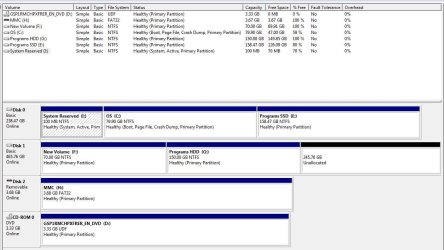
Post a screenshot of "disk management" with all fields visible.
 

My Computer My Computer

Computer type
Laptop
Computer Manufacturer/Model Number
ACER ASPIRE 5742G
OS
Microsoft Windows 7 Home Premium 64-bits 7601 Multiprocessor Free Service Pack 1
CPU
Intel(R) Core(TM) i3 CPU M 370 @ 2.40GHz
Motherboard
Acer Aspire 5742G
Memory
4,00 GB
Graphics Card(s)
ATI Mobility Radeon HD 5400 Series
Sound Card
(1) AMD High Definition Audio Device (2) Realtek High Defi
Screen Resolution
1366 x 768 x 32 bits (4294967296 colors) @ 60 Hz
Hard Drives
WDC WD5000BEVT-22ZAT0
All is fine for now! Let's recap:
in elevated command prompt:
Code:
bcdedit /enum all
works if "system reserved" partition is assigned a drive letter. If not assigned a drive letter ... it fails. Is that correct and the only problem? Also msconfig lists the right info if drive letter has been assigned
Correct.
DiskManAll.JPG
 

My Computer My Computer

Computer Manufacturer/Model Number
Aus G73JH-RBBX05
OS
Windows 7 SP1 Home Premium x64
CPU
Intel Core i7 720QM
Motherboard
Asus (Intel HM55 Chipset)
Memory
Kingston 8 GB
Graphics Card(s)
ATI Mobility Radeon HD 5870
Sound Card
Realtek
Monitor(s) Displays
LG
Screen Resolution
1600X900
Hard Drives
Crucial M4 256GB
(Seagate Momentus ST9500420AS)Currently Disabled
Mouse
Razer Naga
Internet Speed
Cable
All is fine for now! Let's recap:
in elevated command prompt:
Code:
bcdedit /enum all
works if "system reserved" partition is assigned a drive letter. If not assigned a drive letter ... it fails. Is that correct and the only problem? Also msconfig lists the right info if drive letter has been assigned
Correct.

bcdedit /enum all

When no drive letter assigned. What exact error message?

In \Boot\bcd (on system reserved) is all the bootmenu info. it's actually a registry hive. It doesn't contain info like "win7 is on physical disk 3" and also not "win7 is on partition 2". It contains info like "win7 is on physical drive with signature 732A9F on partition starting on sector 12389108" that is why you can swap disk ordering without problems. even creating partitiosn on physical drive isn't a problem... as long as the start sector remains the same.

Your win7 boots and is fine. It finds the bcd on "system reserved" and start further from C-drive. Very strange.

disk management knows the partition where bcd store is located. It is marked as "system" succesfully (?) bcdedit/enum command should be able to display it.
 

My Computer My Computer

Computer type
Laptop
Computer Manufacturer/Model Number
ACER ASPIRE 5742G
OS
Microsoft Windows 7 Home Premium 64-bits 7601 Multiprocessor Free Service Pack 1
CPU
Intel(R) Core(TM) i3 CPU M 370 @ 2.40GHz
Motherboard
Acer Aspire 5742G
Memory
4,00 GB
Graphics Card(s)
ATI Mobility Radeon HD 5400 Series
Sound Card
(1) AMD High Definition Audio Device (2) Realtek High Defi
Screen Resolution
1366 x 768 x 32 bits (4294967296 colors) @ 60 Hz
Hard Drives
WDC WD5000BEVT-22ZAT0
In my OP i stated, When I type bcdedit in elevated CMD Prompt, it says "The boot configuration data store could not be opened.The system cannot find the file specified."

bcdedit.JPG

What should I be looking for In \Boot\bcd (on system reserved)??
 

My Computer My Computer

Computer Manufacturer/Model Number
Aus G73JH-RBBX05
OS
Windows 7 SP1 Home Premium x64
CPU
Intel Core i7 720QM
Motherboard
Asus (Intel HM55 Chipset)
Memory
Kingston 8 GB
Graphics Card(s)
ATI Mobility Radeon HD 5870
Sound Card
Realtek
Monitor(s) Displays
LG
Screen Resolution
1600X900
Hard Drives
Crucial M4 256GB
(Seagate Momentus ST9500420AS)Currently Disabled
Mouse
Razer Naga
Internet Speed
Cable
Can you post the disk management screenshot again, but now with drive letter assigned
 

My Computer My Computer

Computer type
Laptop
Computer Manufacturer/Model Number
ACER ASPIRE 5742G
OS
Microsoft Windows 7 Home Premium 64-bits 7601 Multiprocessor Free Service Pack 1
CPU
Intel(R) Core(TM) i3 CPU M 370 @ 2.40GHz
Motherboard
Acer Aspire 5742G
Memory
4,00 GB
Graphics Card(s)
ATI Mobility Radeon HD 5400 Series
Sound Card
(1) AMD High Definition Audio Device (2) Realtek High Defi
Screen Resolution
1366 x 768 x 32 bits (4294967296 colors) @ 60 Hz
Hard Drives
WDC WD5000BEVT-22ZAT0
sure here ya go

DiskManAllAssign.JPG

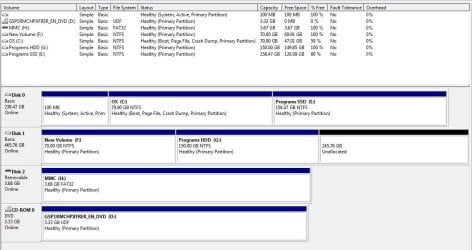
Why does it only label it "System Reserved" when assigned and is this normal?
 

My Computer My Computer

Computer Manufacturer/Model Number
Aus G73JH-RBBX05
OS
Windows 7 SP1 Home Premium x64
CPU
Intel Core i7 720QM
Motherboard
Asus (Intel HM55 Chipset)
Memory
Kingston 8 GB
Graphics Card(s)
ATI Mobility Radeon HD 5870
Sound Card
Realtek
Monitor(s) Displays
LG
Screen Resolution
1600X900
Hard Drives
Crucial M4 256GB
(Seagate Momentus ST9500420AS)Currently Disabled
Mouse
Razer Naga
Internet Speed
Cable
sure here ya go

View attachment 220631

Why does it only label it "System Reserved" when assigned and is this normal?
good question!! And why did it not show it as filesystem NTFS? And why it didn't know the used space?...

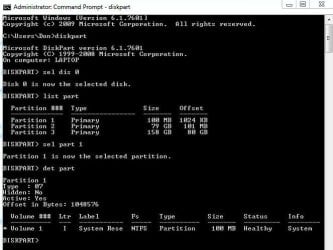
in elevated command prompt:

diskpart
sel dis 0
list part (note the partition number of 100MB partition)
sel part 1 (replace with actual number)
det part
exit

post output
 

My Computer My Computer

Computer type
Laptop
Computer Manufacturer/Model Number
ACER ASPIRE 5742G
OS
Microsoft Windows 7 Home Premium 64-bits 7601 Multiprocessor Free Service Pack 1
CPU
Intel(R) Core(TM) i3 CPU M 370 @ 2.40GHz
Motherboard
Acer Aspire 5742G
Memory
4,00 GB
Graphics Card(s)
ATI Mobility Radeon HD 5400 Series
Sound Card
(1) AMD High Definition Audio Device (2) Realtek High Defi
Screen Resolution
1366 x 768 x 32 bits (4294967296 colors) @ 60 Hz
Hard Drives
WDC WD5000BEVT-22ZAT0
Don't mean to intrude, but in Admin cmd prompt, can it find bcdedit in c:\user directory?

TJG

Sorry, I just answered my own stupid question. Yes it can.
 

My Computer My Computer

Computer Manufacturer/Model Number
Dell Dimension E510
OS
Windows 7 Home Premium 32bits
CPU
Intel Pentium 4 521
Motherboard
Dell Inc. ORD203
Memory
DDR2 4096MBytes
Graphics Card(s)
ATI Radeon HD 2400 Series
Sound Card
On-Board Sigma Tel High Definition Audio
Monitor(s) Displays
Dell ST2210 1920x1080x60 hertz
Hard Drives
320 SATA
500 SATA
PSU
Antec 430 Watts
Case
Dell
Cooling
Standard Fans
I know what you want me to do but I don't understand what you meant by;
list part (not the partition number of 100MB partition)
sel part 1 (replace with actual number)

This is when it's assigned
DiskPartAssigned.JPG
 

My Computer My Computer

Computer Manufacturer/Model Number
Aus G73JH-RBBX05
OS
Windows 7 SP1 Home Premium x64
CPU
Intel Core i7 720QM
Motherboard
Asus (Intel HM55 Chipset)
Memory
Kingston 8 GB
Graphics Card(s)
ATI Mobility Radeon HD 5870
Sound Card
Realtek
Monitor(s) Displays
LG
Screen Resolution
1600X900
Hard Drives
Crucial M4 256GB
(Seagate Momentus ST9500420AS)Currently Disabled
Mouse
Razer Naga
Internet Speed
Cable
Don't mean to intrude, but in Admin cmd prompt, can it find bcdedit in c:\user directory?

TJG
bcdedit.exe is in C:\Windows\system32. And C:\Windows\system32 in in the search path!
So I don't see the problem
 

My Computer My Computer

Computer type
Laptop
Computer Manufacturer/Model Number
ACER ASPIRE 5742G
OS
Microsoft Windows 7 Home Premium 64-bits 7601 Multiprocessor Free Service Pack 1
CPU
Intel(R) Core(TM) i3 CPU M 370 @ 2.40GHz
Motherboard
Acer Aspire 5742G
Memory
4,00 GB
Graphics Card(s)
ATI Mobility Radeon HD 5400 Series
Sound Card
(1) AMD High Definition Audio Device (2) Realtek High Defi
Screen Resolution
1366 x 768 x 32 bits (4294967296 colors) @ 60 Hz
Hard Drives
WDC WD5000BEVT-22ZAT0
I know what you want me to do but I don't understand what you meant by;
list part (not the partition number of 100MB partition)
sel part 1 (replace with actual number)

This is when it's assigned
View attachment 220635
not=note. typing error. Output looks fine. Now same commands again. But first deassign drive letter. Post output
 

My Computer My Computer

Computer type
Laptop
Computer Manufacturer/Model Number
ACER ASPIRE 5742G
OS
Microsoft Windows 7 Home Premium 64-bits 7601 Multiprocessor Free Service Pack 1
CPU
Intel(R) Core(TM) i3 CPU M 370 @ 2.40GHz
Motherboard
Acer Aspire 5742G
Memory
4,00 GB
Graphics Card(s)
ATI Mobility Radeon HD 5400 Series
Sound Card
(1) AMD High Definition Audio Device (2) Realtek High Defi
Screen Resolution
1366 x 768 x 32 bits (4294967296 colors) @ 60 Hz
Hard Drives
WDC WD5000BEVT-22ZAT0
Back
Top