
Solved bcd/bcdedit problems and others after Acronis DD11

wow I'm still checking but I think Automount Enable might have done it. :)
 

My Computer My Computer

At a glance

Windows 7 SP1 Home Premium x64Intel Core i7 720QMKingston 8 GBATI Mobility Radeon HD 5870
Computer Manufacturer/Model Number
Aus G73JH-RBBX05
OS
Windows 7 SP1 Home Premium x64
CPU
Intel Core i7 720QM
Motherboard
Asus (Intel HM55 Chipset)
Memory
Kingston 8 GB
Graphics Card(s)
ATI Mobility Radeon HD 5870
Sound Card
Realtek
Monitor(s) Displays
LG
Screen Resolution
1600X900
Hard Drives
Crucial M4 256GB
(Seagate Momentus ST9500420AS)Currently Disabled
Mouse
Razer Naga
Internet Speed
Cable
System Reserved should never have a letter. It is not issued one during install. I've never heard of it going offline for any reason unless you're referring to manually editing the BCD. Will this be another thread that goes on for three pages with bcd trivia but no resolution? Should I check back in a few days? These are quicker solutions than the automated Repairs which we've used since release?

Please answer the question: What does deleting System Reserved and running a Startup Repair do?
If you delete "system reserved" partition it can't go offline of course. Startup Repair makes the system bootable as advised by you many times.

Please read this System Partition goes offline on Windows Server 2008 and Windows server 2008 R2 after installing some 3rd Party Disk or Storage Management Software.
 

My Computer My Computer

At a glance

Microsoft Windows 7 Home Premium 64-bits 7601...Intel(R) Core(TM) i3 CPU M 370 @ 2.40GHz4,00 GBATI Mobility Radeon HD 5400 Series
Computer type
Laptop
Computer Manufacturer/Model Number
ACER ASPIRE 5742G
OS
Microsoft Windows 7 Home Premium 64-bits 7601 Multiprocessor Free Service Pack 1
CPU
Intel(R) Core(TM) i3 CPU M 370 @ 2.40GHz
Motherboard
Acer Aspire 5742G
Memory
4,00 GB
Graphics Card(s)
ATI Mobility Radeon HD 5400 Series
Sound Card
(1) AMD High Definition Audio Device (2) Realtek High Defi
Screen Resolution
1366 x 768 x 32 bits (4294967296 colors) @ 60 Hz
Hard Drives
WDC WD5000BEVT-22ZAT0
You must Mark Win7 Partition Active and then run Startup Repair - Run 3 Separate Times for it to work. I would not delete System Reserved until it starts and WIn7 part holds the System Active flags.

I am sorry for impatience with bcd edits but these threads can go on for pages and never seem to get anywhere. The automated methods have been very good to us here, and are consumer friendly so that others pick them up by osmosis.
 
Kaktussoft, I believe the Automount Enable cmd fixed my issue. I guess Acronis Disk Director 11 somehow disabled it when I installed/uninstalled it. Thank You so much.
 

My Computer My Computer

At a glance

Windows 7 SP1 Home Premium x64Intel Core i7 720QMKingston 8 GBATI Mobility Radeon HD 5870
Computer Manufacturer/Model Number
Aus G73JH-RBBX05
OS
Windows 7 SP1 Home Premium x64
CPU
Intel Core i7 720QM
Motherboard
Asus (Intel HM55 Chipset)
Memory
Kingston 8 GB
Graphics Card(s)
ATI Mobility Radeon HD 5870
Sound Card
Realtek
Monitor(s) Displays
LG
Screen Resolution
1600X900
Hard Drives
Crucial M4 256GB
(Seagate Momentus ST9500420AS)Currently Disabled
Mouse
Razer Naga
Internet Speed
Cable
Do you know how to get the choice for "Repair Your Computer" back when I press F8 at boot?
 

My Computer My Computer

At a glance

Windows 7 SP1 Home Premium x64Intel Core i7 720QMKingston 8 GBATI Mobility Radeon HD 5870
Computer Manufacturer/Model Number
Aus G73JH-RBBX05
OS
Windows 7 SP1 Home Premium x64
CPU
Intel Core i7 720QM
Motherboard
Asus (Intel HM55 Chipset)
Memory
Kingston 8 GB
Graphics Card(s)
ATI Mobility Radeon HD 5870
Sound Card
Realtek
Monitor(s) Displays
LG
Screen Resolution
1600X900
Hard Drives
Crucial M4 256GB
(Seagate Momentus ST9500420AS)Currently Disabled
Mouse
Razer Naga
Internet Speed
Cable
Does your installation show up now in msconfig>Boot and Startup and Recovery?

To restore F8 System Recovery options run Startup Repair x3. If that won't do it then it requires a Reinstall. It may confirm boot sector corruption needing wipe with Clean command.

Our colleague SIW2 can help you manually restore the F8 WinRE link however invariably another issue will pop up.

There are frequently ancilliary issues such as loss of F8 WinRe link which just emerged that are not solved by bcd edit or even moving boot files using Easybcd, but require the macro repair approach taken by Startup Repairs run three times.
 
Yes, my installation shows up now in msconfig>Boot and Startup and Recovery.

F8 at boot works but the option to "repair your computer"(was first option) now is missing.
I have tried running repair 3x yesterday, but I should run it now to add that option back to list at F8?
 

My Computer My Computer

At a glance

Windows 7 SP1 Home Premium x64Intel Core i7 720QMKingston 8 GBATI Mobility Radeon HD 5870
Computer Manufacturer/Model Number
Aus G73JH-RBBX05
OS
Windows 7 SP1 Home Premium x64
CPU
Intel Core i7 720QM
Motherboard
Asus (Intel HM55 Chipset)
Memory
Kingston 8 GB
Graphics Card(s)
ATI Mobility Radeon HD 5870
Sound Card
Realtek
Monitor(s) Displays
LG
Screen Resolution
1600X900
Hard Drives
Crucial M4 256GB
(Seagate Momentus ST9500420AS)Currently Disabled
Mouse
Razer Naga
Internet Speed
Cable
You must Mark Win7 Partition Active and then run Startup Repair - Run 3 Separate Times for it to work. I would not delete System Reserved until it starts and WIn7 part holds the System Active flags.

I am sorry for impatience with bcd edits but these threads can go on for pages and never seem to get anywhere. The automated methods have been very good to us here, and are consumer friendly so that others pick them up by osmosis.
I know by long (you advised me a few times) that "startup repair" performs all major repair attempts.

But his problem was that msconfig didn't show the boot info. And bcdedit didn't as well. So I asked him the "disk management" screenshot to see the status of the volume. And diskpart for even more info. I didn't advise him to enter any advanced bcdedit things!
 

My Computer My Computer

At a glance

Microsoft Windows 7 Home Premium 64-bits 7601...Intel(R) Core(TM) i3 CPU M 370 @ 2.40GHz4,00 GBATI Mobility Radeon HD 5400 Series
Computer type
Laptop
Computer Manufacturer/Model Number
ACER ASPIRE 5742G
OS
Microsoft Windows 7 Home Premium 64-bits 7601 Multiprocessor Free Service Pack 1
CPU
Intel(R) Core(TM) i3 CPU M 370 @ 2.40GHz
Motherboard
Acer Aspire 5742G
Memory
4,00 GB
Graphics Card(s)
ATI Mobility Radeon HD 5400 Series
Sound Card
(1) AMD High Definition Audio Device (2) Realtek High Defi
Screen Resolution
1366 x 768 x 32 bits (4294967296 colors) @ 60 Hz
Hard Drives
WDC WD5000BEVT-22ZAT0
Yes, my installation shows up now in msconfig>Boot and Startup and Recovery.

F8 at boot works but the option to "repair your computer"(was first option) now is missing.
I have tried running repair 3x yesterday, but I should run it now to add that option back to list at F8?
You did do rebuildbcd. that deleted that option. Not sure if "startup repair" will bring it back. Just try it.

post results
 

My Computer My Computer

At a glance

Microsoft Windows 7 Home Premium 64-bits 7601...Intel(R) Core(TM) i3 CPU M 370 @ 2.40GHz4,00 GBATI Mobility Radeon HD 5400 Series
Computer type
Laptop
Computer Manufacturer/Model Number
ACER ASPIRE 5742G
OS
Microsoft Windows 7 Home Premium 64-bits 7601 Multiprocessor Free Service Pack 1
CPU
Intel(R) Core(TM) i3 CPU M 370 @ 2.40GHz
Motherboard
Acer Aspire 5742G
Memory
4,00 GB
Graphics Card(s)
ATI Mobility Radeon HD 5400 Series
Sound Card
(1) AMD High Definition Audio Device (2) Realtek High Defi
Screen Resolution
1366 x 768 x 32 bits (4294967296 colors) @ 60 Hz
Hard Drives
WDC WD5000BEVT-22ZAT0

My Computer My Computer

At a glance

Windows 10 Pro. 64/ version 1709 Windows 7 Pr...Intel i7-6800K @ 4.3Corsair Platinum 16 gig @2400EVGA GTX 1070 OC
Computer type
PC/Desktop
Computer Manufacturer/Model Number
Home made Desktop
OS
Windows 10 Pro. 64/ version 1709 Windows 7 Pro/64
CPU
Intel i7-6800K @ 4.3
Motherboard
ASUS X-99 Deluxe II
Memory
Corsair Platinum 16 gig @2400
Graphics Card(s)
EVGA GTX 1070 OC
Monitor(s) Displays
Asus 27" LED LCD/VE278Q
Screen Resolution
1920-1080 or 1280-720 HDMI
Hard Drives
INTEL SSD 730-240 Gb Sata 3.0/
PSU
EVGA Platium 1200W
Case
Phanteks Luxe Tempered Glass 8 fans/ one radiator
Cooling
XSPC/ Water Cooled CPU
Keyboard
Das 4 Professional
Mouse
Logitech M705/MX Anywhere 2-S
Internet Speed
100 mbits
Antivirus
Microsoft Security Essentials/ Malwarebytes Premium 3.0/ SAS
Browser
I.E. 11 default/Firefox/ ISP Time Warner Cable/Spectrum
Other Info
LG BluRay Burner/
Sound system-KLipsch-THX/
Icy Dock ssd Hot Swap bays.
I should have more patience with manual bcd editing but see it drive consumers away quickly. Your help here seems to have worked. :geek: Now we need to get his F8 WinRe link restored and hope that other issues don't pop up as they so often do with this type of corruption.
Another case for freeware: Partition Wizard, Win7 or Macrium imaging.
 
Layback Bear, my OS is on my SSD(DISK0= c: is OS and e: is programs)
 

My Computer My Computer

At a glance

Windows 7 SP1 Home Premium x64Intel Core i7 720QMKingston 8 GBATI Mobility Radeon HD 5870
Computer Manufacturer/Model Number
Aus G73JH-RBBX05
OS
Windows 7 SP1 Home Premium x64
CPU
Intel Core i7 720QM
Motherboard
Asus (Intel HM55 Chipset)
Memory
Kingston 8 GB
Graphics Card(s)
ATI Mobility Radeon HD 5870
Sound Card
Realtek
Monitor(s) Displays
LG
Screen Resolution
1600X900
Hard Drives
Crucial M4 256GB
(Seagate Momentus ST9500420AS)Currently Disabled
Mouse
Razer Naga
Internet Speed
Cable
To Kaktussoft I have read through this several times. Because for my want for knowledge may I ask some questions. Sure I can.
1.Why when a clean install is done there is no letter on 100MB Reserve. Isn't that the way Windows 7 wants it without a letter?
------------------------------------------------------------------
2.Why is the operating system not on the SSD?
Now I get the point diskpart>automount enable -enable automatic drive letter assignment if it is not on

I didn't kown automount did that... my fault. I thought it just made the volume online. Normally it hasn't a drive letter to prevent changes by accident I assume.
 

My Computer My Computer

At a glance

Microsoft Windows 7 Home Premium 64-bits 7601...Intel(R) Core(TM) i3 CPU M 370 @ 2.40GHz4,00 GBATI Mobility Radeon HD 5400 Series
Computer type
Laptop
Computer Manufacturer/Model Number
ACER ASPIRE 5742G
OS
Microsoft Windows 7 Home Premium 64-bits 7601 Multiprocessor Free Service Pack 1
CPU
Intel(R) Core(TM) i3 CPU M 370 @ 2.40GHz
Motherboard
Acer Aspire 5742G
Memory
4,00 GB
Graphics Card(s)
ATI Mobility Radeon HD 5400 Series
Sound Card
(1) AMD High Definition Audio Device (2) Realtek High Defi
Screen Resolution
1366 x 768 x 32 bits (4294967296 colors) @ 60 Hz
Hard Drives
WDC WD5000BEVT-22ZAT0
I realize I wasn't asked, but WIn7 doesn't assign a drive letter to SysReserved so it will not be written to by programs which clog it and make imaging fail.
 
Did startup repair (3x) solve the winre issue?
 

My Computer My Computer

At a glance

Microsoft Windows 7 Home Premium 64-bits 7601...Intel(R) Core(TM) i3 CPU M 370 @ 2.40GHz4,00 GBATI Mobility Radeon HD 5400 Series
Computer type
Laptop
Computer Manufacturer/Model Number
ACER ASPIRE 5742G
OS
Microsoft Windows 7 Home Premium 64-bits 7601 Multiprocessor Free Service Pack 1
CPU
Intel(R) Core(TM) i3 CPU M 370 @ 2.40GHz
Motherboard
Acer Aspire 5742G
Memory
4,00 GB
Graphics Card(s)
ATI Mobility Radeon HD 5400 Series
Sound Card
(1) AMD High Definition Audio Device (2) Realtek High Defi
Screen Resolution
1366 x 768 x 32 bits (4294967296 colors) @ 60 Hz
Hard Drives
WDC WD5000BEVT-22ZAT0

My Computer My Computer

At a glance

Windows 10 Pro. 64/ version 1709 Windows 7 Pr...Intel i7-6800K @ 4.3Corsair Platinum 16 gig @2400EVGA GTX 1070 OC
Computer type
PC/Desktop
Computer Manufacturer/Model Number
Home made Desktop
OS
Windows 10 Pro. 64/ version 1709 Windows 7 Pro/64
CPU
Intel i7-6800K @ 4.3
Motherboard
ASUS X-99 Deluxe II
Memory
Corsair Platinum 16 gig @2400
Graphics Card(s)
EVGA GTX 1070 OC
Monitor(s) Displays
Asus 27" LED LCD/VE278Q
Screen Resolution
1920-1080 or 1280-720 HDMI
Hard Drives
INTEL SSD 730-240 Gb Sata 3.0/
PSU
EVGA Platium 1200W
Case
Phanteks Luxe Tempered Glass 8 fans/ one radiator
Cooling
XSPC/ Water Cooled CPU
Keyboard
Das 4 Professional
Mouse
Logitech M705/MX Anywhere 2-S
Internet Speed
100 mbits
Antivirus
Microsoft Security Essentials/ Malwarebytes Premium 3.0/ SAS
Browser
I.E. 11 default/Firefox/ ISP Time Warner Cable/Spectrum
Other Info
LG BluRay Burner/
Sound system-KLipsch-THX/
Icy Dock ssd Hot Swap bays.
If startup repair (3x) doesn't solve the winre issue:
In elevated command prompt
Code:
Reagentc /disable
Reagentc /enable
 

My Computer My Computer

At a glance

Microsoft Windows 7 Home Premium 64-bits 7601...Intel(R) Core(TM) i3 CPU M 370 @ 2.40GHz4,00 GBATI Mobility Radeon HD 5400 Series
Computer type
Laptop
Computer Manufacturer/Model Number
ACER ASPIRE 5742G
OS
Microsoft Windows 7 Home Premium 64-bits 7601 Multiprocessor Free Service Pack 1
CPU
Intel(R) Core(TM) i3 CPU M 370 @ 2.40GHz
Motherboard
Acer Aspire 5742G
Memory
4,00 GB
Graphics Card(s)
ATI Mobility Radeon HD 5400 Series
Sound Card
(1) AMD High Definition Audio Device (2) Realtek High Defi
Screen Resolution
1366 x 768 x 32 bits (4294967296 colors) @ 60 Hz
Hard Drives
WDC WD5000BEVT-22ZAT0
Kaktussoft, no Repair 3x did not work.

B4 I run those I wanna show you something
 

My Computer My Computer

At a glance

Windows 7 SP1 Home Premium x64Intel Core i7 720QMKingston 8 GBATI Mobility Radeon HD 5870
Computer Manufacturer/Model Number
Aus G73JH-RBBX05
OS
Windows 7 SP1 Home Premium x64
CPU
Intel Core i7 720QM
Motherboard
Asus (Intel HM55 Chipset)
Memory
Kingston 8 GB
Graphics Card(s)
ATI Mobility Radeon HD 5870
Sound Card
Realtek
Monitor(s) Displays
LG
Screen Resolution
1600X900
Hard Drives
Crucial M4 256GB
(Seagate Momentus ST9500420AS)Currently Disabled
Mouse
Razer Naga
Internet Speed
Cable

My Computer My Computer

At a glance

Microsoft Windows 7 Home Premium 64-bits 7601...Intel(R) Core(TM) i3 CPU M 370 @ 2.40GHz4,00 GBATI Mobility Radeon HD 5400 Series
Computer type
Laptop
Computer Manufacturer/Model Number
ACER ASPIRE 5742G
OS
Microsoft Windows 7 Home Premium 64-bits 7601 Multiprocessor Free Service Pack 1
CPU
Intel(R) Core(TM) i3 CPU M 370 @ 2.40GHz
Motherboard
Acer Aspire 5742G
Memory
4,00 GB
Graphics Card(s)
ATI Mobility Radeon HD 5400 Series
Sound Card
(1) AMD High Definition Audio Device (2) Realtek High Defi
Screen Resolution
1366 x 768 x 32 bits (4294967296 colors) @ 60 Hz
Hard Drives
WDC WD5000BEVT-22ZAT0
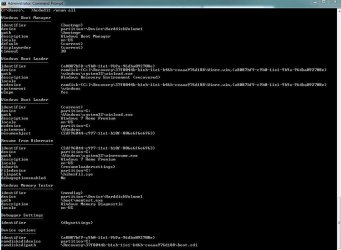
In the first Windows Boot Loader, description shows (recovered) and the identifier shows a8087bf8...but in device and osdevice they show (9a8087bf9...)
And Device Options, identifier at bottom shows a8087bf9...

bcdeditEnumAll.JPG

Could this be causing "repair computer" missing from F8 options at boot?
 

My Computer My Computer

At a glance

Windows 7 SP1 Home Premium x64Intel Core i7 720QMKingston 8 GBATI Mobility Radeon HD 5870
Computer Manufacturer/Model Number
Aus G73JH-RBBX05
OS
Windows 7 SP1 Home Premium x64
CPU
Intel Core i7 720QM
Motherboard
Asus (Intel HM55 Chipset)
Memory
Kingston 8 GB
Graphics Card(s)
ATI Mobility Radeon HD 5870
Sound Card
Realtek
Monitor(s) Displays
LG
Screen Resolution
1600X900
Hard Drives
Crucial M4 256GB
(Seagate Momentus ST9500420AS)Currently Disabled
Mouse
Razer Naga
Internet Speed
Cable
Back
Top