Belkin F5D9050 Driver Issues

Foxx

New member
Local time
12:23 PM
Messages
1
Hey all,

This is my first time posting on the forums and I'm having issues with my Belkin wireless adapter (Model: F5D9050 Ver: 3000). I've been browsing through the forums and have seen a lot of the threads with people having issues with the Belkin F5D7050 and I've tried fixes outlined throughout those pages with the drivers for my device obviously. I've tried compatibility mode with XP and Vista drivers, I've tried installing and uninstalling so many times it's not even funny but no matter what I've done the device always comes up as unrecognized and the drivers never load properly. I wasn't sure if anyone could offer up any insight on something else I could try or if anyone else has been able to get this particular USB Wireless adapter working? I'm running the 64bit version of Windows 7 Build 7100 as well.

Thanks in advance for any help y'all can offer!
 

My Computer

OS
Windows 7 - Build 7100
CPU
Intel Extreme QX 6850 Quad-Core
Memory
4 GB - Corsair Dominator
Graphics Card(s)
GTX 295
Monitor(s) Displays
22" Samsung
Screen Resolution
1680*1050
PSU
850w Corsair
Case
Thermaltake

My Computer

Computer Manufacturer/Model Number
Made myself
OS
Windows 7 Ultmate 32 bit 6.1.7600 Build 7600
CPU
Intel(R) Core(TM)2 CPU 6400 @ 2.13GHz
Motherboard
Biostar P4M890-M7 PCI-E
Memory
2.00 GB PC2-4200 DDR2-SDRAM UDIMM
Graphics Card(s)
Onboard VIA/S3G Unichrome Pro IGP (Had to use Vista Driver)
Sound Card
Integrated Realtek AC 97 Audio
Monitor(s) Displays
Optiquest 22inch
Screen Resolution
1024x768
Hard Drives
WDC 80gig 8mbcache Primary Sata
WDC 160gig 16mbcache Slave Sata
PSU
Allied 500w
Case
X-Blade
Cooling
Rosewill Heatsink/Fan
Keyboard
Microsoft Natural
Mouse
Microsoft Intellimouse
Internet Speed
too slow for me/Cable
Other Info
Memory Led/Case Fan Led/Lito On DVD-RW Drive.
Same problem

I also have been having this problem. Any luck getting it to work with Windows 7?

I have the same F5D9050 Network Adapter ... Oddly enough, running Ubuntu, the Network Adapter receives internet signals perfectly. When running Win7, the adapter will work for a short period of time and eventually disconnects, and seems unable to detect my wireless router (the name disappears from the connection options) for whatever reason.

Despite Win7's compatibility mode, will the 32-bit architecture software work when I am running Win7 in 64-bit mode?
 

My Computer

Computer Manufacturer/Model Number
NCS
OS
Windows 7, Ubuntu
Hi,

I just finished installing Windows 7 and, after encountering the same issue with this Belkin adapter as I did with Vista 64 - which required a driver from Ralink - returned to their site and downloaded their most current driver. Ralink makes the chip for the F5D9050 and while the older driver I'd been using for Vista 64 didn't work for Windows 7, the new one did, although not identified as supporting Windows 7. So, if you've not already found this driver, just click here to download it from Ralink.
 

My Computer

Computer Manufacturer/Model Number
Self-built
OS
Vista64 and Windows 7RC
CPU
Intel Core2 Duo X6800
Motherboard
Gigabyte EP45-DS3R
Memory
Aopen 4x2GB PC6400 DDR2
Graphics Card(s)
XFX GeForce 7600GT 256MB GDDR3
Sound Card
Creative Audigy 2 ZS Platinum
Monitor(s) Displays
BenQ FP241W LCD, Iiyama VisionMaster 450 CRT
Hard Drives
2x150GB Western Digital Raptor SATA150
1x750GB Seagate Barracuda 7200.11 SATA3 swappable
PSU
Seasonic S12-600
Case
Coolermaster R690
Cooling
Thermalright Ultra120 Extreme
Please note that there are actually five different chipsets used in these adapters - you need to check on the Belkin site as to which is present in any particular adaptor
 

My Computers

System One System Two

  • Computer type
    PC/Desktop
    Computer Manufacturer/Model Number
    ChillBlast - Custom to my design
    OS
    Windows 11 Pro x64 [Latest Release and Release Preview]
    CPU
    Ryzen 9 5950X, 3.8 - 5.2 MHz
    Motherboard
    Asus Prime X570-Pro
    Memory
    64GB [2 x 32GB] DDR4 3200MHz
    Graphics Card(s)
    4GB NVIDIA GEFORCE GTX 1650 Ti
    Sound Card
    On-board SPDIF to 5.1 System + HDMI [5.1 system]
    Monitor(s) Displays
    32" UHD 32 Bit HDR Monitor + 43" UHD 4K 32Bit HDR TV
    Screen Resolution
    2 x 3840 x 2160 @60Hz
    Hard Drives
    1TB M2 SSD OS, 500GB Fast Access SSD, 2 x 8TB Data + Various Externals from 1TB to 4TB, 10TB NAS
    PSU
    NZXT C750 80 PLUS Gold 750W Modular PSU
    Case
    Workstation Case [Matt Black]
    Cooling
    NZXT Kraken X63 280mm CPU Cooler +2x Quiet Case fans
    Keyboard
    Logitech Wireless MX Keys & K400 + others
    Mouse
    Logitech Wireless MX Master 3S
    Internet Speed
    920 MB Down 50 MB Up
    Antivirus
    BitDefender Total Security Pro
    Browser
    Chrome (always run latest Non-Beta)
    Other Info
    Also run ...
    Laptop - Quad 8GB - Windows 10 Pro x64
    Nexus 7 Android tablet x2
    Samsung 10.2" tablet
    Blackview TAB 8 4G Android Tablet c/w Keyboard
    Wacom Intuos Pro Medium Pen Pad
    Wacom Intuos Pro Small Pen Pad
    Wacom Expresskeys Remote
    Loopdeck+ Graphics Controller
    Shuttle Pro v2 Control
  • Computer type
    Laptop
    System Manufacturer/Model Number
    Dell XPS 17 10750H
    OS
    Windows 11 Pro x64 Latest RP
    CPU
    Intel I7 10750H 5.0GHz
    Motherboard
    Dell XPS
    Memory
    32GB [2x16GB] DDR4 2933 MHz
    Graphics Card(s)
    nVidia GTX1650Ti 4 GB GDDR6
    Sound Card
    Stock [Realtek] 4 Speaker
    Monitor(s) Displays
    17" IPS UHD+ Infinity Edge Touchscreen
    Screen Resolution
    3840 x 2400
    Hard Drives
    2TB M2 NVMe, 4TB External + various 500GB & 1TB External NVMe (also have access to spinner HDD from
    PSU
    Stock
    Case
    Stock XPS Aluminium & Carbon Fibre
    Cooling
    Stock - Active Fan Control
    Keyboard
    Backlit + Various Logitech
    Mouse
    Stock Track Pad + Logitech MX Trackball
    Internet Speed
    72 MB Down 18MB Up
    Browser
    Chrome
    Other Info
    Also run ...
    Laptop - Quad 8GB - Windows 10 Pro x64
    Nexus 7 Android tablet x2
    10.2" tablet
    Sony Z3 Android Smartphone
    Wacom Intuos Pro Medium Pen Pad
    Wacom Intuos Pro Small Pen Pad
    Wacom Expresskeys Remote
    Loopdeck+ Graphics Controller
    Shuttle Pro v2 Control Pad
    10TB NAS
Belkin F5D9050 Ver 3014
Wireless G Plus MIMO USB Network Adapter
Working in windows 7 professional 64bit

I have found a solution to this problem, you actually don't even need to download any drivers for it either.(Unless I actually selected on that I already picked. Link provided at end of post)

Solution, First go to start, devices and printers, with the belkin F5D9050 plugged in you should see a device that is unidentified(you know which one it should be something for wireless, I can't remember exactly), right click and go to properties, hardware tab, and properties of the device again(not sure the exact order for it due to mine already installed), then go to update drive button. This will bring up a windows menu with 2 options 1 go look online or something of the sort and the other is to search your computer for the driver yourself. Pick the one to search on your computer, in this window go to then pick let me search my computer for driver. On the new window it will list categories of devices, I picked the one for all drivers(will take a little time to load the list). Go down the list and find Ralink(I had two that were named very similar, I went into the first one listed), it should bring up a list of types of drivers it has for the company, pick the one that says USB g stick or something very similar to that. After picking it your wireless should work(mine has been working without a hitch, it detected a network very shortly after) There you have it, wireless on with the belkin F5D9050 on windows 7. :D

*** NOTE IF YOU DO NOT HAVE RALINK DRIVERS FOR THE USB STICK ***
I believe it might of been on of the drivers I attempted to get my wireless working with. This is the manufacturer of the chipset for the F5D9050, so the driver I installed from them might be what I ended up selecting in the list.

The driver I selected is USB (RT257x /RT2671 /RT520x)
(note, from what I have read online, there are a few different chipsets for our belkin F5D9050. If what I installed on the windows driver list worked, this is most likely the same for you. Might not be a solution for other versions of the device though)

http://www.ralinktech.com/download....qTXVNRjh3T0RJME1EbGZNUzQxTGpRdU1GOUdjbVZsQw==

If link doesn't work, here is the page.
Ralink corp.

If you need help or I wasn't clear about any of the instructions post on here or give me an email at [email removed ]
 

My Computer

Computer Manufacturer/Model Number
me
OS
windows 7
CPU
q6600
Motherboard
evga 122-ck-nf63-tr
Memory
ocz ddr2 800 2x 1gb
Graphics Card(s)
2x XFX(and evga) 8800GTS 320mb
Sound Card
mobo
Monitor(s) Displays
22" sceptre
Hard Drives
10k 74gb raptor, 7.2k 320gb seagate
PSU
muskin 550w modular
Case
lian li with 2x 120mm
Cooling
ninja 120mm fan on it
Not fixed, but getting closer.

I know this is an old post, but since this is the first one to come up on a Google search, I thought I would update people on what I have encountered,

I have done a clean install to Windows 7 Pro 64bit, and my adapter does not work. Here is what happened:

- The default install of Win7 did not recognise the adapter.
- I tried to install the drivers from the supplied cd, but they did not work.
- I tried downloading the newest Belkin drivers, but they are only 32bit and did not work.
- I tried forcing Win7 to use the old drivers but they did not work (I tried all the drivers listed under the manufacturer Ralink including the USB Stick drivers as the post above suggests)
- I downloaded the latest drivers from Ralink for the RT7x chipset. These did not work.

NOW THE INTERESTING PART:

I wanted to get Windows Update to download a suitable driver. So I tethered my mobile phone to my computer to get it to use my mobile internet. I then told the Update Driver to search for drivers online. This installed a Belkin driver from Windows Update. However, when I tried to look for Wireless Networks, Win7 said there was no connection avaliable.

I went the 'view network connections' and noticed that my Wireless Adapter was disabled. I tried enabling it but it would not enable. I then right-clicked on the adapter and selected Diagnose. This gave me the error message "Windows couldn't automatically bind the IP protocol stack to the network adapter".

I telephoned Belkin to ask them what to do and they basically said to wait for them to make new drivers. I am sure this is a driver issue, but I have just found the following page on Google and will be trying out the suggestions later today:

Windows couldn't automatically bind the IP protocol stack to the network adapter.
 

My Computer

Computer Manufacturer/Model Number
Chillblast Juggernault
OS
Windows 7
Alright, I gave up. I found another adapter that works with Windows 7 64bit. The Netgear WG111 - is cheap and works. Just make sure you install the drivers under Vista compatibility mode.
 

My Computer

Computer Manufacturer/Model Number
Chillblast Juggernault
OS
Windows 7
Belkin F5D9050 Ver 3014
Wireless G Plus MIMO USB Network Adapter
Working in windows 7 professional 64bit

I have found a solution to this problem, you actually don't even need to download any drivers for it either.(Unless I actually selected on that I already picked. Link provided at end of post)

Solution, First go to start, devices and printers, with the belkin F5D9050 plugged in you should see a device that is unidentified(you know which one it should be something for wireless, I can't remember exactly), right click and go to properties, hardware tab, and properties of the device again(not sure the exact order for it due to mine already installed), then go to update drive button. This will bring up a windows menu with 2 options 1 go look online or something of the sort and the other is to search your computer for the driver yourself. Pick the one to search on your computer, in this window go to then pick let me search my computer for driver. On the new window it will list categories of devices, I picked the one for all drivers(will take a little time to load the list). Go down the list and find Ralink(I had two that were named very similar, I went into the first one listed), it should bring up a list of types of drivers it has for the company, pick the one that says USB g stick or something very similar to that. After picking it your wireless should work(mine has been working without a hitch, it detected a network very shortly after) There you have it, wireless on with the belkin F5D9050 on windows 7. :D

*** NOTE IF YOU DO NOT HAVE RALINK DRIVERS FOR THE USB STICK ***
I believe it might of been on of the drivers I attempted to get my wireless working with. This is the manufacturer of the chipset for the F5D9050, so the driver I installed from them might be what I ended up selecting in the list.

The driver I selected is USB (RT257x /RT2671 /RT520x)
(note, from what I have read online, there are a few different chipsets for our belkin F5D9050. If what I installed on the windows driver list worked, this is most likely the same for you. Might not be a solution for other versions of the device though)

http://www.ralinktech.com/download.php?t=U0wyRnpjMlYwY3k4eU1EQTVMekE1THpFeEwyUnZkMjVzYjJGa05EZzVORGszTWpZME9DNWxlR1U5UFQxSlUxOUJVRjlUVkVGZlVsUTNlRjlFTFRFdU15NDFMakJmVmtFdE15NHhMamN1TUY5WE55MDBMakF1TXk0d1gxSlZMVE11TVM0eUxqQmZRVlV0TXk0d0xqTXVNRjh3T0RJME1EbGZNUzQxTGpRdU1GOUdjbVZsQw%3D%3D

If link doesn't work, here is the page.
Ralink corp.

If you need help or I wasn't clear about any of the instructions post on here or give me an email at [email removed ]

I signed up just to say "thank you." I followed your directions and the wireless now works flawlessly.

Thanks!

Edit: Looks like I spoke too soon. The adapter would randomly be identified as "unknown" by windows. I have no idea what's going on. Unplugging the adapter and reconnect sometimes works, but it happens often enough to make wireless networking unusable! I even went through and got the drivers through "windows update." Still, the adapter would randomly switch from working fine to "unknown USB device."
 
Last edited:

My Computer

OS
Windows 7
do you know what version your device is? This whole situation is kind of irritating, I didn't know belkin had such terrible drive support ; /


If i were you i would try to do a full windows update, and try a possibly differnt Ralink driver. Mine has worked without a hitch for over a month now, I get emails from when people post here. So i'll respond pretty quickly if you have any more questions.
The main thing is what version your device is, if possible can you list out what the sticker says on your device, i might be able to help you some more from there.
 

My Computer

Computer Manufacturer/Model Number
me
OS
windows 7
CPU
q6600
Motherboard
evga 122-ck-nf63-tr
Memory
ocz ddr2 800 2x 1gb
Graphics Card(s)
2x XFX(and evga) 8800GTS 320mb
Sound Card
mobo
Monitor(s) Displays
22" sceptre
Hard Drives
10k 74gb raptor, 7.2k 320gb seagate
PSU
muskin 550w modular
Case
lian li with 2x 120mm
Cooling
ninja 120mm fan on it
do you know what version your device is? This whole situation is kind of irritating, I didn't know belkin had such terrible drive support ; /


If i were you i would try to do a full windows update, and try a possibly differnt Ralink driver. Mine has worked without a hitch for over a month now, I get emails from when people post here. So i'll respond pretty quickly if you have any more questions.
The main thing is what version your device is, if possible can you list out what the sticker says on your device, i might be able to help you some more from there.

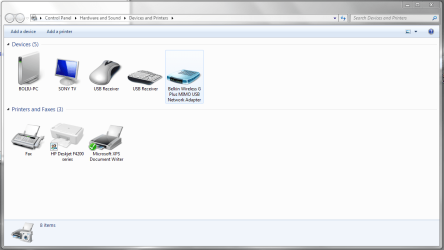
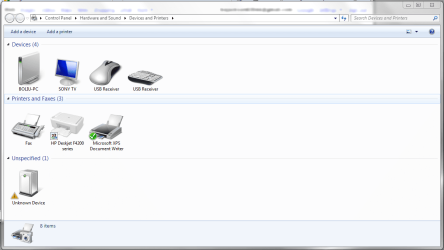
It's Ver. 4000. I'm thinking it may be a problem with Win7 since it would be recognized at times. For some reason, the system ignores the working drivers and reverts back to identifying it as "unknown." Check out the screenshots attached, they're taken minutes apart.
 

Attachments

  • Capture.PNG
    Capture.PNG
    48.2 KB · Views: 388
  • Capture 1.PNG
    Capture 1.PNG
    63.5 KB · Views: 276
Last edited:

My Computer

OS
Windows 7
am having the same problem , with f5d9050 version 3000 , cant find any drivers , i'll check the link provided by Stephenishere , if this doesnt work am switching back to 32bit , why doesnt belkin update their drivers faster !

** i tried the link and when i try to launch the ralink utility it says no card available and when i install the driver nothing happens :S
 
Last edited:

My Computer

OS
windows 7 Ultimate
I have this Belkin wireless adapter, F5D9050 Version 3002, which I successfully used with the Win7 release candidate with a driver I downloaded from Ralink. When I decided to install the retail release of Win7 Pro, that same driver failed to work. When I say failed, I mean as in running the driver installation file and the adapter being udpated and ready to use. Now, here is the file I currently have, but unfortunately I do not remember if this was the same or a more recent driver I obtained from Ralink:

IS_AP_STA_RT7x_D-1.3.5.0_VA-3.1.7.0_W7-4.0.3.0_RU-3.1.2.0_AU-3.0.3.0_082409_1.5.4.0_Free.exe

From that long name, I assume this means it is version 3.1.7.0 for Windows 7. I may have found, downloaded, and installed this driver when I first discovered the retail Win7 release wasn't working with the adapter. Regardless of that, the installer still didn't work, yet I took the same sort of approach as described by Stephenishere in post #6. That is, from Device Manager, I opened the properties for the invalid device and updated the driver by navigating to the list of manufacturers for Network Adapters, choosing Belkin, and - I'm pretty certain - the Belkin Wireless G USB Adapater. Windows 7 detected the driver that way and my adapter worked fine. However, in a subsequent Windows Update, a different driver was automatically found and updated. The device identification in Device Manager is now "Belkin Wireless G Plus MIMO USB Network Adapter", and it appears the driver may actually be older than what I was using, judging from a version number of 3.1.2.0 dated 11/12/2007. The adapter works like a champ for me, although sometimes it is lost upon connecting another USB device, which seems to be some sort of USB limitation on my system. When that occurs, I simply unplug/replug the adapter from its stand, and it gets reconnected and restored with all functionality.
 

My Computer

Computer Manufacturer/Model Number
Self-built
OS
Vista64 and Windows 7RC
CPU
Intel Core2 Duo X6800
Motherboard
Gigabyte EP45-DS3R
Memory
Aopen 4x2GB PC6400 DDR2
Graphics Card(s)
XFX GeForce 7600GT 256MB GDDR3
Sound Card
Creative Audigy 2 ZS Platinum
Monitor(s) Displays
BenQ FP241W LCD, Iiyama VisionMaster 450 CRT
Hard Drives
2x150GB Western Digital Raptor SATA150
1x750GB Seagate Barracuda 7200.11 SATA3 swappable
PSU
Seasonic S12-600
Case
Coolermaster R690
Cooling
Thermalright Ultra120 Extreme
I have this Belkin wireless adapter, F5D9050 Version 3002, which I successfully used with the Win7 release candidate with a driver I downloaded from Ralink. When I decided to install the retail release of Win7 Pro, that same driver failed to work. When I say failed, I mean as in running the driver installation file and the adapter being udpated and ready to use. Now, here is the file I currently have, but unfortunately I do not remember if this was the same or a more recent driver I obtained from Ralink:

IS_AP_STA_RT7x_D-1.3.5.0_VA-3.1.7.0_W7-4.0.3.0_RU-3.1.2.0_AU-3.0.3.0_082409_1.5.4.0_Free.exe

From that long name, I assume this means it is version 3.1.7.0 for Windows 7. I may have found, downloaded, and installed this driver when I first discovered the retail Win7 release wasn't working with the adapter. Regardless of that, the installer still didn't work, yet I took the same sort of approach as described by Stephenishere in post #6. That is, from Device Manager, I opened the properties for the invalid device and updated the driver by navigating to the list of manufacturers for Network Adapters, choosing Belkin, and - I'm pretty certain - the Belkin Wireless G USB Adapater. Windows 7 detected the driver that way and my adapter worked fine. However, in a subsequent Windows Update, a different driver was automatically found and updated. The device identification in Device Manager is now "Belkin Wireless G Plus MIMO USB Network Adapter", and it appears the driver may actually be older than what I was using, judging from a version number of 3.1.2.0 dated 11/12/2007. The adapter works like a champ for me, although sometimes it is lost upon connecting another USB device, which seems to be some sort of USB limitation on my system. When that occurs, I simply unplug/replug the adapter from its stand, and it gets reconnected and restored with all functionality.

I've done everything you have and I was still having the problem I described. I think it may be a problem with my XPS 8000 rather than the adapter. The sad thing is that my XPS is barely 2 weeks old!
 

My Computer

OS
Windows 7
Thanks

Thank you! Now my Belkin F5D9050 is working with my Windows 7 64-bit..Thanks a lot!:cool::D
 

My Computer

Computer Manufacturer/Model Number
Custom Built
OS
Windows 7 Ultimate 64-bit
CPU
Intel P4 Quad Core 2.83Ghz
Motherboard
Gigabyte
Memory
4 GB DDR2
Graphics Card(s)
1GB Nvidia GeForce
Sound Card
Creative SB Audigy 4
Monitor(s) Displays
LG 20" LCD
Hard Drives
1x1TB SATA
1x160GB SATA
Stephenishere, I also signed up just to say thank you!!! for posting the solution. I followed your instructions and it is now working!
 

My Computer

Computer type
PC/Desktop
OS
win 7 64 bit
Thank you also bojackson63044 and Stephenishere. Mine is the F5D9050C version 4. The info was invaluable.
Stephenishere's step by steps were spot on. I'm new to Windows 7 and the internet is up and running.... will it be spotty?? maybe, but for now I can finish setting up all my basics. Thank you!!! Thank you!!!
 

My Computer

Computer type
PC/Desktop
Computer Manufacturer/Model Number
custom build
OS
windows 7 professional 64 bit
CPU
amd athlon 64 x2 Dual Core Processor 5400+ 2.81 GHz
Memory
2.0 GB
Since this is the first hit on Google, I wanted to update the thread and let passersby know that Ralink was purchased by MediaTek in 2011 so the provided links to Ralink no longer work. You most likely need the driver for RT2671 if you have a v3xxx or v4xxx adapter. According to https://wikidevi.com/wiki/Belkin_F5D9050_v3 and https://wikidevi.com/wiki/Belkin_F5D9050_v4 these models only ever used the RT2671 chip. I was a little confused by those pages saying that they had a second chip (RT2528), but if you look at https://wikidevi.com/wiki/Ralink and search for RT2671 it seems like the RT2671 always uses the RT2528 as its secondary, so no need to find the driver for that one.

Anyway, I installed the driver and did still have to use the manual selection method that Stephenishere detailed. I used the first Ralink Technology Corp. entry (the one without the comma) and selected the one listed as "802.11b/g USB Turbo Wireless Adapter (Ralink)". Everything seems to be working well here. This adapter is old as dirt, but hey - it still does the job when speed isn't critical.

Link for RT2671 from MediaTek: USB (RT257x/ RT2671/ RT520x) - MediaTek
Full download page if you happen to need a different one: Downloads - MediaTek
Purchase by MediaTek documented here: Ralink - Wikipedia, the free encyclopedia
 

My Computer

Computer type
PC/Desktop
OS
Windows 7 Ultimate x64
Thanks soydeedo, your post was correct on all counts. Using archive.org I was able to confirm that the release you mentioned (2K/XP:1.3.5.0, Vista:3.1.7.0, Win7:4.0.3.0, dated 08/24/2009) is the latest one. The page also indicates the drivers are 64-bit compatible for XP/Vista/7.

Unfortunately Mediatek has now removed all downloads for these chips (RT257x /RT2671 /RT520x). If anyone in the future needs the installer, searching for "RT2671 4.0.3.0" should lead you there. I grabbed it from the following site: RT2671 @ TousLesDrivers.com
 

My Computer

Computer type
PC/Desktop
OS
Win7 Pro x64
CPU
Intel Q9550
Motherboard
Gigabyte EP45-DS4P
Memory
16GB PC2-8000
Graphics Card(s)
ATI HD7970
Sound Card
Onboard
Monitor(s) Displays
IPS screen, Projector
Screen Resolution
1920x1200 / 1280x720
PSU
Corsair HX750
Cooling
Water
Back
Top