Belkin Network USB hub F5L009

Thank you very much

Right

Several chats by webmail with Belkin support. The numbers are their successive suggestions - I was transferred to a "Technical Support Escalation Agent" after the first couple of contacts.

1. Try deleting everything Belkin and reinstall the F5L009 software - yes, I knew it wasn't going to work, but heigh-ho.

2. Try the F5L049 software. Had to go into tools to find the F5L009 and connect to it, but got there in the end. No go, still kept disconnecting.

3. Try connecting another device - a scanner or a drive. Tried a drive - tried copying a bundle of directories - kept disconnecting.

4. Try the software for the F7D4301 Play Max router - which also has Silex USB ports. Despite having to cancel the setup program once the install was complete, able to access the USB Print and Storage Center from the Router Monitor pop-up menu. Found the hub, found the printer, installed itself as a shared printer.

Bingo! Printed a 130MB hi-res colour file with no disconnects. Transferred 7GB of files to the USB drive at the same time.

Still the problem of the router setup program appearing at each boot and having to cancel it, but at least my shared network printer is shared again.

This was the second wireless hub I tried, the first being flaky and practically useless. I was very disappointed to find the Belkin not running under 7. Perhaps a Sale of Goods act issue? There is no clear indication it won't. Not without Andy's help anyway! I find it astounding they actually updated the drivers for 7 then attached them to another product! Anyway the 301 drivers appear to be perfect. The only thing is the prompt to setup at startup (probably turnoffable in the registry with some delving) and the lack of more than one simultaneous user...but neither of those are biggies. Only paid £29 for it so shouldn't complain! And my laptop doesn't have to slave the externals for the network anymore so no traily wires or constant strain on the USB socket.
Thanks again:D
 

My Computer My Computer

At a glance

WIndows 7 64bitIntel Mobile Core 2 Duo @ 2.50GHz4.00 GB Dual-Channel DDR2 @ 332MH512MB GeForce 9800M GTS
Computer type
Laptop
Computer Manufacturer/Model Number
Clevo M57RU
OS
WIndows 7 64bit
CPU
Intel Mobile Core 2 Duo @ 2.50GHz
Motherboard
Clevo Co. SANTA ROSA CRB (U2E1)
Memory
4.00 GB Dual-Channel DDR2 @ 332MH
Graphics Card(s)
512MB GeForce 9800M GTS
Sound Card
Realtek High Definition Audio
Screen Resolution
1920x1200
Hard Drives
OCZ-AGILITY3 60gb
Seagate ST9500420AS 466gb
500mb Intel turbo memory configured as pagefile
Internet Speed
60mb/s
Antivirus
None. Frequent win 7 imaging
Browser
Chrome
disable setup screen

To stop the setup screen nagging each time and to get rid of most extraneous stuff here is what I did.

After installing F7D4301 I went to "programs and features" in the control panel, listed by date and uninstalled zune, adobe reader, and all the other bits like bitspeed, and left just the "setup and router monitor" and the "USB and Storage Centre"

I went into regedit, to:

[HKEY_LOCAL_MACHINE\SOFTWARE\Wow6432Node\Microsoft\Windows\CurrentVersion\Uninstall\Belkin Setup and Router Monitor_is1].

I exported this section (just in case), and then deleted the entry saying:

DisplayIcon"="C:\\Program Files (x86)\\Belkin\\Router Setup and Monitor\\BelkinSetup.exe

I then went to:
C:\Program Files (x86)\Belkin\Router Setup and Monitor

I renamed BelkinSetup.exe BelkinSetup.bak, and BelkinSetup.dd BelkinSetup.bk I didn't delete, in case there were issues.

I setup each device individually to connect automatically, and now it is seamless and invisible and the the tray icon has only what should be there for our purposes, aside from a redundant backup tool.

Now why couldn't Belkin have done all that!
 

My Computer My Computer

At a glance

WIndows 7 64bitIntel Mobile Core 2 Duo @ 2.50GHz4.00 GB Dual-Channel DDR2 @ 332MH512MB GeForce 9800M GTS
Computer type
Laptop
Computer Manufacturer/Model Number
Clevo M57RU
OS
WIndows 7 64bit
CPU
Intel Mobile Core 2 Duo @ 2.50GHz
Motherboard
Clevo Co. SANTA ROSA CRB (U2E1)
Memory
4.00 GB Dual-Channel DDR2 @ 332MH
Graphics Card(s)
512MB GeForce 9800M GTS
Sound Card
Realtek High Definition Audio
Screen Resolution
1920x1200
Hard Drives
OCZ-AGILITY3 60gb
Seagate ST9500420AS 466gb
500mb Intel turbo memory configured as pagefile
Internet Speed
60mb/s
Antivirus
None. Frequent win 7 imaging
Browser
Chrome
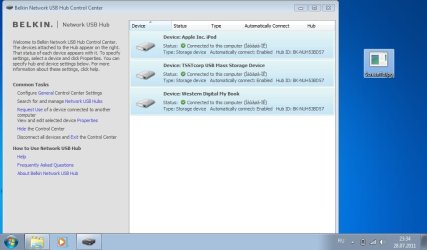
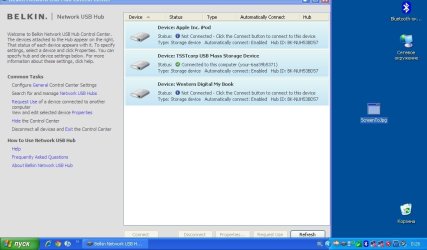
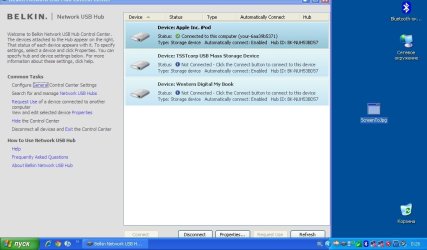
have such a problem.
usb is connected, but only in one usb device.

on windows 7 at once three device are connected they are hard disk, printer, ipod,

and on Xp sp3 if a hard disk is connected, it is necessary to disconnect and then a printer

is connected

but why three equipments are not connected at once XP?
 

Attachments

  • win7.jpg
    win7.jpg
    58.2 KB · Views: 91
  • XP.jpg
    XP.jpg
    63.1 KB · Views: 48
  • Xp1.jpg
    Xp1.jpg
    64.3 KB · Views: 48

My Computer My Computer

At a glance

Windows 7 Home Premium 32bit
OS
Windows 7 Home Premium 32bit
Hi all,

I'm sorry to reactivate this post but I have a big problem with my Belkin Hub.
It works fine with winXP x32, my camera works perfectly.
But when I change to win7 x64, my unit appears "may not be compatible" and I have no control...
All are updated, firmware and sxuptp.sys (3.4.1.0).
I have autorized in my firewall and the other devices work fine...

Just, if I connect my camera with USB cable, without USB Hub and after on the USB Hub (without power OFF), It's OK on the control center... It's amazing...

Any idea?

Many thanks
 

My Computer My Computer

At a glance

Windows 7 Professional x64
OS
Windows 7 Professional x64
Hi all,

I'm sorry to reactivate this post but I have a big problem with my Belkin Hub.
It works fine with winXP x32, my camera works perfectly.
But when I change to win7 x64, my unit appears "may not be compatible" and I have no control...
All are updated, firmware and sxuptp.sys (3.4.1.0).
I have autorized in my firewall and the other devices work fine...

Just, if I connect my camera with USB cable, without USB Hub and after on the USB Hub (without power OFF), It's OK on the control center... It's amazing...

Any idea?

Many thanks

Try using sxuptp.sys ver. 3.3.8.0 instead of 3.4.1.0 - somehow it should work better.

And by the way. I have noticed something annoying. I have external Creative SB Live! (which is actually branded by Toshiba and known as Toshiba Multimedia Center) connected to the Belkin Network Hub and despite of the fact that the audio is working through the network (and even in 5.1 mode through another WiFi router) - it is laggy. It can't be noticed while listeinng music from Winamp for example, but when you try to play QuakeLive you will realize that everything you hear is in fact a few miliseconds AFTER you see it on the screen. In other words there is a noticeable delay while playing sounds through audio card connected to Belkin's device.

Belkin Support didn't help much, after a few e-mails they just said that this device is not compatibile and that's all... :/

PS my friend has exactly the same issue with Asus Xonar U3 external audio card and Belkin Network Hub

PS2 after some research I found out that this Belkin's device operates with maximum transfer ca. 3MB/s. According to my network meter application I see that listening 5.1 music consumes max. 650KB/s so bandwidth is not the issue I suppose.

PS3 can anyone predict how USB2VGA adapter will work with this hub? I have no idea how much transfer does it need to work properly.

Any good ideas what can be done to solve this issue?
 
Last edited:

My Computer My Computer

At a glance

Windows 7 Professional x64
OS
Windows 7 Professional x64
F5L009 Belkin USB Hub Manager

I have been using a Belkin F5L009 USB Hub manager for some time with only one problem encountered. I have 2 PCs hardwired to router, 1 PC wirelessly connected to router and a notebook also wirelessly connected to router. The 3 PCs and Notebook are all running Windows 7 Home Premium.
I also have an NAS device, two printers and a scanner connected.
The Hub manager software is upto date (1.4.0 - SXUPTP Driver :3.1.5.0)
The only problem that I have found is when I try printing from the PC which is wirelessly connected to the router, the printerselected prints very slowly!
I think that the USB Hub manager is a very good way of connecting all of theses devices!
 

My Computer My Computer

At a glance

Windows 7 64 bit home premiumIntel(R) Core(TM) 2 Quad CPU [email protected]4 X 1024 MBytes Samsung DDR2 (PC2-6400)Radeon HD4350
Computer Manufacturer/Model Number
Dell Inspiron 545
OS
Windows 7 64 bit home premium
CPU
Intel(R) Core(TM) 2 Quad CPU [email protected]
Motherboard
Dell 0N826N
Memory
4 X 1024 MBytes Samsung DDR2 (PC2-6400)
Graphics Card(s)
Radeon HD4350
Sound Card
AMD High Definition audio device and Realtek HDA
Monitor(s) Displays
Dell S2309W
Hard Drives
ATA 500 GIGABYTE
ATA 500 GIGABYTE
Your software is not up to date :)

da7819f2195d0d4bb8f4a94cd1e56b6815328.jpg


But you will not find the driver on Belkin's official website :)
 

My Computer My Computer

At a glance

Windows 7 Professional x64
OS
Windows 7 Professional x64
Belkin F5L009 USB Hub manager

Thought my software was upto date but obviously not! Where can I get the update if it is not on Belkin's website?
Incidentally this proves that even with out of date software the Hub manager works well!
 

My Computer My Computer

At a glance

Windows 7 64 bit home premiumIntel(R) Core(TM) 2 Quad CPU [email protected]4 X 1024 MBytes Samsung DDR2 (PC2-6400)Radeon HD4350
Computer Manufacturer/Model Number
Dell Inspiron 545
OS
Windows 7 64 bit home premium
CPU
Intel(R) Core(TM) 2 Quad CPU [email protected]
Motherboard
Dell 0N826N
Memory
4 X 1024 MBytes Samsung DDR2 (PC2-6400)
Graphics Card(s)
Radeon HD4350
Sound Card
AMD High Definition audio device and Realtek HDA
Monitor(s) Displays
Dell S2309W
Hard Drives
ATA 500 GIGABYTE
ATA 500 GIGABYTE
should be in this thread :D
 

My Computer My Computer

At a glance

Windows 7 Professional x64
OS
Windows 7 Professional x64
Hello

I have an external hard disk on the belkin usb hub, also 2 printers at the hub.
It works fine, but now I want to backup my hard disk at the external.

Now my question, can you connect to a device with cmd?
Or somthing like that --> "C:\Program Files\Belkin\Network USB Hub Control Center\Connect.exe" -connect:harddisk

I want to scheduled my backup and if the backup program starts he must be first connect to the harddisk.

Sorry for my bad English.
Pieter
 

My Computer My Computer

At a glance

Windows 7 Ultimate 32bit
OS
Windows 7 Ultimate 32bit
Hello,

I've got it! :) So now I can try this driver on my computer (W7 HP x64) and it was buggy (devices appears but can't connect). With this new version I think there's no problems, can connect to devices (thumbdrive/printer checked, printer in shared mode too), I can copy more than 1-2 GBs over the network HUB without disconnecting... so I think it's 99.99...9% working version with the original control center.

You can download it here: Multiupload.com - upload your files to multiple file hosting sites!

Please test it, and report the problems/success stories :)

Regards,
Norbert
Back in post #57 Norbert kindly posted the above. After frustration with my W7 computers and the Belkin provided software I used the uploaded files and since then the hub has worked at 100% reliability.

I just installed the W8 Consumer Experience and needed the modified install file but couldn't find my download so came back to get it from Multiupload but it seems that that is no longer available. After an in depth search of my system I finally found it. To make sure I always have it available I have put the install file on my web space - so if anybody needs it you can get it here

HTTP://www.drosera.f2s.com/Belkin_F5L009_driver_v2_with_updated_SXUPTP.sys__3.3.8.0_-_F7D4301_.zip

Misterfish
 

My Computer My Computer

At a glance

W7 Pro and W7 Ultimate - both 32 bit (plus W8...
OS
W7 Pro and W7 Ultimate - both 32 bit (plus W8 CE)

My Computer My Computer

At a glance

Windows 7 Ultimate x64
OS
Windows 7 Ultimate x64
The hub is designed to attach USB devices which are normally wired to a PC to have them connect via the router and be wireless. In regards to your setup, the USB webcam would have to be hard-wired to the belkin hub (the belkin hub has to be hard-wired to your wireless router which will then transmit the signal wirelessly.
I wanted to make a USB webcam a wireless webcam along with the Belkin Home Base, but it failed.
- webcam wired to Belkin Home Base wired to Router = webcam not detected
- webcam wired to Belkin Home Base wireless to Router = webcam not detected
I tried 3 different webcams. What IS detected in both modes is a more simple device like a USB thermometer. The ad for the Belkin Home Base comes with "supports webcams" but in fact it does not work with webcams. I find this misleading, for me the Belkin Home Base is useless.
 

My Computer My Computer

At a glance

Windows 7 Home Premium 32bit.
OS
Windows 7 Home Premium 32bit.
Got it working finally!!

I tried all the procedures described here but every time I ran the installation package for the Belkin control center Windows stopped the process and showed there was and error with the Setup64.exe

Then I decided to go to the Silex web site and found a recent version of the Virtual Link software. Donwloaded it, installed (with no Belkin crapware installed whatsoever) and ran 100%. I can see my printer with no issues. :D :party:

The link to the software page is this >>> Silex Support - SX-Virtual Link Software Download

They have fairly updated versions for Win and Mac. I hope this helps.

Cheers
 

My Computer My Computer

At a glance

Windows 7 Professional x64
OS
Windows 7 Professional x64
hmm, this app is looking very nice but it is constantly disconnecting my audio device every ca. 1min (with belkin software it was just fine). What can be wrong? //edit: older firmware was working better but...

---edit---

I was using this Belkin Device for a long time with my external USB sound card - Sound Blaster Live! 24-bit and it worked like a charm but... some day a lightening stroke nearby. I had to return the device as the seller didn't have a spare one, and bought another one. Unfortunately I have many issues with running my audio through it now. Everything is working for a while but after a few minutes the sound is choppy and I noticed that network connection is dropping the speed from 300mbps to even a 1mbps then. I really do not understand it... I tried different drivers etc and even bought Sound Blaster Audigy 2 NX (another usb sound card). In this case the situation was similar but in addiction it is very driver-dependable. What surprised me - it is working (but often choppy) with Microsoft driver but it is not working with driver from creative. Does anyone have any idea how to solve this problem?
 
Last edited:

My Computer My Computer

At a glance

Windows 7 Professional x64
OS
Windows 7 Professional x64
Back
Top