Best AV out there?

My IE11 Google browser (fully updated) got hijacked yesterday (No Install Chrome button/slow...), and my KIS2013 (Kaspersky Internet Security) AV failed to prevent this or detect it on All scans!

I then ran my Full on-demand scans with MBAM- Negative.

I then ran my on-demand Emsisoft-kit, and it detected/Quarantined a High-Risk browser hijacker in the registry!

The Emsisoft AV always has a High detection rate, but did Not play well with my Windows Security Center (Non-MS code... is Not recognized by WSC), and their Firewall was a BSOD pain!

Other thoughts- In the past I hated the Google Chrome nag, but now I like it!
First, what is a IE11 Google Browser?
Second, can you add links to Emisoft and the other you mention? :D
 

My Computer My Computer

Computer type
PC/Desktop
Computer Manufacturer/Model Number
Home Built Desktop By DataTech
OS
Windows 7 Ultimate X64 SP1
CPU
Intel i5-2550K, Differing ~4.4-4.8GHz No built in GPU
Motherboard
ASUS P8Z68-V PRO/GEN3
Memory
16GB G.Skill Sniper 1866MHz @ 2133MHz 2x8GB
Graphics Card(s)
ASUS GTX650TIB-DC2OC-2GD5, (650TI Boost)
Sound Card
Onboard Realtek 5-1
Monitor(s) Displays
Samsung P2570HD
Screen Resolution
1920x1080
Hard Drives
Samsung 840 Pro 256GB SSD for OS, 500GB Seagate Constellation (Enterprise drive) for Data
PSU
Corsair HX650W
Case
Inwin Dragon Rider
Cooling
Hyper 212 EVO w/two Noctua fans, push-pull, @1300 RPM
Keyboard
E-Z Eyes, bright yellow keys with large characters
Mouse
steelseries SENSEI Laser Pro Gaming
Internet Speed
48-51Mbs Mbs down, 11 Mbs up Xfinity Cable
Antivirus
Norton Internet Security 2013
Browser
IE 10, Opera, Pale Moon if needed
Other Info
4 case fans, LG BluRay-RE, ASUS DVD-RW, Mr. Fusion power supply, 1.21 gigawatts.
My IE11 Google browser (fully updated) got hijacked yesterday (No Install Chrome button/slow...), and my KIS2013 (Kaspersky Internet Security) AV failed to prevent this or detect it on All scans!

I then ran my Full on-demand scans with MBAM- Negative.

I then ran my on-demand Emsisoft-kit, and it detected/Quarantined a High-Risk browser hijacker in the registry!

The Emsisoft AV always has a High detection rate, but did Not play well with my Windows Security Center (Non-MS code... is Not recognized by WSC), and their Firewall was a BSOD pain!

Other thoughts- In the past I hated the Google Chrome nag, but now I like it!
First, what is a IE11 Google Browser?
Second, can you add links to Emisoft and the other you mention? :D
scottls59901 has a thread here. This is a duplicate post :-(

To stay on topic for this thread, I'll say that Emsisoft flags several of W7's native DLLs. I wonder how the OS survives with that AV tool installed.
 

My Computer My Computer

Computer type
Laptop
Computer Manufacturer/Model Number
Employer provided Dell Latitude
OS
W7 Pro SP1 64bit
CPU
i7
Memory
8GB
Graphics Card(s)
Intel HD Graphics
Hard Drives
crappy SSD
Antivirus
Employer mandated Symantec Endpoint Protection
Browser
Pale Moon 64bit, IE11 64bit & Chrome 64bit
I have been using Roboscan Internet Security for about a week and I'm considering buying Pro £8.40 GBP a year :)
 

My Computer My Computer

Computer type
PC/Desktop
Computer Manufacturer/Model Number
Home Built
OS
Win 7 Pro x64, Win 10 Pro x64, Linux Light x86
CPU
Core i7 3770K
Motherboard
Gigabyte GA-Z77P-D3
Memory
Crucial Ballistix Sport 8GB
Graphics Card(s)
ASUS GeForce GTX 650 Ti
Sound Card
On board
Monitor(s) Displays
ASUS 22 W/S
Screen Resolution
1920 x 1080
Hard Drives
Intel 320 Series SSD, WD Caviar Black 1TB
PSU
Corsair CX 750w
Case
Black Night
Cooling
120mm fans front/back, Coolermaster Hyper 212 Evo
Keyboard
Razer Blackwidow Expert 2013 Mechanical Keyboard
Mouse
Logitech G300 Gaming Mouse
Internet Speed
20mb Unlimited
Antivirus
ZA Antivirus + Firewall
Browser
Cyberfox
Other Info
Powered USB Hub, External Drives 3 x 1TB, Phone Dock.
I have been using Roboscan Internet Security for about a week and I'm considering buying Pro £8.40 GBP a year :)
I would avoid any company that uses the phrase "Boost your Registry":

robo.png

To me, that casts a shadow of doubt on their entire product line.
 

My Computer My Computer

Computer type
Laptop
Computer Manufacturer/Model Number
Employer provided Dell Latitude
OS
W7 Pro SP1 64bit
CPU
i7
Memory
8GB
Graphics Card(s)
Intel HD Graphics
Hard Drives
crappy SSD
Antivirus
Employer mandated Symantec Endpoint Protection
Browser
Pale Moon 64bit, IE11 64bit & Chrome 64bit
Well I'm a little computer savy so I prob would not use that part ... bit like CCleaner, I clean my own registry :)
 

Attachments

  • 000794.jpg
    000794.jpg
    41.2 KB · Views: 0

My Computer My Computer

Computer type
PC/Desktop
Computer Manufacturer/Model Number
Home Built
OS
Win 7 Pro x64, Win 10 Pro x64, Linux Light x86
CPU
Core i7 3770K
Motherboard
Gigabyte GA-Z77P-D3
Memory
Crucial Ballistix Sport 8GB
Graphics Card(s)
ASUS GeForce GTX 650 Ti
Sound Card
On board
Monitor(s) Displays
ASUS 22 W/S
Screen Resolution
1920 x 1080
Hard Drives
Intel 320 Series SSD, WD Caviar Black 1TB
PSU
Corsair CX 750w
Case
Black Night
Cooling
120mm fans front/back, Coolermaster Hyper 212 Evo
Keyboard
Razer Blackwidow Expert 2013 Mechanical Keyboard
Mouse
Logitech G300 Gaming Mouse
Internet Speed
20mb Unlimited
Antivirus
ZA Antivirus + Firewall
Browser
Cyberfox
Other Info
Powered USB Hub, External Drives 3 x 1TB, Phone Dock.
Sorry - I did not mean to imply that you did not know what you were doing. My comments were meant for those finding this thread while seeking suggestions for an AV tool.

Along those lines I'll add that the pro version of Roboscan has a featured called "Cover My Tracks". This feature allows the user to clear a list of web pages that were "opened". The feature only works for IE9 and below. Starting with IE10, the surfing history is kept in a way that Roboscan does not clear. If Roboscan ever updates their "Cover My Tracks" feature to work with IE10 and above, the tin foil hat crowd might like this feature since it can be set to automatically clear surfing history on a periodic basis.

Roboscan's interface is nice, but I would only recommend it for the tech savvy. There are several features that should (IMO) be changed from the default. (e.g. heuristic scanning is off by default)

Roboscan did fairly well in detecting/cleaning infected files based on my very unscientific method of testing. (I turned on heuristic scanning - which probably only impacts detection once a file runs - unless Roboscan virtualizes/simulates a run.) The infected files that I downloaded were new enough to not be listed/caught by IE's SmartScreen Filter; however, one of the files that Roboscan let thru is this file (g6h.exe): https://www.virustotal.com/en/file/...6df7b297df4c070032b9074f/analysis/1393177078/

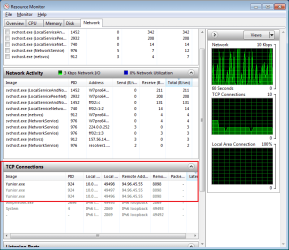
g6h.exe renames itself as Yunior.exe and runs that exe. Yunior starts when Windows does and connects to an IP in this range WHOIS Search, Domain Name, Website, and IP Tools - Who.is
y-connect.png

Yunior also hides itself from Windows Explorer in a way that I'm not familiar with:
y-hide.png

This makes it impossible to submit the Yunior EXE to VirusTotal.com using the normal web interface. Fortunately, Process Explorer can still find/submit the infected file for you: http://www.sevenforums.com/system-security/320426-process-explorer-16-a.html#post2681060


Turning on Roboscan's firewall (and restarting the computer just for fun) did not stop Yunior from making an outgoing connection. Such blocking is turned off by default.

It seems odd that some of the very features that one would pay for would be disabled by default.
 

My Computer My Computer

Computer type
Laptop
Computer Manufacturer/Model Number
Employer provided Dell Latitude
OS
W7 Pro SP1 64bit
CPU
i7
Memory
8GB
Graphics Card(s)
Intel HD Graphics
Hard Drives
crappy SSD
Antivirus
Employer mandated Symantec Endpoint Protection
Browser
Pale Moon 64bit, IE11 64bit & Chrome 64bit
My IE11 Google browser (fully updated) got hijacked yesterday (No Install Chrome button/slow...), and my KIS2013 (Kaspersky Internet Security) AV failed to prevent this or detect it on All scans!

I then ran my Full on-demand scans with MBAM- Negative.

I then ran my on-demand Emsisoft-kit, and it detected/Quarantined a High-Risk browser hijacker in the registry!

The Emsisoft AV always has a High detection rate, but did Not play well with my Windows Security Center (Non-MS code... is Not recognized by WSC), and their Firewall was a BSOD pain!

Other thoughts- In the past I hated the Google Chrome nag, but now I like it!
First, what is a IE11 Google Browser?
Second, can you add links to Emisoft and the other you mention? :D
Two of the highest detection rate free on-demand AV scans are-
1. MBAM (MalwareBytesAntiMalware)-
There Free is VG (Whatever you do Don't get Pro!), and will even remove PUPs (Potentionally Unwanted Programs- i.e. Eye Candy). https://www.malwarebytes.org/free/

1a. The Best/easiest free Rootkit remover that found 4 rootkits, all the others missed is -
Malwarebytes : Malwarebytes Anti-Rootkit BETA

2. Free Emsisoft Emergency Kit- GUI Must reside on your desktop (Not shown in All Programs).
https://www.emsisoft.com/en/software/eek/
You can Customize Updates (remove other languages), after update you may see A Restart on your taskbar (for Version updates), and then update again Before scan.
Custom Scan- specify Direct Disk Access (to get rootkits...), and only scan your C: drive... (Full scan takes Forever!).

-The trick is to run All on-demand AV's... 15min After a no activity reboot, and to First temp disable your active AV until After a Restart (in case it wants to remove something on reboot...)!
-Always do a reboot after scans, even if they are negative!

Enjoy! :)
 

My Computer My Computer

Computer Manufacturer/Model Number
ZT Desktop
OS
Windows 7 Pro (32)
CPU
i7/2600
Motherboard
Intel
Memory
4gb
Graphics Card(s)
512mg (add on card was less buggy than Intel direct driver)
Sound Card
Internal
Monitor(s) Displays
19" DELL Ultra Sharp
Hard Drives
C:= WD Raptor Sata6 10k rpm
D:/E:= WD Black Sata 3.0
Case
ZT Full
Cooling
ZT
Internet Speed
8000kbps cable
Other Info
Free Outpost Pro Internet Security, and no other active anti-malware.
Free On-Demand- SpyWareBlaster, MBAM, Emsisoft-Kit, and Kaspersky Anti-rootkit utility TDSSKiller.
Back
Top