Best Windows 7 Defrag App

xSeanBoi

PortableAppZ Creator
Member
Local time
12:29 PM
Messages
21
Location
Nebraska, USA
There is always a lot of controversy when it comes to disk defragmentation tools. Some people believe that you do not need a third-party disk defragmentation tool. Others are loyal to a specific program. Well, here's my thoughts. I will even tell you why.

I know that a lot of you are huge fans of free programs but this is one case in which I would recommend making an exception...

For regular 'home' users all defragmenters do the same good job... with one exception: Vopt is the only one capable of optimizing start-up files
INCLUDING realigning the pagefile. To do this the right way, a little bit of thinking is required.

Some say the size of your pagefile is depending on your installed RAM. Wrong.
It depends on your daily work. For example:

The "commit charge" of Designers working with Photoshop day in day out
is WAY higher than for the average guy who plays some games - no matter how much RAM is installed.

To find your "personal" pagefile size, use the computer as you normally would. After a few hours, open your Task Manager (CTRL-ALT-DEL) and go to the Performance tab and check the "commit charge"

Performance
Total: RAM currently used
Limit: Physical RAM + current pagefile
Peak: Most RAM used today (well... peak)

As you can see, the difference is quite noticeable. You can reduce the size of your pagefile. Smaller pagefile = better performance.

Now press Win+Pause -> Advanced tab -> Performance -> Click Settings
-> Advanced tab -> Virtual Memory -> "Change"

By default "System managed size" is checked. Now Windows
tends to increase and decrease the filesize whenever it's bored, causing your pagefile to split into fragments which then causes performance loss.

To optimize this, check "Custom size" and lock the file by entering YOUR
personal value TWICE. Don't forget to click on "Set" afterward. Nowadays a value of 512MB is just fine. Don't go lower.

If you have, for example, 1GB of physical RAM and your "Peak" was 695MB (729,000 KB) set it to 512MB or 768MB

Windows will ask you to reboot your computer once you accept all changes. Do it.

Finally, run Vopt and run the Clean Tasks first to get rid of junk files. Select the Drive with your new pagefile (usually drive letter C) Click "Defragmenting" -> "Defrag pagefile"

The clever method - and Vopt is the ONLY one who does it:
Vopt moves the complete pagefile to the very middle of your HDD. Why? Because the middle or the center is the Idle-point for the HDD's shuttle. This ensures the LOWEST access time possible.

Furthermore, Vopt overrides loading AutoStart and some Core Applications during the next boot. Otherwise you couldn't access and/or move them. Sounds logical, right? I thought so too :)

This procedure is what I've been doing FIRST on a fresh system for the past 8 years.http://www.sevenforums.com/[/IMG][IMG]http://img823.imageshack.us/img823/1061/vopt2.jpg[/IMG]
 

My Computer

Computer Manufacturer/Model Number
Dell Inspiron 1545
OS
Windows 7 Professional Build 7601 (x64)
CPU
Intel Mobile Core 2 Duo T6600 @ 2.20GHz 56 °C
Motherboard
Dell Inc. 0G848F (Microprocessor)
Memory
4.0GB Dual-Channel DDR2 @ 399MHz (6-6-6-18)
Graphics Card(s)
Mobile Intel 4 Series Express Chipset Family
Sound Card
Realtek High Definition Audio Device
Screen Resolution
720p HD Resolution @ 1366 x 768
Hard Drives
320GB TOSHIBA TOSHIBA MK3265GSX (IDE)
where is Vopt located ? thanks
 

My Computer

Computer type
PC/Desktop
Computer Manufacturer/Model Number
Custom Build
OS
Windows 10 Pro - 64 bit
CPU
Intel i7 2600K
Motherboard
Asus P8P67
Memory
8 Gig ddr3 1600 mhz - viper extreme (Patriot)
Graphics Card(s)
EVGA 980 TI
Monitor(s) Displays
2 - Lg 21" LED , sony 48 " bravia LED
Hard Drives
one - samsung 840 series 465.76 GB SSD
two - wd 2 tB black
one - wd 1.5 tb black
one - wb 1 tb black
PSU
1000 Watt Coolmaster : Silent Pro Gold
Case
antec 1200
Cooling
watercooled
Mouse
logitech wireless
Antivirus
Norton Security 2015
Other Info
powerware 3.1 KVA FERRUPS with 4 - 1000 Amp Deep cycle batteries ...
Here is a link to the homepage. You can download a trial here.
Trial downloads are full and unrestricted product versions which are time-limited. You must register them to continue using them beyond the 30-day trial period.
 

My Computer

Computer Manufacturer/Model Number
Dell Inspiron 1545
OS
Windows 7 Professional Build 7601 (x64)
CPU
Intel Mobile Core 2 Duo T6600 @ 2.20GHz 56 °C
Motherboard
Dell Inc. 0G848F (Microprocessor)
Memory
4.0GB Dual-Channel DDR2 @ 399MHz (6-6-6-18)
Graphics Card(s)
Mobile Intel 4 Series Express Chipset Family
Sound Card
Realtek High Definition Audio Device
Screen Resolution
720p HD Resolution @ 1366 x 768
Hard Drives
320GB TOSHIBA TOSHIBA MK3265GSX (IDE)
Here is a link to the homepage. You can download a trial here.
Trial downloads are full and unrestricted product versions which are time-limited. You must register them to continue using them beyond the 30-day trial period.
thanks :)
 

My Computer

Computer type
PC/Desktop
Computer Manufacturer/Model Number
Custom Build
OS
Windows 10 Pro - 64 bit
CPU
Intel i7 2600K
Motherboard
Asus P8P67
Memory
8 Gig ddr3 1600 mhz - viper extreme (Patriot)
Graphics Card(s)
EVGA 980 TI
Monitor(s) Displays
2 - Lg 21" LED , sony 48 " bravia LED
Hard Drives
one - samsung 840 series 465.76 GB SSD
two - wd 2 tB black
one - wd 1.5 tb black
one - wb 1 tb black
PSU
1000 Watt Coolmaster : Silent Pro Gold
Case
antec 1200
Cooling
watercooled
Mouse
logitech wireless
Antivirus
Norton Security 2015
Other Info
powerware 3.1 KVA FERRUPS with 4 - 1000 Amp Deep cycle batteries ...
Why use a trial version of anything, especially when there are FREE applications with the same or better functionality. Try jkdefrag.
 
Smart defrag is a neat little app that has some other tidy features on it and best of all it's free.

1.png


Smart Defrag
 

My Computer

Computer Manufacturer/Model Number
Custom Build.
OS
Windows 7 Ultimate x64.
CPU
i5 760 @ 4.2Ghz. 1.18v
Motherboard
Gigabyte - H55M-USB3
Memory
4g Corsair xms3 ddr3, 1600Mhz.
Graphics Card(s)
Gigabyte GTX-560Ti soc edition
Sound Card
Asus Xonar Dx - Logitech Z5500.
Monitor(s) Displays
Acer 22" LCD Wide screen 1680-1050 -Samsung 42" Plasma....
Screen Resolution
1680/1050 -----1920/1080p.
Hard Drives
2x 2TB Seagate Go Flex,
1x 1TB Seagate,
1x 640WD Black,
x16 Gig sandisc flash drive,
1x8Gig sandisc flash drive.
PSU
XigmaTek 80plus NRP-PC702 - 700w dual 30a.
Case
Venus Gamers Midi Tower Case with LED Display
Cooling
Arctic Freezer 7 Pro Rev 2... x2 Arctic F8 case fans........
Keyboard
Logitech G15-v2 Gaming.
Mouse
Microsoft Sidewinder X8.
Internet Speed
Virgin Media - 50mb down- 8mb up.
Other Info
x2 Xbox 360 wireless controllers...

Dual layer optical disc drive...

Chrome 79million

A.V = MSE
The main point I was trying to make is that this is the ONLY defrag program that will realign the pagefile and moves it to the very middle of your HDD so that access time is as low as possible. JkDefrag, MyDefrag, Smart Defrag, Puran Defrag, Auslogics Disk Defrag, UltraDefrag, Diskeeper and the built-in Windows Defrag cannot do this. Vopt is the ONLY defrag program that does and it noticeably increases overall system speed. The program also defrag quite quickly; so fast that daily defragmentations are very tolerable.
 

My Computer

Computer Manufacturer/Model Number
Dell Inspiron 1545
OS
Windows 7 Professional Build 7601 (x64)
CPU
Intel Mobile Core 2 Duo T6600 @ 2.20GHz 56 °C
Motherboard
Dell Inc. 0G848F (Microprocessor)
Memory
4.0GB Dual-Channel DDR2 @ 399MHz (6-6-6-18)
Graphics Card(s)
Mobile Intel 4 Series Express Chipset Family
Sound Card
Realtek High Definition Audio Device
Screen Resolution
720p HD Resolution @ 1366 x 768
Hard Drives
320GB TOSHIBA TOSHIBA MK3265GSX (IDE)
So many opinions about page file size over the years, with most of the people who actually wrote windows saying let the OS manage the file. In these days of fast CPU's and with 4+ Gigs or Ram common, I don't think you'll see a noticeable increase in overall system speed. My opinion.

If Vopt was free, great, but to pay for a program, only to acquire that specific feature which has questionable results on system performance...

Not saying you are wrong, just saying there are no doubt other things you can do for free that will have greater effect on system performance. I'll stick to my system managed page file, and free defrag programs. A Guy
 

My Computer

Computer type
PC/Desktop
OS
Windows 10 Home x64
CPU
INTEL Core i5-750 Quad-Core 3.37GHz
Motherboard
ASUS P7P55D
Memory
HyperX Fury Black Series 8GB (2 x 4GB) 1866Mhz
Graphics Card(s)
EVGA GeForce GTX 750 Superclocked 1GB 128-Bit GDDR5
Monitor(s) Displays
LG 32MA68HY 32" IPS
Screen Resolution
1920 x 1080
Hard Drives
Samsung 840 Evo 120GB, SEAGATE 500GB Barracuda® 7200.12, SATA 3 Gb/s, 7200 RPM, 16MB cache
PSU
ANTEC TruePower New TP-550, 80 PLUS, 550W
Case
ANTEC Three Hundred Illusion
Cooling
COOLER MASTER Hyper 212 Plus, 4 x 120mm 1 x 140mm Noctua's
Internet Speed
85 + Mbps
Antivirus
Avast
Browser
Vivaldi
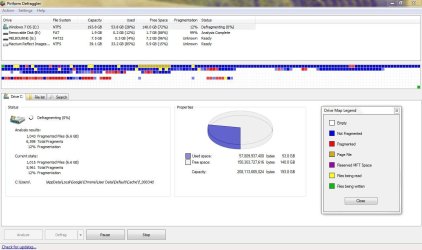
Smart Defrag is good free program but I prefer Defraggler a free program developed by Piriform (who are the developers of Ccleaner).
 

Attachments

  • Capture.JPG
    Capture.JPG
    100.7 KB · Views: 401

My Computer

Computer Manufacturer/Model Number
Self-built on 31/1/11
OS
Windows 7 Ultimate 64 bit
CPU
Intel i5 2400 @ 3.80 GHz
Motherboard
Ashrock P67 Extreme 4
Memory
Mushkin Silverline 996768 4GB
Graphics Card(s)
MSI GTX 460 760MB Cyclone Overclocked
Sound Card
Integrated
Monitor(s) Displays
Asus VH202T 20" Widescreen
Screen Resolution
1600x900
Hard Drives
SSD: OCZ Vertex 2 60GB
HDD: Hitachi Deskstar 7K1000.C 500GB
PSU
Silverstone Strider 500W
Case
Zalman Z9 Plus
Cooling
Cooler Master Hyper 212 Plus
Keyboard
Logitech Wireless Keyboard MK520
Mouse
Logitech M310
Internet Speed
3 Mbps
Other Info
UEFI: Ashrock P67/
Network Card :TP-Link WN350GD/
WEI: 7.4/
ODD: Lite-On IHAS324
For stuff like this, I'll stick with the microsoft utilities. I don't like risking data corruption, and MS can test for that more completely than other companies.
 

My Computer

Computer Manufacturer/Model Number
Black_Box (homebuilt)
OS
windows 7 RTM x64
CPU
Phenom II 965 Quad Core 3.4Ghz
Motherboard
Asus M4A79T Deluxe
Memory
Mushkin Blackline 8GB (4x2gb)
Graphics Card(s)
XFX Radeon 5970 Black Edition
Sound Card
onboard
Monitor(s) Displays
Dell 2408WPF-main Dell E248WFP-secondary
Screen Resolution
1920x1200-main 1920x1200-secondary
Hard Drives
OCZ Vertex Limited Edition 100GB (OS)
x1 WD Black Edition 500GB drive (Storage)
PSU
XFX 850w Black Edition (Modular)
Case
Mountian Mods H2go
Cooling
CoolITSystems ECO A.L.C.
Keyboard
Logitech MX 5500 wireless keyboard
Mouse
Razor Copperhead
Internet Speed
16Mb down/2Mb up Wowway Cable Internet
Auslogics works best for me. It's also fast. It has a defrag and optimize option. Also has auto defrag option.
 

My Computer

OS
Windows 7 Home Premium
CPU
Intel(R) Pentium(R) 4 CPU 3.20GHz
Motherboard
Asus P5VD2-MX-XE
Memory
Physical Memory : 2048 MB (2 x 1024 DDR2-SDRAM )
Graphics Card(s)
Video Card : NVIDIA GeForce 7300 SE/7200 GS
Sound Card
ASUSTeK Computer ALC-660 6-channel CODEC
Monitor(s) Displays
Monitor Type : Acer X183H - 19 inches
Screen Resolution
1366 x 768
Hard Drives
ATA WDC WD1600JS-60NCB1
Keyboard
Logitech
Mouse
Logitech
Internet Speed
DSL 3000
Heh...I just gave Auslogics BoostSpeed a try, had never heard of 'em but looked decent, but not enuff to budge me off TuneUp 2010. Re: defrag software, there's a few good freeware ones as mentioned above. But for me, things get a bit more involved.
I'm running 2 very different SSDs from Ocz for boot drives as well as 2 - 1TB raid0 arrays (2x500gb) for storage and a 2x250GB external raid1 (via a JMicron JMB363 controller on my mobo) for backups ofc. The tricky part for me is that I have both a current SandForce based SSD as well as an older 1st gen. SSD with the infamous stuttering JMicron602 controller and gawd awful 4k random write speeds.
As most are aware, defragging an SSD is not good for it's health/longevity. But in the case of gen1 (JMicron) SSDs, which don't support Trim, have no external write cache and no garbage collection during idle time. Without TRIM and/or GC, drive maintenance get a bit complicated. You sorta have to do a 'manual' trim/GC about once every few weeks. This means using a defragger that has the 'aggressively consolidate free space' option instead of just the usual HDD degragger. Good one's I know of that have this option are PerfectDisk 10 & 11 as well as My Defragger. Was surprised that Diskeeper didn't have a 'CFS' option. I recommend and run DK 2010 Premier Pro w/ HyperFast for SSDs at all times. You'll have to goggle HyperFast, I'm to lazy to attempt a summary (it reduces random writes basically). After consolidating, all the free space is then wiped clean and written to with an 'FF' (which is hex for a '1'). I use an app written by one of the members of the Ocz forums and is called AS Cleaner v0.5..yeah it's the same person who wrote AS SSD Benchmark. This makes all the freshly emptied/erased blocks immediately ready to write to, instead of the normal routine where the controller waits until a write is 'on deck' before it resets the block with an FF.
Yeah, It's an extra chore added to my regular pc 'housekeeping' but it does a decent job all things considered. The drive has been running 24/7 for almost 2 years as an XP boot/OS drive without Trim and without GC, yet it shows absolutely NO write speed degradation thus far!!
So, a certain type of defragging is actually good for a 'certain type' of SSD. :confused:
As far as defragging my arrays, I let DK run 24/7 as a service so it maintains the hdds in real time more or less and HyperFast reduces the overall amount of small random writes which were/are the weakest area of SSD performance. Heh...but you'd never guess that to be the case when you try a new generation (SF) ssd, now 4k writes are fast as hell...go figure..lol.
 

My Computer

Computer Manufacturer/Model Number
Custom designed & self built 'Extreme DuoPro 2'
OS
Win 7 Ult. x64
CPU
E8400 'Wolfdale' C2D 6MB Cache 3GHz @ 4GHz 24/7 - 4.3GHz Max
Motherboard
Asus P5K-E WiFi - ICH9R - JMB363 with 2xeSata chans Raid 0/1
Memory
2x2GB+2x1GB Ocz Reaper HPC - DDR2-1066 5-5-5-15 @ 2.1v
Graphics Card(s)
Palit HD4850 SSE - 512MB DDR5 - 750MHz/950MHz Factory Clock
Sound Card
Creative Audigy 2 ZS - 7.1 Channel - 24bit Proc.
Monitor(s) Displays
ViewSonic VX922 - 2ms Black to Black
Screen Resolution
1280x1024
Hard Drives
Dual Boot SSDs: OCZ Vertex 2 50GB (W7) - Apex 60GB (XP)
Primary: 2x500GB Seagate 7200.12s Raid0
Storage: 2x500GB Seagate 7200.12s Raid0
Backup: 2x250GB Seagate 7200.11s Ext. Raid1
PSU
PC Power & Cooling Silencer 610W
Case
CoolerMaster Storm Scout - 2x140mm 2x120mm
Cooling
Thermalright VenomousX - 120mm TR FDB Fan w/ shrowd
Keyboard
Logitech G110
Mouse
Logitech LX8 Laser
Internet Speed
22Mb Down / 7Mb Up
Other Info
Audigy ZS2 - Logitech Z-2300s - 2.1 200W RMS 270W Peak
Modded by swapping the 8" sub for a JL Audio Dual Voice Coil car sub! Mounted 2x120mm 2500rpm together to blow on the amp's external heatsink. On/off by RF remote cont. 12v switch in case.
This is my shot at building a 'most bang for the buck' system. ;)
Zaxx,you had me at ssd:D
 

My Computer

OS
Windows 7 Home Premium
CPU
Intel(R) Pentium(R) 4 CPU 3.20GHz
Motherboard
Asus P5VD2-MX-XE
Memory
Physical Memory : 2048 MB (2 x 1024 DDR2-SDRAM )
Graphics Card(s)
Video Card : NVIDIA GeForce 7300 SE/7200 GS
Sound Card
ASUSTeK Computer ALC-660 6-channel CODEC
Monitor(s) Displays
Monitor Type : Acer X183H - 19 inches
Screen Resolution
1366 x 768
Hard Drives
ATA WDC WD1600JS-60NCB1
Keyboard
Logitech
Mouse
Logitech
Internet Speed
DSL 3000
Judging by the msg on my profile page, it seems I've said/typed something against the rules. Was half asleep and I'm not sure what it is that I said. I'm unable to reply to the msg to even ask what I did wrong. :confused:
 

My Computer

Computer Manufacturer/Model Number
Custom designed & self built 'Extreme DuoPro 2'
OS
Win 7 Ult. x64
CPU
E8400 'Wolfdale' C2D 6MB Cache 3GHz @ 4GHz 24/7 - 4.3GHz Max
Motherboard
Asus P5K-E WiFi - ICH9R - JMB363 with 2xeSata chans Raid 0/1
Memory
2x2GB+2x1GB Ocz Reaper HPC - DDR2-1066 5-5-5-15 @ 2.1v
Graphics Card(s)
Palit HD4850 SSE - 512MB DDR5 - 750MHz/950MHz Factory Clock
Sound Card
Creative Audigy 2 ZS - 7.1 Channel - 24bit Proc.
Monitor(s) Displays
ViewSonic VX922 - 2ms Black to Black
Screen Resolution
1280x1024
Hard Drives
Dual Boot SSDs: OCZ Vertex 2 50GB (W7) - Apex 60GB (XP)
Primary: 2x500GB Seagate 7200.12s Raid0
Storage: 2x500GB Seagate 7200.12s Raid0
Backup: 2x250GB Seagate 7200.11s Ext. Raid1
PSU
PC Power & Cooling Silencer 610W
Case
CoolerMaster Storm Scout - 2x140mm 2x120mm
Cooling
Thermalright VenomousX - 120mm TR FDB Fan w/ shrowd
Keyboard
Logitech G110
Mouse
Logitech LX8 Laser
Internet Speed
22Mb Down / 7Mb Up
Other Info
Audigy ZS2 - Logitech Z-2300s - 2.1 200W RMS 270W Peak
Modded by swapping the 8" sub for a JL Audio Dual Voice Coil car sub! Mounted 2x120mm 2500rpm together to blow on the amp's external heatsink. On/off by RF remote cont. 12v switch in case.
This is my shot at building a 'most bang for the buck' system. ;)
For stuff like this, I'll stick with the microsoft utilities. I don't like risking data corruption, and MS can test for that more completely than other companies.

I'm sure Microsoft is more worried about getting their product on the market than making sure it is as fast and secure as possible. Just take a look at how soon they begin work on a Service Pack. They were working on SP1 for Win7 less than a month after it was released and are working on Win8 simultaneously.

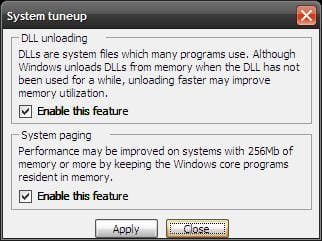
As for the other comment(s) about freeware programs that optimize and defrag the pagefile, they are still not as good as Vopt. Vopt is just as fast as Auslogics Disk Defrag and while the other programs optimize and defrag the pagefile, so does Vopt. However, none of the other programs realign the pagefile and move it to the very middle of your HDD so that access time is as low as possible. As far as optimizing goes, Vopt (through an option you can select within the program) can do as good of a job, if not better. See attached picture of the two options in Vopt.
 

Attachments

  • untitled.JPG
    untitled.JPG
    18.2 KB · Views: 2,910

My Computer

Computer Manufacturer/Model Number
Dell Inspiron 1545
OS
Windows 7 Professional Build 7601 (x64)
CPU
Intel Mobile Core 2 Duo T6600 @ 2.20GHz 56 °C
Motherboard
Dell Inc. 0G848F (Microprocessor)
Memory
4.0GB Dual-Channel DDR2 @ 399MHz (6-6-6-18)
Graphics Card(s)
Mobile Intel 4 Series Express Chipset Family
Sound Card
Realtek High Definition Audio Device
Screen Resolution
720p HD Resolution @ 1366 x 768
Hard Drives
320GB TOSHIBA TOSHIBA MK3265GSX (IDE)
Zaxx, I don't know what you did. Most of your post was too deep for me. What ever it was, I hope I don't do it.
 

My Computer

OS
Windows 7 Home Premium
CPU
Intel(R) Pentium(R) 4 CPU 3.20GHz
Motherboard
Asus P5VD2-MX-XE
Memory
Physical Memory : 2048 MB (2 x 1024 DDR2-SDRAM )
Graphics Card(s)
Video Card : NVIDIA GeForce 7300 SE/7200 GS
Sound Card
ASUSTeK Computer ALC-660 6-channel CODEC
Monitor(s) Displays
Monitor Type : Acer X183H - 19 inches
Screen Resolution
1366 x 768
Hard Drives
ATA WDC WD1600JS-60NCB1
Keyboard
Logitech
Mouse
Logitech
Internet Speed
DSL 3000
They should improve the aesthetics of their site.
I, for instance, didn't try the product because of the site win 95 style.

But i think smart defrag is very good, i defrag once a day, fast optimize once a week, and deep optimize once in a month. Keeps my HD in peak performance.
 

My Computer

Computer Manufacturer/Model Number
Custom Built
OS
Windows 7 Professional x64
CPU
Intel Core i7 2600k - 3.4 GHz
Motherboard
Asus Maximus IV Z68 - Extreme
Memory
4x4 Ripjaws X79 Series 2133 MHz (9-11-10-28)
Graphics Card(s)
1x eVGA GTX 580 - 3GB Classified
Sound Card
Realtek ALC 889 HD Audio
Monitor(s) Displays
Full HD Philips TV 32"
Screen Resolution
1920x1080
Hard Drives
1x Crucial m4 SSD 512 GB
PSU
800W Coolermaster Silentpro Gold
Case
Sentey - Renegade GS-6200
Cooling
Stock
Keyboard
Logitech K800 Wireless
Mouse
Logitech Performance MX Laser
Internet Speed
10MB Internet Connection
Thanks AlexRD. Smart Defrag is a good product. I have used it before. I just like Auslogics more. What looks like W 95?
 

My Computer

OS
Windows 7 Home Premium
CPU
Intel(R) Pentium(R) 4 CPU 3.20GHz
Motherboard
Asus P5VD2-MX-XE
Memory
Physical Memory : 2048 MB (2 x 1024 DDR2-SDRAM )
Graphics Card(s)
Video Card : NVIDIA GeForce 7300 SE/7200 GS
Sound Card
ASUSTeK Computer ALC-660 6-channel CODEC
Monitor(s) Displays
Monitor Type : Acer X183H - 19 inches
Screen Resolution
1366 x 768
Hard Drives
ATA WDC WD1600JS-60NCB1
Keyboard
Logitech
Mouse
Logitech
Internet Speed
DSL 3000
Judging by the msg on my profile page, it seems I've said/typed something against the rules. Was half asleep and I'm not sure what it is that I said. I'm unable to reply to the msg to even ask what I did wrong. :confused:

Zaxx, it's a private message from an Admin or Moderator probably. Just open it like any PM. If you are unclear, they are all nice guys and probably could explain, but better to read the rules thread 1st:

http://www.sevenforums.com/general-discussion/8-forum-rules-please-read.html

A Guy
 

My Computer

Computer type
PC/Desktop
OS
Windows 10 Home x64
CPU
INTEL Core i5-750 Quad-Core 3.37GHz
Motherboard
ASUS P7P55D
Memory
HyperX Fury Black Series 8GB (2 x 4GB) 1866Mhz
Graphics Card(s)
EVGA GeForce GTX 750 Superclocked 1GB 128-Bit GDDR5
Monitor(s) Displays
LG 32MA68HY 32" IPS
Screen Resolution
1920 x 1080
Hard Drives
Samsung 840 Evo 120GB, SEAGATE 500GB Barracuda® 7200.12, SATA 3 Gb/s, 7200 RPM, 16MB cache
PSU
ANTEC TruePower New TP-550, 80 PLUS, 550W
Case
ANTEC Three Hundred Illusion
Cooling
COOLER MASTER Hyper 212 Plus, 4 x 120mm 1 x 140mm Noctua's
Internet Speed
85 + Mbps
Antivirus
Avast
Browser
Vivaldi
Back
Top