Big Trouble with Favorites

TommyO

New member
Local time
6:35 AM
Messages
27
When I click on my Favorites button, sometimes it works perfectly but usually it does not. When it does not, here's what happens.

1. I click on the Favorites button.

2. The list of my 15 folders appears along with Add to Favorites and Organize Favorites on top of the list. These folders have that little triangle to the right of the box.

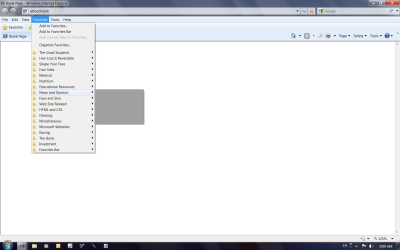
3. When I place the mouse pointer over a folder a grayed-out empty box appears. This is the same for all folders. Clicking doesn't do anything either.

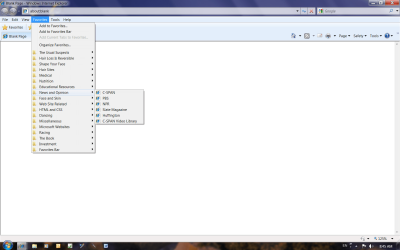
When the favorites button is working, as soon as I place the mouse pointer over a folder, my whole list of favorites within the folder appears.

I have a new HP computer with Windows 7. I've had no problems till this happened about two months ago. I hope someone can give me a clear, not too technical, solution to my problem.
 
Last edited by a moderator:

My Computer My Computer

At a glance

windows 7
OS
windows 7
Can you post a screenshot of what is happening as well please?
 
Last edited by a moderator:

My Computer My Computer

At a glance

Windows 7Core i78 GBATI FireGL
Computer Manufacturer/Model Number
HP Pavilion dv7
OS
Windows 7
CPU
Core i7
Memory
8 GB
Graphics Card(s)
ATI FireGL
Monitor(s) Displays
Secondary is an HP L1940T
Screen Resolution
1680x1050
Hard Drives
160 GB SSD and 500 GB SATA
Keyboard
G11 Logitech
Mouse
G7 Logitech
Internet Speed
Fiber
Other Info
My rig smegging rules!
Evidently this is not the way to post a screen shot. I used the PrtScr button to get the screen shot and I placed both the good and the bad ones in my Pictures Folder, but I can't place them here. Can you tell me how to do it.
 
Last edited by a moderator:

My Computer My Computer

At a glance

windows 7
OS
windows 7

My Computer My Computer

At a glance

64-bit Windows 11 Pro for WorkstationsIntel i7-8700K OC'd to 5 GHz64 GB (4x16GB) G.SKILL TridentZ RGB DDR4 3600...ASUS ROG-STRIX-GTX1080TI-O11G-GAMING
Computer type
PC/Desktop
Computer Manufacturer/Model Number
Self built custom
OS
64-bit Windows 11 Pro for Workstations
CPU
Intel i7-8700K OC'd to 5 GHz
Motherboard
ASUS ROG Maximus XI Formula Z390
Memory
64 GB (4x16GB) G.SKILL TridentZ RGB DDR4 3600 MHz
Graphics Card(s)
ASUS ROG-STRIX-GTX1080TI-O11G-GAMING
Sound Card
Integrated
Monitor(s) Displays
2 x Samsung Odyssey G7 27"
Screen Resolution
2560x1440
Hard Drives
1TB Samsung 990 PRO M.2,
4TB Samsung 990 PRO PRO M.2,
TerraMaster F8 SSD Plus NAS
PSU
Seasonic Prime Titanium 850W
Case
Thermaltake Core P3
Cooling
Corsair Hydro H115i
Keyboard
Logitech wireless K800
Mouse
Logitech MX Master 4
Internet Speed
2 Gb/s Download and 100 Mb/s Upload
Antivirus
Malwarebyte Anti-Malware Premium
Browser
Google Chrome
Other Info
Logitech Z625 speaker system,
Logitech BRIO 4K Pro webcam,
HP Color LaserJet Pro MFP M477fdn,
APC SMART-UPS RT 1000 XL - SURT1000XLI,
Galaxy S23 Plus phone
The top screenshot shows how the Favorites list looks when it's working; the bottom one shows how it looks when it's messed up.

Favorites.png

Favorites 2.png
 

My Computer My Computer

At a glance

windows 7
OS
windows 7

My Computer My Computer

At a glance

Windows 7 x64 pro/ Windows 7 x86 Pro/ XP SP3 x86
Computer Manufacturer/Model Number
Too many to describe...
OS
Windows 7 x64 pro/ Windows 7 x86 Pro/ XP SP3 x86
I tried the suggestions about changing entries in the registery. It didn't work. Are there any other suggestions or will I have to live with this problem?
 

My Computer My Computer

At a glance

windows 7
OS
windows 7
Back
Top