BIOS updating

BAZ

New member
Member
Local time
4:03 AM
Messages
78
I am not sure and want to know if I need to update my BIOS.

This laptop is 2 years old, and is running all well. I haven't had any crashes etc. But I am wondering if updating the BIOS will prolong my machine's life.

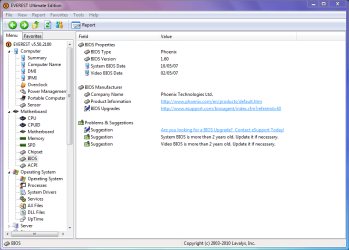
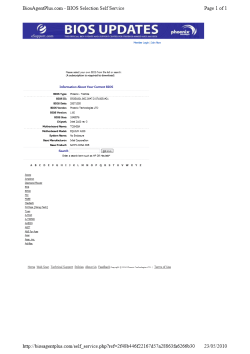
Here are some screenshots which give basic info. about the laptop in question.
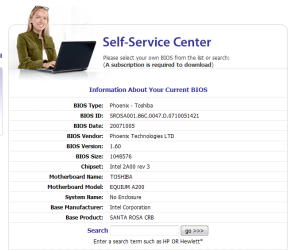
Info current BIOS.png

BIOS info_EVEREST.PNG


PS I didn't like the idea of paying more than 20 quid for their yearly subscription. :zip:
 

Attachments

  • Info current BIOS_2.png
    Info current BIOS_2.png
    27.6 KB · Views: 79

My Computer

Computer Manufacturer/Model Number
TOSHIBA EQUIUM A200 (X86-based PC AT/AT COMPATIBLE)
OS
Windows 7 Ultimate x86
CPU
Intel(R) Pentium(R) Dual CPU T2310 @ 1.46GHz
Motherboard
Intel Corporation SANTA ROSA CRB
Memory
2GB
Graphics Card(s)
Mobile Intel(R) 965 Express Chipset Family
Screen Resolution
1280 * 800 Pixels
Hard Drives
ST9120822AS ATA Device (IDE)
Unless the BIOS update corrects a problem that you're having, then I wopuld leave well alone. These updates are usually to enable the motherboard to support newer hardware such as processors. Since yours is a laptop, you wouldn't be able to upgrade anyway, so I would leave it as it is.
 

My Computer

Computer type
PC/Desktop
Computer Manufacturer/Model Number
Dwarf Dwf/11/2012 r09/2013
OS
Windows 8.1 Pro RTM x64
CPU
Intel Core-i5-3570K 4-core @ 3.4GHz (Ivy Bridge) (OC 4.4GHz)
Motherboard
ASRock Z77 Extreme4-M
Memory
4 x 4GB DDR3-1600 Corsair Vengeance CMZ8GX3M2A1600C9B (16GB)
Graphics Card(s)
MSI GeForce GTX770 Gaming OC 2GB
Sound Card
Realtek High Definition on board solution (ALC 898)
Monitor(s) Displays
ViewSonic VA1912w Widescreen (VGA)
Screen Resolution
1440x900
Hard Drives
OCZ Agility 3 SSD 120GB SATA III x2 (RAID 0)
Samsung HD501LJ 500GB SATA II x2
Hitachi HDS721010CLA332 1TB SATA II
Iomega 1.5TB Ext USB 2.0
WD 2.0TB Ext USB 3.0
PSU
XFX Pro Series 850W Semi-Modular
Case
Gigabyte IF233
Cooling
1 x 120mm Front Inlet 1 x 120mm Rear Exhaust
Keyboard
Microsoft Comfort Curve Keyboard 3000 (USB)
Mouse
Microsoft Comfort Mouse 3000 for Business (USB)
Internet Speed
NetGear DG834Gv3 ADSL Modem/Router (Ethernet) ~4.0 Mb/s (O2)
Antivirus
Avast! 8.0.1497
Browser
IE 11
Other Info
Optical Drive: HL-DT-ST BD-RE BH10LS30 SATA Bluray
Lexmark S305 Printer/Scanner/Copier (USB)
WEI Score: 8.1/8.1/8.5/8.5/8.25
Asus Eee PC 1011PX Netbook (Windows 7 x86 Starter)
  • Like
Reactions: BAZ
STOP PAYING FOR THAT SUBSCRIPTION!

1) First of all, fully authorized and legitimate bios updates should be available from your PC manufacturer's website. Use those, IF REQUIRED, not ones from a 3rd party website.

2) Bios updates do not prolong your computer's life. They may simply resolve a problem or provide a new beneficial feature. If you never update the bios in the computer's lifetime and dont experience any issues (as you said), you'll be just fine.

3) Flashing the bios can be risky! It has the potential to brick your motherboard if you dont do it right. also, the most important thing to do before flashing a bios is to be prepared for a bad flash. How? having a bootable usb/cd with a working bios ready and being fully conversant with the recovery procedures. A lot of people dont take that basic precaution and get bombed.

Nobody can say with 100% guarantee that a bios flash will succeed. That way computers can be most temperamental (like cats).

So:

1) Research your bios update options at Toshiba's website.

2) If you discover a bios update for your model, go through its CHANGELOG. That'll tell you what it brings to the table.

3) If you see something desirable, take ADEQUATE PRECAUTIONS that I mentioned and then proceed.

Otherwise, sit tight, watch TV and have a beer! Your computer will be fine.
 

My Computer

Computer Manufacturer/Model Number
Too many to describe...
OS
Windows 7 x64 pro/ Windows 7 x86 Pro/ XP SP3 x86
  • Like
Reactions: BAZ
Okay thanks.

So BIOS updgrae doesn't actually improve the reliability of a machine? I heard it was so. :confused:

Another similar question please... I have a computer with Vista installed on it, and it has 2 physical hard drives. I installed Windows 7 on that alongside Vista, now when I use Windows 7 I can't see my hard drive partitions from the other drive. Is that a BIOS problem? Or its to do with hard drive's driver not being compatable with windows 7?
 

My Computer

Computer Manufacturer/Model Number
TOSHIBA EQUIUM A200 (X86-based PC AT/AT COMPATIBLE)
OS
Windows 7 Ultimate x86
CPU
Intel(R) Pentium(R) Dual CPU T2310 @ 1.46GHz
Motherboard
Intel Corporation SANTA ROSA CRB
Memory
2GB
Graphics Card(s)
Mobile Intel(R) 965 Express Chipset Family
Screen Resolution
1280 * 800 Pixels
Hard Drives
ST9120822AS ATA Device (IDE)
Thank you for the useful info., Bill2. Now I think I best leave it as it is since I don't really have any big isses with current state of my laptop.

So could someone answer my second question in post # 4. Do I need to update BIOS on that desktop? Or need to update some driver?
 

My Computer

Computer Manufacturer/Model Number
TOSHIBA EQUIUM A200 (X86-based PC AT/AT COMPATIBLE)
OS
Windows 7 Ultimate x86
CPU
Intel(R) Pentium(R) Dual CPU T2310 @ 1.46GHz
Motherboard
Intel Corporation SANTA ROSA CRB
Memory
2GB
Graphics Card(s)
Mobile Intel(R) 965 Express Chipset Family
Screen Resolution
1280 * 800 Pixels
Hard Drives
ST9120822AS ATA Device (IDE)
STOP PAYING FOR THAT SUBSCRIPTION!

1) First of all, fully authorized and legitimate bios updates should be available from your PC manufacturer's website. Use those, IF REQUIRED, not ones from a 3rd party website.

2) Bios updates do not prolong your computer's life. They may simply resolve a problem or provide a new beneficial feature. If you never update the bios in the computer's lifetime and dont experience any issues (as you said), you'll be just fine.

3) Flashing the bios can be risky! It has the potential to brick your motherboard if you dont do it right. also, the most important thing to do before flashing a bios is to be prepared for a bad flash. How? having a bootable usb/cd with a working bios ready and being fully conversant with the recovery procedures. A lot of people dont take that basic precaution and get bombed.

Nobody can say with 100% guarantee that a bios flash will succeed. That way computers can be most temperamental (like cats).

So:

1) Research your bios update options at Toshiba's website.

2) If you discover a bios update for your model, go through its CHANGELOG. That'll tell you what it brings to the table.

3) If you see something desirable, take ADEQUATE PRECAUTIONS that I mentioned and then proceed.

Otherwise, sit tight, watch TV and have a beer! Your computer will be fine.
Good advice!
 

My Computer

Computer type
PC/Desktop
Computer Manufacturer/Model Number
Mellon Labs (custom build)
OS
Win 7 Pro x64/Win 10 Pro x64 dual boot
CPU
AMD FX 8350 Vishera @ 4200
Motherboard
ASUS M5A97 R2.0
Memory
16 GB Mushkin Blackline DDR3-2400 @ 1866 (9-10-10-10-31)
Graphics Card(s)
XFX Radeon R9 280 Double D Black Edition
Sound Card
Realtek HD Audio on MB. Sounds great.
Monitor(s) Displays
Acer 24", Acer 22"
Screen Resolution
3840 x 1080
Hard Drives
1 x Mushkin Chronos 120 GB SSD (Win 10)
1 x Samsung 850 EVO 250 GB SSD (Win 7)
1 x WD 1TB SATA Blue
1 x WD 1TB SATA Green
PSU
Corsair TX-750
Case
CoolerMaster HAF 912+
Cooling
Coolermaster Seidon 240M Liquid AIO. 6 case fans
Keyboard
Logitech G710+
Mouse
Logitech G500s
Internet Speed
Much better since I got fiber, but still way overpriced.
Antivirus
MSE, Malware Bytes for scanning
Browser
Firefox
Other Info
Corsair VOID USB headphones.

A Mellon Labs X-1 - LCD Smartie driven system status display.

Brought to you by the letter E
Back
Top