BIOS Upgrade failed

Inferdramon

New member
Member
Local time
8:39 AM
Messages
25
I've tried to upgrade my computer's BIOS, but it failed multiple times. The first time, It said "WinFlash: Load Driver Failed!!" after I doubleclicked it while in Internet Explorer's download list and I clicked OK. It then came up with a message that said that it failed to install properly and I attempted a reinstall after closing Internet Explorer. Same message. I tried later a third time after disabling Vipre. This time, I could see it do something, a blue line going across the screen. But it still said "WinFlash: Load Driver Failed!!"

What do I do? Should I avoid rebooting? Is it not a problem if the driver failed to load? I've heard that with some computers, a failed upgrade shouldn't cause a problem.

My computer is a Dell Inspiron 545s and the BIOS is version A11 and the brand is, according to DXDiag, is Phoenix AwardBIOS v6.00PG. The version I attempted to upgrade to is A12.
 

My Computer

OS
Windows 7
First, a failed and corrupted BIOS on a Dell and the ONLY option is to replace the motherboard. It does not have a BIOS recovery feature that some commercial motherboards have. I used to do a lot of support on the Dell forums so I know how they work.

The two "Fixes and Enhancements" listed on the Dell downloads are "Enhanced Display" and "USB Key Support". If you are not having any display issues or USB flash drive support isssues you should consider not installing (or attempting) this update. In most cases BIOS updates should only be done if there is something in the BIOS' updates that apply to your specific installation, especially with a Dell since a failed/corrupted BIOS will require a new motherboard.

If you want to try it again, follow the listed Dell installation instructions EXACTLY.

You can get additional assistance from one of the user experts on the Dell communitry Desktop General Hardware section Desktop - Dell Community
 

My Computer

Computer type
PC/Desktop
Computer Manufacturer/Model Number
My Own Build
OS
Windows 10 64 bit
CPU
Intel i7 6700K
Motherboard
ASUS ROG Maximus VIII Hero
Memory
16GB Corsair Dominator
Graphics Card(s)
Intel CPU Graphics
Sound Card
RealTek
Monitor(s) Displays
27" Dell S2719dgf
Screen Resolution
2560X1440
Hard Drives
1 TB Samsung 850 EVO SSD for Win 10 Pro
500GB Samsung 850 EVO SSD for Win 10 Insider
2 TB drive for backup
PSU
EVGA Supernova 750G2
Case
BeQuiet Silent Base 600
Cooling
Deepcool Captain 120EX
Keyboard
Microsoft Wireless 2000
Mouse
Microsoft wireless
Internet Speed
100 MB/sec (Cable)
Antivirus
Microsoft Defender and Malwarebytes
Browser
Edge/Firefox
Other Info
Cakewalk (Sonar) by BandLab and Studio One 4.1 Pro recording studio software. MOTU 896Mk3 Hybrid recording interface, Frontier Tranzport wireless control unit, Behringer X-Touch Control Surface.
Five USB connected optical drives for CD Audio production using Nero BurningROM
I forgot to mention that when I ran the file, it never comes up with any options display or anything about replacing the BIOS. It fails almost instantly, about 1-2 seconds after I click the file. Maybe 3 at most. Does that change anything, or is it still possible the BIOS is corrupted? A friend of mine who has some experience with computers believes that the driver to flash is what failed to load, thus the BIOS was never touched. Another thing, according to the download page, this file is supposed to be run after a reboot via floppy disk. But my computer has no floppy drive.
 

My Computer

OS
Windows 7
Oh here's something that might be helpful. A friend of mine gave me a file for A11, the previous version, and the same problem happens. So I took the liberty of taking screenshots. I had to record a video first since it flashes by so fast. Here's the window that flashed for a second before the failure message popped up: http://i165.photobucket.com/albums/u72/Inferdramon/thetwomessages.png
 

My Computer

OS
Windows 7
There are Windows and DOS versions of the BIOS update on the Dell forum. Only use the Windows version. ]


Since it is failing during the initialization phase, the BIOS didn't get updated. If it had completed, it would have rebooted your PC and installed the BIOS update before Windows reloads.

I would be careful with that A11 as its labeled "foxconn". That is another issue, a non-Dell supplied BIOS generally will not install on a Dell motherboard/BIOS. I've seen, from posts on the Dell forums, of users trying non-Dell BIOS' and they will not install. Foxconn makes a lot of motherboards for Dell (many but not all Dell models) but usually the BIOS is labeled "Dell" and not "Foxconn". (Foxconn also makes the Apple iPhones and iPads).

If you need the A12 update (see my first response about "needing" the update), suggest you post on the Dell forum that I linked you to and let those more familiar with what is happening assist you.
 
Last edited:

My Computer

Computer type
PC/Desktop
Computer Manufacturer/Model Number
My Own Build
OS
Windows 10 64 bit
CPU
Intel i7 6700K
Motherboard
ASUS ROG Maximus VIII Hero
Memory
16GB Corsair Dominator
Graphics Card(s)
Intel CPU Graphics
Sound Card
RealTek
Monitor(s) Displays
27" Dell S2719dgf
Screen Resolution
2560X1440
Hard Drives
1 TB Samsung 850 EVO SSD for Win 10 Pro
500GB Samsung 850 EVO SSD for Win 10 Insider
2 TB drive for backup
PSU
EVGA Supernova 750G2
Case
BeQuiet Silent Base 600
Cooling
Deepcool Captain 120EX
Keyboard
Microsoft Wireless 2000
Mouse
Microsoft wireless
Internet Speed
100 MB/sec (Cable)
Antivirus
Microsoft Defender and Malwarebytes
Browser
Edge/Firefox
Other Info
Cakewalk (Sonar) by BandLab and Studio One 4.1 Pro recording studio software. MOTU 896Mk3 Hybrid recording interface, Frontier Tranzport wireless control unit, Behringer X-Touch Control Surface.
Five USB connected optical drives for CD Audio production using Nero BurningROM
Assuming you are sure you have the right file, are you right-clicking on it and choosing "Run As Administrator"?
 

My Computer

OS
Windows 7 Ultimate x64 SP1
CPU
Intel Core i7-2600
Motherboard
Gigabyte GA-P67A-UD3P-B3
Memory
12 GB Patriot Extreme DDR3-1333
Graphics Card(s)
Nvidia GTX 470
Monitor(s) Displays
Dell UltraSharp 2209WA
Hard Drives
OCZ Agility3 240 GB, WD5001AALS, WD7501AALS
PSU
OCZ ModStream 700W
Case
CoolerMaster HAF 912 Advanced
Cooling
CoolerMaster Hyper 212 Plus
I got the file straight from Dell's site. I assumed it was the right one. I'll take a look at the Dell forum. And no I haven't tried running as Administrator. I think I noticed why it wasn't working. Apparently I had cloud scanning enabled in Comodo Firewall and it was blocking the file from doing too much. Next time I try, I'll disable that along with Vipre.
 

My Computer

OS
Windows 7
Make sure you have the "correct" BIOS

First off you need to make sure you have the correct BIOS for your specific motherboard. Many Dell (or other pc manufactureres) use different motherboards from model to model. So saying it's a Dell computer with "AwardBIOS v6.00PG" may not be correct. Which gets me to my next point...

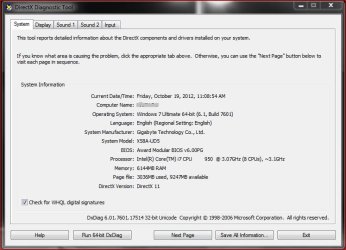
If you're relying on the DX Diagnostics (DXDIAG) to tell you what your BIOS is... you're looking in the wrong area. The DXDIAG doe's not give the correct info with regards to BIOS version as seen here (mine)...

dxdiag.JPG

Note mine lists the same BIOS version as yours (AwardBIOS v6.00PG). What you are looking at is the chip, not the BIOS version. My correct BIOS version is F6.

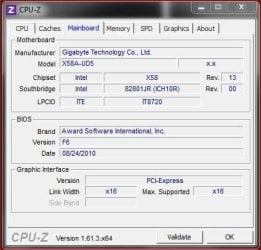
That said, you can read the boot screen, go into the BIOS, or you can use a free utility like CPU-Z to read the current BIOS version...

CPUZ.JPG

And lastly... MAKE SURE your READ the instructions for updating your BIOS. A BIOS gone bad can render your computer useless!!!

Good luck.
 

My Computer

Computer type
PC/Desktop
Computer Manufacturer/Model Number
Custom built by me.
OS
Windows 10 Pro
CPU
Intel Core i7-4770K (3.5Ghz)
Motherboard
Gigabyte G1 Sniper 5 (F10 Bios)
Memory
32 gig Corsair Dominator Platinum (4x8Gig)
Graphics Card(s)
Sapphire Tri-X R9 Fury
Sound Card
Soundblaster ZXR
Monitor(s) Displays
NEC PA242W 24" LCD Monitor
Screen Resolution
1920 x 1200
Hard Drives
Primary - Samsung 850 Pro (512gig), Samsung 840 Pro (256gig), 2TB WD Caviar Black.
PSU
EVGA Supernova 1000 G2
Case
Cooler Master HAF X
Cooling
Corsair H100i with Corsair Air Series SP120 Quiet Fans
Keyboard
Logitech Wireless Wave
Mouse
Logitech Performance MX
Internet Speed
High Speed Cable
Antivirus
Norton Security
Browser
IE11
Other Info
Memory Timings - 1866MHz @ 9-9-9-27-1T @ 1.5 volts
I did doublecheck with CPU-Z and my BIOS version is A11.
 

My Computer

OS
Windows 7
I did doublecheck with CPU-Z and my BIOS version is A11.

OK, did you do the other stuff? Make sure you have the right BIOS? Read (follow) the update instructions?

And not sure what you mean here...
I got the file straight from Dell's site. I assumed it was the right one. I'll take a look at the Dell forum. And no I haven't tried running as Administrator. I think I noticed why it wasn't working. Apparently I had cloud scanning enabled in Comodo Firewall and it was blocking the file from doing too much. Next time I try, I'll disable that along with Vipre.

but I highly recommend you download the complete file before trying to update your BIOS as the update needs to run uninterrupted. If an interruption occurs, you could brick your computer!
 

My Computer

Computer type
PC/Desktop
Computer Manufacturer/Model Number
Custom built by me.
OS
Windows 10 Pro
CPU
Intel Core i7-4770K (3.5Ghz)
Motherboard
Gigabyte G1 Sniper 5 (F10 Bios)
Memory
32 gig Corsair Dominator Platinum (4x8Gig)
Graphics Card(s)
Sapphire Tri-X R9 Fury
Sound Card
Soundblaster ZXR
Monitor(s) Displays
NEC PA242W 24" LCD Monitor
Screen Resolution
1920 x 1200
Hard Drives
Primary - Samsung 850 Pro (512gig), Samsung 840 Pro (256gig), 2TB WD Caviar Black.
PSU
EVGA Supernova 1000 G2
Case
Cooler Master HAF X
Cooling
Corsair H100i with Corsair Air Series SP120 Quiet Fans
Keyboard
Logitech Wireless Wave
Mouse
Logitech Performance MX
Internet Speed
High Speed Cable
Antivirus
Norton Security
Browser
IE11
Other Info
Memory Timings - 1866MHz @ 9-9-9-27-1T @ 1.5 volts
Only flash the bios if you are experiencing issues with the machine or you need a feature
that the new bios has. If the machine is running fine, don't mess with it.
 

My Computer

Computer Manufacturer/Model Number
HAL-9000
OS
Windows 7 Ultimate 64bit
CPU
Intel i7 3770K
Motherboard
Asus Sabertooth Z77
Memory
16GB DDR3 1333 Corsair XMS3
Graphics Card(s)
XFX HD6950 2GB EyeFinity
Sound Card
Logitech G35 & Sennheiser PC135 & VIA HD
Monitor(s) Displays
23" HP 2310e, 23" Samsung B2230, 21.5" Viewsonic
Screen Resolution
5760x1080
Hard Drives
16TB of Storage
128GB & 256GB Crucial M4 SSD's, 2X 1TB WD Black, 3x 2TB WD, 3x 2TB Samsung F4, 1.5TB Seagate, WD 500GB,
PSU
Antec True Power New 650watt
Case
Cooler Master HAF-932
Cooling
Corsair H60 Hydro Cooler, 3x 230mm Fans, 2x120mm Fan
Keyboard
Logitech G15 and G13
Mouse
Logitech G700 Gaming Mouse
Internet Speed
50/10 Mbit
Other Info
Speakers : Alesis M1 Active Mk2 Studio Monitors , APC RS 1200 UPS, HP 4500DN Color Laser, HP P1006 mono Laser, Kodak 8500 Dye-Sub, Epson 1280 inkjet, Epson Worforce 610 MFC
However if you're going to flash the BIOS for whatever reason... make sure you follow procedures.
 

My Computer

Computer type
PC/Desktop
Computer Manufacturer/Model Number
Custom built by me.
OS
Windows 10 Pro
CPU
Intel Core i7-4770K (3.5Ghz)
Motherboard
Gigabyte G1 Sniper 5 (F10 Bios)
Memory
32 gig Corsair Dominator Platinum (4x8Gig)
Graphics Card(s)
Sapphire Tri-X R9 Fury
Sound Card
Soundblaster ZXR
Monitor(s) Displays
NEC PA242W 24" LCD Monitor
Screen Resolution
1920 x 1200
Hard Drives
Primary - Samsung 850 Pro (512gig), Samsung 840 Pro (256gig), 2TB WD Caviar Black.
PSU
EVGA Supernova 1000 G2
Case
Cooler Master HAF X
Cooling
Corsair H100i with Corsair Air Series SP120 Quiet Fans
Keyboard
Logitech Wireless Wave
Mouse
Logitech Performance MX
Internet Speed
High Speed Cable
Antivirus
Norton Security
Browser
IE11
Other Info
Memory Timings - 1866MHz @ 9-9-9-27-1T @ 1.5 volts
but I highly recommend you download the complete file before trying to update your BIOS as the update needs to run uninterrupted. If an interruption occurs, you could brick your computer!
The files from Dell are complete when downloaded. As for other brands, any "web-updater" process I've ever used downloads the files and checks them before beginning any actual update process.
 

My Computer

OS
Windows 7 Ultimate x64 SP1
CPU
Intel Core i7-2600
Motherboard
Gigabyte GA-P67A-UD3P-B3
Memory
12 GB Patriot Extreme DDR3-1333
Graphics Card(s)
Nvidia GTX 470
Monitor(s) Displays
Dell UltraSharp 2209WA
Hard Drives
OCZ Agility3 240 GB, WD5001AALS, WD7501AALS
PSU
OCZ ModStream 700W
Case
CoolerMaster HAF 912 Advanced
Cooling
CoolerMaster Hyper 212 Plus
Thanks, but I'm replying to what was posted. Better to be safe and say something than sorry by leaving something out and assuming :)

Also I've never used a "web updater" to update any BIOS and I've done plenty; but to each his own. As for the file downloads, yes, you are correct... but I've also experienced those rare times when a file wasn't complete. It does happen.

At any rate the OP hasn't posted back since so...???

Peace :cool:
 

My Computer

Computer type
PC/Desktop
Computer Manufacturer/Model Number
Custom built by me.
OS
Windows 10 Pro
CPU
Intel Core i7-4770K (3.5Ghz)
Motherboard
Gigabyte G1 Sniper 5 (F10 Bios)
Memory
32 gig Corsair Dominator Platinum (4x8Gig)
Graphics Card(s)
Sapphire Tri-X R9 Fury
Sound Card
Soundblaster ZXR
Monitor(s) Displays
NEC PA242W 24" LCD Monitor
Screen Resolution
1920 x 1200
Hard Drives
Primary - Samsung 850 Pro (512gig), Samsung 840 Pro (256gig), 2TB WD Caviar Black.
PSU
EVGA Supernova 1000 G2
Case
Cooler Master HAF X
Cooling
Corsair H100i with Corsair Air Series SP120 Quiet Fans
Keyboard
Logitech Wireless Wave
Mouse
Logitech Performance MX
Internet Speed
High Speed Cable
Antivirus
Norton Security
Browser
IE11
Other Info
Memory Timings - 1866MHz @ 9-9-9-27-1T @ 1.5 volts
Also I've never used a "web updater" to update any BIOS and I've done plenty; but to each his own. As for the file downloads, yes, you are correct... but I've also experienced those rare times when a file wasn't complete. It does happen.
Gigabyte boards, for example, offer a program that will download the new BIOS, verify it's quality and compatibility, and then reboot to flash the actual BIOS. If there's an issue with the downloaded file, you'll know, and it won't continue. Same thing with the installers like Dell. If you downloaded a corrupt file...you'll know and you won't even be given a chance to make the attempt.
 

My Computer

OS
Windows 7 Ultimate x64 SP1
CPU
Intel Core i7-2600
Motherboard
Gigabyte GA-P67A-UD3P-B3
Memory
12 GB Patriot Extreme DDR3-1333
Graphics Card(s)
Nvidia GTX 470
Monitor(s) Displays
Dell UltraSharp 2209WA
Hard Drives
OCZ Agility3 240 GB, WD5001AALS, WD7501AALS
PSU
OCZ ModStream 700W
Case
CoolerMaster HAF 912 Advanced
Cooling
CoolerMaster Hyper 212 Plus
Yeah I have a Gigabyte board (see system specs) which uses Q-Flash and @BIOS but I much rather download the executable file and install it myself. Others may take a different approach as they may not trust updating a BIOS in the Windows environment. I understand that as well.

Bottom line is you need to make sure the file is complete no matter which way you go before doing the update. And that incomplete/corrupt downloads do happen.

Anyway we can debate this all day long but I just offered my opinion based on my experiences with updating BIOS's. Others may vary.

Peace :cool:
 

My Computer

Computer type
PC/Desktop
Computer Manufacturer/Model Number
Custom built by me.
OS
Windows 10 Pro
CPU
Intel Core i7-4770K (3.5Ghz)
Motherboard
Gigabyte G1 Sniper 5 (F10 Bios)
Memory
32 gig Corsair Dominator Platinum (4x8Gig)
Graphics Card(s)
Sapphire Tri-X R9 Fury
Sound Card
Soundblaster ZXR
Monitor(s) Displays
NEC PA242W 24" LCD Monitor
Screen Resolution
1920 x 1200
Hard Drives
Primary - Samsung 850 Pro (512gig), Samsung 840 Pro (256gig), 2TB WD Caviar Black.
PSU
EVGA Supernova 1000 G2
Case
Cooler Master HAF X
Cooling
Corsair H100i with Corsair Air Series SP120 Quiet Fans
Keyboard
Logitech Wireless Wave
Mouse
Logitech Performance MX
Internet Speed
High Speed Cable
Antivirus
Norton Security
Browser
IE11
Other Info
Memory Timings - 1866MHz @ 9-9-9-27-1T @ 1.5 volts
I much rather download the executable file and install it myself. Others may take a different approach as they may not trust updating a BIOS in the Windows environment. I understand that as well.
This is where I have to shake my head. I'm trying not to turn this into a debate, but I want to make sure the correct info is given. I also don't want to rehash the HUGE thread and debate from the past, but there is no such thing as flashing the BIOS in the Windows environment. That's the exact phrase that started the huge battle. I also encourage you not to take my word for it and look through the manual or website of Gigabyte, Dell, etc. The actual process of flashing is done outside of Windows, by the board itself. It's the same process as the built-in board utility that you are probably used to. The Windows app, @BIOS, in this case, downloads the BIOS file, checks it, then pre-loads it to the board. your system is rebooted, and the BIOS flash is performed.

The reason why I'm pointing this out is not to start a battle, it's to make sure people reading see the correct descriptions. There is no BIOS flash in Windows...so the fears of doing so are unfounded. It's the same process as flashing from DOS or a USB flash drive...just with less steps for the end user to take. It isn't any more or less dangerous than any other BIOS flash method. It's simply more convenient. Dell is the same way. Your download includes the BIOS file, which is checked, loaded, and then flashed outside of Windows on a reboot.
 

My Computer

OS
Windows 7 Ultimate x64 SP1
CPU
Intel Core i7-2600
Motherboard
Gigabyte GA-P67A-UD3P-B3
Memory
12 GB Patriot Extreme DDR3-1333
Graphics Card(s)
Nvidia GTX 470
Monitor(s) Displays
Dell UltraSharp 2209WA
Hard Drives
OCZ Agility3 240 GB, WD5001AALS, WD7501AALS
PSU
OCZ ModStream 700W
Case
CoolerMaster HAF 912 Advanced
Cooling
CoolerMaster Hyper 212 Plus
I also don't want to rehash the HUGE thread and debate from the past, but there is no such thing as flashing the BIOS in the Windows environment.

So what are these? And what environment are they working in?

My Intel BX975 MB...
Express BIOS Update [BX97520J.86A.2838.EB.EXE] - Self-extracting Windows*-based update file includes Software License Agreement and the utility for updating the BIOS. It is designed to be used on Windows* systems. This method is the most commonly used.
Source - http://downloadcenter.intel.com/Detail_Desc.aspx?agr=Y&DwnldID=16896&lang=eng&OSVersion=Windows%20Vista%2064*&DownloadType=BIOS

Intel's latest MB and it's BIOS update...
GAZ7711H.86A.0053.EB.EXE - Self-extracting Windows*-based update file includes Software License Agreement and the utility for updating the BIOS. It is designed to be used on Windows* systems. This method is the most commonly used.
Source - http://downloadcenter.intel.com/Det...Version=Windows 7 (64-bit)*&DownloadType=BIOS

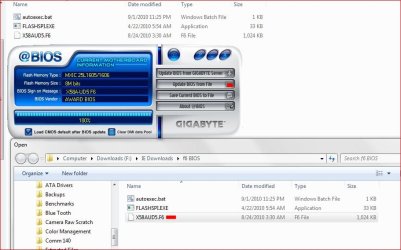
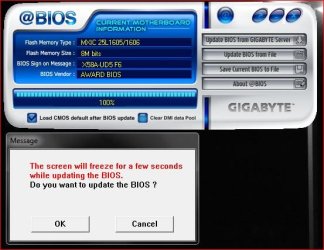
Even this utility works in a "Windows" based Environment....

@BIOS Updater.JPG

@BIOS Updater-2.JPG

Perhaps we disagree on what a Windows based environment is?

As I said before, I have experience doing this ;)

Peace out :cool:
 

My Computer

Computer type
PC/Desktop
Computer Manufacturer/Model Number
Custom built by me.
OS
Windows 10 Pro
CPU
Intel Core i7-4770K (3.5Ghz)
Motherboard
Gigabyte G1 Sniper 5 (F10 Bios)
Memory
32 gig Corsair Dominator Platinum (4x8Gig)
Graphics Card(s)
Sapphire Tri-X R9 Fury
Sound Card
Soundblaster ZXR
Monitor(s) Displays
NEC PA242W 24" LCD Monitor
Screen Resolution
1920 x 1200
Hard Drives
Primary - Samsung 850 Pro (512gig), Samsung 840 Pro (256gig), 2TB WD Caviar Black.
PSU
EVGA Supernova 1000 G2
Case
Cooler Master HAF X
Cooling
Corsair H100i with Corsair Air Series SP120 Quiet Fans
Keyboard
Logitech Wireless Wave
Mouse
Logitech Performance MX
Internet Speed
High Speed Cable
Antivirus
Norton Security
Browser
IE11
Other Info
Memory Timings - 1866MHz @ 9-9-9-27-1T @ 1.5 volts
I could trot out my experience and job title if you'd like, but debates usually go south after that happens. You are falling into the trap of the previous discussions on the topic. If you run through those processes...Gigabyte and Dell, for example, and you have the experience level you claim, then you'd surely know what happens after you are prompted for a reboot.

If so, then you'd know why the flashing isn't done from within windows. You are making the mistake of confusing the BIOS flash process with the process of the board loading the file into it's memory subsystem so it can actually be flashed after shutting down Windows.

I'm getting a migraine from even thinking of going down this path again, and I'm sure others are who are reading. Use that experience you are tossing around to follow through on the entire process. I'll use Dell as my example because my entire company fleet is Dell, and I just upgraded my BIOS on an old D630 late yesterday. Yes, you run the file from within Windows...but if you happen to watch what's going on...you are asked to reboot. You are brought to a console screen after POST showing you the status of each step, and once the flash is completed, the system is rebooted again using the new BIOS, continues through the POST, on to Windows...and then you are given a confirmation screen once Windows loads.

Again, I'll state: The utility may be run from within Windows...but the actual process of replacing the file on chip is done from outside the OS. That's the conclusion reached each and everytime this is "debated".
 

My Computer

OS
Windows 7 Ultimate x64 SP1
CPU
Intel Core i7-2600
Motherboard
Gigabyte GA-P67A-UD3P-B3
Memory
12 GB Patriot Extreme DDR3-1333
Graphics Card(s)
Nvidia GTX 470
Monitor(s) Displays
Dell UltraSharp 2209WA
Hard Drives
OCZ Agility3 240 GB, WD5001AALS, WD7501AALS
PSU
OCZ ModStream 700W
Case
CoolerMaster HAF 912 Advanced
Cooling
CoolerMaster Hyper 212 Plus
Good mourning gentlemen. I have not done every brand of motherboard but the ones I have done all end up doing it the same way. No mater what method you use the actual installing of the bios into the motherboard is done before Windows 7 starts. I know of no way Windows 7 can change the bios. I know of no way of getting into bios unless you reboot and enter bios before Windows 7 starts.
 

My Computer

Computer type
PC/Desktop
Computer Manufacturer/Model Number
Home made Desktop
OS
Windows 10 Pro. 64/ version 1709 Windows 7 Pro/64
CPU
Intel i7-6800K @ 4.3
Motherboard
ASUS X-99 Deluxe II
Memory
Corsair Platinum 16 gig @2400
Graphics Card(s)
EVGA GTX 1070 OC
Monitor(s) Displays
Asus 27" LED LCD/VE278Q
Screen Resolution
1920-1080 or 1280-720 HDMI
Hard Drives
INTEL SSD 730-240 Gb Sata 3.0/
PSU
EVGA Platium 1200W
Case
Phanteks Luxe Tempered Glass 8 fans/ one radiator
Cooling
XSPC/ Water Cooled CPU
Keyboard
Das 4 Professional
Mouse
Logitech M705/MX Anywhere 2-S
Internet Speed
100 mbits
Antivirus
Microsoft Security Essentials/ Malwarebytes Premium 3.0/ SAS
Browser
I.E. 11 default/Firefox/ ISP Time Warner Cable/Spectrum
Other Info
LG BluRay Burner/
Sound system-KLipsch-THX/
Icy Dock ssd Hot Swap bays.
Back
Top