Bioshock finally working

Wow, thanks Leon, i just tried Win2k compatibility like you suggested & it worked. Sound & crashing problems fixed :D I'd almost given up trying to get bioshock to run on 7. That's the problem with bioshock, great game but it was poorly tested, you never know if it's going to work with certain hadware configurations or not...
 

My Computer

OS
XP/7
CPU
Core 2 Duo 2.66 GHz (E7300)
Motherboard
Intel DG43NB
Memory
2 Gb DDR2-800
Graphics Card(s)
GeForce 9800GT
Sound Card
Sound Blaster X-Fi XtremeGamer Fatal1ty Champion Series
Garbanzo,

Thanks for your help! This was the ONLY fix that worked for me and Bioshock now runs happily on my Win7 x64 machine. It's odd how things change between the RC and the final code (as the game ran fine on the RC). But I'm back up and running again.
 

My Computer

OS
Windows 7 Professional x64
CPU
AMD 7750
Motherboard
Gigabyte MA78GM-US2H
Memory
4GB DDR2 1066
Graphics Card(s)
ATI 3200
Monitor(s) Displays
Dell 2007
PSU
650
Case
Coolerrrmaster Wavemaster
Bioshock working in Windows 7 64bit

Hi all,
First time posting. I got Bioshock (Non Steam version) to work by doing this. I installed it while running the installer in Windows XP SP2 compatibility. Whether that makes a difference, I am unsure.
Then to run the game, do this:
Start Menu
All Programs
Games
When you see Bioshock, right click and select Play - Direct X 9

The game worked like a charm. I had audio and the game never froze.
Good luck
:D
 

My Computer

OS
Windows 7 64bit
Installed easily, patched it as the auto didn't work. Set to Vista SP2 compatiblity, and only the sound in one section close to the end was off for a few minutes. No issues - except without compatibility its unplayable for me.
 

My Computer

Computer Manufacturer/Model Number
Sony Vaio Z46GDU
OS
Windows 7 Ultimate x86-64
CPU
[email protected] 1066MHz FSB
Motherboard
Sony branded
Memory
6GB DDR3 1066MHz
Graphics Card(s)
9300M GS 256MB Dedicated (Speed) + Intel4500MHD (Stamina)
Sound Card
Realtek HD Audio
Monitor(s) Displays
13.1' WXGA
Screen Resolution
1600x900
Hard Drives
320GB 7200RPM w/ 16MB cache
Internet Speed
1MB/s
Bioshock problem solved easy

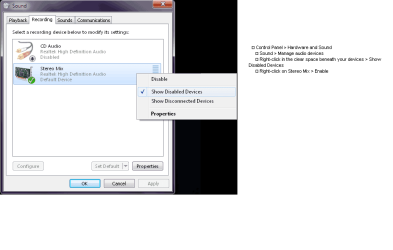
I was have similiar problem on my new instaled win 7 ultimate (sorry for my bad english) - no sound in game. Try this (see picture), works for me just fine ....
Without any patching, any start under win xp compatibility, just do it and play the great game ....
P.S.
I have a standard configuration (dual core e6300, mb g31, ati 4650, hd 500gb, sound card on board, 4gb ddr2 ram .... standard drivers for mb and gpu)
 

Attachments

  • 09_windows_7_no_sound.png
    09_windows_7_no_sound.png
    21 KB · Views: 3,633

My Computer

OS
windows 7 ultimate
CPU
intel e6300
Motherboard
gigabyte g31
Memory
4gb ddr2 800mhz
Graphics Card(s)
ati radeon 4650 1gb ddr2
Sound Card
on board
Monitor(s) Displays
acer 20" tft
Hard Drives
wd 500 gb sataII
I have the exact same problem as ballerjones as well, I have the retail copy and sound doesn't work in game...only in menu or when hacking. Any help appreciated.

Referring to doco300, anyone know why in Sound nothing comes up when I enable disabled devices? Technically Realtek High Definition Audio (or rather I mean the Stereo Mix) should appear since I had to do the same thingish for CoD4 when I was running Vista. Again, any help appreciated.
 

My Computer

Computer Manufacturer/Model Number
Acer
OS
Windows 7 Home Premium 64-bit
CPU
AMD Phenom X4 9500
Motherboard
F690GVM
Memory
3 GB DDR2-667
Graphics Card(s)
Powercolor Radeon 5770-1GB GDDR5
Sound Card
onboard Realtek HD Audio
Monitor(s) Displays
Acer 20" LCD
Screen Resolution
1680 x 1050
Hard Drives
WD Black Caviar 1TB
PSU
OCZ ModXstream Modular 700W
Bioshock on Windows 7 x64 and Steam

try this Support it worked for me and DX10, sound, and everything else works, and I don't have to use compatibility mode
 

My Computer

OS
Windows 7 Professional x64
Okay I got it, I just needed to install the sound driver and then I could go into the sound tab. Thanks all.
 

My Computer

Computer Manufacturer/Model Number
Acer
OS
Windows 7 Home Premium 64-bit
CPU
AMD Phenom X4 9500
Motherboard
F690GVM
Memory
3 GB DDR2-667
Graphics Card(s)
Powercolor Radeon 5770-1GB GDDR5
Sound Card
onboard Realtek HD Audio
Monitor(s) Displays
Acer 20" LCD
Screen Resolution
1680 x 1050
Hard Drives
WD Black Caviar 1TB
PSU
OCZ ModXstream Modular 700W
I have tried to install Bioshock on a new Windows 7 machine.
My first attempt was as described by several others in this thread - the sound was working in the game menus and videos, but not in the game itself.
My first response was to attempt an unstall and reinstall... but guess what? It now will not install - I'm getting CRC errors (?!?) because .bik files don't match those in the setup's cab file (it also says the medium may be corrupted, but since I'm not trying to talk to dead relatives, that doesn't bother me).

Any suggestions? I'd happily try playing the game with no sound... if I could get it to work at all...
 

My Computer

OS
Windows 7 Home Premium 64bit
CPU
AMD Phenom II X4 965
Motherboard
MSI 770-C45
Memory
4Gb DDR3
Graphics Card(s)
GeForce GTX260
Sound Card
Realtek ALC888S (X-Fi Fatal1ty not working in win7)
Internet Speed
unforgivably slow...
Strange, I didnt have any issues at All w/Bioshock or Bioshock 2 in Win7 x64.
Even w/DX10. No need for comapatability, tweaks or anything.
Just instal, patch & play.


The only issue I had was with sound.
If set for 5.1 and Reverb ON, I had positional 5.1 that worked perfectly.

If I turned on EAX effects, I had sound in menu but not in game.
i even tried Alchemy as well, and still wouldnt work.
 

My Computer

Computer Manufacturer/Model Number
Custom (Self Build)
OS
Windows 7 Home Premium 64bit
CPU
Intel Core i7 2700k
Motherboard
eVGA P67 SLI
Memory
8GB Mushkin Redline Ridgebacks @1866
Graphics Card(s)
EVGA GTX570 SC
Sound Card
XiFi Titanium HD
Monitor(s) Displays
LG W2453V
Screen Resolution
1920x1080
Hard Drives
Intel 320 80GB -- Intel X25-V 40GB --WD Black 1TB x2 -- WD Blue 640GB
PSU
Seasonic x750
Case
Corsair 600T SE White
Cooling
eVGA Superclocked CPU Cooler
Keyboard
Saitek Cyborg
Antivirus
Kaspersky
Browser
IE
Other Info
LG BD/DVD
I'm only running with stereo sound.... but since my problem is more fundamental than that, now, I frankly couldn't give a damn about lack of sound at the moment...

I just want to be able to install the damn game!
 

My Computer

OS
Windows 7 Home Premium 64bit
CPU
AMD Phenom II X4 965
Motherboard
MSI 770-C45
Memory
4Gb DDR3
Graphics Card(s)
GeForce GTX260
Sound Card
Realtek ALC888S (X-Fi Fatal1ty not working in win7)
Internet Speed
unforgivably slow...
I'm only running with stereo sound.... but since my problem is more fundamental than that, now, I frankly couldn't give a damn about lack of sound at the moment...

I just want to be able to install the damn game!

What are your system specs? Post a screenshot of HWInfo32's summary screen.
 

My Computer

Computer Manufacturer/Model Number
Sony Vaio Z46GDU
OS
Windows 7 Ultimate x86-64
CPU
[email protected] 1066MHz FSB
Motherboard
Sony branded
Memory
6GB DDR3 1066MHz
Graphics Card(s)
9300M GS 256MB Dedicated (Speed) + Intel4500MHD (Stamina)
Sound Card
Realtek HD Audio
Monitor(s) Displays
13.1' WXGA
Screen Resolution
1600x900
Hard Drives
320GB 7200RPM w/ 16MB cache
Internet Speed
1MB/s
I don't know what HWInfo32 is, but I can give you a brief run down of my system spec...

AMD Phenom II X4 965
4Gb RAM
nVidia GTX260
Plenty of HDD space
Windows 7 Home Premium 64-bit.

Anything else?

Get this, though... the problem is getting worse.

Earlier it failed to load at the "Engine.U" file (I tried a couple of times, but it was the same each time)
So I ejected the disk and tried again; it failed to load at a blk file - the same one, a couple of times.
So I ejected again, and tried again; this time it failed to load at the "dfe" (I think) file...

Every other game I have tried to load has worked... I don't see this as a drive or a media failure...

It seems to fail to load at a different point, dependent upon when I put the disk in... MADNESS!!!
 

My Computer

OS
Windows 7 Home Premium 64bit
CPU
AMD Phenom II X4 965
Motherboard
MSI 770-C45
Memory
4Gb DDR3
Graphics Card(s)
GeForce GTX260
Sound Card
Realtek ALC888S (X-Fi Fatal1ty not working in win7)
Internet Speed
unforgivably slow...
Seeing as its different points, It could be a error reading the disc. Either the disc itself or the reader.

Can you copy the contents of the disc to your HD, or create a ISO of it successfully?

If not, its likely read errors.
 

My Computer

Computer Manufacturer/Model Number
Custom (Self Build)
OS
Windows 7 Home Premium 64bit
CPU
Intel Core i7 2700k
Motherboard
eVGA P67 SLI
Memory
8GB Mushkin Redline Ridgebacks @1866
Graphics Card(s)
EVGA GTX570 SC
Sound Card
XiFi Titanium HD
Monitor(s) Displays
LG W2453V
Screen Resolution
1920x1080
Hard Drives
Intel 320 80GB -- Intel X25-V 40GB --WD Black 1TB x2 -- WD Blue 640GB
PSU
Seasonic x750
Case
Corsair 600T SE White
Cooling
eVGA Superclocked CPU Cooler
Keyboard
Saitek Cyborg
Antivirus
Kaspersky
Browser
IE
Other Info
LG BD/DVD
I'm not convinced it is the media, since it installs fine on my old machine, but I did (eventually) manage to get it to install...

Each time the installation failed on a file I ejected the disc, and reinserted it, clicked retry, and lo-and-behold, it then loaded that file (but later failed on another file, of course)... the whole process took about four hours... *sigh*

Now I'm back to a situation where I have sound in the game menus, in the video clips, but not in the playable part of the game itself... frustrating...

...and nothing suggested anywhere seems to work!
 

My Computer

OS
Windows 7 Home Premium 64bit
CPU
AMD Phenom II X4 965
Motherboard
MSI 770-C45
Memory
4Gb DDR3
Graphics Card(s)
GeForce GTX260
Sound Card
Realtek ALC888S (X-Fi Fatal1ty not working in win7)
Internet Speed
unforgivably slow...
Bioshock (Steam ver.): what worked for me... so far!

Just got my new rig about a week ago, and even though I had bought Bioshock during the Steam Winter Sale, I did not install it until last night since my last comp had no hope of running it.

My issue was a little worse than what most have experienced, as I could not even get the game to load. First, it froze on the nVidia splash video with looping sound. Took forever to get it to reboot at this point, since my whole system was bogged down (like trudging through mud). So, my first step was this:
I don't know if you figured this out yet or not, but all you have to do is run Microsoft DirectX® End-User Runtime to fix W7 up for gaming!
After I installed the Runtime ALL my games played just fine! ;)
It installs all versions of DirectX & the games will use what they need.
Installing DX Runtime got me through that hiccup, only to freeze at the end of the next splash video (RT Games). Wove my way to the exe file and tried the Win7 compatibility troubleshooter. It suggested WinXP SP2. No dice, but it was easier to reboot (not as bogged down). So, then I tried this:
I know it sounds weird, but after changing bioshock exe to work in compatibility mode with windows 2000, everthing just went fine, even with that crap patch 1.1 from 2k. the game is running well and isnt crashing anymore, hope that will help! ( lol)

And it worked!!! Sonuvagun... who woulda thunk that Win2K could be useful for anything? Anyway, this got me to the title screen, so I decided to go ahead and post my findings (thus far) since it has taken me about 1.5 hrs to get here. Will update if I need to do anything else.

Hope this helps out fellow Steamers!

VSP
 

My Computer

Computer Manufacturer/Model Number
Custom Built
OS
Win7 Pro x64
CPU
i7 860 @ 2.80GHZ
Motherboard
Gigabyte P55A-UD4P
Memory
Corsair Dominator DDR3 1600 (8GB) in XMP mode
Graphics Card(s)
Radeon HD 5850 XFX XXX Edition
Monitor(s) Displays
Hanns-G HG281D
Screen Resolution
1920 x 1200
Hard Drives
Seagate Barracuda 7200.11 1.5TB (300GB C: part ;) )
PSU
Corsair TX750W
Case
NZXT Tempest EVO
Cooling
Asetek LCLC 120, NZXT Stock Fans (4x120mm, 2x140mm)
Keyboard
Cyber Snipa V2 (oh, and MS Natural Multimedia 1.0A)
Mouse
Wolfking Trooper MVP Blue
Internet Speed
FiOS 15/5
Crud... got too greedy. Noticed that the title screen was a little grainy, so I went into the Options menu and saw that the default rez was 1024 x 768, so I bumped it up to my native rez (1920 x 1200) and it bombed out. Now I can't get back in.

Anybody know how to change the display settings before running the game?

Can't think anymore. Gonna hit the hay and try again in the morn.

VSP

EDIT: OK, I was able to get it to load again and it seems Bioshock reset itself back to default rez. I upped it to a lower rez widescreen mode, and it bombed out again. :p Really, truly giving up for the night.
 
Last edited:

My Computer

Computer Manufacturer/Model Number
Custom Built
OS
Win7 Pro x64
CPU
i7 860 @ 2.80GHZ
Motherboard
Gigabyte P55A-UD4P
Memory
Corsair Dominator DDR3 1600 (8GB) in XMP mode
Graphics Card(s)
Radeon HD 5850 XFX XXX Edition
Monitor(s) Displays
Hanns-G HG281D
Screen Resolution
1920 x 1200
Hard Drives
Seagate Barracuda 7200.11 1.5TB (300GB C: part ;) )
PSU
Corsair TX750W
Case
NZXT Tempest EVO
Cooling
Asetek LCLC 120, NZXT Stock Fans (4x120mm, 2x140mm)
Keyboard
Cyber Snipa V2 (oh, and MS Natural Multimedia 1.0A)
Mouse
Wolfking Trooper MVP Blue
Internet Speed
FiOS 15/5
So, I decided to download the Catalyst 10.2 driver last Friday and give it a go, and found out that they had just released 10.3 on 3/24/10. I did the appropriate uninstall/install and reset the compatability mode to none. Clicked on the Bioshock link and crossed my fingers...

Voila!!!

Worked like a charm. Changed the rez to 1920 x 1200 and it did not bomb out. Looked beautiful! In fact, I played it for about 4 hours straight.

(Still getting the large mouse pointer at random intervals, but I read here that they released an even newer 10.3 since I downloaded it. Thanks to Rik55 for the link and Airbot for linking to the link. ;) Off to try that one.)

Now I just have to figure out if it is better to harvest or not... any advice (w/o giving away too much story)?
 
Last edited:

My Computer

Computer Manufacturer/Model Number
Custom Built
OS
Win7 Pro x64
CPU
i7 860 @ 2.80GHZ
Motherboard
Gigabyte P55A-UD4P
Memory
Corsair Dominator DDR3 1600 (8GB) in XMP mode
Graphics Card(s)
Radeon HD 5850 XFX XXX Edition
Monitor(s) Displays
Hanns-G HG281D
Screen Resolution
1920 x 1200
Hard Drives
Seagate Barracuda 7200.11 1.5TB (300GB C: part ;) )
PSU
Corsair TX750W
Case
NZXT Tempest EVO
Cooling
Asetek LCLC 120, NZXT Stock Fans (4x120mm, 2x140mm)
Keyboard
Cyber Snipa V2 (oh, and MS Natural Multimedia 1.0A)
Mouse
Wolfking Trooper MVP Blue
Internet Speed
FiOS 15/5
Oh, here's an idea...

Running it in Windows 2000 compatibility mode worked, and here's something to think about.

The name of the company is 2K.

2K? Two thousand. Windows 2000. It makes sense. Am I right?
 

My Computer

OS
Windows 7
Harvest
 

My Computer

Computer type
PC/Desktop
Computer Manufacturer/Model Number
Acer M5641
OS
Windows 7 Home Premium 64bit
CPU
Q6600
Motherboard
Nvidia MCP73PV
Memory
4GB.
Graphics Card(s)
Sapphire Vapor-X 5750
Sound Card
XFI Extreem music
Monitor(s) Displays
Acer X223W
Screen Resolution
1680x1050
Hard Drives
WD10 02FAEX
WD64 00AAKS
PSU
stock 450w
Case
acer
Cooling
stock
Keyboard
Microsoft Digital Media Pro.
Mouse
Logitech MX620
Internet Speed
49.51Mbs down 4.98Mbs up 17.6ms ping
Antivirus
MSE
Browser
Waterfox
Other Info
Shaw Cable
Netgear R6200
Back
Top