bit and Bytes 101

lostsoul62

Banned
Local time
2:27 AM
Messages
380
Location
AZ
Everyone knows that there are 8 bits to a Byte. It's been 30 years since I went to school for this so here it goes. A modem like dial up there is 10 bits to every Byte sent and I guess it is that way sending data over the Internet now a days. On a hard drive you have to have a bit between every Byte so I'm thinking is a total of 10 bits for every Byte or did they change something in the last 30 years?
 

My Computer

OS
Windows 7 x64 RC1, Vista Ultimate, XP Pro
CPU
AMD 955
Memory
4 gigs - 1333
Graphics Card(s)
5750
Monitor(s) Displays
i-inc 28"
Screen Resolution
1920x1200
Hard Drives
2 SATA2 750 GB - 1 SATA2 1TB - 1 SATA3 1TB - 1 USB3 2TB - 1 USB3 500 GB, SSD 60 GB
Internet Speed
7 Megs
Hard drives drives use 8b/10b encoding. So your 3 Gb/s hard drive can, in principle, do 300 MB/s tops.

The encoding provides better power and transmission characteristics (google up 8b/10b encoding). Your PCI Express uses this encoding too.

The Internet doesn't use 8b/10b encoding - some of the hardware that carries Internet data may use a 8b/10b encoding, like a Gigabit Ethernet, but it is not required or part of Ip or the Internet.
 
Last edited:

My Computer

Computer type
PC/Desktop
Computer Manufacturer/Model Number
Home built (GeneO industries)/Model 4
OS
Windows 10 Pro. EFI boot partition, full EFI boot
CPU
i7 4770k 4.4GHz (44-44-43-43 turbo) @ 1.248V
Motherboard
ASUS Maximus VI Hero
Memory
16GB (8GBx2) @2200 MHz G.skill Sniper 10-11-10-30-1, 1.6V
Graphics Card(s)
MSI GTX 970 Gaming 4G
Sound Card
Onboard SupremeFX Audio
Monitor(s) Displays
NEC Spectraview 2490WUXi-SV
Screen Resolution
1920 x 1200
Hard Drives
Samsung 850 Pro 256GB (OS), Samsung 2x 128GB 840 Pro SSD in RAID0, 3x WD Blue 6Gb/s 1TB RAID0, WD 2TB Black external USB 3.0, 2TB WD20EARS Green external USB 3.0, 2x 500GB Seagate and 1 750 GB external USB, 1x 350GB external USB3
PSU
Seasonic X-850 (2012 KM3 model)
Case
Fractal Design Define R4
Cooling
NH-D14, NF-F12, NF-A15; NF-P14, NF-P12,NF-A14, S12A PWM
Keyboard
Cooler Master Storm Quickfire Rapid - Brown
Mouse
Logitech G602
Internet Speed
126.4 Mb/s down, 24.3 Mb/s up
Other Info
USB 3.0 x8 , SATA III x8, eSATA, USB 2.0 x6. Samsung DVD R/W drive.

WEI: CPU 7.8, Memory 7.9, Graphics 7.9, Disk 7.9
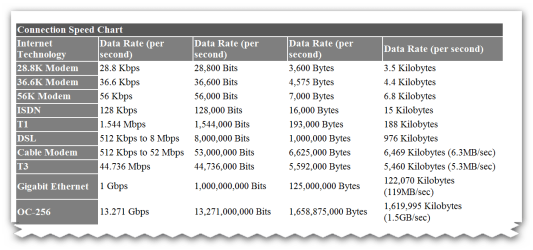
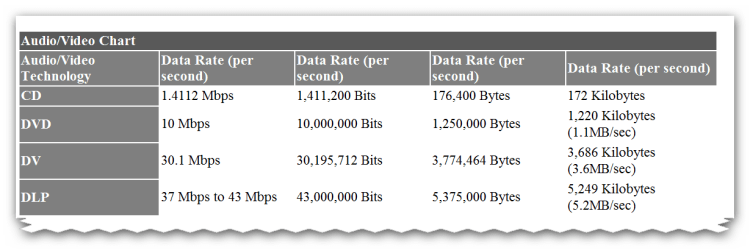
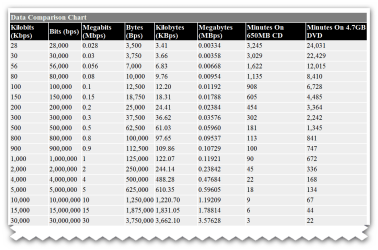
here is collection of Data Measurement Charts
LINK
>>>> Data Measurement Chart

USB 3 >>> USB 3.0 SuperSpeed will be 10 times faster than the 480Mbps limit of the 2.0 spec. The example Intel likes to give out when talking about the new speed is that transferring a 27GB HD movie to your future media player will only take 70 seconds with USB 3.0, while it would take 15 minutes or more with 2.0. Keep in mind that you’re only going to be able to take advantage of this speed if your portable storage device can write data that quickly. Solid state devices will benefit most from the speed boost, while magnetic hard disks will be limited by their RPM and corresponding read/write speeds. Also, new Mass Storage Device drivers will have to be developed for Windows to take advantage of the spec.
 

Attachments

  • brys snap ?13 ?March ?2011 06h25m34s.png
    brys snap ?13 ?March ?2011 06h25m34s.png
    11.4 KB · Views: 3
  • brys snap ?13 ?March ?2011 06h26m15s.png
    brys snap ?13 ?March ?2011 06h26m15s.png
    30.9 KB · Views: 8
  • brys snap ?13 ?March ?2011 06h26m41s.png
    brys snap ?13 ?March ?2011 06h26m41s.png
    40.7 KB · Views: 9
  • brys snap ?13 ?March ?2011 06h27m15s.png
    brys snap ?13 ?March ?2011 06h27m15s.png
    18.1 KB · Views: 7
  • brys snap ?13 ?March ?2011 06h27m39s.png
    brys snap ?13 ?March ?2011 06h27m39s.png
    34.3 KB · Views: 10

My Computer

Computer Manufacturer/Model Number
packard bell IXTREME M5722
OS
Operating System : Windows 7 Home Premium Edition 6.01.7600 SP1 (x64)
CPU
Processor : Intel Core 2 Quad Q8300 @ 2500 MHz
Motherboard
Mainboard : Packard Bell (Acer EG43M )
Memory
Physical Memory :8GB Corsair4x 2GB 800MHz C5 DDR2
Graphics Card(s)
Video Card : XFX 6700 AMD
Monitor(s) Displays
Maestro 234DL - BenQ V2220 - BenQ VW2420H
Screen Resolution
Current Display :1920x1080p pixels at 60 Hz in HD LED
Hard Drives
Hard Disks : WDC (1000 GB)
Drive C: (Hard Disk) : 428 GB available on 491 GB
Drive D: (Hard Disk) : 426 GB available on 492 GB
SAMSUNG spinpoint HD103SJ 1000.2 GB
(X 2) KINGSTON SSD NOW V 30GB
PSU
XFX ProSeries 550W PSU
Case
PACKARD BELL IXTREME
Cooling
System Blower Current: 150mA Air Flow16CFM ;Akasa 90mm rear
Keyboard
Gigabyte Aivia K8100
Mouse
TRUST-Wireless Laser Mouse - Carbon edition MI-7770C
Internet Speed
TP-LINK > TL-WN951N / AV500 Gigabit Powerline Adapters
Browser
chrome dev
Other Info
EXTRA COOLING>(FAN CONTROLLER) PC Bay Cooler 3 x 40mm fans; Akasa AK-HD-BL Blue hard drive cooler 2 x 40 mm fan 4500 rpm 29.7 dBA
Bios> American Megatrends Inc.
Version : P01-A1
Date : 08/31/2009
The Internet doesn't use 8b/10b encoding - some of the hardware that carries Internet data may use a 8b/10b encoding, like a Gigabit Ethernet, but it is not required or part of Ip or the Internet.[/QUOTE]

Well out of over a dozen answers your the only one who understands my question. I've tried to find out with no luck but on a hard drive and because of the encoding would there be a total of 10 bits for every Byte on the hard drive? Why wouldn't the Internet have this same encoding with 10 total bits for every Byte. I went to school for 2 years to become a computer tech and that was what we were taught with all the techie stuff why. So I'm just asking a question that you really need a formal education to understand but it has been 30 years and I'm just wondering.
 

My Computer

OS
Windows 7 x64 RC1, Vista Ultimate, XP Pro
CPU
AMD 955
Memory
4 gigs - 1333
Graphics Card(s)
5750
Monitor(s) Displays
i-inc 28"
Screen Resolution
1920x1200
Hard Drives
2 SATA2 750 GB - 1 SATA2 1TB - 1 SATA3 1TB - 1 USB3 2TB - 1 USB3 500 GB, SSD 60 GB
Internet Speed
7 Megs
From your last post, it seems like you are asking 2 separate questions.

"The Internet" is comprised of many different entities, and all sorts of equipment, connections, and protocols. The only standard you could really attribute to the Internet as a whole is TCP/IP, which is layer 3 and up. 8b/10b encoding happens at a lower layer, and would only really be relevant between directly connected hosts.

About the hard drive side of things......You say there are 10bits for every byte on the hard drive. I thought the 10b part was only on the interface, not actually stored on the hard drive, ie, the platters......??? I am pretty sure about this, but I could be wrong.... Don't forget, 8b/10b is used at the Link Layer (layer 2).

Trust me, these days, formal educations aren't what they used to be. I learned a LOT more just playing around with stuff, and reading on my own, than what my "formal" education gave me.

I am curious. What is the real question you are trying to answer? Please keep in mind, you are talking about mutiple things here. What an interface does at the lower layers in order to communicate with the other side of the connection, is different from what is happening at higher layers, ie, actual user data, packets, etc.....and at the lower (physical) layer, too, for that matter.

You might do good to study up on the OSI 7 layer model.
 

My Computer

Computer Manufacturer/Model Number
ME!
OS
Windows 7 Pro 64bit
CPU
Intel i5 750 - OCed @ 3.57GHz
Motherboard
Gigabyte P55A-UD3
Memory
8GB DDR3
Graphics Card(s)
GTX260
Sound Card
onboard sound
Monitor(s) Displays
Dual 22" LCD
Screen Resolution
1680x1050 x 2
Hard Drives
removable - 2x Samsung F1 1TB; WD Caviar Black 1TB
PSU
I forgot - 750W Antec
Case
Antec P18something
Cooling
I blow on the CPU from time to time
Mouse
Logitech MX laser
Internet Speed
7Mb
From your last post, it seems like you are asking 2 separate questions.

"The Internet" is comprised of many different entities, and all sorts of equipment, connections, and protocols. The only standard you could really attribute to the Internet as a whole is TCP/IP, which is layer 3 and up. 8b/10b encoding happens at a lower layer, and would only really be relevant between directly connected hosts.

About the hard drive side of things......You say there are 10bits for every byte on the hard drive. I thought the 10b part was only on the interface, not actually stored on the hard drive, ie, the platters......??? I am pretty sure about this, but I could be wrong.... Don't forget, 8b/10b is used at the Link Layer (layer 2).

Trust me, these days, formal educations aren't what they used to be. I learned a LOT more just playing around with stuff, and reading on my own, than what my "formal" education gave me.

I am curious. What is the real question you are trying to answer? Please keep in mind, you are talking about mutiple things here. What an interface does at the lower layers in order to communicate with the other side of the connection, is different from what is happening at higher layers, ie, actual user data, packets, etc.....and at the lower (physical) layer, too, for that matter.

You might do good to study up on the OSI 7 layer model.

No you are not wrong. The 8b/10b is for the low level transfer protocol, not the bits stored on the disk. The bits stored on the disk have their own overhead, though that is transparent to the end user. Quoted capacity in storage is real available capacity for the user, quoted link speeds for disk drive technology ( e.g. 3Gb/s or 6Gb/s) need to be corrected for 8b/10b encoding, but even then you are usually limited by the hard disk technology, not the link speed.

And yes, what is the question :D
 

My Computer

Computer type
PC/Desktop
Computer Manufacturer/Model Number
Home built (GeneO industries)/Model 4
OS
Windows 10 Pro. EFI boot partition, full EFI boot
CPU
i7 4770k 4.4GHz (44-44-43-43 turbo) @ 1.248V
Motherboard
ASUS Maximus VI Hero
Memory
16GB (8GBx2) @2200 MHz G.skill Sniper 10-11-10-30-1, 1.6V
Graphics Card(s)
MSI GTX 970 Gaming 4G
Sound Card
Onboard SupremeFX Audio
Monitor(s) Displays
NEC Spectraview 2490WUXi-SV
Screen Resolution
1920 x 1200
Hard Drives
Samsung 850 Pro 256GB (OS), Samsung 2x 128GB 840 Pro SSD in RAID0, 3x WD Blue 6Gb/s 1TB RAID0, WD 2TB Black external USB 3.0, 2TB WD20EARS Green external USB 3.0, 2x 500GB Seagate and 1 750 GB external USB, 1x 350GB external USB3
PSU
Seasonic X-850 (2012 KM3 model)
Case
Fractal Design Define R4
Cooling
NH-D14, NF-F12, NF-A15; NF-P14, NF-P12,NF-A14, S12A PWM
Keyboard
Cooler Master Storm Quickfire Rapid - Brown
Mouse
Logitech G602
Internet Speed
126.4 Mb/s down, 24.3 Mb/s up
Other Info
USB 3.0 x8 , SATA III x8, eSATA, USB 2.0 x6. Samsung DVD R/W drive.

WEI: CPU 7.8, Memory 7.9, Graphics 7.9, Disk 7.9
Back
Top