BitLocker Drive Encryption - Unlock a Locked Data or Removable Drive

How to Unlock a Data or Removable Drive Locked by BitLocker Drive Encryption


   Information
This will show you how to unlock a internal data drive or a removable drive (ex: USB flash drive or external) that was locked by BitLocker Drive Encryption in Windows 7, and now cannot be accessed.

These drives normally would be locked after you have either logged off or restarted the computer.

   Warning
If you forgot or lost the password for the data or removable drive, then you must have it's BitLocker recovery key to be able to unlock and gain access to the drive again.

You should have a copy of the BitLocker recovery key if you did what was recommended in step 6 or 11 of OPTION ONE in the tutorial below to either Save the recovery key to file, save and print recovery key again, or write down the recovery key somewhere for safe keeping.

BitLocker Drive Encryption - Internal Data Hard Drives - Turn On or Off


OPTION ONE

To Unlock a Data or Removable Drive Using BitLocker Wizard


1. Do either step 2 or 3 below for what option you would like to use.

2. Open the Control Panel (icons view), click on the BitLocker Drive Encryption icon, and click on the Unlock Drive link for the locked drive that you would like to unlock. (see screenshot below)
Control-Panel.jpg


A) If prompted by UAC, then click on Yes.

B) Close the Control Panel, and go to step 4 or 5.
OR

3. Open the Computer window, right click on the locked drive that you would like to unlock, and click on Unlock Drive.... (see screenshot below)
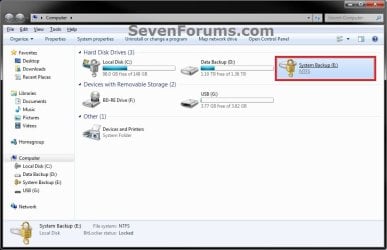
Locked-Internal.jpg


A) If prompted by UAC, then click on Yes.

B) Go to step 4 or 5.
4. To Type in the Password to Unlock this Drive
A) Type in the password, and click on Unlock. (see screenshot below step 5A)
NOTE: The password will be at least 8 letters and/or numbers long.

B) Go to step 6.
5. To Enter the "BitLocker Recovery Key" to Unlock this Drive
NOTE: This step is for if you lost or forgot the password for this drive.
A) Click on the I forgot my password link. (see screenshot below)
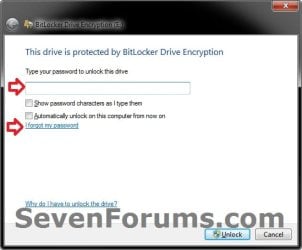
Forgot.jpg
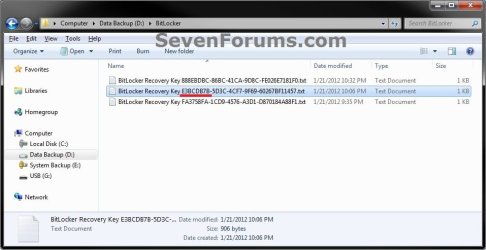
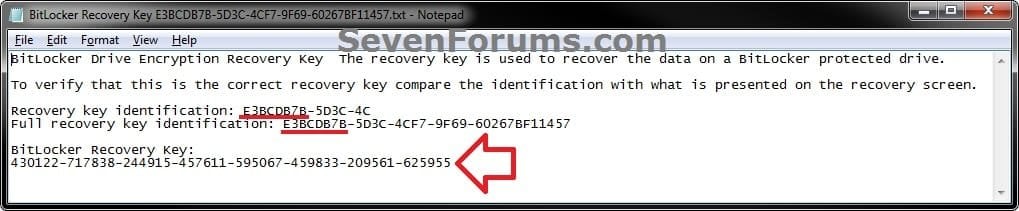
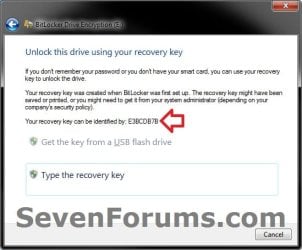
B) Using the provided "recovery key ID" number in the screenshot below, locate the BitLocker recovery key for this drive, and then click on Type the recovery key. (see screenshots below)
Step1.jpg

Step2A.jpg

Step2B.jpg

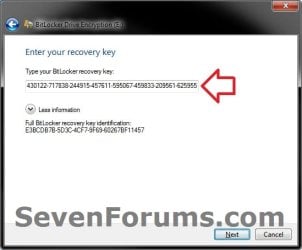
C) Type in the long BitLocker recovery key number, and click on Next. (see screenshot below)
Step3.jpg
D) Click on Finish, and continue on to step 6. (see screenshot below)
NOTE: If you had forgotten the password, then you can now click on Manage BitLocker, and Change password to unlock drive to create a new one to use.
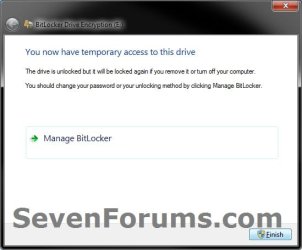
Step4.jpg
6. The drive will now be unlocked until you log off or restart the computer next.
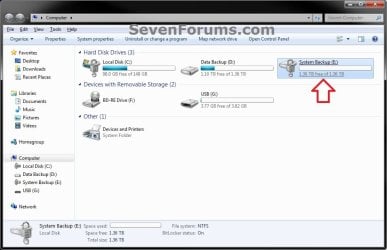
Unlocked_Internal.jpg


OPTION TWO

To Unlock a Data or Removable Drive in a Command Prompt


1. Open a elevated command prompt, then do step 2 or 3 below for what option you would like to use.

2. To Use the Password to Unlock this Drive
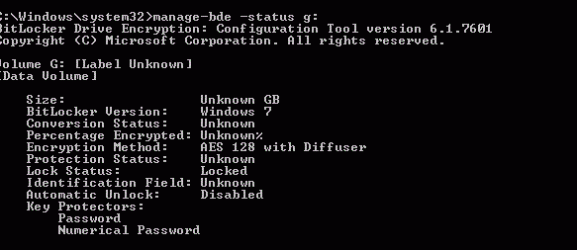
A) In the elevated command prompt, type the command below and press Enter. (see screenshot below)
NOTE: Substitute E: in the command below with the drive letter of the locked drive that you wanted to unlock instead.
manage-bde -unlock E: -password
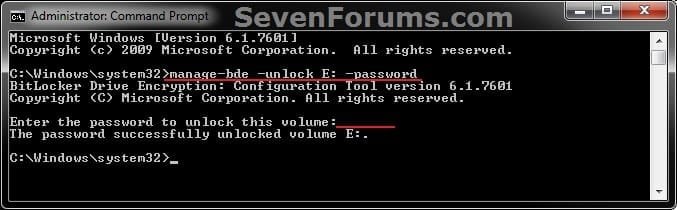
CMD-password.jpg
B) When prompted in the elevated command prompt, type in the password for the drive and press Enter.
NOTE: You will not see the password as you type it. The password will be at least 8 letters and/or numbers long.

C) Go to step 4.
3. To Use the "BitLocker Recovery Key" to Unlock this Drive
NOTE: This step is for if you lost or forgot the password for this drive.
A) Locate the BitLocker recovery key for this drive. (see screenshots below)
Step2A.jpg

Step2B.jpg

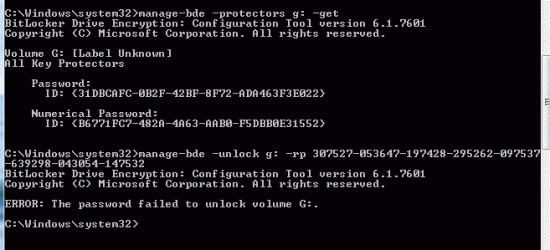
B) In the elevated command prompt, type the command below and press Enter. (see screenshot below)
NOTE: Substitute E: in the command below with the drive letter of the locked drive that you wanted to unlock, and substitute BitLocker Recovery Key in the command below with the actual long number recovery key for the drive.
manage-bde -unlock E: -rp BitLocker Recovery Key
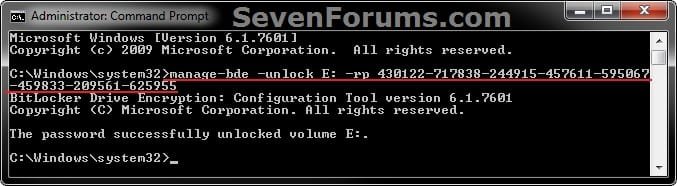
CMD-Recovery_Key.jpg
C) Go to step 4.
4. The drive will now be unlocked until you log off or restart the computer next.
That's it,
Shawn


Last edited:
Yes I can access the data but I aim to boot from the SSD rather than backup the data , install and configure, which will take me a day or more

Tobias
 

My Computer My Computer

Computer type
PC/Desktop
OS
W10P
Hi
I have a encrypted drive -data only (on a laptop with TPM) & keep the password (which I had entered when the drive was encrypted). Now my OS drive is dead (win 7 Enterprise x64) & I have replaced a new one with new OS (win7 Ulti x64). CAn I unlock the encrypted data drive with new OS?
 

My Computer My Computer

Computer type
PC/Desktop
OS
Win 7 Ultimate x64
Hello mabu85, and welcome to Seven Forums. :)

If you have the BitLocker password or recovery key for the encrypted data drive, then you should be able to unlock it from within the new OS.
 

My Computer My Computer

Computer type
PC/Desktop
Computer Manufacturer/Model Number
Self built custom
OS
64-bit Windows 11 Pro for Workstations
CPU
Intel i7-8700K OC'd to 5 GHz
Motherboard
ASUS ROG Maximus XI Formula Z390
Memory
64 GB (4x16GB) G.SKILL TridentZ RGB DDR4 3600 MHz
Graphics Card(s)
ASUS ROG-STRIX-GTX1080TI-O11G-GAMING
Sound Card
Integrated
Monitor(s) Displays
2 x Samsung Odyssey G7 27"
Screen Resolution
2560x1440
Hard Drives
1TB Samsung 990 PRO M.2,
4TB Samsung 990 PRO PRO M.2,
TerraMaster F8 SSD Plus NAS
PSU
Seasonic Prime Titanium 850W
Case
Thermaltake Core P3
Cooling
Corsair Hydro H115i
Keyboard
Logitech wireless K800
Mouse
Logitech MX Master 4
Internet Speed
2 Gb/s Download and 100 Mb/s Upload
Antivirus
Malwarebyte Anti-Malware Premium
Browser
Google Chrome
Other Info
Logitech Z625 speaker system,
Logitech BRIO 4K Pro webcam,
HP Color LaserJet Pro MFP M477fdn,
APC SMART-UPS RT 1000 XL - SURT1000XLI,
Galaxy S23 Plus phone

My Computer My Computer

Computer type
Laptop
Computer Manufacturer/Model Number
HP
OS
windows 7 E

My Computer My Computer

Computer type
PC/Desktop
Computer Manufacturer/Model Number
Self built custom
OS
64-bit Windows 11 Pro for Workstations
CPU
Intel i7-8700K OC'd to 5 GHz
Motherboard
ASUS ROG Maximus XI Formula Z390
Memory
64 GB (4x16GB) G.SKILL TridentZ RGB DDR4 3600 MHz
Graphics Card(s)
ASUS ROG-STRIX-GTX1080TI-O11G-GAMING
Sound Card
Integrated
Monitor(s) Displays
2 x Samsung Odyssey G7 27"
Screen Resolution
2560x1440
Hard Drives
1TB Samsung 990 PRO M.2,
4TB Samsung 990 PRO PRO M.2,
TerraMaster F8 SSD Plus NAS
PSU
Seasonic Prime Titanium 850W
Case
Thermaltake Core P3
Cooling
Corsair Hydro H115i
Keyboard
Logitech wireless K800
Mouse
Logitech MX Master 4
Internet Speed
2 Gb/s Download and 100 Mb/s Upload
Antivirus
Malwarebyte Anti-Malware Premium
Browser
Google Chrome
Other Info
Logitech Z625 speaker system,
Logitech BRIO 4K Pro webcam,
HP Color LaserJet Pro MFP M477fdn,
APC SMART-UPS RT 1000 XL - SURT1000XLI,
Galaxy S23 Plus phone
Jan Cronje

Hello Team, I am in desperate need for help. I am using the external drive on my Dell laptop since the internal drive (C:) has crashed. Drive F: is asking for the recovery key to unlock the drive. I didn't use this drive for quite a while and lost the page where I kept the recovery key. Is there a way that I can recover the key again? One of my books that I have to submit to the publisher is stored on this drive. I sincerely hope that you can assist me. I thank you for you time and I am looking forward to hearing from you.
Kind Regards
Jan Cronje
 

My Computer My Computer

Computer type
Laptop
Computer Manufacturer/Model Number
HP ProBook 4520s
OS
Windows 7 ultimate 64bit
CPU
i3 CPU
Motherboard
Intel i3 Core
Memory
4.00 GB
Graphics Card(s)
no
Mouse
Cordless Microsoft
Hello Jan, and welcome to Seven Forums.

Sorry to hear about your predicament. If you have either the BitLocker startup key, password, or recovery key, you could use the method in the tutorial below to recover the BitLocker drive to another drive that's at least the same size.

:ar: BitLocker Repair Tool - Recover Drive in Windows 7 and 8
 

My Computer My Computer

Computer type
PC/Desktop
Computer Manufacturer/Model Number
Self built custom
OS
64-bit Windows 11 Pro for Workstations
CPU
Intel i7-8700K OC'd to 5 GHz
Motherboard
ASUS ROG Maximus XI Formula Z390
Memory
64 GB (4x16GB) G.SKILL TridentZ RGB DDR4 3600 MHz
Graphics Card(s)
ASUS ROG-STRIX-GTX1080TI-O11G-GAMING
Sound Card
Integrated
Monitor(s) Displays
2 x Samsung Odyssey G7 27"
Screen Resolution
2560x1440
Hard Drives
1TB Samsung 990 PRO M.2,
4TB Samsung 990 PRO PRO M.2,
TerraMaster F8 SSD Plus NAS
PSU
Seasonic Prime Titanium 850W
Case
Thermaltake Core P3
Cooling
Corsair Hydro H115i
Keyboard
Logitech wireless K800
Mouse
Logitech MX Master 4
Internet Speed
2 Gb/s Download and 100 Mb/s Upload
Antivirus
Malwarebyte Anti-Malware Premium
Browser
Google Chrome
Other Info
Logitech Z625 speaker system,
Logitech BRIO 4K Pro webcam,
HP Color LaserJet Pro MFP M477fdn,
APC SMART-UPS RT 1000 XL - SURT1000XLI,
Galaxy S23 Plus phone
Hi,

In my Company, one laptop was encrypted by bitlocker before joining group's domain.
Now, HDD in it was locked somehow, and it won't accept the recovery key.
When Windows prompts and shows part of the Identifier (AE8ED0B0) it matches the same one on the print-out from when it was encrypted, but when entering the Recovery Key into prompted field, it says "this key doesn't match the drive".

Any help, other than asking for password, because the user that was using the laptop says he didn't put any password (doubt)...

Thanks in advance
 

My Computer My Computer

Computer type
PC/Desktop
OS
Windows 10 x64

My Computer My Computer

Computer type
PC/Desktop
Computer Manufacturer/Model Number
Self built custom
OS
64-bit Windows 11 Pro for Workstations
CPU
Intel i7-8700K OC'd to 5 GHz
Motherboard
ASUS ROG Maximus XI Formula Z390
Memory
64 GB (4x16GB) G.SKILL TridentZ RGB DDR4 3600 MHz
Graphics Card(s)
ASUS ROG-STRIX-GTX1080TI-O11G-GAMING
Sound Card
Integrated
Monitor(s) Displays
2 x Samsung Odyssey G7 27"
Screen Resolution
2560x1440
Hard Drives
1TB Samsung 990 PRO M.2,
4TB Samsung 990 PRO PRO M.2,
TerraMaster F8 SSD Plus NAS
PSU
Seasonic Prime Titanium 850W
Case
Thermaltake Core P3
Cooling
Corsair Hydro H115i
Keyboard
Logitech wireless K800
Mouse
Logitech MX Master 4
Internet Speed
2 Gb/s Download and 100 Mb/s Upload
Antivirus
Malwarebyte Anti-Malware Premium
Browser
Google Chrome
Other Info
Logitech Z625 speaker system,
Logitech BRIO 4K Pro webcam,
HP Color LaserJet Pro MFP M477fdn,
APC SMART-UPS RT 1000 XL - SURT1000XLI,
Galaxy S23 Plus phone

My Computer My Computer

Computer type
PC/Desktop
OS
Windows 10 x64

My Computer My Computer

Computer type
PC/Desktop
Computer Manufacturer/Model Number
Self built custom
OS
64-bit Windows 11 Pro for Workstations
CPU
Intel i7-8700K OC'd to 5 GHz
Motherboard
ASUS ROG Maximus XI Formula Z390
Memory
64 GB (4x16GB) G.SKILL TridentZ RGB DDR4 3600 MHz
Graphics Card(s)
ASUS ROG-STRIX-GTX1080TI-O11G-GAMING
Sound Card
Integrated
Monitor(s) Displays
2 x Samsung Odyssey G7 27"
Screen Resolution
2560x1440
Hard Drives
1TB Samsung 990 PRO M.2,
4TB Samsung 990 PRO PRO M.2,
TerraMaster F8 SSD Plus NAS
PSU
Seasonic Prime Titanium 850W
Case
Thermaltake Core P3
Cooling
Corsair Hydro H115i
Keyboard
Logitech wireless K800
Mouse
Logitech MX Master 4
Internet Speed
2 Gb/s Download and 100 Mb/s Upload
Antivirus
Malwarebyte Anti-Malware Premium
Browser
Google Chrome
Other Info
Logitech Z625 speaker system,
Logitech BRIO 4K Pro webcam,
HP Color LaserJet Pro MFP M477fdn,
APC SMART-UPS RT 1000 XL - SURT1000XLI,
Galaxy S23 Plus phone
Back
Top