
SysKey - Create USB Key to Lock or Unlock Windows

How to Create a USB Startup Key to Lock or Unlock Windows

   Information
SysKey (SAM Lock Tool) is an in-built Windows utility that can help you secure the Security Accounts Management or SAM database. The SAM Database stores hashed copies of your user passwords, which is encrypted with a locally stored system startup key by default.

You can use SysKey to store the startup key locally in Windows or on a USB flash drive. Having the startup key stored on a USB flash drive instead will give you better security since the USB flash drive must be connected at startup to be able to login and gain access to Windows.

This tutorial will show you how to use SysKey to be able to create a USB flash key "Startup Key Disk" to lock or unlock Vista, Windows 7, or Windows 8 with.

You must be logged in as an administrator to be able to do the steps in this tutorial.


   Note
If you Lock Windows with OPTION ONE:
  • The startup key placed on the USB flash drive is only good to gain access to logon to the specific Windows that it was created in.
  • This will only lock the Windows computer at boot from a cold startup after a restart or shut down. It will not lock Windows after a log off, lock, or switch user.
  • Once Windows has started after logging in, you will no longer need to have the USB flash drive connected. It is only required to be connected at system startup at boot.
  • You will still be able to continue to use the USB flash drive as normal. Just do not ever delete the StartKey.Key file on it, or you will not be able to unlock Windows with it anymore.
  • It is recommended to create a USB flash drive per user that you wish to be able to log in from startup.
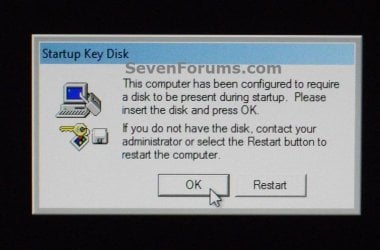
EXAMPLE: Windows Startup
NOTE: This is an example of what you will see at Windows startup after using OPTION ONE. Windows will not startup until you connect the USB startup key.
startup.jpg


OPTION ONE

To Lock Windows to Require a USB Key at Startup to Unlock


NOTE: This option will store the startup key on your USB flash key instead of locally. It will require the USB flash drive to be connected at system startup to be able to unlock Windows.
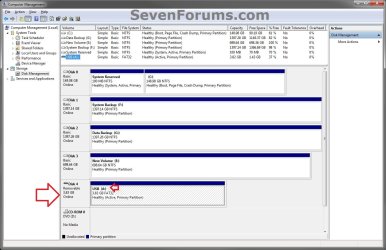
1. If you have not already, you will need to change the drive letter of the USB flash drive to have the letter A. (see screenshot below)
diskmgmt.jpg
2. Press the Windows+R keys to open the Run dialog, type syskey, and click/tap on OK.

3. If prompted by UAC, then click/tap on Yes (Windows 7/8) or Continue (Vista).

4. Click/tap on Update. (see screenshot below)
syskey-1.jpg
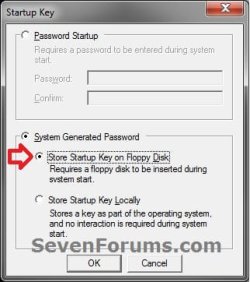
5. Select (dot) System Generated Password, select (dot) the Store Startup Key on Floppy Disk option, and click/tap on OK. (see screenshot below)
syskey-2.jpg
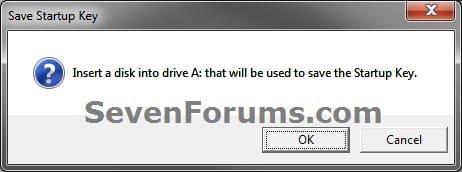
6. If you have not already, connect the USB flash drive with the drive letter of A from step 1, and click/tap on OK. (see screenshot below)
syskey-3.jpg
7. Click/tap on OK. (see screenshot below)


   Note

  • This places the StartKey.Key file on the USB flash drive. If you already have an existing StartKey.Key file on the USB, then the older existing one would be renamed to StartKey.Bak for the new one to be saved to it.
  • It is recommended that you keep a backup of this StartKey.Key file at another location in case the USB gets corrupted or lost. This way you will be able to copy it to another USB with a drive letter of A to be able to gain access to Windows again.
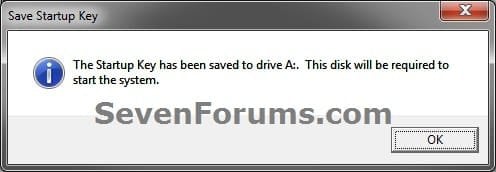
syskey-4.jpg
8. Click/tap on OK. (see screenshot below)
syskey-5.jpg
9. Windows will now require this USB flash drive to be connected at startup when you boot your computer to be able to login to Windows.


OPTION TWO

To Unlock Windows to Not Require a USB Key at Startup


NOTE: This option is the default setting in Windows to store the startup key locally. It will undo OPTION ONE to have Windows no longer require the USB flash drive at startup.
1. Press the Windows+R keys to open the Run dialog, type syskey, and click/tap on OK.

2. If prompted by UAC, then click/tap on Yes (Windows 7/8) or Continue (Vista).

3. Click/tap on Update. (see screenshot below)
syskey-1.jpg
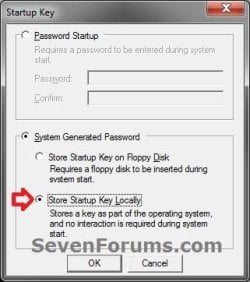
4. Select (dot) System Generated Password, select (dot) the Store Startup Key Locally option, and click/tap on OK. (see screenshot below)
undo-2.jpg
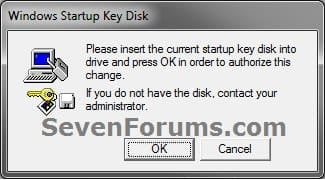
5. If you have not already, connect the USB flash drive with the drive letter of A from OPTION ONE, and click/tap on OK. (see screenshot below)
undo-3.jpg
6. Click/tap on OK. (see screenshot below)
syskey-5.jpg
7. Windows will now no longer require the USB flash drive to be connected at startup for access.
That's it,
Shawn


Last edited:
Brilliant, thank you. Does the USB key always have to read as the same drive number? How would I ensure this?

Nope. It doesn't matter about the USB key. It only matters that the StartKey.Key file is in the root directory of it.
 
Last edited:

My Computer My Computer

At a glance

64-bit Windows 11 Pro for WorkstationsIntel i7-8700K OC'd to 5 GHz64 GB (4x16GB) G.SKILL TridentZ RGB DDR4 3600...ASUS ROG-STRIX-GTX1080TI-O11G-GAMING
Computer type
PC/Desktop
Computer Manufacturer/Model Number
Self built custom
OS
64-bit Windows 11 Pro for Workstations
CPU
Intel i7-8700K OC'd to 5 GHz
Motherboard
ASUS ROG Maximus XI Formula Z390
Memory
64 GB (4x16GB) G.SKILL TridentZ RGB DDR4 3600 MHz
Graphics Card(s)
ASUS ROG-STRIX-GTX1080TI-O11G-GAMING
Sound Card
Integrated
Monitor(s) Displays
2 x Samsung Odyssey G7 27"
Screen Resolution
2560x1440
Hard Drives
1TB Samsung 990 PRO M.2,
4TB Samsung 990 PRO PRO M.2,
TerraMaster F8 SSD Plus NAS
PSU
Seasonic Prime Titanium 850W
Case
Thermaltake Core P3
Cooling
Corsair Hydro H115i
Keyboard
Logitech wireless K800
Mouse
Logitech MX Master 4
Internet Speed
2 Gb/s Download and 100 Mb/s Upload
Antivirus
Malwarebyte Anti-Malware Premium
Browser
Google Chrome
Other Info
Logitech Z625 speaker system,
Logitech BRIO 4K Pro webcam,
HP Color LaserJet Pro MFP M477fdn,
APC SMART-UPS RT 1000 XL - SURT1000XLI,
Galaxy S23 Plus phone
recovery using saved syskey

I'll start with saying I am not a technical genius. I set my lap top up for a SAM lock. Put the syskey on my usb with letter A and have been happily using it for almost a year. My usb has shorted out and is now corrupt (that alone was a new education in what technology can do). I made a spare copy of the syskey (as a saved file) onto another computer and have now loaded it onto a brand new usb key (same model as the old one), but the computer won't accept it. The syskey is in the root directory. Using my other computer I assigned it drive letter A. How do I now get my locked laptop to accept the new usb key to unlock my computer?
 

My Computer My Computer

At a glance

Windows 7Intel Core i3
Computer type
Laptop
Computer Manufacturer/Model Number
HP ProBook 4520s
OS
Windows 7
CPU
Intel Core i3
Hello James, and welcome to Seven Forums.

Was the USB formatted as FAT32, and the SysKey copied to the root of the USB flash drive?

While the other computer may think the new USB is A:, the original computer most likely assigned it a different drive letter since the other USB was assigned to A.

See if assigning A: to the new USB in a command prompt at boot on your original computer may work.
In the command prompt, type the commands below, and press Enter after each one. When successfully finished, restart the computer to see if it works.
  • diskpart
  • list volume (make note of the volume number for the USB flash drive)
  • select volume # (substitute # for the actual volume number of the USB flash drive)
  • assign letter=A
Hope this helps, :)
Shawn


My Computer My Computer

At a glance

64-bit Windows 11 Pro for WorkstationsIntel i7-8700K OC'd to 5 GHz64 GB (4x16GB) G.SKILL TridentZ RGB DDR4 3600...ASUS ROG-STRIX-GTX1080TI-O11G-GAMING
Computer type
PC/Desktop
Computer Manufacturer/Model Number
Self built custom
OS
64-bit Windows 11 Pro for Workstations
CPU
Intel i7-8700K OC'd to 5 GHz
Motherboard
ASUS ROG Maximus XI Formula Z390
Memory
64 GB (4x16GB) G.SKILL TridentZ RGB DDR4 3600 MHz
Graphics Card(s)
ASUS ROG-STRIX-GTX1080TI-O11G-GAMING
Sound Card
Integrated
Monitor(s) Displays
2 x Samsung Odyssey G7 27"
Screen Resolution
2560x1440
Hard Drives
1TB Samsung 990 PRO M.2,
4TB Samsung 990 PRO PRO M.2,
TerraMaster F8 SSD Plus NAS
PSU
Seasonic Prime Titanium 850W
Case
Thermaltake Core P3
Cooling
Corsair Hydro H115i
Keyboard
Logitech wireless K800
Mouse
Logitech MX Master 4
Internet Speed
2 Gb/s Download and 100 Mb/s Upload
Antivirus
Malwarebyte Anti-Malware Premium
Browser
Google Chrome
Other Info
Logitech Z625 speaker system,
Logitech BRIO 4K Pro webcam,
HP Color LaserJet Pro MFP M477fdn,
APC SMART-UPS RT 1000 XL - SURT1000XLI,
Galaxy S23 Plus phone
Dumb questions - how do I get the command prompt? I know after logging in I press Wdw+r. How do I do it on the boot up?
 

My Computer My Computer

At a glance

Windows 7Intel Core i3
Computer type
Laptop
Computer Manufacturer/Model Number
HP ProBook 4520s
OS
Windows 7
CPU
Intel Core i3
The two links above can help show you a few ways to do so. :)
 

My Computer My Computer

At a glance

64-bit Windows 11 Pro for WorkstationsIntel i7-8700K OC'd to 5 GHz64 GB (4x16GB) G.SKILL TridentZ RGB DDR4 3600...ASUS ROG-STRIX-GTX1080TI-O11G-GAMING
Computer type
PC/Desktop
Computer Manufacturer/Model Number
Self built custom
OS
64-bit Windows 11 Pro for Workstations
CPU
Intel i7-8700K OC'd to 5 GHz
Motherboard
ASUS ROG Maximus XI Formula Z390
Memory
64 GB (4x16GB) G.SKILL TridentZ RGB DDR4 3600 MHz
Graphics Card(s)
ASUS ROG-STRIX-GTX1080TI-O11G-GAMING
Sound Card
Integrated
Monitor(s) Displays
2 x Samsung Odyssey G7 27"
Screen Resolution
2560x1440
Hard Drives
1TB Samsung 990 PRO M.2,
4TB Samsung 990 PRO PRO M.2,
TerraMaster F8 SSD Plus NAS
PSU
Seasonic Prime Titanium 850W
Case
Thermaltake Core P3
Cooling
Corsair Hydro H115i
Keyboard
Logitech wireless K800
Mouse
Logitech MX Master 4
Internet Speed
2 Gb/s Download and 100 Mb/s Upload
Antivirus
Malwarebyte Anti-Malware Premium
Browser
Google Chrome
Other Info
Logitech Z625 speaker system,
Logitech BRIO 4K Pro webcam,
HP Color LaserJet Pro MFP M477fdn,
APC SMART-UPS RT 1000 XL - SURT1000XLI,
Galaxy S23 Plus phone
the above 2 links require I have the install disks?
I purchased the computer set up about 2 years ago and don't have the disks.
I have been able to get to the HP BIOS using the Esc key - but cannot get either shift F10 or F8 to give me a command line prompt.
Launching in repair causes it to try to run it's own diagnostics - which when complete put me back at the screen which asks for the boot disk with the SysKey.
I can get into the HP BIOS - but it is an HP GUI not a command prompt.
 

My Computer My Computer

At a glance

Windows 7Intel Core i3
Computer type
Laptop
Computer Manufacturer/Model Number
HP ProBook 4520s
OS
Windows 7
CPU
Intel Core i3

My Computer My Computer

At a glance

64-bit Windows 11 Pro for WorkstationsIntel i7-8700K OC'd to 5 GHz64 GB (4x16GB) G.SKILL TridentZ RGB DDR4 3600...ASUS ROG-STRIX-GTX1080TI-O11G-GAMING
Computer type
PC/Desktop
Computer Manufacturer/Model Number
Self built custom
OS
64-bit Windows 11 Pro for Workstations
CPU
Intel i7-8700K OC'd to 5 GHz
Motherboard
ASUS ROG Maximus XI Formula Z390
Memory
64 GB (4x16GB) G.SKILL TridentZ RGB DDR4 3600 MHz
Graphics Card(s)
ASUS ROG-STRIX-GTX1080TI-O11G-GAMING
Sound Card
Integrated
Monitor(s) Displays
2 x Samsung Odyssey G7 27"
Screen Resolution
2560x1440
Hard Drives
1TB Samsung 990 PRO M.2,
4TB Samsung 990 PRO PRO M.2,
TerraMaster F8 SSD Plus NAS
PSU
Seasonic Prime Titanium 850W
Case
Thermaltake Core P3
Cooling
Corsair Hydro H115i
Keyboard
Logitech wireless K800
Mouse
Logitech MX Master 4
Internet Speed
2 Gb/s Download and 100 Mb/s Upload
Antivirus
Malwarebyte Anti-Malware Premium
Browser
Google Chrome
Other Info
Logitech Z625 speaker system,
Logitech BRIO 4K Pro webcam,
HP Color LaserJet Pro MFP M477fdn,
APC SMART-UPS RT 1000 XL - SURT1000XLI,
Galaxy S23 Plus phone
UPDATE: did manage to get it to start in safe mode with a command prompt (as shown in the first link) by beating on the F8 key during boot up (but has to be a boot from off not a restart on my machine). New problem, after it runs the script to load the drivers it does not leave me at a command line - it pops up the Startup key Disk box and asks for my start up key to be inserted .... which is back to my initial problem I think??
 

My Computer My Computer

At a glance

Windows 7Intel Core i3
Computer type
Laptop
Computer Manufacturer/Model Number
HP ProBook 4520s
OS
Windows 7
CPU
Intel Core i3
Great information, I see one potential problem with "spare keys". I obsessivly change drive letters a lot, and have found that whenever you assign a drive letter, (A), the computer forgets the previous "A" drive assignment.

I think that when you assign the Spare Key as "A" it would no longer see the first one as "A" unless it was identical size and signiture.

I suggest that anyone doing this should confirm that each USB stick is seen as "A" beforehand.
 

My Computer My Computer

At a glance

Windows 7 Pro 64 Bit
Computer type
PC/Desktop
OS
Windows 7 Pro 64 Bit
Brink thanks a lot for this Great tutorial .
 

My Computer My Computer

At a glance

windows 7 x64
OS
windows 7 x64
Startup key.key lost

Hi Sir,
I have created the "USB KEY" to lock my computer by using my pendrive. But now i have lost my Startup key.key file and now i am unable to open my laptop. Please help me " How to open my Laptop ? " or "how to recover my Startup key.key file ?". That pendrive was formated my friend unknowingly.
 

My Computer My Computer

At a glance

windows 8.1
Computer type
Laptop
Computer Manufacturer/Model Number
Sony Vaio
OS
windows 8.1
Hello,

I'm afraid that if you don't have a backup of this StartKey.Key file to restore on a USB to unlock your PC, then you'll need to reinstall Windows. :(

If you have another computer, then you could connect the hard drive to it to backup any files that you may want first.
 

My Computer My Computer

At a glance

64-bit Windows 11 Pro for WorkstationsIntel i7-8700K OC'd to 5 GHz64 GB (4x16GB) G.SKILL TridentZ RGB DDR4 3600...ASUS ROG-STRIX-GTX1080TI-O11G-GAMING
Computer type
PC/Desktop
Computer Manufacturer/Model Number
Self built custom
OS
64-bit Windows 11 Pro for Workstations
CPU
Intel i7-8700K OC'd to 5 GHz
Motherboard
ASUS ROG Maximus XI Formula Z390
Memory
64 GB (4x16GB) G.SKILL TridentZ RGB DDR4 3600 MHz
Graphics Card(s)
ASUS ROG-STRIX-GTX1080TI-O11G-GAMING
Sound Card
Integrated
Monitor(s) Displays
2 x Samsung Odyssey G7 27"
Screen Resolution
2560x1440
Hard Drives
1TB Samsung 990 PRO M.2,
4TB Samsung 990 PRO PRO M.2,
TerraMaster F8 SSD Plus NAS
PSU
Seasonic Prime Titanium 850W
Case
Thermaltake Core P3
Cooling
Corsair Hydro H115i
Keyboard
Logitech wireless K800
Mouse
Logitech MX Master 4
Internet Speed
2 Gb/s Download and 100 Mb/s Upload
Antivirus
Malwarebyte Anti-Malware Premium
Browser
Google Chrome
Other Info
Logitech Z625 speaker system,
Logitech BRIO 4K Pro webcam,
HP Color LaserJet Pro MFP M477fdn,
APC SMART-UPS RT 1000 XL - SURT1000XLI,
Galaxy S23 Plus phone
If you have another computer, then you could connect the hard drive to it to backup any files that you may want first.

Noob question: I have always assumed that the process encrypts the disk, too, making it unusable if the key is lost even when the HDD is removed from the computer in question. So this process only protects your data as long as the HDD is not removed and connected to another computer? Protecting the computer instead of protecting the HDD?
 

My Computer My Computer

At a glance

Windows 10 Pro x64 EN-GB1.6 GHz Intel Core i7-720QM Processor6 GBATI Mobility Radeon HD 5850 Graphics
Computer type
Laptop
Computer Manufacturer/Model Number
HP ENVY 17-1150eg
OS
Windows 10 Pro x64 EN-GB
CPU
1.6 GHz Intel Core i7-720QM Processor
Memory
6 GB
Graphics Card(s)
ATI Mobility Radeon HD 5850 Graphics
Sound Card
Beats sound system with integrated subwoofer
Monitor(s) Displays
17" laptop display, 22" LED and 32" Full HD TV through HDMI
Screen Resolution
1600*900 (1), 1920*1080 (2&3)
Hard Drives
Internal: 2 x 500 GB SATA Hard Disk Drive 7200 rpm
External: 2TB for backups, 3TB USB3 network drive for media
Cooling
As Envy runs a bit warm, I have it on a Cooler Master pad
Keyboard
Logitech diNovo Media Desktop Laser (bluetooth)
Mouse
Logitech Performance Mouse MX
Internet Speed
50/10 Mbps VDSL
Antivirus
Windows Defender 4.3.9431.0
Browser
Maxthon 3.5.2., IE11
Hey Kari,

No problem. SysKey was meant to encrypt SAM to protect against offline password cracking attacks by preventing the possessor of an unauthorised copy of the SAM from extracting information from it.

https://en.wikipedia.org/wiki/Syskey

Today, it would be better to use BitLocker to encrypt the Windows disk to prevent any unauthorized access at all.
 

My Computer My Computer

At a glance

64-bit Windows 11 Pro for WorkstationsIntel i7-8700K OC'd to 5 GHz64 GB (4x16GB) G.SKILL TridentZ RGB DDR4 3600...ASUS ROG-STRIX-GTX1080TI-O11G-GAMING
Computer type
PC/Desktop
Computer Manufacturer/Model Number
Self built custom
OS
64-bit Windows 11 Pro for Workstations
CPU
Intel i7-8700K OC'd to 5 GHz
Motherboard
ASUS ROG Maximus XI Formula Z390
Memory
64 GB (4x16GB) G.SKILL TridentZ RGB DDR4 3600 MHz
Graphics Card(s)
ASUS ROG-STRIX-GTX1080TI-O11G-GAMING
Sound Card
Integrated
Monitor(s) Displays
2 x Samsung Odyssey G7 27"
Screen Resolution
2560x1440
Hard Drives
1TB Samsung 990 PRO M.2,
4TB Samsung 990 PRO PRO M.2,
TerraMaster F8 SSD Plus NAS
PSU
Seasonic Prime Titanium 850W
Case
Thermaltake Core P3
Cooling
Corsair Hydro H115i
Keyboard
Logitech wireless K800
Mouse
Logitech MX Master 4
Internet Speed
2 Gb/s Download and 100 Mb/s Upload
Antivirus
Malwarebyte Anti-Malware Premium
Browser
Google Chrome
Other Info
Logitech Z625 speaker system,
Logitech BRIO 4K Pro webcam,
HP Color LaserJet Pro MFP M477fdn,
APC SMART-UPS RT 1000 XL - SURT1000XLI,
Galaxy S23 Plus phone
Thanks for clearing this for an encryption noob :)
 

My Computer My Computer

At a glance

Windows 10 Pro x64 EN-GB1.6 GHz Intel Core i7-720QM Processor6 GBATI Mobility Radeon HD 5850 Graphics
Computer type
Laptop
Computer Manufacturer/Model Number
HP ENVY 17-1150eg
OS
Windows 10 Pro x64 EN-GB
CPU
1.6 GHz Intel Core i7-720QM Processor
Memory
6 GB
Graphics Card(s)
ATI Mobility Radeon HD 5850 Graphics
Sound Card
Beats sound system with integrated subwoofer
Monitor(s) Displays
17" laptop display, 22" LED and 32" Full HD TV through HDMI
Screen Resolution
1600*900 (1), 1920*1080 (2&3)
Hard Drives
Internal: 2 x 500 GB SATA Hard Disk Drive 7200 rpm
External: 2TB for backups, 3TB USB3 network drive for media
Cooling
As Envy runs a bit warm, I have it on a Cooler Master pad
Keyboard
Logitech diNovo Media Desktop Laser (bluetooth)
Mouse
Logitech Performance Mouse MX
Internet Speed
50/10 Mbps VDSL
Antivirus
Windows Defender 4.3.9431.0
Browser
Maxthon 3.5.2., IE11
De nada mate. :)
 

My Computer My Computer

At a glance

64-bit Windows 11 Pro for WorkstationsIntel i7-8700K OC'd to 5 GHz64 GB (4x16GB) G.SKILL TridentZ RGB DDR4 3600...ASUS ROG-STRIX-GTX1080TI-O11G-GAMING
Computer type
PC/Desktop
Computer Manufacturer/Model Number
Self built custom
OS
64-bit Windows 11 Pro for Workstations
CPU
Intel i7-8700K OC'd to 5 GHz
Motherboard
ASUS ROG Maximus XI Formula Z390
Memory
64 GB (4x16GB) G.SKILL TridentZ RGB DDR4 3600 MHz
Graphics Card(s)
ASUS ROG-STRIX-GTX1080TI-O11G-GAMING
Sound Card
Integrated
Monitor(s) Displays
2 x Samsung Odyssey G7 27"
Screen Resolution
2560x1440
Hard Drives
1TB Samsung 990 PRO M.2,
4TB Samsung 990 PRO PRO M.2,
TerraMaster F8 SSD Plus NAS
PSU
Seasonic Prime Titanium 850W
Case
Thermaltake Core P3
Cooling
Corsair Hydro H115i
Keyboard
Logitech wireless K800
Mouse
Logitech MX Master 4
Internet Speed
2 Gb/s Download and 100 Mb/s Upload
Antivirus
Malwarebyte Anti-Malware Premium
Browser
Google Chrome
Other Info
Logitech Z625 speaker system,
Logitech BRIO 4K Pro webcam,
HP Color LaserJet Pro MFP M477fdn,
APC SMART-UPS RT 1000 XL - SURT1000XLI,
Galaxy S23 Plus phone
A Couple of Questions

G'day!!

Thank you very much for the easy to read and follow tutorials!!

I just have a couple of questions:

Is there any advantage using a USB with the SYSKEY key on it to boot along with BitLocker or Truecrypt FDE? Just to store SAM access remotely; especially is the computer is left on and unattended in Windows 'Locked' mode for long periods (it runs services for the network).

How to you reissue the SYSKEY key on a regular basis; in order to maintain security in case of compromised USB key? I'm assuming anyone who has access to that USB for more than a few seconds will be able to copy it and decrypt the SAM db at leisure?

Also is there a windows (and/or Linux) USB solution where on removal of a USB with an encryption key on it the entire system is paralysed? So no CD, USB, BIOS, internal or external ports/slots/sockets (including RAM) can be modified? Some systems and services can be selected to continue while most can not and Firewall rules are modified to a Key In or Key Out rule sets? This would allow a computer to run however if physical control wasn't maintained there would still be a level of security from Evil Maid type attacks.

Once again, love your work and simple step by step instructions!

Cheers

Rustee
 

My Computer My Computer

At a glance

Multi
Computer type
PC/Desktop
OS
Multi
Hello Rustee, and welcome to Ten Forums. :)

For what you're wanting, using BitLocker on all drives should work well. SysKey could be used for additional security, and used on the same USB for BitLocker. Yeah, you don't want anyone to have access to the USB except yourself since it'll whomever has it access.

You might also setup a BIOS/UEFI password. This way the PC will not boot until you enter the BIOS/UEFI password first.

You could also keep the computer in a locked secure room if you're concerned about a maid or someone in the house having physical access to it.
 

My Computer My Computer

At a glance

64-bit Windows 11 Pro for WorkstationsIntel i7-8700K OC'd to 5 GHz64 GB (4x16GB) G.SKILL TridentZ RGB DDR4 3600...ASUS ROG-STRIX-GTX1080TI-O11G-GAMING
Computer type
PC/Desktop
Computer Manufacturer/Model Number
Self built custom
OS
64-bit Windows 11 Pro for Workstations
CPU
Intel i7-8700K OC'd to 5 GHz
Motherboard
ASUS ROG Maximus XI Formula Z390
Memory
64 GB (4x16GB) G.SKILL TridentZ RGB DDR4 3600 MHz
Graphics Card(s)
ASUS ROG-STRIX-GTX1080TI-O11G-GAMING
Sound Card
Integrated
Monitor(s) Displays
2 x Samsung Odyssey G7 27"
Screen Resolution
2560x1440
Hard Drives
1TB Samsung 990 PRO M.2,
4TB Samsung 990 PRO PRO M.2,
TerraMaster F8 SSD Plus NAS
PSU
Seasonic Prime Titanium 850W
Case
Thermaltake Core P3
Cooling
Corsair Hydro H115i
Keyboard
Logitech wireless K800
Mouse
Logitech MX Master 4
Internet Speed
2 Gb/s Download and 100 Mb/s Upload
Antivirus
Malwarebyte Anti-Malware Premium
Browser
Google Chrome
Other Info
Logitech Z625 speaker system,
Logitech BRIO 4K Pro webcam,
HP Color LaserJet Pro MFP M477fdn,
APC SMART-UPS RT 1000 XL - SURT1000XLI,
Galaxy S23 Plus phone
I know this is a SUPER old post, but it's the closest to what I'm looking for that I've found so far. We distribute PC's with games on them. I have seen that some gaming PC's will have USB keys in them that can't seem to be read on any computer except the one they were created on. Does the approach described here work like that? If I would turn on BitLocker and use a USB key with the Syskey info on it, can the person purchasing the game duplicate the drive and duplicate the USB key and use them in another PC with the same hardware?

We are trying to prevent them from just building extra PC's and dropping cloned hard drives in them with cloned usb keys. And don't want to force them to have the games online.

Thanks!
 

My Computer My Computer

At a glance

Win7x64 plus many more
Computer type
PC/Desktop
OS
Win7x64 plus many more
Hello Mike, and welcome to Seven Forums. :)

That's correct. The SysKey USB can only be used on the computer it was created on.

While the StartKey.Key file on the USB can be copied to any USB to be able to use that USB to unlock the computer with.

I'm not sure if the USB will still work on a cloned PC though.
 

My Computer My Computer

At a glance

64-bit Windows 11 Pro for WorkstationsIntel i7-8700K OC'd to 5 GHz64 GB (4x16GB) G.SKILL TridentZ RGB DDR4 3600...ASUS ROG-STRIX-GTX1080TI-O11G-GAMING
Computer type
PC/Desktop
Computer Manufacturer/Model Number
Self built custom
OS
64-bit Windows 11 Pro for Workstations
CPU
Intel i7-8700K OC'd to 5 GHz
Motherboard
ASUS ROG Maximus XI Formula Z390
Memory
64 GB (4x16GB) G.SKILL TridentZ RGB DDR4 3600 MHz
Graphics Card(s)
ASUS ROG-STRIX-GTX1080TI-O11G-GAMING
Sound Card
Integrated
Monitor(s) Displays
2 x Samsung Odyssey G7 27"
Screen Resolution
2560x1440
Hard Drives
1TB Samsung 990 PRO M.2,
4TB Samsung 990 PRO PRO M.2,
TerraMaster F8 SSD Plus NAS
PSU
Seasonic Prime Titanium 850W
Case
Thermaltake Core P3
Cooling
Corsair Hydro H115i
Keyboard
Logitech wireless K800
Mouse
Logitech MX Master 4
Internet Speed
2 Gb/s Download and 100 Mb/s Upload
Antivirus
Malwarebyte Anti-Malware Premium
Browser
Google Chrome
Other Info
Logitech Z625 speaker system,
Logitech BRIO 4K Pro webcam,
HP Color LaserJet Pro MFP M477fdn,
APC SMART-UPS RT 1000 XL - SURT1000XLI,
Galaxy S23 Plus phone
Back
Top