BitLocker Drive Encryption - Unlock a Locked OS Drive

How to Unlock a Windows 7 Computer Locked by BitLocker Drive Encryption


   Information
This will show you how to unlock a computer that the drive Windows 7 is installed on was locked by BitLocker Drive Encryption, and now cannot be accessed.


   Note
If the drive that Windows is installed on (the operating system drive) is encrypted by BitLocker Drive Encryption, it can become locked by BitLocker and require the use of the recovery key in the following situations:
  • The computer is working, but BitLocker has detected a possible security risk during startup.
  • The computer is working, but you lost the BitLocker startup key (USB flash drive) or PIN, or the startup key is damaged.
  • The computer isn't working (for example, a power supply problem), and you have transferred its hard disk to a different computer.
If your computer is part of a domain, some BitLocker features and settings can be controlled by your system administrator.

Assistive technology software that runs on Windows, such as screen reading software, cannot read BitLocker startup screens because they are displayed during BIOS startup and before Windows runs. This includes screens used when you type a PIN or recovery key, and any BitLocker error messages.

   Warning
To be able to unlock the Windows 7 drive and regain access to your files, you must have the BitLocker recovery key for it.

You should have a copy of the BitLocker recovery key if you did what was recommended in step 13 of OPTION ONE in the tutorial below to either duplicate the startup key to a backup USB flash drive, save and print recovery key again, or write down the recovery key somewhere for safe keeping.

http://www.sevenforums.com/tutorial...cryption-windows-7-drive-turn-off-no-tpm.html


OPTION ONE

To Unlock the OS Drive on Original Computer


NOTE: This option is for when you are still able to power up the computer that the OS drive is locked on, and to enter the BitLocker recovery key to unlock it and be able to start Windows 7 afterwards.
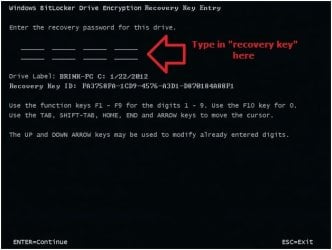
1. When you start the computer, BitLocker will interrupt startup and display a message informing you that the system drive is locked. (see screenshot below)
Recovery-1.jpg
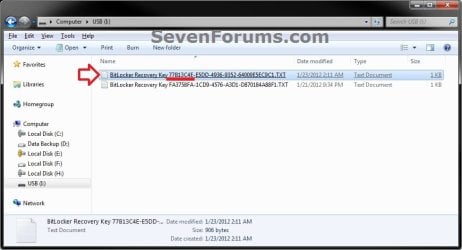
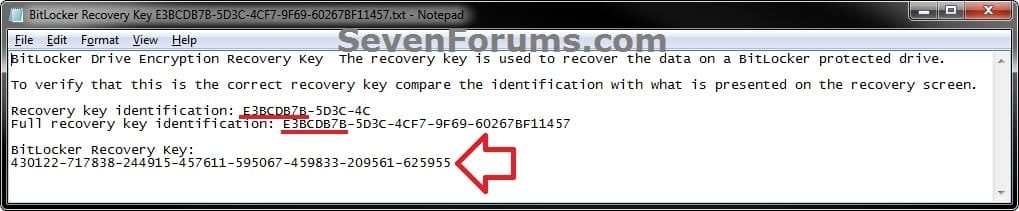
2. Locate the BitLocker recovery key (see screenshot below) for this drive, and then press ENTER. (see screenshot above)
NOTE: If you happen to have a duplicate USB flash drive (startup key) that you could use instead, then connect it now, and press the ESC key to restart the computer to unlock the OS drive as usual.
Step2B.jpg
3. Type in the BitLocker recovery key as shown in the screenshot below, and press Enter. (see screenshot below)
Recovery-2.jpg
4. If successful, you will now begin to start Windows 7 and have access to the OS drive again until you log off or restart the computer next.


OPTION TWO

To Unlock the OS Drive on a Different Computer


NOTE: This option is for when you are not able to power up the original computer that the OS (Windows 7) drive is locked on, and will connect it to another working Windows 7 Ultimate or Enterprise computer to gain access to it again.
1. Shut down both computers.

2. Remove the drive from the computer that isn't working and install (connect) it in the other (host) computer running either Windows 7 Ultimate or Enterprise.

3. Start the host computer and log on to an administrator account.

4. Open the Computer window, right click on the transferred drive, and click on Unlock Drive.
NOTE: You could also open BitLocker Drive Encryption in the Control Panel (icons view) to click on Unlock Drive for the transferred drive.

5. Do step 6 or 7 below for what option you would like to use to unlock the drive with.

6. To Use the USB Flash Drive that Contains the Recovery Key to Unlock this Drive
A) Connect the USB flash drive that contains the startup and recovery key for this drive.

B) Click on Get the key from a USB flash drive. (see top screenshot below step 7A)

C) If prompted by UAC, then click on Yes.

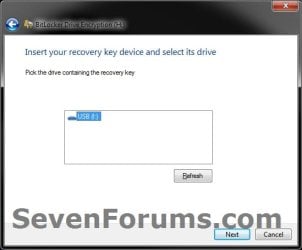
D) Select the USB flash drive, and click on Next. (see screenshot below)
USB.jpg
E) Go to step 8.
7. To Enter the "BitLocker Recovery Key" to Unlock this Drive
NOTE: This step is for if you lost or damaged the startup key (USB flash drive) for this drive.
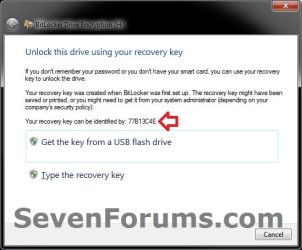
A) Using the provided "recovery key ID" number in the screenshot below, locate the BitLocker recovery key for this drive, and then click on Type the recovery key. (see screenshots below)
Transfer-1.jpg

key1.jpg

key2.jpg

B) If prompted by UAC, then click on Yes.

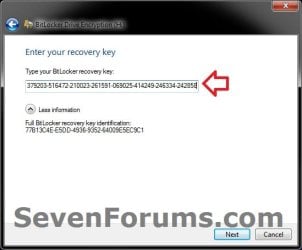
C)Type in the long BitLocker recovery key number, and click on Next. (see screenshot below)
Transfer-2.jpg
D) Continue on to step 8.
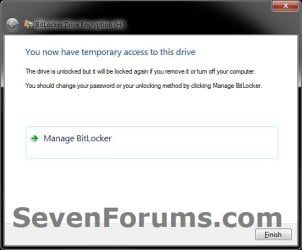
8. Click on Finish. (see screenshot below)

   Tip
While unlocked, it would be a good idea to click on Manage BitLocker to create a duplicate startup key (USB flash drive), decrypt the drive, and/or copy what you want from the drive to another location.

Transfer-3.jpg
9. The transferred drive will now be unlocked, and you will have access to it again until you log off or restart the computer next.
That's it,
Shawn


Last edited:
Even though i had tried all the above steps, still i get the same problem. An Error displaying "The Drive is already locked".

Actually I had Locked my drive using BitLocker Encryption. When i tried to open the locked drive by giving the password which i had provided while locking it, is not working. Although i had tried with the Recovery Key for that. But that too not working. It displays the message "The system cannot find the file specified".

Please help to solve this issue. Thanks..
 

My Computer My Computer

At a glance

Windows 7 - 32 Bit
OS
Windows 7 - 32 Bit
Hello lakshmanaprabu, and welcome to Seven Forums.

Are you sure that you have the correct recovery key for the drive as referenced by the key ID number?

If you do not care about losing what's on the drive, then you could also format the drive to unencrypt it.
 

My Computer My Computer

At a glance

64-bit Windows 11 Pro for WorkstationsIntel i7-8700K OC'd to 5 GHz64 GB (4x16GB) G.SKILL TridentZ RGB DDR4 3600...ASUS ROG-STRIX-GTX1080TI-O11G-GAMING
Computer type
PC/Desktop
Computer Manufacturer/Model Number
Self built custom
OS
64-bit Windows 11 Pro for Workstations
CPU
Intel i7-8700K OC'd to 5 GHz
Motherboard
ASUS ROG Maximus XI Formula Z390
Memory
64 GB (4x16GB) G.SKILL TridentZ RGB DDR4 3600 MHz
Graphics Card(s)
ASUS ROG-STRIX-GTX1080TI-O11G-GAMING
Sound Card
Integrated
Monitor(s) Displays
2 x Samsung Odyssey G7 27"
Screen Resolution
2560x1440
Hard Drives
1TB Samsung 990 PRO M.2,
4TB Samsung 990 PRO PRO M.2,
TerraMaster F8 SSD Plus NAS
PSU
Seasonic Prime Titanium 850W
Case
Thermaltake Core P3
Cooling
Corsair Hydro H115i
Keyboard
Logitech wireless K800
Mouse
Logitech MX Master 4
Internet Speed
2 Gb/s Download and 100 Mb/s Upload
Antivirus
Malwarebyte Anti-Malware Premium
Browser
Google Chrome
Other Info
Logitech Z625 speaker system,
Logitech BRIO 4K Pro webcam,
HP Color LaserJet Pro MFP M477fdn,
APC SMART-UPS RT 1000 XL - SURT1000XLI,
Galaxy S23 Plus phone
hey guys!

i had locked a drive using bitlocker! i reinstalled my windows! now i cant access the drive( i hadnt turn off the bitlocker or suspended it!)

when i click on the drive it says u have to format it! and when i click format it says cant format!

i have 40 GB of data that i cant loose!

pliz help me!
 

My Computer My Computer

At a glance

Windows 7 Ultimate
Computer type
PC/Desktop
OS
Windows 7 Ultimate
Did you create a Bitlocker recovery key?

If not, the data on the HDD cannot be recovered - there is no way around that.
 

My Computer My Computer

At a glance

Windows 10 Pro x64 ; Xubuntu x64Intel i7 860 @ 2.80 GHz O/C'ed to 4.0GHz16GB Corsair Vengance DDR3 @ 661 MHz Dual Cha...EVGA NVidia GTX 560 1024MB
Computer type
PC/Desktop
Computer Manufacturer/Model Number
Golden Mk. I.4
OS
Windows 10 Pro x64 ; Xubuntu x64
CPU
Intel i7 860 @ 2.80 GHz O/C'ed to 4.0GHz
Motherboard
Gigabyte P55A-UD3R Rev.1. Award BIOS F13
Memory
16GB Corsair Vengance DDR3 @ 661 MHz Dual Channel (9-9-9-24)
Graphics Card(s)
EVGA NVidia GTX 560 1024MB
Sound Card
Realtek Integrated
Monitor(s) Displays
Dual Samsung SyncMaster 2494HS
Screen Resolution
1920*1080 and 1920*1080
Hard Drives
1*Samsung 840 EVO 120GB SSD;
1*OCZ Vertex 2 60GB SSD;
2*Samsung F3 SpinPoint 1TB in RAID0;
1*Samsung F1 SpinPoint 1TB;
2*Western Digital 1TB External USB 3.0
1*Western Digital 500GB External USB 3.0
1*Seagate 500GB External USB 2.0
PSU
Thermaltake ToughPower QFan 750W
Case
Thermaltake Element S VK60001W2Z
Cooling
Corsair H60 Water Cooling, 2*230mm and 2*80mm case fans
Keyboard
Logitech G110
Mouse
Logitech MX518
yeah i have the recovery key!

help me! for gods sake!
 

My Computer My Computer

At a glance

Windows 7 Ultimate
Computer type
PC/Desktop
OS
Windows 7 Ultimate
Hold on, You said you reinstalled Windows. To the same drive? Describe exactly the steps you took.
 

My Computer My Computer

At a glance

Windows 10 Pro x64 ; Xubuntu x64Intel i7 860 @ 2.80 GHz O/C'ed to 4.0GHz16GB Corsair Vengance DDR3 @ 661 MHz Dual Cha...EVGA NVidia GTX 560 1024MB
Computer type
PC/Desktop
Computer Manufacturer/Model Number
Golden Mk. I.4
OS
Windows 10 Pro x64 ; Xubuntu x64
CPU
Intel i7 860 @ 2.80 GHz O/C'ed to 4.0GHz
Motherboard
Gigabyte P55A-UD3R Rev.1. Award BIOS F13
Memory
16GB Corsair Vengance DDR3 @ 661 MHz Dual Channel (9-9-9-24)
Graphics Card(s)
EVGA NVidia GTX 560 1024MB
Sound Card
Realtek Integrated
Monitor(s) Displays
Dual Samsung SyncMaster 2494HS
Screen Resolution
1920*1080 and 1920*1080
Hard Drives
1*Samsung 840 EVO 120GB SSD;
1*OCZ Vertex 2 60GB SSD;
2*Samsung F3 SpinPoint 1TB in RAID0;
1*Samsung F1 SpinPoint 1TB;
2*Western Digital 1TB External USB 3.0
1*Western Digital 500GB External USB 3.0
1*Seagate 500GB External USB 2.0
PSU
Thermaltake ToughPower QFan 750W
Case
Thermaltake Element S VK60001W2Z
Cooling
Corsair H60 Water Cooling, 2*230mm and 2*80mm case fans
Keyboard
Logitech G110
Mouse
Logitech MX518
Hello hoseinz,

I'm a bit confused as well. If you reinstalled Windows, it would have formatted the drive, and in the process removed BitLocker encryption for it.

As Golden posted above, please post back step by step what you did for us to be able to better help. :)
 

My Computer My Computer

At a glance

64-bit Windows 11 Pro for WorkstationsIntel i7-8700K OC'd to 5 GHz64 GB (4x16GB) G.SKILL TridentZ RGB DDR4 3600...ASUS ROG-STRIX-GTX1080TI-O11G-GAMING
Computer type
PC/Desktop
Computer Manufacturer/Model Number
Self built custom
OS
64-bit Windows 11 Pro for Workstations
CPU
Intel i7-8700K OC'd to 5 GHz
Motherboard
ASUS ROG Maximus XI Formula Z390
Memory
64 GB (4x16GB) G.SKILL TridentZ RGB DDR4 3600 MHz
Graphics Card(s)
ASUS ROG-STRIX-GTX1080TI-O11G-GAMING
Sound Card
Integrated
Monitor(s) Displays
2 x Samsung Odyssey G7 27"
Screen Resolution
2560x1440
Hard Drives
1TB Samsung 990 PRO M.2,
4TB Samsung 990 PRO PRO M.2,
TerraMaster F8 SSD Plus NAS
PSU
Seasonic Prime Titanium 850W
Case
Thermaltake Core P3
Cooling
Corsair Hydro H115i
Keyboard
Logitech wireless K800
Mouse
Logitech MX Master 4
Internet Speed
2 Gb/s Download and 100 Mb/s Upload
Antivirus
Malwarebyte Anti-Malware Premium
Browser
Google Chrome
Other Info
Logitech Z625 speaker system,
Logitech BRIO 4K Pro webcam,
HP Color LaserJet Pro MFP M477fdn,
APC SMART-UPS RT 1000 XL - SURT1000XLI,
Galaxy S23 Plus phone
i did not install windows on the same drive!

anyway i managed to decrypt it using CMD repair!

at the end of the cmd process i was asked to write a check disk command! i did! but somekind of error happened !!!

so i had to format the drive! and i lost my data! :(

i have tried some recovery programs but none of them could recover my files!

any suggestions???
 

My Computer My Computer

At a glance

Windows 7 Ultimate
Computer type
PC/Desktop
OS
Windows 7 Ultimate
I wish you would had consulted with us with the error to see if we may have been able to help before you formatted the drive.

You will not be able to recover files from a BitLocker encrypted drive that has not been unlocked. Especially after you formatted the drive. :(

I hope you have backups somewhere.
 

My Computer My Computer

At a glance

64-bit Windows 11 Pro for WorkstationsIntel i7-8700K OC'd to 5 GHz64 GB (4x16GB) G.SKILL TridentZ RGB DDR4 3600...ASUS ROG-STRIX-GTX1080TI-O11G-GAMING
Computer type
PC/Desktop
Computer Manufacturer/Model Number
Self built custom
OS
64-bit Windows 11 Pro for Workstations
CPU
Intel i7-8700K OC'd to 5 GHz
Motherboard
ASUS ROG Maximus XI Formula Z390
Memory
64 GB (4x16GB) G.SKILL TridentZ RGB DDR4 3600 MHz
Graphics Card(s)
ASUS ROG-STRIX-GTX1080TI-O11G-GAMING
Sound Card
Integrated
Monitor(s) Displays
2 x Samsung Odyssey G7 27"
Screen Resolution
2560x1440
Hard Drives
1TB Samsung 990 PRO M.2,
4TB Samsung 990 PRO PRO M.2,
TerraMaster F8 SSD Plus NAS
PSU
Seasonic Prime Titanium 850W
Case
Thermaltake Core P3
Cooling
Corsair Hydro H115i
Keyboard
Logitech wireless K800
Mouse
Logitech MX Master 4
Internet Speed
2 Gb/s Download and 100 Mb/s Upload
Antivirus
Malwarebyte Anti-Malware Premium
Browser
Google Chrome
Other Info
Logitech Z625 speaker system,
Logitech BRIO 4K Pro webcam,
HP Color LaserJet Pro MFP M477fdn,
APC SMART-UPS RT 1000 XL - SURT1000XLI,
Galaxy S23 Plus phone
sad thing is i dont! so there is no way?
 

My Computer My Computer

At a glance

Windows 7 Ultimate
Computer type
PC/Desktop
OS
Windows 7 Ultimate
Usually not after formatting a locked BitLocker encrypted drive. :(

If the data is critical, you could try taking it to a professional data recovery business, but it would be extremely expensive and unlikely to recovery much.
 

My Computer My Computer

At a glance

64-bit Windows 11 Pro for WorkstationsIntel i7-8700K OC'd to 5 GHz64 GB (4x16GB) G.SKILL TridentZ RGB DDR4 3600...ASUS ROG-STRIX-GTX1080TI-O11G-GAMING
Computer type
PC/Desktop
Computer Manufacturer/Model Number
Self built custom
OS
64-bit Windows 11 Pro for Workstations
CPU
Intel i7-8700K OC'd to 5 GHz
Motherboard
ASUS ROG Maximus XI Formula Z390
Memory
64 GB (4x16GB) G.SKILL TridentZ RGB DDR4 3600 MHz
Graphics Card(s)
ASUS ROG-STRIX-GTX1080TI-O11G-GAMING
Sound Card
Integrated
Monitor(s) Displays
2 x Samsung Odyssey G7 27"
Screen Resolution
2560x1440
Hard Drives
1TB Samsung 990 PRO M.2,
4TB Samsung 990 PRO PRO M.2,
TerraMaster F8 SSD Plus NAS
PSU
Seasonic Prime Titanium 850W
Case
Thermaltake Core P3
Cooling
Corsair Hydro H115i
Keyboard
Logitech wireless K800
Mouse
Logitech MX Master 4
Internet Speed
2 Gb/s Download and 100 Mb/s Upload
Antivirus
Malwarebyte Anti-Malware Premium
Browser
Google Chrome
Other Info
Logitech Z625 speaker system,
Logitech BRIO 4K Pro webcam,
HP Color LaserJet Pro MFP M477fdn,
APC SMART-UPS RT 1000 XL - SURT1000XLI,
Galaxy S23 Plus phone
help (similar situation feeling uneasy but hopeful)

Recently had a malware issue and used an application in an attempt to repair called "combofix" that seemed to do something to the OS files and other applications in the background. In any event, it did more damage than good and Windows 7 would not boot back up..got a blue screen and could not load Safe Mode as well.

I proceeded to pull out original disc to see about repairing the OS but got prompted for recovery key.

Background: I don't ever recall using BitLocker to encrypt my C drive (it's possible but I really can't recall. I did however use BitLocker to encrypt all my other drives. Perhaps it's a requirement to encrypt system drive (C) in order to get this functionality on the others?)

Facts:

1) I always have to manually unlock each fixed drive everytime I boot up in Windows 7 if I want access

2) I know the password to each fixed bitlocker drive (they are the same password)

3) I'm unaware of where I put my recovery key (16 digit pin?)...I believe it's in a text file somewhere on my system drive or potentially on one of the fixed drives.


Questions:

1) If I know the password (not recovery pin) to my fixed drives, should I be able to recover it if I do a new OS on a new SSD HD? I would think I would just see the drives listed again and I just right click and unlock and type in my password? I hope so...

2) I have data on my supposedly bitlocked former C drive...can I still access it by hooking it up as a secondary drive on the new rig by right clicking on the drive and using the same password as my other fixed drives?

3) Hypothetically I have my bitlocker key on my other drives, how would I find it? Does the key have a file extension?


Rant: LESSON LEARNED. I'm going overkill on this next time..I'm going to email my recovery key to all my email addresses, save on a thumb drive, never store any more data on my C drive.

I'm so depressed right now. I hope you experts reply back with some decent news. I have some confidence that I can access the majority of my data but I'm a bit worried about my system drive about never seeing that data ever again. :cry::cry::cry:
 

My Computer My Computer

At a glance

Windows 7 Ultimate/Professional (I can't reca...
Computer type
PC/Desktop
Computer Manufacturer/Model Number
custom build GIGABIT
OS
Windows 7 Ultimate/Professional (I can't recall 100%)
Hard Drives
sandisk 256gb ssd (system drive) and 3 other SATA HDD (storage)
Antivirus
AVG at the time, going to ESET NOD32
Browser
IE and CHROME
Hello Carson, and welcome to Seven Forums.

Yeah, it would be a good idea to always have the BitLocker recovery keys backed up or printed out, then save them in a safe place for occasions such as this. :(

Since these are only data drives that were encrypted and not the OS drive, then you may get lucky. When you install Windows on the new SSD, it should recognize the encrypted data drives to where all you would have to do is enter the BitLocker password to unlock them as usual. Just do not format the old corrupted OS drive yet just in case you may need it to attempt to recover anything from if able.

Fingers crossed. :)
 

My Computer My Computer

At a glance

64-bit Windows 11 Pro for WorkstationsIntel i7-8700K OC'd to 5 GHz64 GB (4x16GB) G.SKILL TridentZ RGB DDR4 3600...ASUS ROG-STRIX-GTX1080TI-O11G-GAMING
Computer type
PC/Desktop
Computer Manufacturer/Model Number
Self built custom
OS
64-bit Windows 11 Pro for Workstations
CPU
Intel i7-8700K OC'd to 5 GHz
Motherboard
ASUS ROG Maximus XI Formula Z390
Memory
64 GB (4x16GB) G.SKILL TridentZ RGB DDR4 3600 MHz
Graphics Card(s)
ASUS ROG-STRIX-GTX1080TI-O11G-GAMING
Sound Card
Integrated
Monitor(s) Displays
2 x Samsung Odyssey G7 27"
Screen Resolution
2560x1440
Hard Drives
1TB Samsung 990 PRO M.2,
4TB Samsung 990 PRO PRO M.2,
TerraMaster F8 SSD Plus NAS
PSU
Seasonic Prime Titanium 850W
Case
Thermaltake Core P3
Cooling
Corsair Hydro H115i
Keyboard
Logitech wireless K800
Mouse
Logitech MX Master 4
Internet Speed
2 Gb/s Download and 100 Mb/s Upload
Antivirus
Malwarebyte Anti-Malware Premium
Browser
Google Chrome
Other Info
Logitech Z625 speaker system,
Logitech BRIO 4K Pro webcam,
HP Color LaserJet Pro MFP M477fdn,
APC SMART-UPS RT 1000 XL - SURT1000XLI,
Galaxy S23 Plus phone
Hello Carson, and welcome to Seven Forums.

Yeah, it would be a good idea to always have the BitLocker recovery keys backed up or printed out, then save them in a safe place for occasions such as this. :(

Since these are only data drives that were encrypted and not the OS drive, then you may get lucky. When you install Windows on the new SSD, it should recognize the encrypted data drives to where all you would have to do is enter the BitLocker password to unlock them as usual. Just do not format the old corrupted OS drive yet just in case you may need it to attempt to recover anything from if able.

Fingers crossed. :)


Thanks for the fast response and warm welcome Brink! Am I to assume that BitLocker was indeed activated on my system drive( C drive ) since it prompted me for the recovery pin upon going into safe mood/windows os repair utility? Or is there a chance I never actually activated it?

I'm still a little unclear in accessing the former system drive with the new setup...


Thanks,
Carson
 

My Computer My Computer

At a glance

Windows 7 Ultimate/Professional (I can't reca...
Computer type
PC/Desktop
Computer Manufacturer/Model Number
custom build GIGABIT
OS
Windows 7 Ultimate/Professional (I can't recall 100%)
Hard Drives
sandisk 256gb ssd (system drive) and 3 other SATA HDD (storage)
Antivirus
AVG at the time, going to ESET NOD32
Browser
IE and CHROME
Sorry Carson. I thought you were referring to your fixed data drives instead.

If it's asking for a recovery key to unlock your OS drive, then yes you did encrypt it with BitLocker. Without the recovery key for the OS drive, you'll pretty much be out of luck to unlock it.

However, you may still be able to unlock your data drives using the password as usual with the new installation.
 

My Computer My Computer

At a glance

64-bit Windows 11 Pro for WorkstationsIntel i7-8700K OC'd to 5 GHz64 GB (4x16GB) G.SKILL TridentZ RGB DDR4 3600...ASUS ROG-STRIX-GTX1080TI-O11G-GAMING
Computer type
PC/Desktop
Computer Manufacturer/Model Number
Self built custom
OS
64-bit Windows 11 Pro for Workstations
CPU
Intel i7-8700K OC'd to 5 GHz
Motherboard
ASUS ROG Maximus XI Formula Z390
Memory
64 GB (4x16GB) G.SKILL TridentZ RGB DDR4 3600 MHz
Graphics Card(s)
ASUS ROG-STRIX-GTX1080TI-O11G-GAMING
Sound Card
Integrated
Monitor(s) Displays
2 x Samsung Odyssey G7 27"
Screen Resolution
2560x1440
Hard Drives
1TB Samsung 990 PRO M.2,
4TB Samsung 990 PRO PRO M.2,
TerraMaster F8 SSD Plus NAS
PSU
Seasonic Prime Titanium 850W
Case
Thermaltake Core P3
Cooling
Corsair Hydro H115i
Keyboard
Logitech wireless K800
Mouse
Logitech MX Master 4
Internet Speed
2 Gb/s Download and 100 Mb/s Upload
Antivirus
Malwarebyte Anti-Malware Premium
Browser
Google Chrome
Other Info
Logitech Z625 speaker system,
Logitech BRIO 4K Pro webcam,
HP Color LaserJet Pro MFP M477fdn,
APC SMART-UPS RT 1000 XL - SURT1000XLI,
Galaxy S23 Plus phone
Sorry Carson. I thought you were referring to your fixed data drives instead.

If it's asking for a recovery key to unlock your OS drive, then yes you did encrypt it with BitLocker. Without the recovery key for the OS drive, you'll pretty much be out of luck to unlock it.

However, you may still be able to unlock your data drives using the password as usual with the new installation.


Brink, yes, I was asking about both my fixed drives and system drive...

Does windows/bitlocker treat encryption of "system" drive versus "fixed" drives differently? As in security behavior? I would wonder why it wouldn't be the same if you attached it as a secondary drive to a new machine...to be able to right click and do an "unlock" with the password.... :cry:

What are your thoughts?

Thanks,
Carson
 

My Computer My Computer

At a glance

Windows 7 Ultimate/Professional (I can't reca...
Computer type
PC/Desktop
Computer Manufacturer/Model Number
custom build GIGABIT
OS
Windows 7 Ultimate/Professional (I can't recall 100%)
Hard Drives
sandisk 256gb ssd (system drive) and 3 other SATA HDD (storage)
Antivirus
AVG at the time, going to ESET NOD32
Browser
IE and CHROME
If I may ask another stupid question... I know (or I hope) that I would have at least created a RECOVERY USB. The problem is perhaps it's in a subdirectory or maybe the USB was overwritten... I'm not sure. But I would like to know how to identify if I have the file(s) on the USB or directory. Can you advise me on how I would know? My next step would be to look inside the thumb drives and to also use NTFS Undelete or similar. I'm getting desperate here....

Thanks,
Carson
 

My Computer My Computer

At a glance

Windows 7 Ultimate/Professional (I can't reca...
Computer type
PC/Desktop
Computer Manufacturer/Model Number
custom build GIGABIT
OS
Windows 7 Ultimate/Professional (I can't recall 100%)
Hard Drives
sandisk 256gb ssd (system drive) and 3 other SATA HDD (storage)
Antivirus
AVG at the time, going to ESET NOD32
Browser
IE and CHROME
It's the same encryption level for the OS vs data drives. It's just that to unlock the OS drive using this method, you will need to have the recovery or startup key. The data drives may let you unlock them as usual with just the password.

You could look on the USB for files that look like the screenshots under step 7 to see if you may have it. If the USB flash has been overwritten and not just deleted, then there's a good change that they be gone for good. Hopefully you'll be able to recover them off the USB (if there) using NTFS Undelete or Recuva.
 

My Computer My Computer

At a glance

64-bit Windows 11 Pro for WorkstationsIntel i7-8700K OC'd to 5 GHz64 GB (4x16GB) G.SKILL TridentZ RGB DDR4 3600...ASUS ROG-STRIX-GTX1080TI-O11G-GAMING
Computer type
PC/Desktop
Computer Manufacturer/Model Number
Self built custom
OS
64-bit Windows 11 Pro for Workstations
CPU
Intel i7-8700K OC'd to 5 GHz
Motherboard
ASUS ROG Maximus XI Formula Z390
Memory
64 GB (4x16GB) G.SKILL TridentZ RGB DDR4 3600 MHz
Graphics Card(s)
ASUS ROG-STRIX-GTX1080TI-O11G-GAMING
Sound Card
Integrated
Monitor(s) Displays
2 x Samsung Odyssey G7 27"
Screen Resolution
2560x1440
Hard Drives
1TB Samsung 990 PRO M.2,
4TB Samsung 990 PRO PRO M.2,
TerraMaster F8 SSD Plus NAS
PSU
Seasonic Prime Titanium 850W
Case
Thermaltake Core P3
Cooling
Corsair Hydro H115i
Keyboard
Logitech wireless K800
Mouse
Logitech MX Master 4
Internet Speed
2 Gb/s Download and 100 Mb/s Upload
Antivirus
Malwarebyte Anti-Malware Premium
Browser
Google Chrome
Other Info
Logitech Z625 speaker system,
Logitech BRIO 4K Pro webcam,
HP Color LaserJet Pro MFP M477fdn,
APC SMART-UPS RT 1000 XL - SURT1000XLI,
Galaxy S23 Plus phone
It's the same encryption level for the OS vs data drives. It's just that to unlock the OS drive using this method, you will need to have the recovery or startup key. The data drives may let you unlock them as usual with just the password.

You could look on the USB for files that look like the screenshots under step 7 to see if you may have it. If the USB flash has been overwritten and not just deleted, then there's a good change that they be gone for good. Hopefully you'll be able to recover them off the USB (if there) using NTFS Undelete or Recuva.


Looks like I have my work cut out for me....
 

My Computer My Computer

At a glance

Windows 7 Ultimate/Professional (I can't reca...
Computer type
PC/Desktop
Computer Manufacturer/Model Number
custom build GIGABIT
OS
Windows 7 Ultimate/Professional (I can't recall 100%)
Hard Drives
sandisk 256gb ssd (system drive) and 3 other SATA HDD (storage)
Antivirus
AVG at the time, going to ESET NOD32
Browser
IE and CHROME
Back
Top