BitLocker Drive Encryption - Unlock a Locked Data or Removable Drive

How to Unlock a Data or Removable Drive Locked by BitLocker Drive Encryption


   Information
This will show you how to unlock a internal data drive or a removable drive (ex: USB flash drive or external) that was locked by BitLocker Drive Encryption in Windows 7, and now cannot be accessed.

These drives normally would be locked after you have either logged off or restarted the computer.

   Warning
If you forgot or lost the password for the data or removable drive, then you must have it's BitLocker recovery key to be able to unlock and gain access to the drive again.

You should have a copy of the BitLocker recovery key if you did what was recommended in step 6 or 11 of OPTION ONE in the tutorial below to either Save the recovery key to file, save and print recovery key again, or write down the recovery key somewhere for safe keeping.

BitLocker Drive Encryption - Internal Data Hard Drives - Turn On or Off


OPTION ONE

To Unlock a Data or Removable Drive Using BitLocker Wizard


1. Do either step 2 or 3 below for what option you would like to use.

2. Open the Control Panel (icons view), click on the BitLocker Drive Encryption icon, and click on the Unlock Drive link for the locked drive that you would like to unlock. (see screenshot below)
Control-Panel.jpg


A) If prompted by UAC, then click on Yes.

B) Close the Control Panel, and go to step 4 or 5.
OR

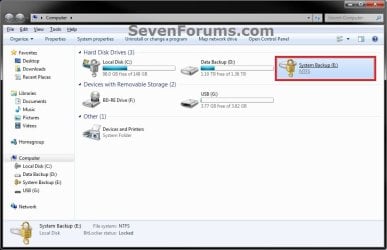
3. Open the Computer window, right click on the locked drive that you would like to unlock, and click on Unlock Drive.... (see screenshot below)
Locked-Internal.jpg


A) If prompted by UAC, then click on Yes.

B) Go to step 4 or 5.
4. To Type in the Password to Unlock this Drive
A) Type in the password, and click on Unlock. (see screenshot below step 5A)
NOTE: The password will be at least 8 letters and/or numbers long.

B) Go to step 6.
5. To Enter the "BitLocker Recovery Key" to Unlock this Drive
NOTE: This step is for if you lost or forgot the password for this drive.
A) Click on the I forgot my password link. (see screenshot below)
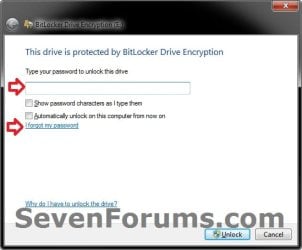
Forgot.jpg
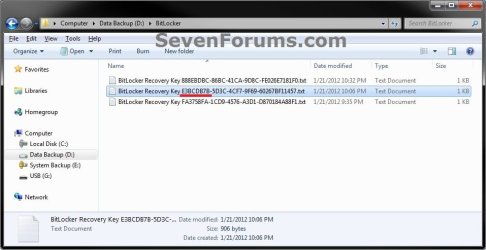
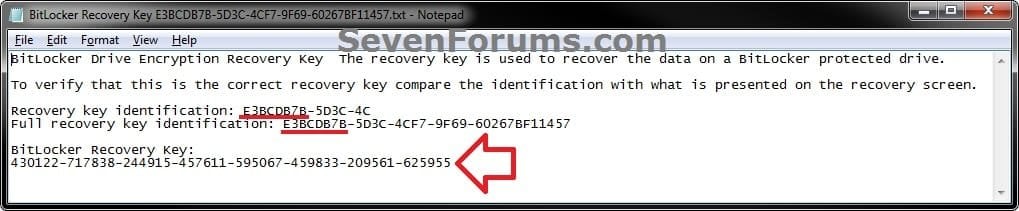
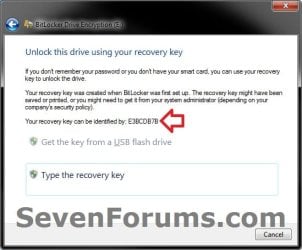
B) Using the provided "recovery key ID" number in the screenshot below, locate the BitLocker recovery key for this drive, and then click on Type the recovery key. (see screenshots below)
Step1.jpg

Step2A.jpg

Step2B.jpg

C) Type in the long BitLocker recovery key number, and click on Next. (see screenshot below)
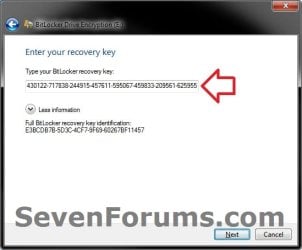
Step3.jpg
D) Click on Finish, and continue on to step 6. (see screenshot below)
NOTE: If you had forgotten the password, then you can now click on Manage BitLocker, and Change password to unlock drive to create a new one to use.
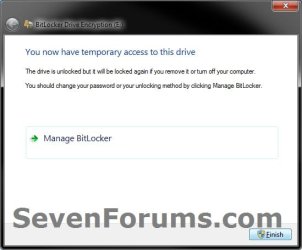
Step4.jpg
6. The drive will now be unlocked until you log off or restart the computer next.
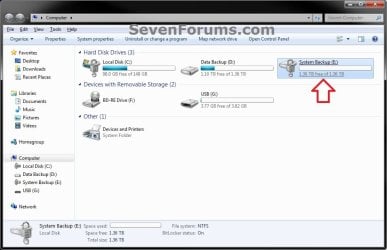
Unlocked_Internal.jpg


OPTION TWO

To Unlock a Data or Removable Drive in a Command Prompt


1. Open a elevated command prompt, then do step 2 or 3 below for what option you would like to use.

2. To Use the Password to Unlock this Drive
A) In the elevated command prompt, type the command below and press Enter. (see screenshot below)
NOTE: Substitute E: in the command below with the drive letter of the locked drive that you wanted to unlock instead.
manage-bde -unlock E: -password
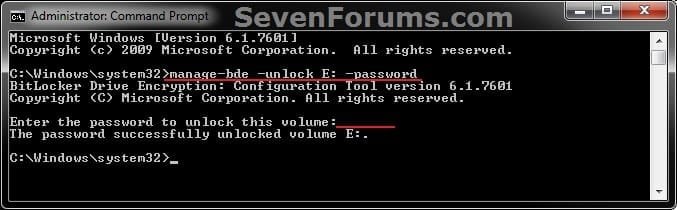
CMD-password.jpg
B) When prompted in the elevated command prompt, type in the password for the drive and press Enter.
NOTE: You will not see the password as you type it. The password will be at least 8 letters and/or numbers long.

C) Go to step 4.
3. To Use the "BitLocker Recovery Key" to Unlock this Drive
NOTE: This step is for if you lost or forgot the password for this drive.
A) Locate the BitLocker recovery key for this drive. (see screenshots below)
Step2A.jpg

Step2B.jpg

B) In the elevated command prompt, type the command below and press Enter. (see screenshot below)
NOTE: Substitute E: in the command below with the drive letter of the locked drive that you wanted to unlock, and substitute BitLocker Recovery Key in the command below with the actual long number recovery key for the drive.
manage-bde -unlock E: -rp BitLocker Recovery Key
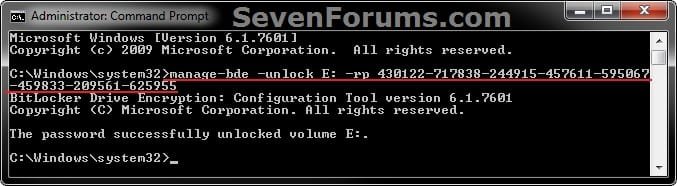
CMD-Recovery_Key.jpg
C) Go to step 4.
4. The drive will now be unlocked until you log off or restart the computer next.
That's it,
Shawn


Last edited:
Dear All

hi.

i really face problme.

i have a external hard. i apply bitlocker on my hard. i have the recovery key.
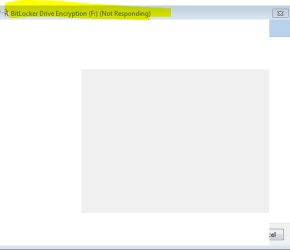
the problem is that as soon as i conect the hard to my laptop, the system is not responding ( hanging).

i need the data in my hard, so plz let me know is there any way to open my hard???
 

My Computer My Computer

At a glance

64 bit
Computer type
Laptop
Computer Manufacturer/Model Number
DELL
OS
64 bit
Antivirus
Avira
Browser
Mozilla firefox
Hello Levik, and welcome to Seven Forums.

Does this happen on any other computer you connect the external drive to?

If not, then you could use the tutorial on another computer with your recovery key to unlock it.
 

My Computer My Computer

At a glance

64-bit Windows 11 Pro for WorkstationsIntel i7-8700K OC'd to 5 GHz64 GB (4x16GB) G.SKILL TridentZ RGB DDR4 3600...ASUS ROG-STRIX-GTX1080TI-O11G-GAMING
Computer type
PC/Desktop
Computer Manufacturer/Model Number
Self built custom
OS
64-bit Windows 11 Pro for Workstations
CPU
Intel i7-8700K OC'd to 5 GHz
Motherboard
ASUS ROG Maximus XI Formula Z390
Memory
64 GB (4x16GB) G.SKILL TridentZ RGB DDR4 3600 MHz
Graphics Card(s)
ASUS ROG-STRIX-GTX1080TI-O11G-GAMING
Sound Card
Integrated
Monitor(s) Displays
2 x Samsung Odyssey G7 27"
Screen Resolution
2560x1440
Hard Drives
1TB Samsung 990 PRO M.2,
4TB Samsung 990 PRO PRO M.2,
TerraMaster F8 SSD Plus NAS
PSU
Seasonic Prime Titanium 850W
Case
Thermaltake Core P3
Cooling
Corsair Hydro H115i
Keyboard
Logitech wireless K800
Mouse
Logitech MX Master 4
Internet Speed
2 Gb/s Download and 100 Mb/s Upload
Antivirus
Malwarebyte Anti-Malware Premium
Browser
Google Chrome
Other Info
Logitech Z625 speaker system,
Logitech BRIO 4K Pro webcam,
HP Color LaserJet Pro MFP M477fdn,
APC SMART-UPS RT 1000 XL - SURT1000XLI,
Galaxy S23 Plus phone
I have an external drive. I tried to encrypted it with bit locker. The process was failed and stope in the halfway.
And now i cant access to the drive. Passwords and recovery key are useless thought they are correct.
i have tried like the way you describe but it is not working.
what should i do?
 

My Computer My Computer

At a glance

Windows 7 Ultimate ×32
Computer type
Laptop
Computer Manufacturer/Model Number
HCL
OS
Windows 7 Ultimate ×32
Hello Csangelo, and welcome to Seven Forums.

What was the full error message, or was it interrupted?
 

My Computer My Computer

At a glance

64-bit Windows 11 Pro for WorkstationsIntel i7-8700K OC'd to 5 GHz64 GB (4x16GB) G.SKILL TridentZ RGB DDR4 3600...ASUS ROG-STRIX-GTX1080TI-O11G-GAMING
Computer type
PC/Desktop
Computer Manufacturer/Model Number
Self built custom
OS
64-bit Windows 11 Pro for Workstations
CPU
Intel i7-8700K OC'd to 5 GHz
Motherboard
ASUS ROG Maximus XI Formula Z390
Memory
64 GB (4x16GB) G.SKILL TridentZ RGB DDR4 3600 MHz
Graphics Card(s)
ASUS ROG-STRIX-GTX1080TI-O11G-GAMING
Sound Card
Integrated
Monitor(s) Displays
2 x Samsung Odyssey G7 27"
Screen Resolution
2560x1440
Hard Drives
1TB Samsung 990 PRO M.2,
4TB Samsung 990 PRO PRO M.2,
TerraMaster F8 SSD Plus NAS
PSU
Seasonic Prime Titanium 850W
Case
Thermaltake Core P3
Cooling
Corsair Hydro H115i
Keyboard
Logitech wireless K800
Mouse
Logitech MX Master 4
Internet Speed
2 Gb/s Download and 100 Mb/s Upload
Antivirus
Malwarebyte Anti-Malware Premium
Browser
Google Chrome
Other Info
Logitech Z625 speaker system,
Logitech BRIO 4K Pro webcam,
HP Color LaserJet Pro MFP M477fdn,
APC SMART-UPS RT 1000 XL - SURT1000XLI,
Galaxy S23 Plus phone
USB drive decryption process interrupted

After decryption process halted, I am unable to access my drive. Windows always asks me for password, but password doesn't work, recovery key as well doesn't work.
I tried to format drive with diskmgmt and diskpart, but it failed with error that drive is write protected. I could remove the write-protection flag with diskpart attributes disk readonly clear, but it has still an "actual" write protection state, which seems to be not editable.
I tried to do some regedit hacks without a result.
With the program "M3 Bitlocker Recovery Free" I was able to access the volume with the recovery key. Also this program shows a partition 0 on that drive with FAT32 and NTFS volumes, wicked. Why can't I access that drive with manage-bde or repair-bde and recovery key but with that 3rd party tool?
I'm really lost, how can I override the MBR of that drive and remove completely the bitlocker, I just want to reuse the drive, I don't need to recover the data. I still have it on my PC.
I also tried to flush the USB with a Low Level Formater and Mass Production Tool from manufactorer, but always fails with that freaky write-protected error message.

Any ideas/help?
 

My Computer My Computer

At a glance

win 7 ultimate 64bit
Computer type
PC/Desktop
Computer Manufacturer/Model Number
Dell
OS
win 7 ultimate 64bit

My Computer My Computer

At a glance

64-bit Windows 11 Pro for WorkstationsIntel i7-8700K OC'd to 5 GHz64 GB (4x16GB) G.SKILL TridentZ RGB DDR4 3600...ASUS ROG-STRIX-GTX1080TI-O11G-GAMING
Computer type
PC/Desktop
Computer Manufacturer/Model Number
Self built custom
OS
64-bit Windows 11 Pro for Workstations
CPU
Intel i7-8700K OC'd to 5 GHz
Motherboard
ASUS ROG Maximus XI Formula Z390
Memory
64 GB (4x16GB) G.SKILL TridentZ RGB DDR4 3600 MHz
Graphics Card(s)
ASUS ROG-STRIX-GTX1080TI-O11G-GAMING
Sound Card
Integrated
Monitor(s) Displays
2 x Samsung Odyssey G7 27"
Screen Resolution
2560x1440
Hard Drives
1TB Samsung 990 PRO M.2,
4TB Samsung 990 PRO PRO M.2,
TerraMaster F8 SSD Plus NAS
PSU
Seasonic Prime Titanium 850W
Case
Thermaltake Core P3
Cooling
Corsair Hydro H115i
Keyboard
Logitech wireless K800
Mouse
Logitech MX Master 4
Internet Speed
2 Gb/s Download and 100 Mb/s Upload
Antivirus
Malwarebyte Anti-Malware Premium
Browser
Google Chrome
Other Info
Logitech Z625 speaker system,
Logitech BRIO 4K Pro webcam,
HP Color LaserJet Pro MFP M477fdn,
APC SMART-UPS RT 1000 XL - SURT1000XLI,
Galaxy S23 Plus phone
Hi All

Please assist me as I am a little bit desperate to recover my data from my old OS drive.

My drive crashed because of bitlocker and I had it replaced with, now when I plug in my old drive into another machine and I enter my recovery password/key to decrypt the drive it just says not responding and hangs there until I force close the application.

Is there anything I can do to work around this?
The first time I tried, it worked and gave me access to the drive and I was quite relieved because I thought my drive was okay, now I cannot access it.

PLEASE HELP!!!! :(
 

My Computer My Computer

At a glance

Windows 7 Enterprise 32 bit
Computer type
PC/Desktop
OS
Windows 7 Enterprise 32 bit

My Computer My Computer

At a glance

64-bit Windows 11 Pro for WorkstationsIntel i7-8700K OC'd to 5 GHz64 GB (4x16GB) G.SKILL TridentZ RGB DDR4 3600...ASUS ROG-STRIX-GTX1080TI-O11G-GAMING
Computer type
PC/Desktop
Computer Manufacturer/Model Number
Self built custom
OS
64-bit Windows 11 Pro for Workstations
CPU
Intel i7-8700K OC'd to 5 GHz
Motherboard
ASUS ROG Maximus XI Formula Z390
Memory
64 GB (4x16GB) G.SKILL TridentZ RGB DDR4 3600 MHz
Graphics Card(s)
ASUS ROG-STRIX-GTX1080TI-O11G-GAMING
Sound Card
Integrated
Monitor(s) Displays
2 x Samsung Odyssey G7 27"
Screen Resolution
2560x1440
Hard Drives
1TB Samsung 990 PRO M.2,
4TB Samsung 990 PRO PRO M.2,
TerraMaster F8 SSD Plus NAS
PSU
Seasonic Prime Titanium 850W
Case
Thermaltake Core P3
Cooling
Corsair Hydro H115i
Keyboard
Logitech wireless K800
Mouse
Logitech MX Master 4
Internet Speed
2 Gb/s Download and 100 Mb/s Upload
Antivirus
Malwarebyte Anti-Malware Premium
Browser
Google Chrome
Other Info
Logitech Z625 speaker system,
Logitech BRIO 4K Pro webcam,
HP Color LaserJet Pro MFP M477fdn,
APC SMART-UPS RT 1000 XL - SURT1000XLI,
Galaxy S23 Plus phone
Hi Brink

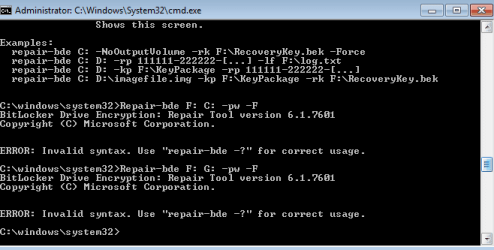
I am having difficulties with running the command as it gives me a syntax error.

is there anyway you could please provide me with an email address for me to chat to you directly?

thank you
 

My Computer My Computer

At a glance

Windows 7 Enterprise 32 bit
Computer type
PC/Desktop
OS
Windows 7 Enterprise 32 bit

My Computer My Computer

At a glance

64-bit Windows 11 Pro for WorkstationsIntel i7-8700K OC'd to 5 GHz64 GB (4x16GB) G.SKILL TridentZ RGB DDR4 3600...ASUS ROG-STRIX-GTX1080TI-O11G-GAMING
Computer type
PC/Desktop
Computer Manufacturer/Model Number
Self built custom
OS
64-bit Windows 11 Pro for Workstations
CPU
Intel i7-8700K OC'd to 5 GHz
Motherboard
ASUS ROG Maximus XI Formula Z390
Memory
64 GB (4x16GB) G.SKILL TridentZ RGB DDR4 3600 MHz
Graphics Card(s)
ASUS ROG-STRIX-GTX1080TI-O11G-GAMING
Sound Card
Integrated
Monitor(s) Displays
2 x Samsung Odyssey G7 27"
Screen Resolution
2560x1440
Hard Drives
1TB Samsung 990 PRO M.2,
4TB Samsung 990 PRO PRO M.2,
TerraMaster F8 SSD Plus NAS
PSU
Seasonic Prime Titanium 850W
Case
Thermaltake Core P3
Cooling
Corsair Hydro H115i
Keyboard
Logitech wireless K800
Mouse
Logitech MX Master 4
Internet Speed
2 Gb/s Download and 100 Mb/s Upload
Antivirus
Malwarebyte Anti-Malware Premium
Browser
Google Chrome
Other Info
Logitech Z625 speaker system,
Logitech BRIO 4K Pro webcam,
HP Color LaserJet Pro MFP M477fdn,
APC SMART-UPS RT 1000 XL - SURT1000XLI,
Galaxy S23 Plus phone
This is the error I get
 

Attachments

  • cmd-error.PNG
    cmd-error.PNG
    6.5 KB · Views: 951

My Computer My Computer

At a glance

Windows 7 Enterprise 32 bit
Computer type
PC/Desktop
OS
Windows 7 Enterprise 32 bit
the affected drive is F and I want to be restored to the C drive.
 

My Computer My Computer

At a glance

Windows 7 Enterprise 32 bit
Computer type
PC/Desktop
OS
Windows 7 Enterprise 32 bit
This is what happens evertyime I enter the recovery ID, I am simply unable to attain any sort of access to the drive.
 

Attachments

  • bitlocker error.PNG
    bitlocker error.PNG
    2.9 KB · Views: 770

My Computer My Computer

At a glance

Windows 7 Enterprise 32 bit
Computer type
PC/Desktop
OS
Windows 7 Enterprise 32 bit
You won't be able to recover F: to C: since C: is the Windows drive. You'll need to recover F: to a different drive letter.
 

My Computer My Computer

At a glance

64-bit Windows 11 Pro for WorkstationsIntel i7-8700K OC'd to 5 GHz64 GB (4x16GB) G.SKILL TridentZ RGB DDR4 3600...ASUS ROG-STRIX-GTX1080TI-O11G-GAMING
Computer type
PC/Desktop
Computer Manufacturer/Model Number
Self built custom
OS
64-bit Windows 11 Pro for Workstations
CPU
Intel i7-8700K OC'd to 5 GHz
Motherboard
ASUS ROG Maximus XI Formula Z390
Memory
64 GB (4x16GB) G.SKILL TridentZ RGB DDR4 3600 MHz
Graphics Card(s)
ASUS ROG-STRIX-GTX1080TI-O11G-GAMING
Sound Card
Integrated
Monitor(s) Displays
2 x Samsung Odyssey G7 27"
Screen Resolution
2560x1440
Hard Drives
1TB Samsung 990 PRO M.2,
4TB Samsung 990 PRO PRO M.2,
TerraMaster F8 SSD Plus NAS
PSU
Seasonic Prime Titanium 850W
Case
Thermaltake Core P3
Cooling
Corsair Hydro H115i
Keyboard
Logitech wireless K800
Mouse
Logitech MX Master 4
Internet Speed
2 Gb/s Download and 100 Mb/s Upload
Antivirus
Malwarebyte Anti-Malware Premium
Browser
Google Chrome
Other Info
Logitech Z625 speaker system,
Logitech BRIO 4K Pro webcam,
HP Color LaserJet Pro MFP M477fdn,
APC SMART-UPS RT 1000 XL - SURT1000XLI,
Galaxy S23 Plus phone
I have entered another external drive in G and the error persists, am I typing the command correctly?
 

Attachments

  • CMDerror2.PNG
    CMDerror2.PNG
    7.8 KB · Views: 1,288

My Computer My Computer

At a glance

Windows 7 Enterprise 32 bit
Computer type
PC/Desktop
OS
Windows 7 Enterprise 32 bit
I don't see any issues with the command.

Is the G: drive of equal or larger size than the F: drive?

If you have the BitLocker recovery key for F: , then you might try the command in step 3 for it instead.
 

My Computer My Computer

At a glance

64-bit Windows 11 Pro for WorkstationsIntel i7-8700K OC'd to 5 GHz64 GB (4x16GB) G.SKILL TridentZ RGB DDR4 3600...ASUS ROG-STRIX-GTX1080TI-O11G-GAMING
Computer type
PC/Desktop
Computer Manufacturer/Model Number
Self built custom
OS
64-bit Windows 11 Pro for Workstations
CPU
Intel i7-8700K OC'd to 5 GHz
Motherboard
ASUS ROG Maximus XI Formula Z390
Memory
64 GB (4x16GB) G.SKILL TridentZ RGB DDR4 3600 MHz
Graphics Card(s)
ASUS ROG-STRIX-GTX1080TI-O11G-GAMING
Sound Card
Integrated
Monitor(s) Displays
2 x Samsung Odyssey G7 27"
Screen Resolution
2560x1440
Hard Drives
1TB Samsung 990 PRO M.2,
4TB Samsung 990 PRO PRO M.2,
TerraMaster F8 SSD Plus NAS
PSU
Seasonic Prime Titanium 850W
Case
Thermaltake Core P3
Cooling
Corsair Hydro H115i
Keyboard
Logitech wireless K800
Mouse
Logitech MX Master 4
Internet Speed
2 Gb/s Download and 100 Mb/s Upload
Antivirus
Malwarebyte Anti-Malware Premium
Browser
Google Chrome
Other Info
Logitech Z625 speaker system,
Logitech BRIO 4K Pro webcam,
HP Color LaserJet Pro MFP M477fdn,
APC SMART-UPS RT 1000 XL - SURT1000XLI,
Galaxy S23 Plus phone
I will try the recovery ID as a method of recovery also.

I have a 250GB 2.5" as my external, the drive I am trying to recover from is a 320GB 2.5" but the data is not more than 150GB.

does the drive itself need to be equivalent to or larger than the affected drive?

so in other words I will a 320GB or more?
 

My Computer My Computer

At a glance

Windows 7 Enterprise 32 bit
Computer type
PC/Desktop
OS
Windows 7 Enterprise 32 bit
Yep, the amount used doesn't matter. You will need a drive at least 320GB or more to recover to. :(
 

My Computer My Computer

At a glance

64-bit Windows 11 Pro for WorkstationsIntel i7-8700K OC'd to 5 GHz64 GB (4x16GB) G.SKILL TridentZ RGB DDR4 3600...ASUS ROG-STRIX-GTX1080TI-O11G-GAMING
Computer type
PC/Desktop
Computer Manufacturer/Model Number
Self built custom
OS
64-bit Windows 11 Pro for Workstations
CPU
Intel i7-8700K OC'd to 5 GHz
Motherboard
ASUS ROG Maximus XI Formula Z390
Memory
64 GB (4x16GB) G.SKILL TridentZ RGB DDR4 3600 MHz
Graphics Card(s)
ASUS ROG-STRIX-GTX1080TI-O11G-GAMING
Sound Card
Integrated
Monitor(s) Displays
2 x Samsung Odyssey G7 27"
Screen Resolution
2560x1440
Hard Drives
1TB Samsung 990 PRO M.2,
4TB Samsung 990 PRO PRO M.2,
TerraMaster F8 SSD Plus NAS
PSU
Seasonic Prime Titanium 850W
Case
Thermaltake Core P3
Cooling
Corsair Hydro H115i
Keyboard
Logitech wireless K800
Mouse
Logitech MX Master 4
Internet Speed
2 Gb/s Download and 100 Mb/s Upload
Antivirus
Malwarebyte Anti-Malware Premium
Browser
Google Chrome
Other Info
Logitech Z625 speaker system,
Logitech BRIO 4K Pro webcam,
HP Color LaserJet Pro MFP M477fdn,
APC SMART-UPS RT 1000 XL - SURT1000XLI,
Galaxy S23 Plus phone
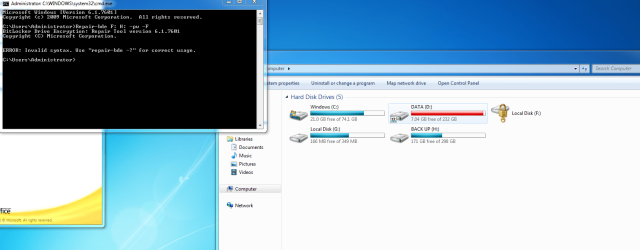
Please see this error again.

I am trying to recover :F(320GB) to drive :H (320GB).

Am i doing something wrong?
 

Attachments

  • error.PNG
    error.PNG
    99.4 KB · Views: 332

My Computer My Computer

At a glance

Windows 7 Enterprise 32 bit
Computer type
PC/Desktop
OS
Windows 7 Enterprise 32 bit
I don't see any obvious issue with the syntax of the command.

Try the command below to see how it does without -f instead:

repair-bde F: H: -pw
 

My Computer My Computer

At a glance

64-bit Windows 11 Pro for WorkstationsIntel i7-8700K OC'd to 5 GHz64 GB (4x16GB) G.SKILL TridentZ RGB DDR4 3600...ASUS ROG-STRIX-GTX1080TI-O11G-GAMING
Computer type
PC/Desktop
Computer Manufacturer/Model Number
Self built custom
OS
64-bit Windows 11 Pro for Workstations
CPU
Intel i7-8700K OC'd to 5 GHz
Motherboard
ASUS ROG Maximus XI Formula Z390
Memory
64 GB (4x16GB) G.SKILL TridentZ RGB DDR4 3600 MHz
Graphics Card(s)
ASUS ROG-STRIX-GTX1080TI-O11G-GAMING
Sound Card
Integrated
Monitor(s) Displays
2 x Samsung Odyssey G7 27"
Screen Resolution
2560x1440
Hard Drives
1TB Samsung 990 PRO M.2,
4TB Samsung 990 PRO PRO M.2,
TerraMaster F8 SSD Plus NAS
PSU
Seasonic Prime Titanium 850W
Case
Thermaltake Core P3
Cooling
Corsair Hydro H115i
Keyboard
Logitech wireless K800
Mouse
Logitech MX Master 4
Internet Speed
2 Gb/s Download and 100 Mb/s Upload
Antivirus
Malwarebyte Anti-Malware Premium
Browser
Google Chrome
Other Info
Logitech Z625 speaker system,
Logitech BRIO 4K Pro webcam,
HP Color LaserJet Pro MFP M477fdn,
APC SMART-UPS RT 1000 XL - SURT1000XLI,
Galaxy S23 Plus phone
Back
Top