BitLocker Drive Encryption - Unlock a Locked OS Drive

How to Unlock a Windows 7 Computer Locked by BitLocker Drive Encryption


   Information
This will show you how to unlock a computer that the drive Windows 7 is installed on was locked by BitLocker Drive Encryption, and now cannot be accessed.


   Note
If the drive that Windows is installed on (the operating system drive) is encrypted by BitLocker Drive Encryption, it can become locked by BitLocker and require the use of the recovery key in the following situations:
  • The computer is working, but BitLocker has detected a possible security risk during startup.
  • The computer is working, but you lost the BitLocker startup key (USB flash drive) or PIN, or the startup key is damaged.
  • The computer isn't working (for example, a power supply problem), and you have transferred its hard disk to a different computer.
If your computer is part of a domain, some BitLocker features and settings can be controlled by your system administrator.

Assistive technology software that runs on Windows, such as screen reading software, cannot read BitLocker startup screens because they are displayed during BIOS startup and before Windows runs. This includes screens used when you type a PIN or recovery key, and any BitLocker error messages.

   Warning
To be able to unlock the Windows 7 drive and regain access to your files, you must have the BitLocker recovery key for it.

You should have a copy of the BitLocker recovery key if you did what was recommended in step 13 of OPTION ONE in the tutorial below to either duplicate the startup key to a backup USB flash drive, save and print recovery key again, or write down the recovery key somewhere for safe keeping.

http://www.sevenforums.com/tutorial...cryption-windows-7-drive-turn-off-no-tpm.html


OPTION ONE

To Unlock the OS Drive on Original Computer


NOTE: This option is for when you are still able to power up the computer that the OS drive is locked on, and to enter the BitLocker recovery key to unlock it and be able to start Windows 7 afterwards.
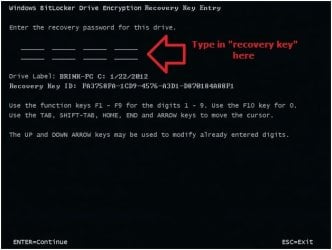
1. When you start the computer, BitLocker will interrupt startup and display a message informing you that the system drive is locked. (see screenshot below)
Recovery-1.jpg
2. Locate the BitLocker recovery key (see screenshot below) for this drive, and then press ENTER. (see screenshot above)
NOTE: If you happen to have a duplicate USB flash drive (startup key) that you could use instead, then connect it now, and press the ESC key to restart the computer to unlock the OS drive as usual.
Step2B.jpg
3. Type in the BitLocker recovery key as shown in the screenshot below, and press Enter. (see screenshot below)
Recovery-2.jpg
4. If successful, you will now begin to start Windows 7 and have access to the OS drive again until you log off or restart the computer next.


OPTION TWO

To Unlock the OS Drive on a Different Computer


NOTE: This option is for when you are not able to power up the original computer that the OS (Windows 7) drive is locked on, and will connect it to another working Windows 7 Ultimate or Enterprise computer to gain access to it again.
1. Shut down both computers.

2. Remove the drive from the computer that isn't working and install (connect) it in the other (host) computer running either Windows 7 Ultimate or Enterprise.

3. Start the host computer and log on to an administrator account.

4. Open the Computer window, right click on the transferred drive, and click on Unlock Drive.
NOTE: You could also open BitLocker Drive Encryption in the Control Panel (icons view) to click on Unlock Drive for the transferred drive.

5. Do step 6 or 7 below for what option you would like to use to unlock the drive with.

6. To Use the USB Flash Drive that Contains the Recovery Key to Unlock this Drive
A) Connect the USB flash drive that contains the startup and recovery key for this drive.

B) Click on Get the key from a USB flash drive. (see top screenshot below step 7A)

C) If prompted by UAC, then click on Yes.

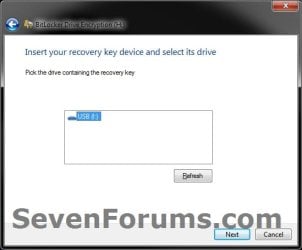
D) Select the USB flash drive, and click on Next. (see screenshot below)
USB.jpg
E) Go to step 8.
7. To Enter the "BitLocker Recovery Key" to Unlock this Drive
NOTE: This step is for if you lost or damaged the startup key (USB flash drive) for this drive.
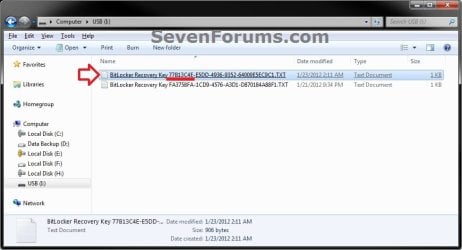
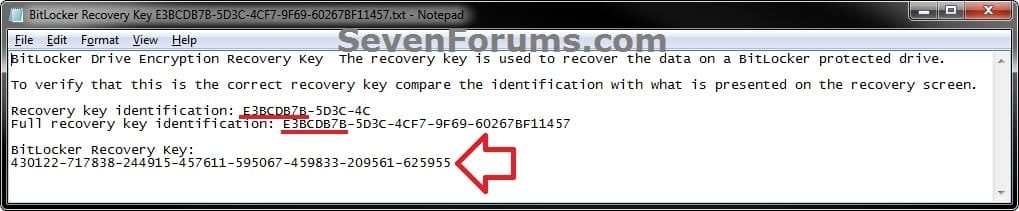
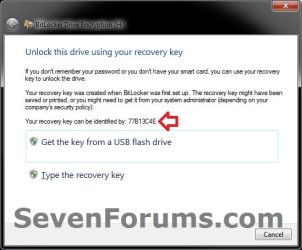
A) Using the provided "recovery key ID" number in the screenshot below, locate the BitLocker recovery key for this drive, and then click on Type the recovery key. (see screenshots below)
Transfer-1.jpg

key1.jpg

key2.jpg

B) If prompted by UAC, then click on Yes.

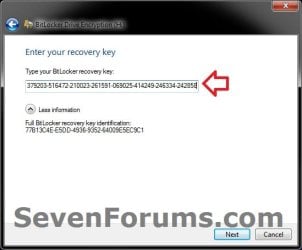
C)Type in the long BitLocker recovery key number, and click on Next. (see screenshot below)
Transfer-2.jpg
D) Continue on to step 8.
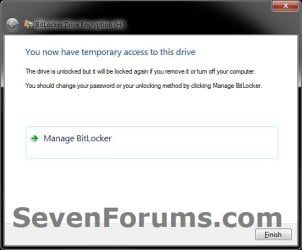
8. Click on Finish. (see screenshot below)

   Tip
While unlocked, it would be a good idea to click on Manage BitLocker to create a duplicate startup key (USB flash drive), decrypt the drive, and/or copy what you want from the drive to another location.

Transfer-3.jpg
9. The transferred drive will now be unlocked, and you will have access to it again until you log off or restart the computer next.
That's it,
Shawn


Last edited:
Hey friends,

Seven forum is really my last hope. I had locked my 1 TB harddisk more than 1 yr back with BitLocker drive. And I have recovery key generated after encryption (but I would like to tell that at that time encryption could get complete only uptill 47%). Everything was going on very well and recovery key as well. But suddenly from last 3 days, the BitLocker drive is not accepting the key...if I type it, it declares it wrong (I have checked it 100 times, it IS right)and says recovery error, type it again.Also if I try to copy recovery key from a USB drive, it says there is no recovery key in USB drive........I dont know what to do. I have very imp documents in it. Also, I have recovery key which should be sufficient to unlock it. It has been responding in the same way in other computers as well. Help me.
 

My Computer My Computer

At a glance

Window 7 Ultimate - 32 bit operating system
Computer type
Laptop
Computer Manufacturer/Model Number
Dell
OS
Window 7 Ultimate - 32 bit operating system
Hello Ankit, and welcome to Seven Forums.

Does the identification number given in the wizard match with the recovery key .txt file on the USB flash drive like in the screenshots under steps 7A in Option Two?
 

My Computer My Computer

At a glance

64-bit Windows 11 Pro for WorkstationsIntel i7-8700K OC'd to 5 GHz64 GB (4x16GB) G.SKILL TridentZ RGB DDR4 3600...ASUS ROG-STRIX-GTX1080TI-O11G-GAMING
Computer type
PC/Desktop
Computer Manufacturer/Model Number
Self built custom
OS
64-bit Windows 11 Pro for Workstations
CPU
Intel i7-8700K OC'd to 5 GHz
Motherboard
ASUS ROG Maximus XI Formula Z390
Memory
64 GB (4x16GB) G.SKILL TridentZ RGB DDR4 3600 MHz
Graphics Card(s)
ASUS ROG-STRIX-GTX1080TI-O11G-GAMING
Sound Card
Integrated
Monitor(s) Displays
2 x Samsung Odyssey G7 27"
Screen Resolution
2560x1440
Hard Drives
1TB Samsung 990 PRO M.2,
4TB Samsung 990 PRO PRO M.2,
TerraMaster F8 SSD Plus NAS
PSU
Seasonic Prime Titanium 850W
Case
Thermaltake Core P3
Cooling
Corsair Hydro H115i
Keyboard
Logitech wireless K800
Mouse
Logitech MX Master 4
Internet Speed
2 Gb/s Download and 100 Mb/s Upload
Antivirus
Malwarebyte Anti-Malware Premium
Browser
Google Chrome
Other Info
Logitech Z625 speaker system,
Logitech BRIO 4K Pro webcam,
HP Color LaserJet Pro MFP M477fdn,
APC SMART-UPS RT 1000 XL - SURT1000XLI,
Galaxy S23 Plus phone
Hello Ankit, and welcome to Seven Forums.

Does the identification number given in the wizard match with the recovery key .txt file on the USB flash drive like in the screenshots under steps 7A in Option Two?

Thanks for replying. I think u meant recovery key identification. Yes it matches completely. Infact I had been using same .txt file for more than a year to open my HD in other desktops.

Brink, Is there any solution to the problem I mentioned above ???
 
Last edited by a moderator:

My Computer My Computer

At a glance

Window 7 Ultimate - 32 bit operating system
Computer type
Laptop
Computer Manufacturer/Model Number
Dell
OS
Window 7 Ultimate - 32 bit operating system

My Computer My Computer

At a glance

64-bit Windows 11 Pro for WorkstationsIntel i7-8700K OC'd to 5 GHz64 GB (4x16GB) G.SKILL TridentZ RGB DDR4 3600...ASUS ROG-STRIX-GTX1080TI-O11G-GAMING
Computer type
PC/Desktop
Computer Manufacturer/Model Number
Self built custom
OS
64-bit Windows 11 Pro for Workstations
CPU
Intel i7-8700K OC'd to 5 GHz
Motherboard
ASUS ROG Maximus XI Formula Z390
Memory
64 GB (4x16GB) G.SKILL TridentZ RGB DDR4 3600 MHz
Graphics Card(s)
ASUS ROG-STRIX-GTX1080TI-O11G-GAMING
Sound Card
Integrated
Monitor(s) Displays
2 x Samsung Odyssey G7 27"
Screen Resolution
2560x1440
Hard Drives
1TB Samsung 990 PRO M.2,
4TB Samsung 990 PRO PRO M.2,
TerraMaster F8 SSD Plus NAS
PSU
Seasonic Prime Titanium 850W
Case
Thermaltake Core P3
Cooling
Corsair Hydro H115i
Keyboard
Logitech wireless K800
Mouse
Logitech MX Master 4
Internet Speed
2 Gb/s Download and 100 Mb/s Upload
Antivirus
Malwarebyte Anti-Malware Premium
Browser
Google Chrome
Other Info
Logitech Z625 speaker system,
Logitech BRIO 4K Pro webcam,
HP Color LaserJet Pro MFP M477fdn,
APC SMART-UPS RT 1000 XL - SURT1000XLI,
Galaxy S23 Plus phone
when i am installing windows 7 enterprise os in my laptop,
After installation complete my other drive is encrypted with bitlocker.
i dont have any key, it is showing only Key id
how i am going to recover my data.
Please help..................
 

My Computer My Computer

At a glance

windows 7 enterprises 32 bit
Computer type
Laptop
Computer Manufacturer/Model Number
ego
OS
windows 7 enterprises 32 bit
Antivirus
no
Hello Ankit,

Without a password or recovery key, there is no access to recover the data. That's how BitLocker is designed to protect your data. If all else fails, you could format the drive to be able to use it again, but you will lose all data on it. :(
 

My Computer My Computer

At a glance

64-bit Windows 11 Pro for WorkstationsIntel i7-8700K OC'd to 5 GHz64 GB (4x16GB) G.SKILL TridentZ RGB DDR4 3600...ASUS ROG-STRIX-GTX1080TI-O11G-GAMING
Computer type
PC/Desktop
Computer Manufacturer/Model Number
Self built custom
OS
64-bit Windows 11 Pro for Workstations
CPU
Intel i7-8700K OC'd to 5 GHz
Motherboard
ASUS ROG Maximus XI Formula Z390
Memory
64 GB (4x16GB) G.SKILL TridentZ RGB DDR4 3600 MHz
Graphics Card(s)
ASUS ROG-STRIX-GTX1080TI-O11G-GAMING
Sound Card
Integrated
Monitor(s) Displays
2 x Samsung Odyssey G7 27"
Screen Resolution
2560x1440
Hard Drives
1TB Samsung 990 PRO M.2,
4TB Samsung 990 PRO PRO M.2,
TerraMaster F8 SSD Plus NAS
PSU
Seasonic Prime Titanium 850W
Case
Thermaltake Core P3
Cooling
Corsair Hydro H115i
Keyboard
Logitech wireless K800
Mouse
Logitech MX Master 4
Internet Speed
2 Gb/s Download and 100 Mb/s Upload
Antivirus
Malwarebyte Anti-Malware Premium
Browser
Google Chrome
Other Info
Logitech Z625 speaker system,
Logitech BRIO 4K Pro webcam,
HP Color LaserJet Pro MFP M477fdn,
APC SMART-UPS RT 1000 XL - SURT1000XLI,
Galaxy S23 Plus phone
i have changed my laptop windows 10 to 8.1 pro 64 bit now my drive is encrypted through bit locker now i entered correct password and recovery key but not accepted. plzz help data is very important.!!!!
 

My Computer My Computer

At a glance

windows 8.1 pro 64 bit
Computer type
Laptop
OS
windows 8.1 pro 64 bit

My Computer My Computer

At a glance

64-bit Windows 11 Pro for WorkstationsIntel i7-8700K OC'd to 5 GHz64 GB (4x16GB) G.SKILL TridentZ RGB DDR4 3600...ASUS ROG-STRIX-GTX1080TI-O11G-GAMING
Computer type
PC/Desktop
Computer Manufacturer/Model Number
Self built custom
OS
64-bit Windows 11 Pro for Workstations
CPU
Intel i7-8700K OC'd to 5 GHz
Motherboard
ASUS ROG Maximus XI Formula Z390
Memory
64 GB (4x16GB) G.SKILL TridentZ RGB DDR4 3600 MHz
Graphics Card(s)
ASUS ROG-STRIX-GTX1080TI-O11G-GAMING
Sound Card
Integrated
Monitor(s) Displays
2 x Samsung Odyssey G7 27"
Screen Resolution
2560x1440
Hard Drives
1TB Samsung 990 PRO M.2,
4TB Samsung 990 PRO PRO M.2,
TerraMaster F8 SSD Plus NAS
PSU
Seasonic Prime Titanium 850W
Case
Thermaltake Core P3
Cooling
Corsair Hydro H115i
Keyboard
Logitech wireless K800
Mouse
Logitech MX Master 4
Internet Speed
2 Gb/s Download and 100 Mb/s Upload
Antivirus
Malwarebyte Anti-Malware Premium
Browser
Google Chrome
Other Info
Logitech Z625 speaker system,
Logitech BRIO 4K Pro webcam,
HP Color LaserJet Pro MFP M477fdn,
APC SMART-UPS RT 1000 XL - SURT1000XLI,
Galaxy S23 Plus phone
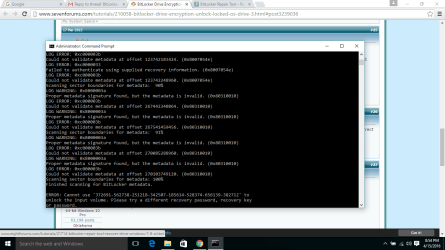
when i give command for recovery key after all data processing nothing happens only this is shown and no single bit of my data is decrypted to new volume na d now im using windows 10. plz help what should i do now.
 

Attachments

  • Screenshot (1).png
    Screenshot (1).png
    48.1 KB · Views: 214

My Computer My Computer

At a glance

windows 8.1 pro 64 bit
Computer type
Laptop
OS
windows 8.1 pro 64 bit
Hello fahadbaig,

It appears that you are not using the correct password or recovery key for that drive. :(
 

My Computer My Computer

At a glance

64-bit Windows 11 Pro for WorkstationsIntel i7-8700K OC'd to 5 GHz64 GB (4x16GB) G.SKILL TridentZ RGB DDR4 3600...ASUS ROG-STRIX-GTX1080TI-O11G-GAMING
Computer type
PC/Desktop
Computer Manufacturer/Model Number
Self built custom
OS
64-bit Windows 11 Pro for Workstations
CPU
Intel i7-8700K OC'd to 5 GHz
Motherboard
ASUS ROG Maximus XI Formula Z390
Memory
64 GB (4x16GB) G.SKILL TridentZ RGB DDR4 3600 MHz
Graphics Card(s)
ASUS ROG-STRIX-GTX1080TI-O11G-GAMING
Sound Card
Integrated
Monitor(s) Displays
2 x Samsung Odyssey G7 27"
Screen Resolution
2560x1440
Hard Drives
1TB Samsung 990 PRO M.2,
4TB Samsung 990 PRO PRO M.2,
TerraMaster F8 SSD Plus NAS
PSU
Seasonic Prime Titanium 850W
Case
Thermaltake Core P3
Cooling
Corsair Hydro H115i
Keyboard
Logitech wireless K800
Mouse
Logitech MX Master 4
Internet Speed
2 Gb/s Download and 100 Mb/s Upload
Antivirus
Malwarebyte Anti-Malware Premium
Browser
Google Chrome
Other Info
Logitech Z625 speaker system,
Logitech BRIO 4K Pro webcam,
HP Color LaserJet Pro MFP M477fdn,
APC SMART-UPS RT 1000 XL - SURT1000XLI,
Galaxy S23 Plus phone
i have entered exactly the same recovery key which matches the identifier code
 

My Computer My Computer

At a glance

windows 8.1 pro 64 bit
Computer type
Laptop
OS
windows 8.1 pro 64 bit
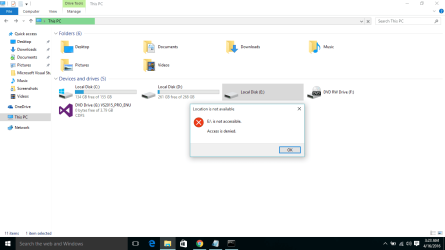
after running that recovery command my drive is status is this whats this means now
 

Attachments

  • Screenshot (5).png
    Screenshot (5).png
    25.7 KB · Views: 398

My Computer My Computer

At a glance

windows 8.1 pro 64 bit
Computer type
Laptop
OS
windows 8.1 pro 64 bit

My Computer My Computer

At a glance

64-bit Windows 11 Pro for WorkstationsIntel i7-8700K OC'd to 5 GHz64 GB (4x16GB) G.SKILL TridentZ RGB DDR4 3600...ASUS ROG-STRIX-GTX1080TI-O11G-GAMING
Computer type
PC/Desktop
Computer Manufacturer/Model Number
Self built custom
OS
64-bit Windows 11 Pro for Workstations
CPU
Intel i7-8700K OC'd to 5 GHz
Motherboard
ASUS ROG Maximus XI Formula Z390
Memory
64 GB (4x16GB) G.SKILL TridentZ RGB DDR4 3600 MHz
Graphics Card(s)
ASUS ROG-STRIX-GTX1080TI-O11G-GAMING
Sound Card
Integrated
Monitor(s) Displays
2 x Samsung Odyssey G7 27"
Screen Resolution
2560x1440
Hard Drives
1TB Samsung 990 PRO M.2,
4TB Samsung 990 PRO PRO M.2,
TerraMaster F8 SSD Plus NAS
PSU
Seasonic Prime Titanium 850W
Case
Thermaltake Core P3
Cooling
Corsair Hydro H115i
Keyboard
Logitech wireless K800
Mouse
Logitech MX Master 4
Internet Speed
2 Gb/s Download and 100 Mb/s Upload
Antivirus
Malwarebyte Anti-Malware Premium
Browser
Google Chrome
Other Info
Logitech Z625 speaker system,
Logitech BRIO 4K Pro webcam,
HP Color LaserJet Pro MFP M477fdn,
APC SMART-UPS RT 1000 XL - SURT1000XLI,
Galaxy S23 Plus phone
Back
Top