
Black screen at TIMES after starting back up.

Melissa2012B

New member
Member
Local time
7:53 PM
Messages
68
I'm using Win 7 Home Premium on my Asus desktop and am not a PC expert but managed to get things so that after 15 minutes, it either sleeps or hibernates ( not sure which it's called ) in a way where the power usage goes down to about 6 watts and the monitor screen shuts off too. ( I think the HD shuts down too ) Then when I come back and click the left mouse button, I can hear some kind of motor start back up in the PC and it takes me to my password screen, I enter it and go back to what I'm doing, without the need to reboot. I like it this way.

But SOMETIMES, instead of waking up like that, I just get a black screen and nothing - no way at all to wake it up. I have to shut off the power at the UPS, turn it on, then do a complete reboot from the power on switch.

Is this a flaw in Win 7 that it does that sometimes?
 

My Computer My Computer

At a glance

Windows 7 Home Premium 64 bit8gb
Computer Manufacturer/Model Number
Asus
OS
Windows 7 Home Premium 64 bit
Memory
8gb
Could be just a transient glitch/bug. You say this is a now and then thing? How often? I'm sure the "motor" you hear is just the HDD starting back up (spinning). How often between times does this happen? In my experience, and others may differ, I've found its best to shut your machine completely off every now and then. Thats not a recommendation, o.k., as not all agree on this, but it works for me. If this happens with some regularity, you could 1.) run a memory test 2.) Run a sfc/scannow to check/repair any corrupted system files. I'll post links to our tutorials on how to do these. Just click on the blue link and follow instructions. Hope this helps! :)

http://www.sevenforums.com/tutorials/715-memory-diagnostics-tool.html

http://www.sevenforums.com/tutorials/1538-sfc-scannow-command-system-file-checker.html
 

My Computer My Computer

At a glance

Windows 10x64 Build 1709Intel i7 7700HQ Kaby Lake16 GB DDR4 @2400Nvidia Geforce GTX 1060
Computer type
Laptop
Computer Manufacturer/Model Number
MSI GE72VR Apache Pro-416
OS
Windows 10x64 Build 1709
CPU
Intel i7 7700HQ Kaby Lake
Motherboard
Micro-Star Intl. MS-179B (U3C1)
Memory
16 GB DDR4 @2400
Graphics Card(s)
Nvidia Geforce GTX 1060
Screen Resolution
1920x1080 120Hz
Hard Drives
256 GB Nvme M.2 SSD

1TB HDD@7200
Cooling
Cooler Blast 4
Keyboard
Steel Series
Antivirus
Bit Defender Free
Browser
Edge
Roughly 1 in every 10-15 times.
 

My Computer My Computer

At a glance

Windows 7 Home Premium 64 bit8gb
Computer Manufacturer/Model Number
Asus
OS
Windows 7 Home Premium 64 bit
Memory
8gb
Could be just a transient glitch/bug. You say this is a now and then thing? How often? I'm sure the "motor" you hear is just the HDD starting back up (spinning). How often between times does this happen? In my experience, and others may differ, I've found its best to shut your machine completely off every now and then. Thats not a recommendation, o.k., as not all agree on this, but it works for me. If this happens with some regularity, you could 1.) run a memory test 2.) Run a sfc/scannow to check/repair any corrupted system files. I'll post links to our tutorials on how to do these. Just click on the blue link and follow instructions. Hope this helps! :)

http://www.sevenforums.com/tutorials/715-memory-diagnostics-tool.html

http://www.sevenforums.com/tutorials/1538-sfc-scannow-command-system-file-checker.html
:ditto:with that Melissa and just what are your power option settings plus I also never keep my machines running full time as Indianacarnie says I don't think personally it is good practice unless there is a very good reason for doing that.
My other thought was when did this start to happen? I ma just thinking Windows update problem or maybe malware have you done any scans? If not the these are good ones to use.


http://www.superantispyware.com/

http://www.malwarebytes.org/products/malwarebytes_free/

http://www.bleepingcomputer.com/download/adwcleaner/
 

My Computer My Computer

At a glance

Desk1 7 Home Prem / Desk2 10 Pro / Main lap A...Desk1 i5 3750K / Laptop i7 GTX 860M / Desk2 i...Desk1 8GB (1866) / Desk2 16GB (1333) / Laptop...Desk 1& 2NVidia GTX 650 & Laptops on board Intel
Computer type
PC/Desktop
Computer Manufacturer/Model Number
Own build (new) Desk1 / Asus ROG Win 7 / Desk2 1st build
OS
Desk1 7 Home Prem / Desk2 10 Pro / Main lap Asus ROG 10 Pro 2 laptop Toshiba 7 Pro Asus P2520 7 & 10
CPU
Desk1 i5 3750K / Laptop i7 GTX 860M / Desk2 i5 2500
Motherboard
Desk1 Asus P877-V / Desk2 Gigabyte H67 UD3H / Laptop ?
Memory
Desk1 8GB (1866) / Desk2 16GB (1333) / Laptop 8Gb DDR3
Graphics Card(s)
Desk 1& 2NVidia GTX 650 & Laptops on board Intel
Sound Card
Desk 1 & 2 -XONAR DG Realtek High Def audio Laptop
Monitor(s) Displays
Desk 1 Benq HD 2450 / Desk2 Philips 24" / Laptop 17.5"
Screen Resolution
1920x1080 D1 & D2 & Laptop 1
Hard Drives
Desk1 Samsung 120GB 830 SSD
Asus ROG 256GB 850 Pro SSD
Desk2 Samsung 840 256 SSD
Toshiba 120GB EVO
PSU
Desk 1 Corsair HX 1050/ Laptop ? / Desk 2 Corsair HX 650
Case
Desk 1 Cooler HAF XM ? Toshiba laptop / Desk2 Coolermaster
Cooling
Fans on all Desk1 -2 Desk2 - all Coolermasters 5 Laptop ?
Keyboard
Desk 1 MS Sidewinder X6 Desk 2 MS Sidewinder X 4
Mouse
Desk 1&2 - Gigabyte MS 900 gamer - laptop - Logitec wireless
Internet Speed
ADSL2+
Other Info
One other Desktop (tester) and spare Toshba laptop both with SSD's
Running Kaspersky 2016 ISS on all machines config'd identically
Logitec audio stereo systems on each machine (x3)
Canon MG5250MFC
Router/modem TP-Link running WPA2SK
My PC runs Avast! and is malware free, it's great. I don't run it full time, it just goes dormant when I'm not here. I do that because it takes about 6 or 8 minutes to boot if I shut it completely down.
 

My Computer My Computer

At a glance

Windows 7 Home Premium 64 bit8gb
Computer Manufacturer/Model Number
Asus
OS
Windows 7 Home Premium 64 bit
Memory
8gb
Hum well that is quite a long boot up time in fact for me a very long time.

Take a look at this http://www.sevenforums.com/tutorials/11728-optimize-windows-7-a.html?filter[2]=Performance Maintenance
> point 7 and I use method 3 but you can use what you want. The rest of the tutorial is also very good for getting a bit more out of the machine only up do lose a bit of the "bling" like transparency but to me that is no great loss.
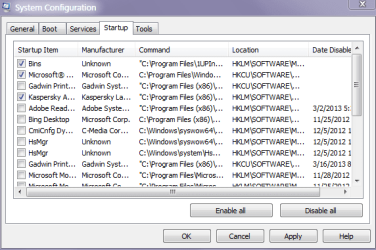
In point 7 it shows what programs are loading on boot and the more listed there the slower it will be. Personally I leave my security ticked Gadgets and another little app that sorts my taskbar icons everything else I un tick. See pic

A few more specifications for that machine would be handy too you can use this - Speccy - Download < download from piriform and download some screen shots when you can. It will show us the CPU memory and stuff like that
 

Attachments

  • MS.PNG
    MS.PNG
    13.6 KB · Views: 1

My Computer My Computer

At a glance

Desk1 7 Home Prem / Desk2 10 Pro / Main lap A...Desk1 i5 3750K / Laptop i7 GTX 860M / Desk2 i...Desk1 8GB (1866) / Desk2 16GB (1333) / Laptop...Desk 1& 2NVidia GTX 650 & Laptops on board Intel
Computer type
PC/Desktop
Computer Manufacturer/Model Number
Own build (new) Desk1 / Asus ROG Win 7 / Desk2 1st build
OS
Desk1 7 Home Prem / Desk2 10 Pro / Main lap Asus ROG 10 Pro 2 laptop Toshiba 7 Pro Asus P2520 7 & 10
CPU
Desk1 i5 3750K / Laptop i7 GTX 860M / Desk2 i5 2500
Motherboard
Desk1 Asus P877-V / Desk2 Gigabyte H67 UD3H / Laptop ?
Memory
Desk1 8GB (1866) / Desk2 16GB (1333) / Laptop 8Gb DDR3
Graphics Card(s)
Desk 1& 2NVidia GTX 650 & Laptops on board Intel
Sound Card
Desk 1 & 2 -XONAR DG Realtek High Def audio Laptop
Monitor(s) Displays
Desk 1 Benq HD 2450 / Desk2 Philips 24" / Laptop 17.5"
Screen Resolution
1920x1080 D1 & D2 & Laptop 1
Hard Drives
Desk1 Samsung 120GB 830 SSD
Asus ROG 256GB 850 Pro SSD
Desk2 Samsung 840 256 SSD
Toshiba 120GB EVO
PSU
Desk 1 Corsair HX 1050/ Laptop ? / Desk 2 Corsair HX 650
Case
Desk 1 Cooler HAF XM ? Toshiba laptop / Desk2 Coolermaster
Cooling
Fans on all Desk1 -2 Desk2 - all Coolermasters 5 Laptop ?
Keyboard
Desk 1 MS Sidewinder X6 Desk 2 MS Sidewinder X 4
Mouse
Desk 1&2 - Gigabyte MS 900 gamer - laptop - Logitec wireless
Internet Speed
ADSL2+
Other Info
One other Desktop (tester) and spare Toshba laptop both with SSD's
Running Kaspersky 2016 ISS on all machines config'd identically
Logitec audio stereo systems on each machine (x3)
Canon MG5250MFC
Router/modem TP-Link running WPA2SK
Thanks, will check into those.
 

My Computer My Computer

At a glance

Windows 7 Home Premium 64 bit8gb
Computer Manufacturer/Model Number
Asus
OS
Windows 7 Home Premium 64 bit
Memory
8gb
But SOMETIMES, instead of waking up like that, I just get a black screen and nothing - no way at all to wake it up. I have to shut off the power at the UPS, turn it on, then do a complete reboot from the power on switch.

Is this a flaw in Win 7 that it does that sometimes?

That randomly happens with me as well. Both with sleep and hibernate. This is NOT a Windows bug/flaw I suppose coz this does not happen on every system I use, only on old machines. Sorry, but I never found a solution. Best is to turn it off. That saves power too, isn't? ;)
 
But SOMETIMES, instead of waking up like that, I just get a black screen and nothing - no way at all to wake it up. I have to shut off the power at the UPS, turn it on, then do a complete reboot from the power on switch.

Is this a flaw in Win 7 that it does that sometimes?

That randomly happens with me as well. Both with sleep and hibernate. This is NOT a Windows bug/flaw I suppose coz this does not happen on every system I use, only on old machines. Sorry, but I never found a solution. Best is to turn it off. That saves power too, isn't? ;)
Yep I just have my screen to turn off as I don't like machines running 24/7 anyway not for the power but more for the fire risk to be honest. I always shut completely down right from the UPS and restart each day but well thats my choice, but some like it on all the time and I really don't see the advantage.

Just out of interest what do you have set up in Power Options settings > Control Panel? I set mine to high performance screen off in 25 minutes and never to sleep and hard disk to 20 minutes and have no problems on any of my machines whatever. See pic all other settings are not touched.
 

Attachments

  • POWER2.PNG
    POWER2.PNG
    28.5 KB · Views: 2

My Computer My Computer

At a glance

Desk1 7 Home Prem / Desk2 10 Pro / Main lap A...Desk1 i5 3750K / Laptop i7 GTX 860M / Desk2 i...Desk1 8GB (1866) / Desk2 16GB (1333) / Laptop...Desk 1& 2NVidia GTX 650 & Laptops on board Intel
Computer type
PC/Desktop
Computer Manufacturer/Model Number
Own build (new) Desk1 / Asus ROG Win 7 / Desk2 1st build
OS
Desk1 7 Home Prem / Desk2 10 Pro / Main lap Asus ROG 10 Pro 2 laptop Toshiba 7 Pro Asus P2520 7 & 10
CPU
Desk1 i5 3750K / Laptop i7 GTX 860M / Desk2 i5 2500
Motherboard
Desk1 Asus P877-V / Desk2 Gigabyte H67 UD3H / Laptop ?
Memory
Desk1 8GB (1866) / Desk2 16GB (1333) / Laptop 8Gb DDR3
Graphics Card(s)
Desk 1& 2NVidia GTX 650 & Laptops on board Intel
Sound Card
Desk 1 & 2 -XONAR DG Realtek High Def audio Laptop
Monitor(s) Displays
Desk 1 Benq HD 2450 / Desk2 Philips 24" / Laptop 17.5"
Screen Resolution
1920x1080 D1 & D2 & Laptop 1
Hard Drives
Desk1 Samsung 120GB 830 SSD
Asus ROG 256GB 850 Pro SSD
Desk2 Samsung 840 256 SSD
Toshiba 120GB EVO
PSU
Desk 1 Corsair HX 1050/ Laptop ? / Desk 2 Corsair HX 650
Case
Desk 1 Cooler HAF XM ? Toshiba laptop / Desk2 Coolermaster
Cooling
Fans on all Desk1 -2 Desk2 - all Coolermasters 5 Laptop ?
Keyboard
Desk 1 MS Sidewinder X6 Desk 2 MS Sidewinder X 4
Mouse
Desk 1&2 - Gigabyte MS 900 gamer - laptop - Logitec wireless
Internet Speed
ADSL2+
Other Info
One other Desktop (tester) and spare Toshba laptop both with SSD's
Running Kaspersky 2016 ISS on all machines config'd identically
Logitec audio stereo systems on each machine (x3)
Canon MG5250MFC
Router/modem TP-Link running WPA2SK
Back
Top