Black Screen when playing games.

Nocure

New member
Local time
12:15 AM
Messages
2
Don't know if this is the right section to post this in, but here goes.

Recently I have been getting black screens just a while after I have started a game. All sound dies and the computer just keeps running.

I downloaded the SF diagnostics tool and got a folder created, which is attached here.
 

My Computer

Computer type
PC/Desktop
Computer Manufacturer/Model Number
custom build
OS
Windows 7 64 bit
CPU
AMD Phenom II Black Edition 3.4Ghz
Motherboard
Asus M4A89GTD PRO/USB3
Memory
8gb 1333mhz
Graphics Card(s)
ASUS GeForce GTX580 1536MB GDDR5
Hard Drives
1x 200gb
1x 500gb
1x 1tb
Antivirus
AVAST! Free Antivirus
Browser
Firefox
Is it a pure solid black screen? How long it is staying? Is it giving any notification balloon from the systrey when it occurs or the display is getting back?

The zip you uploaded contains some crash dumps. Though those are kinda old, but indicates some graphics failure, stop 0x116 BSODs.

In this situation, you need to check the following things.

Stress test the Graphics Card using Furmark.
Video Card - Stress Test with Furmark

Is the computer hot? Report us the heat of the computer after a couple of hours of your normal usage. Upload a screenshot of the summery tab of Speccy.

Check if the Power Supply Unit (PSU) supplying adequate power to the computer or not.
eXtreme Power Supply Calculator
At least 30% free is safe. Also let us know about the wattage of the PSU.

Make it sure that you are using the NVIDIA DRIVERS 320.49WHQL display driver.

Are you overclocking? As you are getting BSODs, you should stop overclocking and run all the hardware components like CPU, GPU and RAM to their default settings. Also set the BIOS to default, too.
How To Clear CMOS (Reset BIOS)

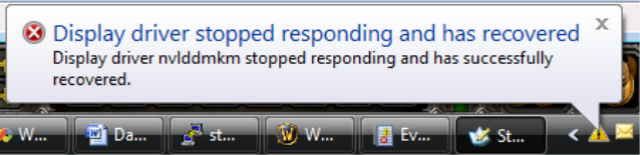
Also, it is important to know that if the black screen is accompanied by any balloon like this or not.
image016.png


Let us know the results.
______________________________________________________________________________
BSOD ANALYSIS:
Code:
........
*******************************************************************************
*                                                                             *
*                        Bugcheck Analysis                                    *
*                                                                             *
*******************************************************************************

Use !analyze -v to get detailed debugging information.

BugCheck 116, {fffffa80081194e0, fffff88007599010, 0, 2}

*** WARNING: Unable to verify timestamp for nvlddmkm.sys
*** ERROR: Module load completed but symbols could not be loaded for nvlddmkm.sys
Probably caused by : nvlddmkm.sys ( nvlddmkm+13b010 )

Followup: MachineOwner
---------

1: kd> !analyze -v
*******************************************************************************
*                                                                             *
*                        Bugcheck Analysis                                    *
*                                                                             *
*******************************************************************************

VIDEO_TDR_FAILURE (116)
Attempt to reset the display driver and recover from timeout failed.
Arguments:
Arg1: fffffa80081194e0, Optional pointer to internal TDR recovery context (TDR_RECOVERY_CONTEXT).
Arg2: fffff88007599010, The pointer into responsible device driver module (e.g. owner tag).
Arg3: 0000000000000000, Optional error code (NTSTATUS) of the last failed operation.
Arg4: 0000000000000002, Optional internal context dependent data.

Debugging Details:
------------------


FAULTING_IP: 
nvlddmkm+13b010
fffff880`07599010 4055            push    rbp

DEFAULT_BUCKET_ID:  GRAPHICS_DRIVER_TDR_FAULT

CUSTOMER_CRASH_COUNT:  1

BUGCHECK_STR:  0x116

PROCESS_NAME:  System

CURRENT_IRQL:  0

STACK_TEXT:  
fffff880`05fe99c8 fffff880`07076054 : 00000000`00000116 fffffa80`081194e0 fffff880`07599010 00000000`00000000 : nt!KeBugCheckEx
fffff880`05fe99d0 fffff880`07075d5e : fffff880`07599010 fffffa80`081194e0 fffffa80`08a70d50 fffffa80`08d6e410 : dxgkrnl!TdrBugcheckOnTimeout+0xec
fffff880`05fe9a10 fffff880`0711cf13 : fffffa80`081194e0 00000000`00000000 fffffa80`08a70d50 fffffa80`08d6e410 : dxgkrnl!TdrIsRecoveryRequired+0x1a2
fffff880`05fe9a40 fffff880`07146cf1 : 00000000`ffffffff 00000000`0001b405 00000000`00000000 00000000`00000002 : dxgmms1!VidSchiReportHwHang+0x40b
fffff880`05fe9b20 fffff880`07145437 : 00000000`00000102 00000000`00000006 00000000`0001b405 00000000`00000000 : dxgmms1!VidSchiCheckHwProgress+0x71
fffff880`05fe9b50 fffff880`071182d2 : ffffffff`ff676980 fffffa80`08d6e410 00000000`00000000 00000000`00000000 : dxgmms1!VidSchiWaitForSchedulerEvents+0x1fb
fffff880`05fe9bf0 fffff880`07144ff6 : 00000000`00000000 fffffa80`06baa850 00000000`00000080 fffffa80`08d6e410 : dxgmms1!VidSchiScheduleCommandToRun+0x1da
fffff880`05fe9d00 fffff800`03564ede : 00000000`fffffc32 fffffa80`08a72b50 fffffa80`0670a040 fffffa80`08a72b50 : dxgmms1!VidSchiWorkerThread+0xba
fffff880`05fe9d40 fffff800`032b7906 : fffff800`03441e80 fffffa80`08a72b50 fffff800`0344fcc0 00000004`dcaff000 : nt!PspSystemThreadStartup+0x5a
fffff880`05fe9d80 00000000`00000000 : 00000000`00000000 00000000`00000000 00000000`00000000 00000000`00000000 : nt!KiStartSystemThread+0x16


STACK_COMMAND:  .bugcheck ; kb

FOLLOWUP_IP: 
nvlddmkm+13b010
fffff880`07599010 4055            push    rbp

SYMBOL_NAME:  nvlddmkm+13b010

FOLLOWUP_NAME:  MachineOwner

MODULE_NAME: nvlddmkm

IMAGE_NAME:  nvlddmkm.sys

DEBUG_FLR_IMAGE_TIMESTAMP:  518fe8f9

FAILURE_BUCKET_ID:  X64_0x116_IMAGE_nvlddmkm.sys

BUCKET_ID:  X64_0x116_IMAGE_nvlddmkm.sys

Followup: MachineOwner
---------

 

My Computer

Computer type
PC/Desktop
Computer Manufacturer/Model Number
Self Assembled
OS
Microsoft Windows 10 Pro Insider Preview 64-bit
CPU
Intel(R) Core(TM) i3-4130 CPU @ 3.40GHz
Motherboard
Gigabyte Technology Co., Ltd. B85M-D3H
Memory
Corsair Vengence 4GB x2 (8.00GB Dual-Channel DDR3 @ 798MHz)
Graphics Card(s)
2047MB GeForce GTS 450 (ZOTAC International)
Sound Card
Onboard (Realtek High Definition Audio)
Monitor(s) Displays
LG Flatron E2040T
Screen Resolution
1600x900
Hard Drives
Western Digital 1 TB
Seagate 500 GB
PSU
Corsair VS550
Case
Cooler Master K380
Cooling
Cooler Master Seidon 120V Plus
Keyboard
Logitech MK260r
Mouse
Logitech MK260r
Internet Speed
PMPL Broadband
Antivirus
Windows Defender + MBAM
Browser
Firefox
Other Info
Dell Studio 15" Laptop
I don't see any baloon. I can be playing one moment and then the picture and sound and any control I had on the computer disappears. But the computer keeps running. The longest I have left the computer in that state is probably about 10 minutes. So I'd guess it just continues to run like that until I shut the computer off using the powerbutton.

Usually on when the I'm just on a browser or the like it's about 56 degrees celsius. And usually 75-87 degrees celsius when playing heavier games.

The CPU is usually 57 degrees on windows too, and about 70-75 when gaming.

I recently dusted off both GCard fans and the CPU fan & cooler, after this is when I started having this issue. So I'm thinking I might have damaged something :/ ( I can't upload a screenshot with the temp. Because the computer will just die a while after starting a game)

Last time I used furmark the card got really hot and I had a bit of an "Oh Shit" moment and had to close it. It went up to about 100 degrees celsius. So I'm a bit scared to run it.

I'm running the 326.19 Beta driver that I just installed. The problems occured before installing this version though. (Yet to test it)

I have a slight overclock. Memory clock 4008 (+8) and no overclock on the core speed.

I have a 750W PSU and the PSU Calculator recommended about 545W
 
Last edited:

My Computer

Computer type
PC/Desktop
Computer Manufacturer/Model Number
custom build
OS
Windows 7 64 bit
CPU
AMD Phenom II Black Edition 3.4Ghz
Motherboard
Asus M4A89GTD PRO/USB3
Memory
8gb 1333mhz
Graphics Card(s)
ASUS GeForce GTX580 1536MB GDDR5
Hard Drives
1x 200gb
1x 500gb
1x 1tb
Antivirus
AVAST! Free Antivirus
Browser
Firefox
Make it sure that the fans are working properly.

And if furmark levels to 100 degrees, I would plan to replace the GPU.

And I would not overclock any hardware component at all, when I am facing a stop 0x116 BSODs.

CPU temps during gaming is very hot, too. Dismantle the PC again. And apply new thermal paste to the CPU.


See if there is any change after applying the thermal paste. Also make it sure that the fans are actually working.
 

My Computer

Computer type
PC/Desktop
Computer Manufacturer/Model Number
Self Assembled
OS
Microsoft Windows 10 Pro Insider Preview 64-bit
CPU
Intel(R) Core(TM) i3-4130 CPU @ 3.40GHz
Motherboard
Gigabyte Technology Co., Ltd. B85M-D3H
Memory
Corsair Vengence 4GB x2 (8.00GB Dual-Channel DDR3 @ 798MHz)
Graphics Card(s)
2047MB GeForce GTS 450 (ZOTAC International)
Sound Card
Onboard (Realtek High Definition Audio)
Monitor(s) Displays
LG Flatron E2040T
Screen Resolution
1600x900
Hard Drives
Western Digital 1 TB
Seagate 500 GB
PSU
Corsair VS550
Case
Cooler Master K380
Cooling
Cooler Master Seidon 120V Plus
Keyboard
Logitech MK260r
Mouse
Logitech MK260r
Internet Speed
PMPL Broadband
Antivirus
Windows Defender + MBAM
Browser
Firefox
Other Info
Dell Studio 15" Laptop
Back
Top