Blocking websites

CJW

New member
Power User
VIP
Local time
3:44 PM
Messages
439
My son's computer is running Windows 7 Pro w/the browsers IE8 & Chrome 90.
I am having a hard time remembering how to block certain websites from each browser.

For IE8: I opened the Windows Control Panel>Internet Options>Security tab>Restricted Sites zone & clicked 'Sites'. I then add a few adult websites & clicked 'Close'. But after starting IE8, I can still access any of the websites.

For Chrome 90: I don't even remember where to begin.

Chrome is his default browser.
I don't think he ever uses IE8, but I want to block the adult sites just in case he does use it.

Can I get some help please?
 

My Computer

Computer type
PC/Desktop
Computer Manufacturer/Model Number
Self built comfuser
OS
10 Pro. 64Bit
CPU
AMD FX 4100, 4-Core Black Edition. Socket AM3+ ~ 3.60GHz
Motherboard
ASUS M5A97 LE R2.0
Memory
2x 4GB Kingston HyperX DDR3-1866 (PC3-14900) - 8GB Total
Graphics Card(s)
ASUS Radeon HD 6670-2GD3
Sound Card
Onboard High Definition Audio Device
Monitor(s) Displays
HP 2009m LCD
Screen Resolution
1600x900, True Color (32bit), 60Hertz
Hard Drives
WD Blue - 1TB, 3D NAND - SATA SSD
PSU
XFX Pro 450W Core Edition - Fully Wired
Case
Antec Super Lanboy
Cooling
Stock CPU fan + 2 (1 front, 1 back) 120mm Antec fans
Keyboard
Logitech MK700/MK710
Mouse
Logitech M705
Internet Speed
Frontier FiOS 50/50
Antivirus
Windows Security
Browser
Vivaldi
Other Info
1x ASUS DRW-24B1ST Multi-DVD Rewriter
1x RocketFish AIO Media Card Reader
1x WD 1TB Passport USB External Drive
Hi CJW,
dont know about chrome, never used it.
Re IE8 its way outta date and i suspect, unless you have updates turned off, your comp is trying to update to IE11.

as your son doesnt use it i would turn it OFF

control panel >>> programs and features.... features (bottom left). then in the small window that opens UNcheck IE8, or whichever version it is
 

My Computer

Computer type
PC/Desktop
Computer Manufacturer/Model Number
medionl/Aspire 6930G/acer x55a
OS
W7 home premium 32bit/W7HP 64bit/w10 tp insider ring
CPU
E5300 dual core
Motherboard
medion MS7366
Memory
3gb
Graphics Card(s)
Nvidia Geforce 7100 Nforce 630i
Monitor(s) Displays
avixc
Internet Speed
n (isp resticted to 72)
Antivirus
mse/pands
Browser
palemoon
Other Info
Belkin Fd7050 n USB using Railink RT2870 drivers, more upto date
The way I've always recommended families to go is by using an external protection regime . The one that has been around longest is I believe OpenDNS which has many options to block specific site categories or specific sites, the other thing is that as It's external it is more effective and difficult to circumvent, youngsters today are very computer literate but so are the people at OpenDNS. They also set up their own categories and keep them valid when actual addresses change.

I've used it in the past for small companies and businesses where the owners wish to control their liability when staff misuse internet access (it can also block and or Limit social networking access to a maximum or specific time set If that is a requirement)

More into here ... How to Set Up Whole-House Parental Controls with OpenDNS
 
Last edited:

My Computers

System One System Two

  • Computer type
    PC/Desktop
    Computer Manufacturer/Model Number
    ChillBlast - Custom to my design
    OS
    Windows 11 Pro x64 [Latest Release and Release Preview]
    CPU
    Ryzen 9 5950X, 3.8 - 5.2 MHz
    Motherboard
    Asus Prime X570-Pro
    Memory
    64GB [2 x 32GB] DDR4 3200MHz
    Graphics Card(s)
    4GB NVIDIA GEFORCE GTX 1650 Ti
    Sound Card
    On-board SPDIF to 5.1 System + HDMI [5.1 system]
    Monitor(s) Displays
    32" UHD 32 Bit HDR Monitor + 43" UHD 4K 32Bit HDR TV
    Screen Resolution
    2 x 3840 x 2160 @60Hz
    Hard Drives
    1TB M2 SSD OS, 500GB Fast Access SSD, 2 x 8TB Data + Various Externals from 1TB to 4TB, 10TB NAS
    PSU
    NZXT C750 80 PLUS Gold 750W Modular PSU
    Case
    Workstation Case [Matt Black]
    Cooling
    NZXT Kraken X63 280mm CPU Cooler +2x Quiet Case fans
    Keyboard
    Logitech Wireless MX Keys & K400 + others
    Mouse
    Logitech Wireless MX Master 3S
    Internet Speed
    920 MB Down 50 MB Up
    Antivirus
    BitDefender Total Security Pro
    Browser
    Chrome (always run latest Non-Beta)
    Other Info
    Also run ...
    Laptop - Quad 8GB - Windows 10 Pro x64
    Nexus 7 Android tablet x2
    Samsung 10.2" tablet
    Blackview TAB 8 4G Android Tablet c/w Keyboard
    Wacom Intuos Pro Medium Pen Pad
    Wacom Intuos Pro Small Pen Pad
    Wacom Expresskeys Remote
    Loopdeck+ Graphics Controller
    Shuttle Pro v2 Control
  • Computer type
    Laptop
    System Manufacturer/Model Number
    Dell XPS 17 10750H
    OS
    Windows 11 Pro x64 Latest RP
    CPU
    Intel I7 10750H 5.0GHz
    Motherboard
    Dell XPS
    Memory
    32GB [2x16GB] DDR4 2933 MHz
    Graphics Card(s)
    nVidia GTX1650Ti 4 GB GDDR6
    Sound Card
    Stock [Realtek] 4 Speaker
    Monitor(s) Displays
    17" IPS UHD+ Infinity Edge Touchscreen
    Screen Resolution
    3840 x 2400
    Hard Drives
    2TB M2 NVMe, 4TB External + various 500GB & 1TB External NVMe (also have access to spinner HDD from
    PSU
    Stock
    Case
    Stock XPS Aluminium & Carbon Fibre
    Cooling
    Stock - Active Fan Control
    Keyboard
    Backlit + Various Logitech
    Mouse
    Stock Track Pad + Logitech MX Trackball
    Internet Speed
    72 MB Down 18MB Up
    Browser
    Chrome
    Other Info
    Also run ...
    Laptop - Quad 8GB - Windows 10 Pro x64
    Nexus 7 Android tablet x2
    10.2" tablet
    Sony Z3 Android Smartphone
    Wacom Intuos Pro Medium Pen Pad
    Wacom Intuos Pro Small Pen Pad
    Wacom Expresskeys Remote
    Loopdeck+ Graphics Controller
    Shuttle Pro v2 Control Pad
    10TB NAS

My Computers

System One System Two

I would simply add any site to block to the hosts file, so it doesn't even resolves the DNS and is simple enough to be done with a normal text editor. As you need admin privileges to modify it, your son won't be able to revert himself (as long as you don't make him an admin, of course).

It's also a global protection. Any browser-specific block can be trivially circumvented by downloading a third browser and using it to access the banned websites.

Off-topic: Why use IE8 at all. Even IE11 is totally obsolete by current standards, much more an earlier version. There is no reason to even have it installed nowadays.
 

My Computer

Computer type
Laptop
Computer Manufacturer/Model Number
Toshiba Sattelite A665-S6092
OS
Windows 7 Ultimate x64
CPU
Intel Core i7-740QM
Memory
8 GB DDR3
Graphics Card(s)
NVIDIA GeForce 330GT
Screen Resolution
1366x768
Hard Drives
Samsung 840 SSD 500GB
1TB USB3 external HD
Cooling
Coolermaster Notepal U3 notebook cooling pad
Internet Speed
3mbps ASDL
Antivirus
ClamWin 0.98.7
Browser
Opera 12.17 x86 (main), Firefox 38 (sec), IE11 (last resort)
Hi CJW,
IE8 its way outta date and i suspect, unless you have updates turned off, your comp is trying to update to IE11.

Yes, Windows Updates is turned off & thank you for the instructions on turning off IE8; I forgot about that procedure.

The way I've always recommended families to go is by using an external protection regime. The one that has been around longest is I believe OpenDNS ...

Thanks for the link. I read the information & got a little confused about some things.
Since I want to block adult websites on his computer only, I should follow this page, correct?

I would simply add any site to block to the hosts file, so it doesn't even resolves the DNS and is simple enough to be done with a normal text editor.

Off-topic: Why use IE8 at all. Even IE11 is totally obsolete by current standards, much more an earlier version. There is no reason to even have it installed nowadays.

How do I use the Host file?
He doesn't use IE, but I forgot how to turn it off. Thanks to torchwood, it's now turned off. I was going to completely remove IE using Revo Uninstaller, but I figured that would cause me too much of a headache.
 
Last edited:

My Computer

Computer type
PC/Desktop
Computer Manufacturer/Model Number
Self built comfuser
OS
10 Pro. 64Bit
CPU
AMD FX 4100, 4-Core Black Edition. Socket AM3+ ~ 3.60GHz
Motherboard
ASUS M5A97 LE R2.0
Memory
2x 4GB Kingston HyperX DDR3-1866 (PC3-14900) - 8GB Total
Graphics Card(s)
ASUS Radeon HD 6670-2GD3
Sound Card
Onboard High Definition Audio Device
Monitor(s) Displays
HP 2009m LCD
Screen Resolution
1600x900, True Color (32bit), 60Hertz
Hard Drives
WD Blue - 1TB, 3D NAND - SATA SSD
PSU
XFX Pro 450W Core Edition - Fully Wired
Case
Antec Super Lanboy
Cooling
Stock CPU fan + 2 (1 front, 1 back) 120mm Antec fans
Keyboard
Logitech MK700/MK710
Mouse
Logitech M705
Internet Speed
Frontier FiOS 50/50
Antivirus
Windows Security
Browser
Vivaldi
Other Info
1x ASUS DRW-24B1ST Multi-DVD Rewriter
1x RocketFish AIO Media Card Reader
1x WD 1TB Passport USB External Drive

My Computer

Computer type
Laptop
Computer Manufacturer/Model Number
Toshiba Sattelite A665-S6092
OS
Windows 7 Ultimate x64
CPU
Intel Core i7-740QM
Memory
8 GB DDR3
Graphics Card(s)
NVIDIA GeForce 330GT
Screen Resolution
1366x768
Hard Drives
Samsung 840 SSD 500GB
1TB USB3 external HD
Cooling
Coolermaster Notepal U3 notebook cooling pad
Internet Speed
3mbps ASDL
Antivirus
ClamWin 0.98.7
Browser
Opera 12.17 x86 (main), Firefox 38 (sec), IE11 (last resort)

My Computers

System One System Two

I've been using OpenDNS since it was released in ~2007 or so. It's now owned by Cisco. Back then their content filtering was down by St. Bernard. Not sure if that's the case anymore or not.

You can use OpenDNS in one of two ways. One is to add their two DNS IP addresses to the network properties you see in that image for the Windows 7 instructions. The other is a broadsword approach and that is to add the OpenDNS DNS IPs in your router or modem. You'll need to refer to your router's or modem's documentation to access those settings.

Now note that he can just go back in and change the DNS IPs to something else like Google's or Cloudflare's and bypass the OpenDNS filtering altogether. Even more so if a VPN is used. So to help prevent this make sure the Windows account is not an administrator account. The other thing that can be done is through group policy if you have a Windows version that allows group policy. Off the top of my head that'd be versions Pro and above, not Home.

To get into group policy type gpedit.msc in the search box under the start orb. Now open the following: User Configuration | Administrative Templates | Network | Network Connections. Now look to the right for "Prohibit TCP/IP advanced configuration and enable it. I'd reboot. It would probably be a lot better to use a non Admin. account since then he can't use a VPN or change things you don't want changed. The installation of software will have to be by you. You'll only be able to run portable software and that could be a factor. By in large, if he's computer smart you have to be smarter. It would require group permissions, and Kiosk-like software, etc. FrontFace Lockdown can help, but don't go overboard disabling things that don't need to be changed like wallpaper and what have you. FrontFace Lockdown Tool - lock down a PC as kiosk terminal

In addition to using OPenDNS, here are some other tools to help further lock down things if necessary.

PC Screen Watcher - monitor and restrict application usage

Process Blocker - prevent some programs from running

Ratool (Removable Access Tool) - control removable storage devices


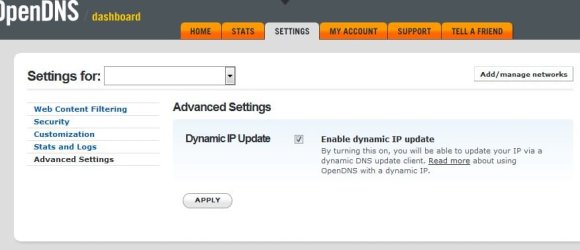
Now here's the deal, if your IP address ever changes, OpenDNS won't work. So you'll want to use the update client, or if your IP is like mine from Comcast and rarely changes (it's called a sticky IP address. I change it myself), then you can manually change your IP to the new IP in your OpenDNS settings. To make sure your IP is updated if it should ever change, go to Settings in OpenDNS. See screenshot. Dynamic IP: General Information for OpenDNS usage – OpenDNS

I would run the client on your computer and not his.


Now for some more nerdy information. You can customize the block page he'll get with an image. But Cisco uses their own certificate for the TLS encrypted connection for the block page so you might need to install their certificate in the computer's certificate store. This was never an issue prior to Cisco taking over OpenDNS. This is not hard to do at all. If you find the block page throws a insecure error, then download the certificate here. Block Page Errors: Installing the Cisco Umbrella Root CA – OpenDNS Just download the certificate, double click on it and hit next on through. It'll install into Windows. You could do it on a per browser basis like the instructions indicate, but I don't do that.
 

Attachments

  • tgnhfgnf.jpg
    tgnhfgnf.jpg
    50.3 KB · Views: 0

My Computer

Computer type
PC/Desktop
OS
Windows 7 Ultimate x64
You DO NOT! want to uninstall or even disable IE. IE is an integral part of the OS whether you think so or not. Just leave it be and don't use IE. That simple.
 

My Computer

Computer type
PC/Desktop
OS
Windows 7 Ultimate x64
why not try through Anti-virus software, if you're using one ? For instance in my Bitdefender - I have Parental Advisor through which you could control & even check the activity as well, on what your son browses.
 

My Computer

Computer type
Laptop
Computer Manufacturer/Model Number
DELL
OS
windows 7 ultimate x32
CPU
T6670,
Motherboard
INTEL CORE 2 DUO, 0TFXK9
Memory
8GB DDR3
Screen Resolution
1366*768
Hard Drives
512GB SSD
Mouse
Logitech M165 w/sidebuttons
Internet Speed
30-150 mb/s
Antivirus
Bitdefender
Browser
FF, Opera GX
Back
Top