Blu ray drive issues

Bearcatrp

New member
Member
VIP
Local time
8:08 PM
Messages
123
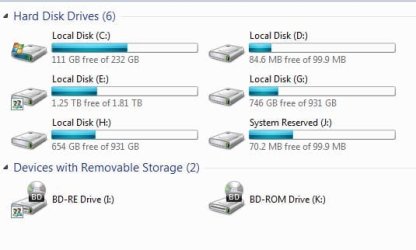
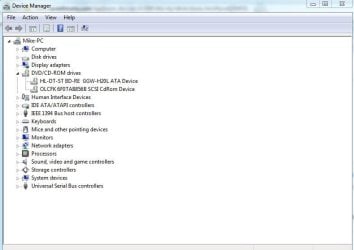
Picked up a OEM Sony blu ray burner drive not long ago. Win7 64 recognizes it as a cd drive. Weird. Can't write anything. Can read discs though. Is it supposed to be recognized as a BD drive or cd drive? I do have another DVD/BD rom (LG) installed. No issues with this. Any help appreciated.
 

My Computer

Computer type
PC/Desktop
Computer Manufacturer/Model Number
Home built
OS
Win7 Pro 64
CPU
2 X5670 2.93 Westmere processors
Motherboard
SuperMicro X8DTI-F
Memory
48GB
Graphics Card(s)
Ati 6950
Monitor(s) Displays
Dell 2408wfp
Hard Drives
256 SSD,1tb & 2tb spinner drives
Does anyone who has a blu ray burner tell me how windows 7 labels their drive, CD, DVD or BD? The one I have is the BD5300S.
 

My Computer

Computer type
PC/Desktop
Computer Manufacturer/Model Number
Home built
OS
Win7 Pro 64
CPU
2 X5670 2.93 Westmere processors
Motherboard
SuperMicro X8DTI-F
Memory
48GB
Graphics Card(s)
Ati 6950
Monitor(s) Displays
Dell 2408wfp
Hard Drives
256 SSD,1tb & 2tb spinner drives

Attachments

  • BD.JPG
    BD.JPG
    29.1 KB · Views: 20

My Computer

Computer type
PC/Desktop
Computer Manufacturer/Model Number
Self made
OS
windows 7 home premium 64, and Windows 10 64 bit
CPU
I7 940
Motherboard
ASUS P6TX58D Premium- BIOS VERSION 1402
Memory
12 GB Dominator 3 channel 1600
Graphics Card(s)
Radeon R9 Fury Nitro
Sound Card
Z1
Monitor(s) Displays
50 Inch Panasonic TV
Screen Resolution
1920x1080
Hard Drives
Main drive OCZ Revodrive V2 and 8 TB multi drives
PSU
Coolermaster 1000
Case
CoolerMaster 932
Cooling
Coolermaster Dual fan
Keyboard
mx 5500 revolution
Mouse
mx 5500 revolution
Internet Speed
12 mb
Browser
Chrome
Other Info
set up for 3D Blue Ray applications with a surround room of 12 speaker Definitive Technology and multi amps, main is driven by yamaha M-65
Go to microsoft fix it. Search for "dvd drive not recognized."
 

My Computer

Computer Manufacturer/Model Number
Home Made
OS
Windows 7 Home Premium x64
CPU
Intel 2500k @4.5ghz 66deg max P95/IBT
Motherboard
Gigabyte Z68A-D3-B3
Memory
8 Gigs Patriot Viper 2 Extreme @1600
Graphics Card(s)
EVGA GTX 580 3 GIG 35degrees idle
Sound Card
Nvidia HD audio via HDMI to 7.1 Receiver
Monitor(s) Displays
32" Olevia hdtv
Screen Resolution
1080p
Hard Drives
64gig SSD(OS/Apps)
250gig (Files and Dox)
1tb (imaging and backup)
PSU
Corsair vx550w
Case
Thermaltake V3 black
Cooling
CM 212+(push n pull) 4 case fans
Keyboard
Logitech wireless Combo, G13
Mouse
G300
Internet Speed
40mps
Other Info
Two others up and running; C2D E5200/MSI G41M-P26/Corsair XMS3 8gb/GTS 250 1gb and C2D E8200/xFx 750sli/8gb Corsair Dominator/2x EVGA 550ti
Working on; i2600 Build...
HP DV6
@Work I use a Lenovo 5536B8U + Lenovo U300s
I have v2.0 firmware. Have looked at the 1.4 version and scratching my head on this one. Do OEM drives come different? Mine does show BD-RE but look into the properties. Shows different. Maybe that's the way it's supposed to I guess. Teckymike, I also have a DVD/BD rom drive. Do you have any conflicts? Was thinking this might be the case and just remove it to see what happens.
 

My Computer

Computer type
PC/Desktop
Computer Manufacturer/Model Number
Home built
OS
Win7 Pro 64
CPU
2 X5670 2.93 Westmere processors
Motherboard
SuperMicro X8DTI-F
Memory
48GB
Graphics Card(s)
Ati 6950
Monitor(s) Displays
Dell 2408wfp
Hard Drives
256 SSD,1tb & 2tb spinner drives
I had the same issue. Try what I suggested please. Or not.
 

My Computer

Computer Manufacturer/Model Number
Home Made
OS
Windows 7 Home Premium x64
CPU
Intel 2500k @4.5ghz 66deg max P95/IBT
Motherboard
Gigabyte Z68A-D3-B3
Memory
8 Gigs Patriot Viper 2 Extreme @1600
Graphics Card(s)
EVGA GTX 580 3 GIG 35degrees idle
Sound Card
Nvidia HD audio via HDMI to 7.1 Receiver
Monitor(s) Displays
32" Olevia hdtv
Screen Resolution
1080p
Hard Drives
64gig SSD(OS/Apps)
250gig (Files and Dox)
1tb (imaging and backup)
PSU
Corsair vx550w
Case
Thermaltake V3 black
Cooling
CM 212+(push n pull) 4 case fans
Keyboard
Logitech wireless Combo, G13
Mouse
G300
Internet Speed
40mps
Other Info
Two others up and running; C2D E5200/MSI G41M-P26/Corsair XMS3 8gb/GTS 250 1gb and C2D E8200/xFx 750sli/8gb Corsair Dominator/2x EVGA 550ti
Working on; i2600 Build...
HP DV6
@Work I use a Lenovo 5536B8U + Lenovo U300s
Will go check it out. Thanks
 

My Computer

Computer type
PC/Desktop
Computer Manufacturer/Model Number
Home built
OS
Win7 Pro 64
CPU
2 X5670 2.93 Westmere processors
Motherboard
SuperMicro X8DTI-F
Memory
48GB
Graphics Card(s)
Ati 6950
Monitor(s) Displays
Dell 2408wfp
Hard Drives
256 SSD,1tb & 2tb spinner drives
I have two drives also and there no conflicts. I did have to set up the drives as shared. According to Sony there is no version 2.0 listed for your drive on their website. That is why I listed the hyperlink for you.
In the device manager does the drive have any flags that might be a yellow color?
 

Attachments

  • devices.JPG
    devices.JPG
    40.5 KB · Views: 16

My Computer

Computer type
PC/Desktop
Computer Manufacturer/Model Number
Self made
OS
windows 7 home premium 64, and Windows 10 64 bit
CPU
I7 940
Motherboard
ASUS P6TX58D Premium- BIOS VERSION 1402
Memory
12 GB Dominator 3 channel 1600
Graphics Card(s)
Radeon R9 Fury Nitro
Sound Card
Z1
Monitor(s) Displays
50 Inch Panasonic TV
Screen Resolution
1920x1080
Hard Drives
Main drive OCZ Revodrive V2 and 8 TB multi drives
PSU
Coolermaster 1000
Case
CoolerMaster 932
Cooling
Coolermaster Dual fan
Keyboard
mx 5500 revolution
Mouse
mx 5500 revolution
Internet Speed
12 mb
Browser
Chrome
Other Info
set up for 3D Blue Ray applications with a surround room of 12 speaker Definitive Technology and multi amps, main is driven by yamaha M-65
I have two drives also and there no conflicts. I did have to set up the drives as shared. According to Sony there is no version 2.0 listed for your drive on their website. That is why I listed the hyperlink for you.
In the device manager does the drive have any flags that might be a yellow color?

That's why I'm scratching my head on the v2. Already tried the firmware installer for 1.4. Said no supporting drive found. No yellow flags in device manager either. Been working on computers since DOS 3.1 and have never seen this before. Have only been back to windows about 6 months, coming from OSX for past 8 years so still new to Win7. Any hacks to remove the firmware to get 1.4 installed?
 

My Computer

Computer type
PC/Desktop
Computer Manufacturer/Model Number
Home built
OS
Win7 Pro 64
CPU
2 X5670 2.93 Westmere processors
Motherboard
SuperMicro X8DTI-F
Memory
48GB
Graphics Card(s)
Ati 6950
Monitor(s) Displays
Dell 2408wfp
Hard Drives
256 SSD,1tb & 2tb spinner drives
Iobit.com has a forced uninstall program in windowscareV5. That should help you uninstall it and check for any extra data in your system.
Have you tried uninstalling the drive in device manager and then doing an update in device manager? Most likely windows will see the drive and install the correct driver for you.
 

My Computer

Computer type
PC/Desktop
Computer Manufacturer/Model Number
Self made
OS
windows 7 home premium 64, and Windows 10 64 bit
CPU
I7 940
Motherboard
ASUS P6TX58D Premium- BIOS VERSION 1402
Memory
12 GB Dominator 3 channel 1600
Graphics Card(s)
Radeon R9 Fury Nitro
Sound Card
Z1
Monitor(s) Displays
50 Inch Panasonic TV
Screen Resolution
1920x1080
Hard Drives
Main drive OCZ Revodrive V2 and 8 TB multi drives
PSU
Coolermaster 1000
Case
CoolerMaster 932
Cooling
Coolermaster Dual fan
Keyboard
mx 5500 revolution
Mouse
mx 5500 revolution
Internet Speed
12 mb
Browser
Chrome
Other Info
set up for 3D Blue Ray applications with a surround room of 12 speaker Definitive Technology and multi amps, main is driven by yamaha M-65
Went ahead and uninstalled the driver. Rebooted. Everything is the same. I checked out windowscare. Haven't downloaded it yet. Do you know if I can save the firmware that's on in now, just in case something goes wrong with 1.4?
 

My Computer

Computer type
PC/Desktop
Computer Manufacturer/Model Number
Home built
OS
Win7 Pro 64
CPU
2 X5670 2.93 Westmere processors
Motherboard
SuperMicro X8DTI-F
Memory
48GB
Graphics Card(s)
Ati 6950
Monitor(s) Displays
Dell 2408wfp
Hard Drives
256 SSD,1tb & 2tb spinner drives
You can download the previous f/w along with 1.4 and reinstall the previous in case.
Is the issue that is is not working or just not displayed right in Exlporer? F/W updates will change how fast the drive burns/reads or make other disks compatible. The drivers will determine how its displayed.
 

My Computer

Computer type
PC/Desktop
Computer Manufacturer/Model Number
Home Built Desktop By DataTech
OS
Windows 7 Ultimate X64 SP1
CPU
Intel i5-2550K, Differing ~4.4-4.8GHz No built in GPU
Motherboard
ASUS P8Z68-V PRO/GEN3
Memory
16GB G.Skill Sniper 1866MHz @ 2133MHz 2x8GB
Graphics Card(s)
ASUS GTX650TIB-DC2OC-2GD5, (650TI Boost)
Sound Card
Onboard Realtek 5-1
Monitor(s) Displays
Samsung P2570HD
Screen Resolution
1920x1080
Hard Drives
Samsung 840 Pro 256GB SSD for OS, 500GB Seagate Constellation (Enterprise drive) for Data
PSU
Corsair HX650W
Case
Inwin Dragon Rider
Cooling
Hyper 212 EVO w/two Noctua fans, push-pull, @1300 RPM
Keyboard
E-Z Eyes, bright yellow keys with large characters
Mouse
steelseries SENSEI Laser Pro Gaming
Internet Speed
48-51Mbs Mbs down, 11 Mbs up Xfinity Cable
Antivirus
Norton Internet Security 2013
Browser
IE 10, Opera, Pale Moon if needed
Other Info
4 case fans, LG BluRay-RE, ASUS DVD-RW, Mr. Fusion power supply, 1.21 gigawatts.
There is no 2.0 firmware to dowload as far as I know. The highest is 1.4 according to the web site. Still don't understand how mine is 2.0 and the highest Sony shows is 1.4. I am hoping I can extract it before attempting to install v1.4.
The drive can read but it won't allow to write to any disc type.
 

My Computer

Computer type
PC/Desktop
Computer Manufacturer/Model Number
Home built
OS
Win7 Pro 64
CPU
2 X5670 2.93 Westmere processors
Motherboard
SuperMicro X8DTI-F
Memory
48GB
Graphics Card(s)
Ati 6950
Monitor(s) Displays
Dell 2408wfp
Hard Drives
256 SSD,1tb & 2tb spinner drives
Can you post a snip of where it shows your 2.0 firmware?
 

My Computer

Computer type
PC/Desktop
Computer Manufacturer/Model Number
Home Built Desktop By DataTech
OS
Windows 7 Ultimate X64 SP1
CPU
Intel i5-2550K, Differing ~4.4-4.8GHz No built in GPU
Motherboard
ASUS P8Z68-V PRO/GEN3
Memory
16GB G.Skill Sniper 1866MHz @ 2133MHz 2x8GB
Graphics Card(s)
ASUS GTX650TIB-DC2OC-2GD5, (650TI Boost)
Sound Card
Onboard Realtek 5-1
Monitor(s) Displays
Samsung P2570HD
Screen Resolution
1920x1080
Hard Drives
Samsung 840 Pro 256GB SSD for OS, 500GB Seagate Constellation (Enterprise drive) for Data
PSU
Corsair HX650W
Case
Inwin Dragon Rider
Cooling
Hyper 212 EVO w/two Noctua fans, push-pull, @1300 RPM
Keyboard
E-Z Eyes, bright yellow keys with large characters
Mouse
steelseries SENSEI Laser Pro Gaming
Internet Speed
48-51Mbs Mbs down, 11 Mbs up Xfinity Cable
Antivirus
Norton Internet Security 2013
Browser
IE 10, Opera, Pale Moon if needed
Other Info
4 case fans, LG BluRay-RE, ASUS DVD-RW, Mr. Fusion power supply, 1.21 gigawatts.
Here it is...
BD.jpg
 

My Computer

Computer type
PC/Desktop
Computer Manufacturer/Model Number
Home built
OS
Win7 Pro 64
CPU
2 X5670 2.93 Westmere processors
Motherboard
SuperMicro X8DTI-F
Memory
48GB
Graphics Card(s)
Ati 6950
Monitor(s) Displays
Dell 2408wfp
Hard Drives
256 SSD,1tb & 2tb spinner drives
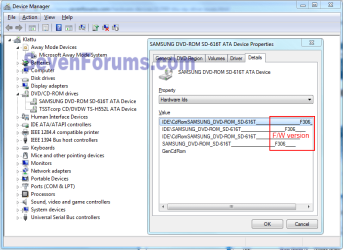
I think the Nero tool is reading wrong info, 1.4 is the latest. Go to control panel/Device Manager and expand the CD/DVD Drives right click a device then Properties then Details tab. In the drop-down menu go to Hardware ID's, the true firmware version will be as shown in the snip below. then we can start from there hopefully.
Capture.PNG
 

My Computer

Computer type
PC/Desktop
Computer Manufacturer/Model Number
Home Built Desktop By DataTech
OS
Windows 7 Ultimate X64 SP1
CPU
Intel i5-2550K, Differing ~4.4-4.8GHz No built in GPU
Motherboard
ASUS P8Z68-V PRO/GEN3
Memory
16GB G.Skill Sniper 1866MHz @ 2133MHz 2x8GB
Graphics Card(s)
ASUS GTX650TIB-DC2OC-2GD5, (650TI Boost)
Sound Card
Onboard Realtek 5-1
Monitor(s) Displays
Samsung P2570HD
Screen Resolution
1920x1080
Hard Drives
Samsung 840 Pro 256GB SSD for OS, 500GB Seagate Constellation (Enterprise drive) for Data
PSU
Corsair HX650W
Case
Inwin Dragon Rider
Cooling
Hyper 212 EVO w/two Noctua fans, push-pull, @1300 RPM
Keyboard
E-Z Eyes, bright yellow keys with large characters
Mouse
steelseries SENSEI Laser Pro Gaming
Internet Speed
48-51Mbs Mbs down, 11 Mbs up Xfinity Cable
Antivirus
Norton Internet Security 2013
Browser
IE 10, Opera, Pale Moon if needed
Other Info
4 case fans, LG BluRay-RE, ASUS DVD-RW, Mr. Fusion power supply, 1.21 gigawatts.
Shows the same thing too. That's where I looked first. Then downloaded Nero to confirm. Think I will send Sony an email to see what they have to say.
 

My Computer

Computer type
PC/Desktop
Computer Manufacturer/Model Number
Home built
OS
Win7 Pro 64
CPU
2 X5670 2.93 Westmere processors
Motherboard
SuperMicro X8DTI-F
Memory
48GB
Graphics Card(s)
Ati 6950
Monitor(s) Displays
Dell 2408wfp
Hard Drives
256 SSD,1tb & 2tb spinner drives
Sounds like a good idea. They may not have updated their download page.
Is the drive malfunctioning?
 

My Computer

Computer type
PC/Desktop
Computer Manufacturer/Model Number
Home Built Desktop By DataTech
OS
Windows 7 Ultimate X64 SP1
CPU
Intel i5-2550K, Differing ~4.4-4.8GHz No built in GPU
Motherboard
ASUS P8Z68-V PRO/GEN3
Memory
16GB G.Skill Sniper 1866MHz @ 2133MHz 2x8GB
Graphics Card(s)
ASUS GTX650TIB-DC2OC-2GD5, (650TI Boost)
Sound Card
Onboard Realtek 5-1
Monitor(s) Displays
Samsung P2570HD
Screen Resolution
1920x1080
Hard Drives
Samsung 840 Pro 256GB SSD for OS, 500GB Seagate Constellation (Enterprise drive) for Data
PSU
Corsair HX650W
Case
Inwin Dragon Rider
Cooling
Hyper 212 EVO w/two Noctua fans, push-pull, @1300 RPM
Keyboard
E-Z Eyes, bright yellow keys with large characters
Mouse
steelseries SENSEI Laser Pro Gaming
Internet Speed
48-51Mbs Mbs down, 11 Mbs up Xfinity Cable
Antivirus
Norton Internet Security 2013
Browser
IE 10, Opera, Pale Moon if needed
Other Info
4 case fans, LG BluRay-RE, ASUS DVD-RW, Mr. Fusion power supply, 1.21 gigawatts.
Can't write anything. Read only.
 

My Computer

Computer type
PC/Desktop
Computer Manufacturer/Model Number
Home built
OS
Win7 Pro 64
CPU
2 X5670 2.93 Westmere processors
Motherboard
SuperMicro X8DTI-F
Memory
48GB
Graphics Card(s)
Ati 6950
Monitor(s) Displays
Dell 2408wfp
Hard Drives
256 SSD,1tb & 2tb spinner drives
Can't write anything. Read only.
Sorry you did say that earlier.

Try this shot-in-the-dark. Power off, disconnect the power and data cables from the suspect drive and reboot. Then repeat after re-connecting it.
 

My Computer

Computer type
PC/Desktop
Computer Manufacturer/Model Number
Home Built Desktop By DataTech
OS
Windows 7 Ultimate X64 SP1
CPU
Intel i5-2550K, Differing ~4.4-4.8GHz No built in GPU
Motherboard
ASUS P8Z68-V PRO/GEN3
Memory
16GB G.Skill Sniper 1866MHz @ 2133MHz 2x8GB
Graphics Card(s)
ASUS GTX650TIB-DC2OC-2GD5, (650TI Boost)
Sound Card
Onboard Realtek 5-1
Monitor(s) Displays
Samsung P2570HD
Screen Resolution
1920x1080
Hard Drives
Samsung 840 Pro 256GB SSD for OS, 500GB Seagate Constellation (Enterprise drive) for Data
PSU
Corsair HX650W
Case
Inwin Dragon Rider
Cooling
Hyper 212 EVO w/two Noctua fans, push-pull, @1300 RPM
Keyboard
E-Z Eyes, bright yellow keys with large characters
Mouse
steelseries SENSEI Laser Pro Gaming
Internet Speed
48-51Mbs Mbs down, 11 Mbs up Xfinity Cable
Antivirus
Norton Internet Security 2013
Browser
IE 10, Opera, Pale Moon if needed
Other Info
4 case fans, LG BluRay-RE, ASUS DVD-RW, Mr. Fusion power supply, 1.21 gigawatts.
Back
Top